
Key Takeaways:
- Automate content creation: Use AI to generate visuals and copy together, saving hours per client weekly
- Enforce brand consistency: Set up brand voice templates once; your team reuses them for every client automatically
- Streamline client approvals: Build approval workflows that reduce revision rounds significantly
- Scale client capacity: Increase from 3 to 8+ clients per account manager without hiring
Agencies waste most of their production time coordinating visuals with copy across multiple clients instead of creating content. This guide shows you how to build a 3-workflow automation system that dramatically reduces time spent per client each week. Learn how to automate social media posts, visuals, and client approvals using AI social media automation.
Why Social Media Automation Fails for Most Agencies
Most agencies fail at social media automation because they only automate scheduling, not content creation. The real bottleneck is coordinating visuals with copy across multiple clients, managing multiple revision rounds per post, and ensuring brand consistency.
According to Asana's Anatomy of Work Index, knowledge workers spend 60% of their time on "work about work" - coordination tasks like chasing updates and managing handoffs rather than actual creative production.
The typical agency workflow: copywriter drafts posts, waits 2-3 days for designer to create matching visuals, designer asks clarifying questions.
The coordination trap: Designers wait for copywriters (or vice versa), adding 2-3 days per post cycle. A simple Instagram post that should take 2 hours stretches into 5 days because people are not working simultaneously.
The revision loop: Clients say "this doesn't sound like us" or "these colors feel off" because your team recreates brand consistency manually every time. There is no source of truth that your AI tools can reference.
The platform problem: The same content does not work across Instagram, LinkedIn, and Twitter. Your team spends hours reformatting the same message for 3-5 platforms per client-pure waste when AI social media automation can adapt content automatically.
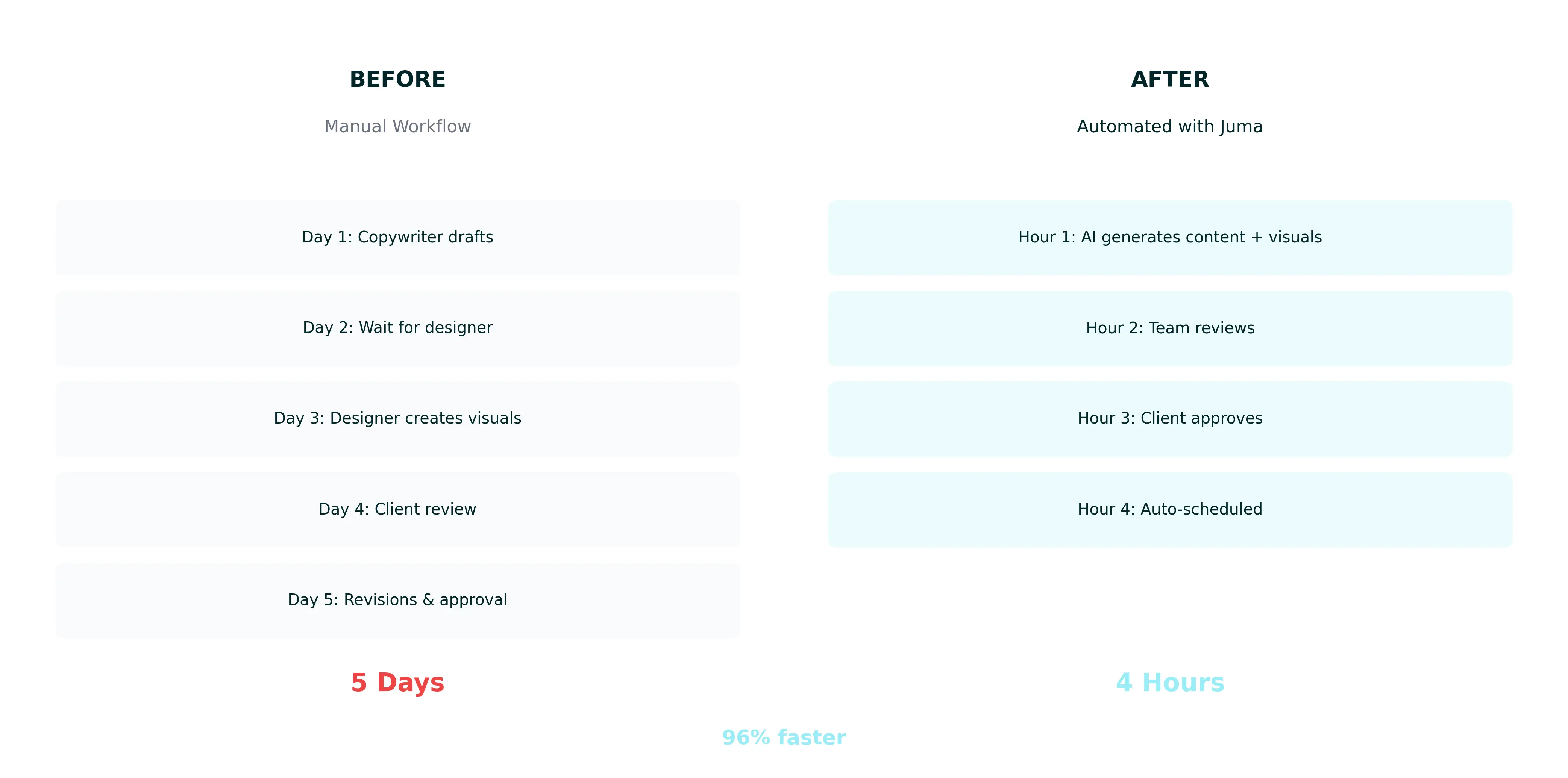
Agencies consistently report spending more time coordinating work than creating it. Teams spend more time in Slack asking "where are we on this?" than producing content. This reveals the hidden cost of poor workflow design.
The 3-Workflow Agency Automation System
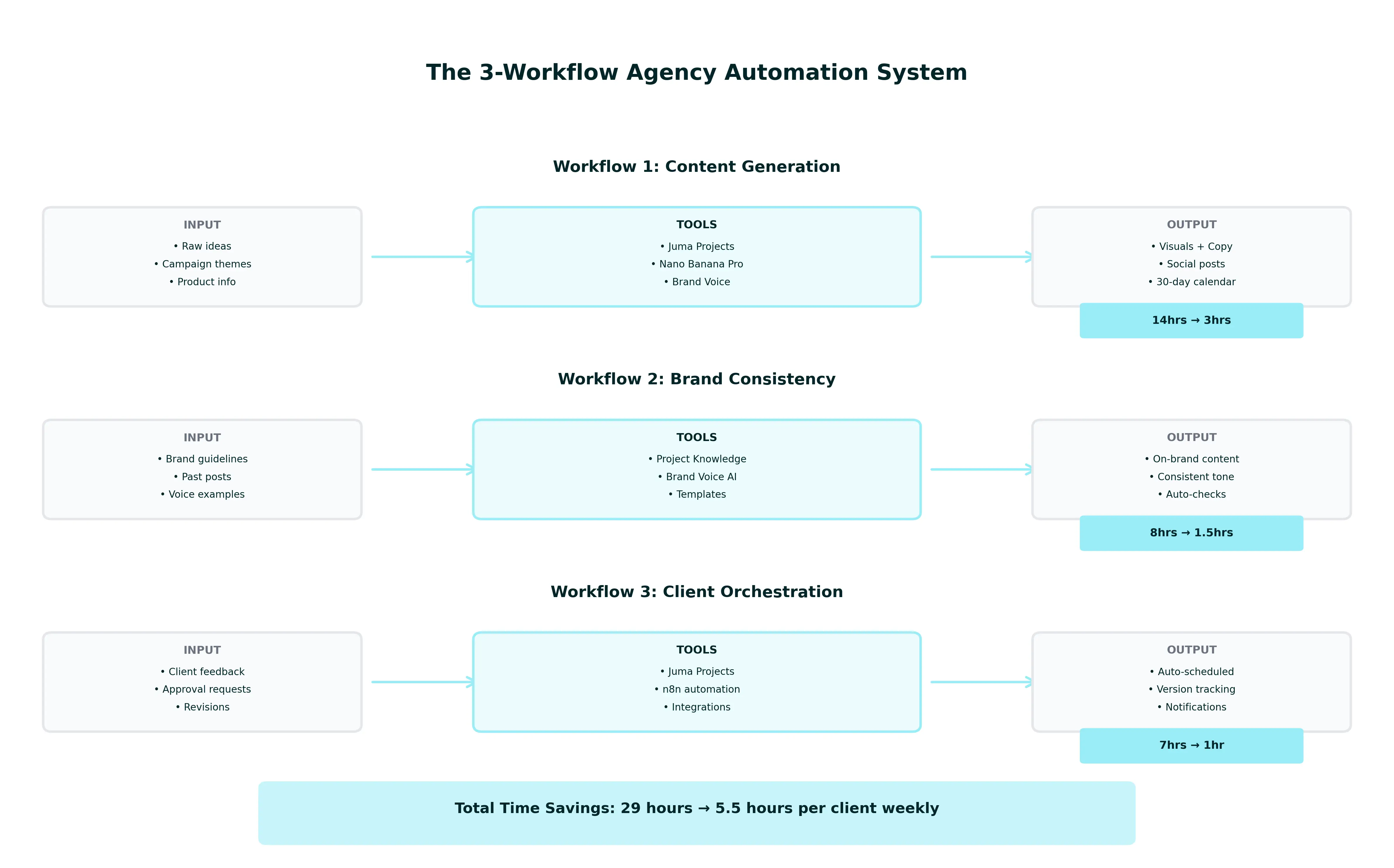
The 3-Workflow System automates social media marketing through three layers: Content Generation (AI creates visuals and copy together), Brand Consistency (enforces client voice automatically), and Client Orchestration (manages approvals and scheduling). This dramatically reduces production time per client weekly. This system shows you how to automate social media posts, visuals, and approvals in one integrated workflow.
Workflow 1: Content Generation - Automates ideation, copywriting, visual creation using Juma (formerly Team-GPT) Projects and Nano Banana Pro. Eliminates the designer-copywriter handoff entirely.
Workflow 2: Brand Consistency - Automates brand voice enforcement, visual style matching, platform adaptation using Juma Brand Voice and Project Knowledge. Junior team members produce senior-level work.
Workflow 3: Client Orchestration - Automates approval routing, revision tracking, scheduling using Juma Projects and n8n workflow automation. Eliminates email chaos and version control confusion.
The Agency Automation Maturity Model
Stage 1: Manual Everything - Every post created from scratch, approvals via email with PDF attachments.
Stage 2: Scheduling Only - Buffer or Hootsuite for scheduling. Saves a few hours but does not address content creation bottleneck. Most agencies are stuck here.
Stage 3: Content Automation - AI generates drafts but you still manually coordinate visuals with copy.
Stage 4: Full Orchestration - All three workflows automated. Your team focuses on strategy while AI handles production.
How to Automate Content Generation with Juma (Visual + Copy Together)
Automate content generation by creating client-specific Projects in Juma (formerly Team-GPT), uploading brand guidelines to Project Knowledge, then using AI to generate visuals and copy in one conversation. This eliminates tool-switching between Canva and ChatGPT, dramatically reducing content creation time per client weekly.
Social media content creation automation starts with organizing your client context. Coordination delays disappear when visual and copy are generated together.
Step 1: Create a Project for Each Client
Navigate to Juma Projects and click "New Project." Name it [Client Name] - Social Media and set permissions so your team can access it while keeping it private from other clients.
All client context lives in one place. When a team member opens this Project, Juma automatically loads everything it needs to know. Junior team members can immediately produce on-brand content because the context is already there.
Step 2: Upload Brand Guidelines to Project knowledge
Click the "Knowledge" tab and upload your client's brand style guide (PDF), 5-10 past social posts as examples, target audience profiles, and competitor analysis. Add an "Info" section with client-specific instructions: tone requirements, hashtag rules, visual style preferences, and approval process.
AI references these guidelines automatically in every chat. Your team never has to remember or look up brand rules - the AI enforces consistency for you.
Step 3: Generate Content Using Juma's Pre-Built Workflows
Watch our Social Media Calendar tutorial to see how agencies generate 30 days of content in one session.
In your client's Project, describe your campaign: theme, target platforms, posting frequency, and key messages. The AI outputs a 30-day content calendar with post ideas, visual concepts, and draft copy - all matching your client's brand voice from Project Knowledge.
You generate a month of content in 20 minutes versus hours manually.
Step 4: Create Visuals with Nano Banana Pro
In the same chat, type: "Generate an Instagram carousel for Post #3 showing our product in a real kitchen setting, bright natural lighting, lifestyle photography style."
AI creates the image using Nano Banana Pro (Google's advanced image generation model built on Gemini 3 Pro). The visual automatically matches your client's color palette and style preferences from Project Knowledge. Learn more in our AI image generation tutorial.
Visual and copy are created together in one chat. No coordination delays. No switching tools. No losing context.
Instead of switching between Canva for visuals and ChatGPT for copy, Juma's (formerly Team-GPT) integrated Nano Banana Pro image generation lets you create both in one conversation. Set up your brand voice once, and your whole team creates from the same foundation. Upload client guidelines, audience profiles, and past examples—the AI references everything automatically.
Nano Banana Pro delivers fast, accurate image generation with exceptional character consistency. This is perfect for agencies creating high-volume social content and learning how to automate social media visuals efficiently.
Your team eliminates tool-switching and context re-entry entirely. Explore all marketing automation workflows at juma.ai/flows.
How to Automate Brand Consistency
Automate brand consistency by capturing your client's voice once, then letting AI enforce it automatically in every piece of content. This eliminates the "doesn't sound like us" revision loop that wastes hours weekly. Train once, enforce forever.
Brand consistency is where most agencies fail. You document guidelines once, but they sit in a PDF no one references. AI changes this by actively enforcing those rules in real time.
Train Brand Voice in Juma
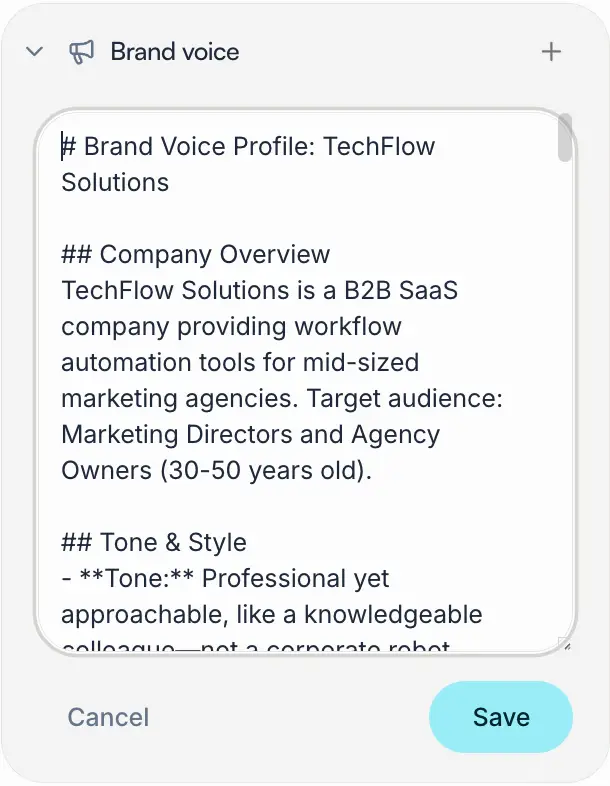
In your client's Project, click "Brand Voice" and upload 5-10 past posts that represent their ideal tone. Include a mix of formats (educational, promotional, engagement) so AI learns the full range.
Juma analyzes vocabulary, sentence structure, emoji usage, and hashtag patterns. It identifies what makes this client's voice unique.
AI now writes in your client's exact voice. No more "sounds too robotic" or "doesn't sound like us" feedback.
When The Crew marketing agency implemented this, CEO Michael Frank noted: "The better you do the Project knowledge, the less you have to care about the AI model you use." Brand Voice training ensures consistency regardless of which AI model generates content.
Set Up Workflow Automation
Use n8n to connect Juma to your scheduling tools. When content is approved in a Juma Project, n8n automatically sends it to Buffer, Hootsuite, or your preferred platform. Learn how to set up n8n with Juma.
Document client-specific requirements in your Project Knowledge: CTA requirements, hashtag limits, partner tags, jargon to avoid. The AI automatically follows this checklist for every post, catching common revision requests before clients see content.
The Crew agency achieved a 90% first-draft approval rate using this workflow. That means 9 out of 10 posts are approved without revisions.
How to Prepare Content for Client Approval
Prepare content for client approval by organizing all posts in a Juma Project, then exporting everything as a DOCX, PDF, or HTML page that clients can review in their preferred tool. This eliminates the manual copy-paste chaos and ensures clients see properly formatted content with visuals intact.
Click the export button and choose your format based on how your client prefers to review:
DOCX (Microsoft Word) - Best for clients who want to leave inline comments and track changes. They can edit directly in Word and send back revisions.
PDF - Best for clients who just need to review and approve. Clean, professional format that preserves all formatting and images. Clients can add comments using PDF tools.
HTML Page - Best for presenting content in a polished, web-friendly format. Clients view it in their browser - looks professional and loads fast.
All three formats preserve your visuals and formatting, so clients see exactly what will be posted. No broken image links or formatting issues.
How to Integrate Juma with Your Existing Tools
Juma integrates with your existing marketing stack through native connections and n8n workflow automation. Connect Google Drive, Notion, HubSpot, Atlassian Rovo, and SharePoint directly to Juma Projects so AI can reference your documents automatically. For advanced automation, use n8n to connect Juma with virtually any tool. These integrations enable you to automate social media visuals by connecting design assets directly to AI generation.
Native Integrations
Google Drive - Sync brand assets and client documents directly into Projects. AI references your Drive files automatically when generating content.
Notion - Connect your workspace to Projects for instant access to wikis and databases. Your team's knowledge base becomes AI's knowledge base.
HubSpot - Pull customer data and campaign performance into Projects. AI generates content informed by actual customer insights.
Atlassian Rovo - Connect Jira and Confluence to Projects. Product and engineering context informs marketing content.
SharePoint - Access enterprise documents without migrating files. Connect client contracts so AI understands project scope.
Coming Soon: SEO Integration (search keywords, analyze rankings), Google Analytics 4 (traffic data), Google Search Console (search performance).
Learn how to set up integrations.
Advanced Automation with n8n
n8n is the key to unlocking Juma's full automation potential. This open-source platform connects Juma to virtually any tool: scheduling platforms (Buffer, Hootsuite), project management (Asana, Monday), communication (Slack, Teams), and analytics (Google Sheets, Airtable).
Example workflow: Client approves content in Juma → n8n detects approval → sends to Buffer → creates Asana task → sends Slack notification → logs to Google Sheet.
Watch our n8n setup guide to build custom automation workflows.
Case Study: The Crew Built an AI-First Agency with 90% Adoption
The Crew, a 70-person marketing agency, implemented Juma's (formerly Team-GPT) AI-first workflow and achieved 90% team adoption. They doubled workflow speed by organizing AI around Projects and using "zero-prompting" templates. The result: faster content production, consistent brand voice across clients, and team members spending more time on strategy.
The Challenge and Solution
CEO Michael Frank included "becoming an AI-first agency" in their 2023 strategy but faced psychological barriers. Content producers feared job loss. Michael noted: "People in marketing, especially people who produce content and text, they are afraid of losing their jobs."
The Crew selected Juma as their central AI hub due to its ability to centralize prompt management, access multiple AI models, and enable collaboration. Their breakthrough was the "Zero-Prompting Strategy."
Michael Frank stated: "The best prompt is the one that you don't have to write."
They configured Juma's Project knowledge with detailed instructions so employees could trigger complex workflows with simple commands like "1" or "insights." This democratized AI access across skill levels.
Examples they built: Research Hub (type "insights" for document summaries), Briefing Bot (type "1" for structured briefings), Community Management Assistant (paste messages for instant response options), Tone of Voice Checker (auto-analyzes content against brand parameters). These specialized agents handled tasks that previously took hours.
The Results
Time Saved: 10-60% efficiency gains across content creation tasks
Adoption Rate: 90% of agency actively using AI daily
Quality Improvement: More research-backed campaigns, consistent brand voice, better targeting
Michael emphasized: "It's not about producing more content with less people. We can increase the quality of our content specified for each target group much easier than before."
Key lessons: Start with organization, not tools. Make AI accessible through "zero-prompting." Focus on quality and impact, not just efficiency. Address resistance by showing how AI eliminates disliked tasks.
Read the full case study.
Common Automation Mistakes (And How to Fix Them)
The three most common agency automation mistakes are: automating before documenting processes, using too many tools, and skipping client training. Learning from these patterns saves months of trial and error.
Mistake #1: Automating Before Documenting
What happens: You automate a broken process, making chaos faster. Team members follow different workflows for the same task.
Fix: Spend one week documenting current workflows before touching automation tools. Use Loom to record your screen as team members work. Create process maps for content creation, client approval, and scheduling.
Mistake #2: Using Too Many Tools
What happens: You have too many tools that do not talk to each other. Research from Asana shows workers lose 57 minutes daily just switching between collaboration tools, plus an additional 30 minutes deciding which tool to use for each task.
Fix: Consolidate to 5-7 core tools. If two tools do similar things, pick one and commit. Track tool usage for two weeks to identify what you actually use versus what you think you use.
Mistake #3: Treating AI Output as Final
What happens: Your team sends AI-generated content directly to clients without review. Clients reject posts because they sound generic or miss brand nuances. Your team loses trust in AI and reverts to manual creation.
Fix: While 65.8% of people rate AI content quality as equal to or better than human writing, the best results come from treating AI as a drafting tool that humans refine, not a replacement for human judgment. Use this rule: "AI drafts, humans polish and approve." Train your team to spot when AI misses context or makes assumptions. The best agencies use AI to create the first 80%, then humans add the final 20% that makes it exceptional.
Set up a quality checklist: Does this sound like the client? Are facts accurate? Does it match their current campaigns? Is the CTA clear? This takes 5-10 minutes per post but prevents hours of revisions later.
Next Steps: Implementing Your Automation System
Start by choosing one client as a pilot, set up their Juma Project with brand guidelines, and learn how to automate social media content generation first. Measure time savings for 30 days, then add brand consistency and approval workflows. Full implementation takes 6-8 weeks but shows ROI within the first 2 weeks.
8-Week Agency Automation Implementation Checklist
Week 1: Setup & Training
Week 2: Content Generation Workflow
Week 3: Brand Consistency Workflow
Week 4: Export & Approval Workflow
Weeks 5-6: Optimize & Scale
Weeks 7-8: Full Team Rollout
Success Metrics to Track
Time per client: Hours spent on social media weekly (target: 50% reduction by Week 4)
Approval rate: Percentage of posts approved on first draft (target: 80%+ by Week 6)
Client satisfaction: NPS score or feedback survey (target: 8+ out of 10)
Revenue per client manager: How many clients each person handles (target: 2x by Week 8)
Ready to Start?
Get started with Juma's free plan to test the content generation workflow with one client. No credit card required.
You get 20 messages to try the system. Create a Project, upload brand guidelines, and generate your first batch of content.
Trusted by 250+ marketing teams worldwide. Rated 4.9/5 on G2.
Related Resources:
LinkedIn Carousels

Competitor Analysis

GEO Optimized Articles

Google Analytics Reports


%20(1).webp)



Private cloud deployment - AWS, Azure, GCP
SSO / SAML + platform administration
Security review support + DPA
Custom contract & SLA
Dedicated account manager & priority onboarding
Invoicing + custom billing terms