Your AI workplace on all devices
Stay aligned and keep creating, whether you’re at your desk or on the move.
Download Juma for mobile
Create on the move
Open Juma in Safari
Open app.juma.ai in Safari.
Open the Menu
Tap the three dots at the bottom of the screen.
Select Share
Add to Home Screen
Scroll down and tap Add to Home Screen.
Open Juma in Chrome
Go to app.juma.ai in Chrome.
Open the Share Menu
View More Options
Tap View more.
Add to Home Screen
Tap the Add to home screen button.
Download Juma for desktop
Keep working without the tab chaos
Chrome "Install page as app" Method
Perfect for Chrome users who want a native app experience
Open Chrome
Launch Chrome browser on your computer
Navigate to Juma
Go to app.juma.ai
Open Chrome Menu
Install as App
Select "Install page as app..." from the menu
Confirm Installation
Click "Install" to add Juma as a desktop app
✨ That's it! Juma will now open in its own window and appear in your taskbar/dock.
Safari "Add to Dock" Method
Perfect for Safari users who want quick access from the dock
Open Safari
Launch Safari browser on your Mac
Navigate to Juma
Go to app.juma.ai
Open Share Menu
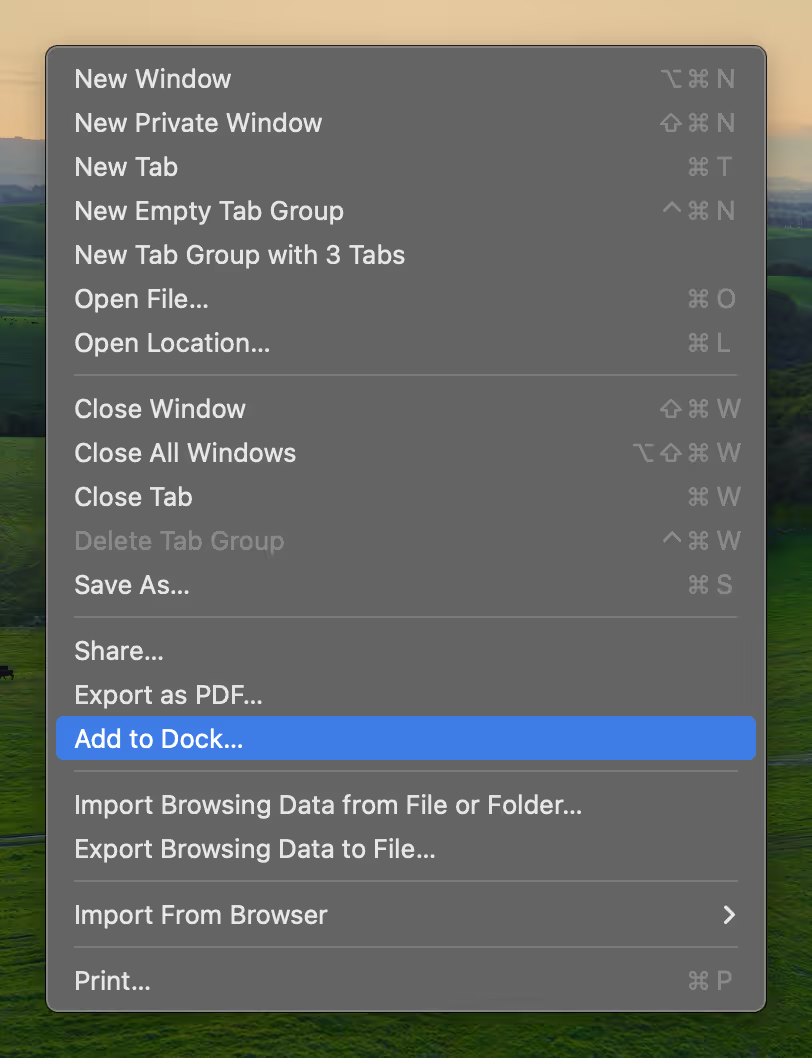
Add to Dock
Select "Add to Dock..." from the menu
Confirm Installation
Click "Add" to install Juma to your Dock
✨ That's it! Juma will now appear in your Dock as a standalone app.
Ask AI about us
400+ marketing teams trust Juma. ChatGPT, Claude, and Perplexity know why. Ask them.
Ready when you are
What's on your plate today?
Start typing a task and Juma will figure out the rest.