Set up your client project: competitor URLs, target keywords, and past comparisons
A Juma Project is a shared space where the team stores everything Juma needs to know about a client. Create one project per client, add context as you go, and Juma will use what's relevant every time the team runs a flow. If the project already exists from other work, just add the SEO-specific items below.
What to add
Competitor URLs
The 3-5 domains the client competes with in organic search. Juma compares against these automatically instead of discovering competitors from scratch each time.
Target Keywords
The keywords the client wants to own. When running a competitive comparison, Juma checks the full keyword cluster around these terms and flags any where a competitor has gained ground.
Past Competitive Analysis
Previous comparison reports or competitive briefs. Juma uses these to track changes over time: "The competitor added a pricing calculator since the last comparison, and their position improved from 5 to 2."
Guide Juma with project info
Add a short description in the project's info field that tells Juma what each file contains and when to use it. For example: "Competitor URLs: top 5 organic competitors, always use for SEO comparisons. Target Keywords: priority terms, check these first. Past Competitive Analysis: January 2026 comparison against Salesforce for CRM keywords."
See exactly why a competitor ranks above you
Frequently Asked Questions
How much time does running an SEO competitor analysis with Juma save compared to doing it manually?
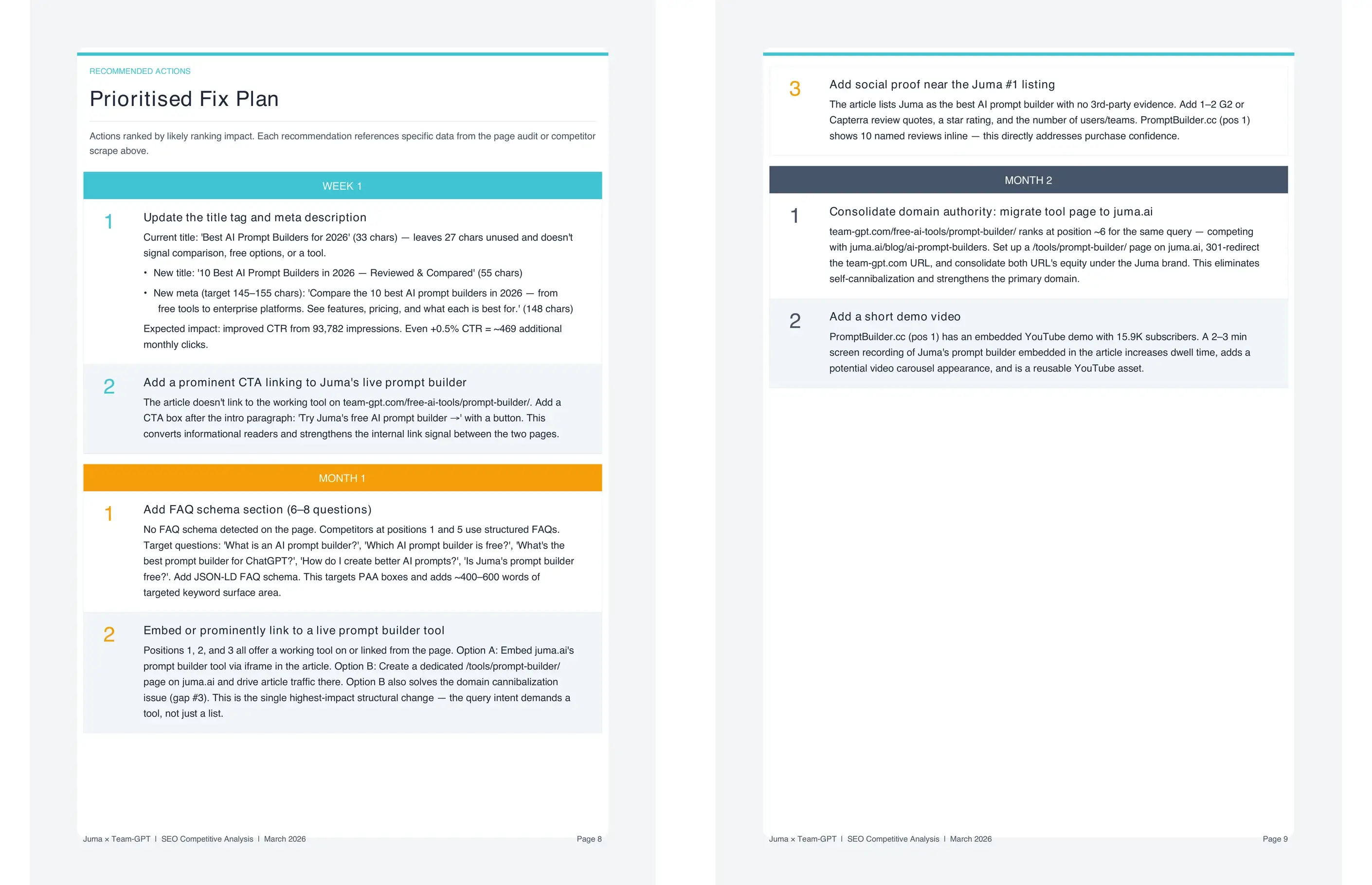
Running an SEO competitor analysis manually takes 2 to 4 hours across five different tools. Juma completes the same analysis in minutes and outputs a structured comparison matrix the team can act on immediately. Teams running regular competitive checks typically save several hours per client per month.
Each manual step uses a different tool: content auditing, schema checking, backlink data, and SERP feature mapping each require their own interface. The outputs from those tools then have to be manually reconciled into a format the team can use, adding time on top of the data gathering. Juma runs all checks in a single workflow and combines the outputs into one comparison matrix. For agencies managing five or more clients with active SEO programs, that adds up to a full working day each month recovered and redirected toward fixes the comparison identifies.
What does the content element matrix cover?
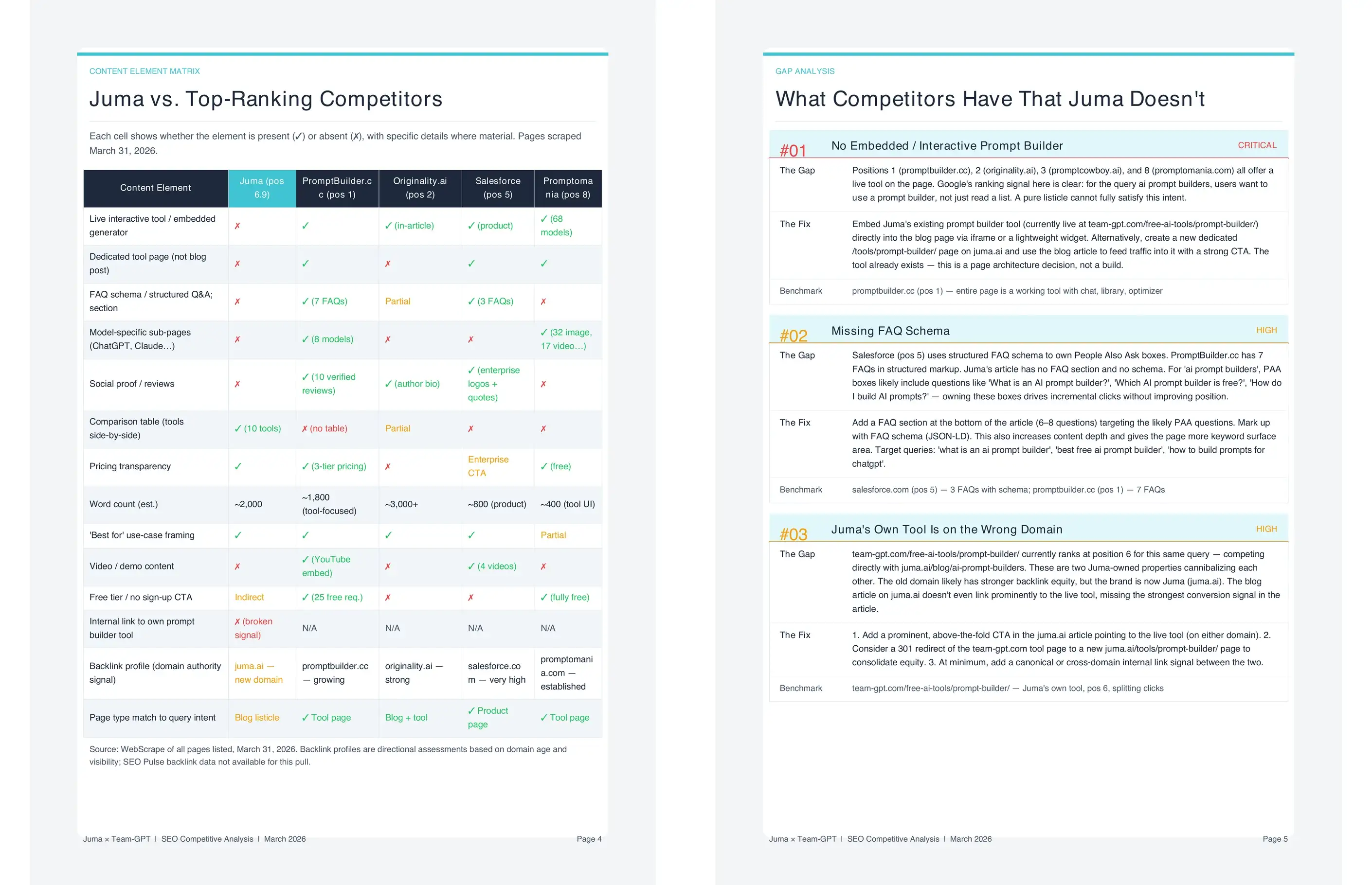
The content element matrix compares word count, heading structure, schema types in use, comparison tables, visual elements, interactive features, and freshness signals side by side. Every element that could explain a ranking difference appears in its own row, showing the client's page value alongside each competitor's value at a glance.
Heading structure rows capture how the competitor organizes their H2s and H3s, which questions they address directly, and whether their structure aligns with People Also Ask boxes in the SERP. Schema rows cover FAQ schema, HowTo schema, Product schema, and any others the competitor has implemented that the client's page has not. Freshness signals include original publish date and last-updated date, because recency is a ranking factor Google weights for certain query types. The full matrix makes it possible to see every competitive gap in one view rather than cross-referencing multiple reports.
What does the SERP landscape section show?
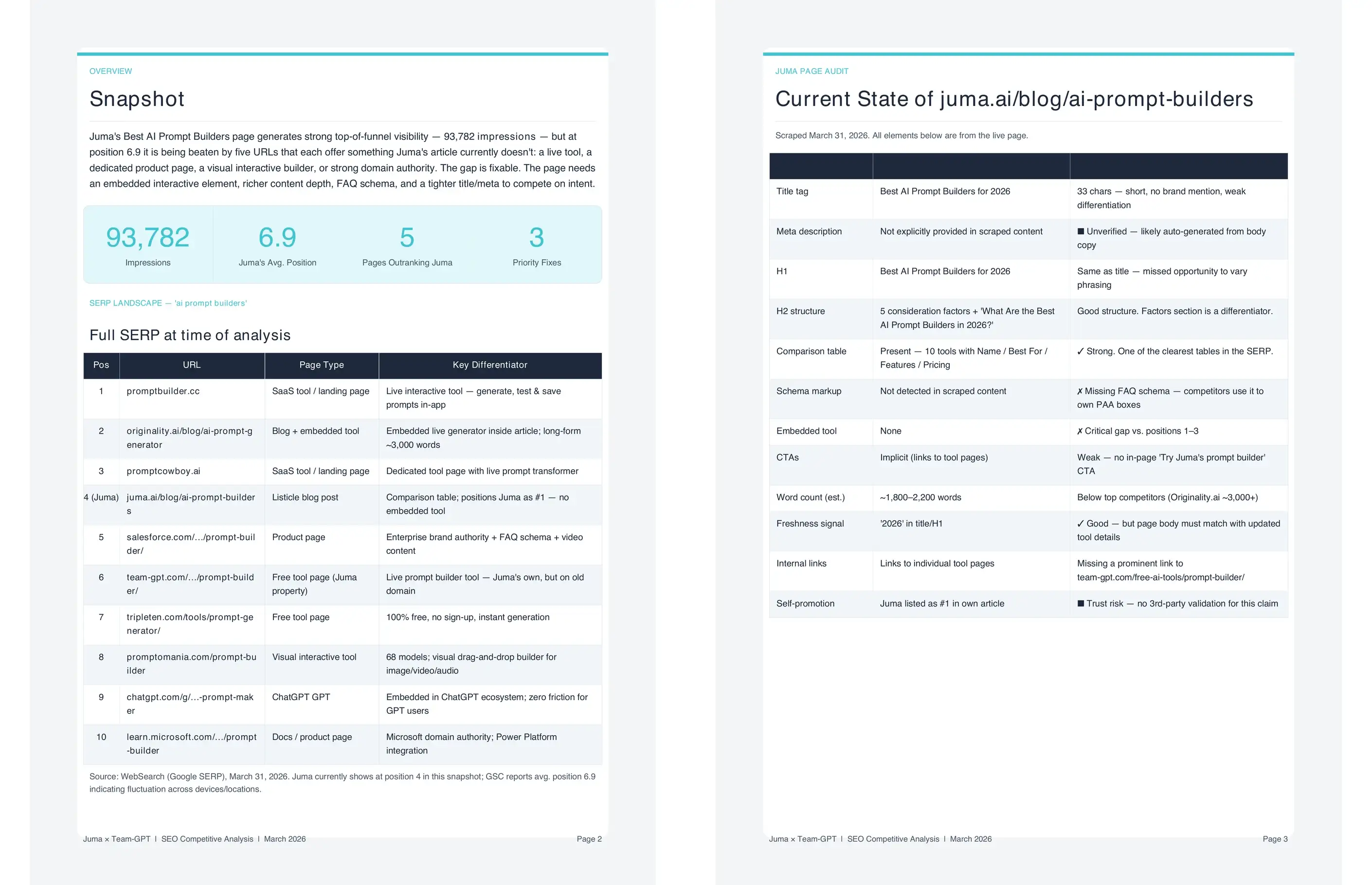
The SERP landscape maps who holds each organic position, whether an AI Overview or featured snippet intercepts clicks before organic results appear, and which competitors earn People Also Ask placements through FAQ schema. This tells the team how much of the available traffic they can realistically target and where additional SERP surface area exists.
If an AI Overview answers the query before users reach organic results, that changes how much traffic position one actually delivers. PAA placements get mapped alongside the competitors that earn them. When a competitor holds multiple PAA positions through FAQ schema and the client's page has none, that shows up as a specific gap with a specific fix: add FAQ schema targeting these questions. A client at position four earning two PAA placements can capture more clicks than a competitor at position two with no schema coverage.
Does this Flow work without Google Search Console connected?
Yes. The analysis works without GSC. Without it, the SEO content gap analysis uses estimated data from third-party tools like Ahrefs, which are directionally accurate but calibrated to average click-through rates rather than the client's specific domain performance. With GSC connected, the comparison uses the client's actual impressions, CTRs, and position trends.
This makes traffic impact estimates in the gap-closing plan significantly more accurate. For clients who have experienced ranking drops, GSC data also allows the comparison to be anchored to the specific timeframe when traffic declined, so the analysis focuses on what changed around that date rather than the current state alone. Connect GSC by going to project settings, selecting Integrations, and authorizing Search Console for the client's property. Once connected, every Flow in the project draws from the client's actual data rather than third-party estimates.
.webp)