Set up your client project: site structure and past audits
A Juma Project is a shared space where the team stores everything Juma needs to know about a client. Create one project per client, add context as you go, and Juma will use what's relevant every time the team runs a flow. If the project already exists from other work, just add the items below.
What to add
Content Inventory
A list of all pages on the site with their primary keyword targets. This helps Juma spot overlaps faster: if two pages both target "email marketing best practices," that conflict is visible before even pulling GSC data.
Past Audit Results
Previous SEO audits that flagged cannibalization. Juma checks whether past conflicts were resolved and flags any new ones that appeared since the last review.
Site Architecture Notes
How the client's content is organized: categories, topic clusters, pillar pages. This context helps Juma distinguish intentional content overlap (a pillar page and its supporting posts) from unintentional cannibalization.
Guide Juma with project info
Add a short description in the project's info field that tells Juma what each file contains and when to use it. For example: "Content Inventory: full page list with keyword targets, last updated March 2026. Past Audit: January 2026 audit, check if past cannibalization issues were resolved. Site Architecture: topic cluster map showing pillar pages and supporting content."
Stop your own pages from competing against each other
Frequently Asked Questions
How much time does this Flow save compared to finding cannibalization manually?
This Flow replaces a full working day of manual Search Console analysis with an automated report that delivers in minutes. A 100-page site requires 6-8 hours of manual cross-referencing to map query overlap. A 500-page site takes multiple days and still misses position volatility patterns that only appear in week-over-week comparisons.
What does the severity ranking in the conflict list mean?
The severity ranking rates each conflict as critical, moderate, or low. Critical means both competing pages sit outside the top 5 on a high-volume keyword, directly costing traffic. Moderate means one page ranks well but the other suppresses its authority by appearing in the same results. Low means minimal traffic impact with little urgency to act immediately.
Critical conflicts are the highest priority because they represent active traffic loss. Google cannot decide which page is more relevant and keeps alternating between them, preventing either from accumulating the ranking authority it needs. Resolving a critical conflict, typically through a merge or a strong differentiation, produces the fastest measurable ranking improvements. Moderate and low conflicts are worth resolving but can be batched into a content maintenance cycle rather than treated as urgent fixes.
How does this keyword cannibalization tool catch conflicts that standard audits miss?
This keyword cannibalization tool detects conflicts by cross-referencing Search Console query data across every page, not just on-page keywords. It identifies where Google shows multiple pages from the same site for the same query, and where position oscillates week to week because Google keeps alternating between two competing pages.
Standard SEO audits check on-page keyword overlap, but two pages can share no exact keywords and still cannibalize each other on queries neither directly targets. On-page analysis alone misses these hidden conflicts. The combination of query-level overlap detection and volatility analysis catches keyword cannibalization SEO problems that stay invisible in standard content audits, performance reviews, and even manual Search Console exports. Many of the conflicts this Flow surfaces are ones the team did not know to look for.
What are the three fix verdicts and when does each one apply?
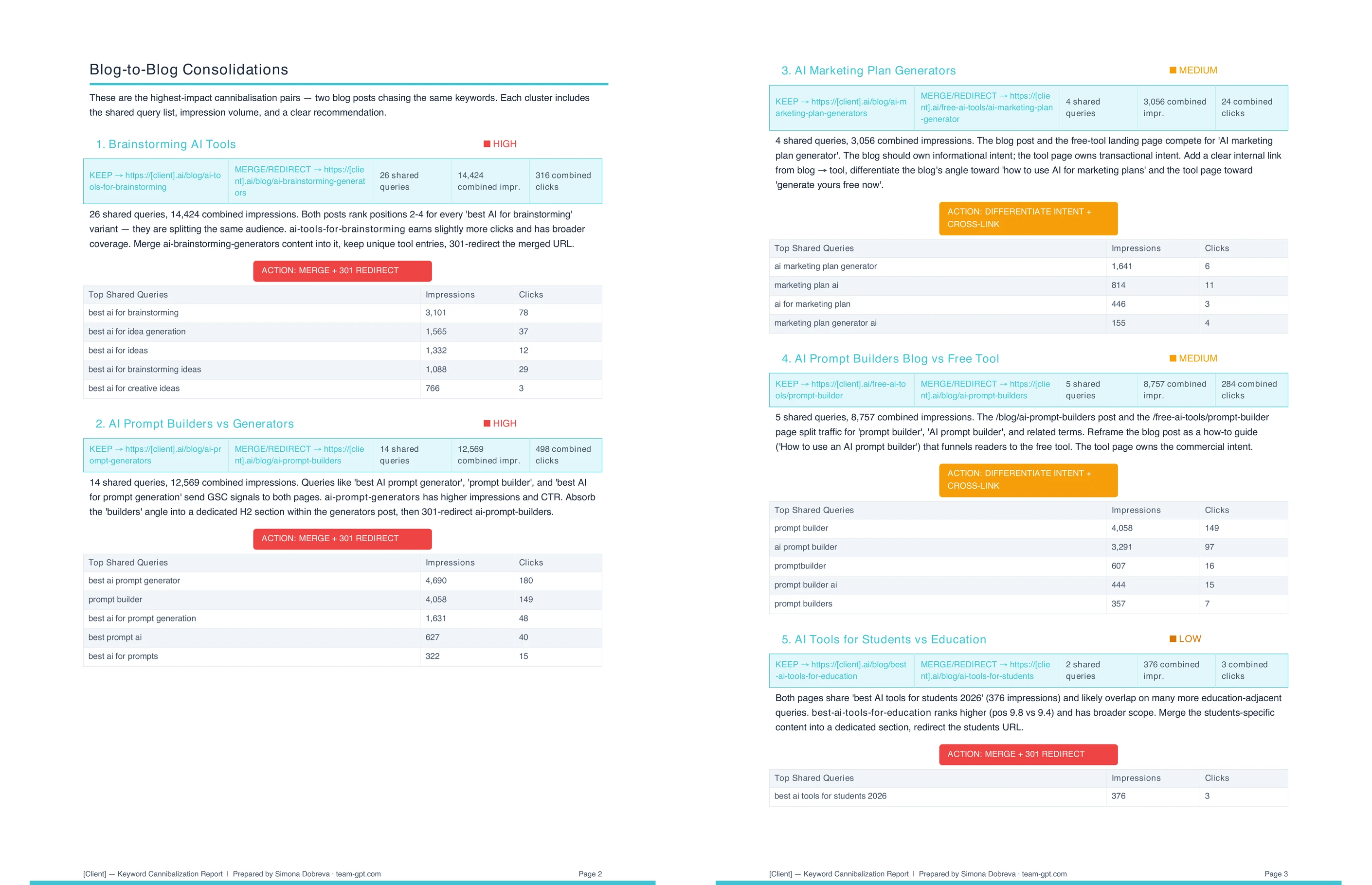
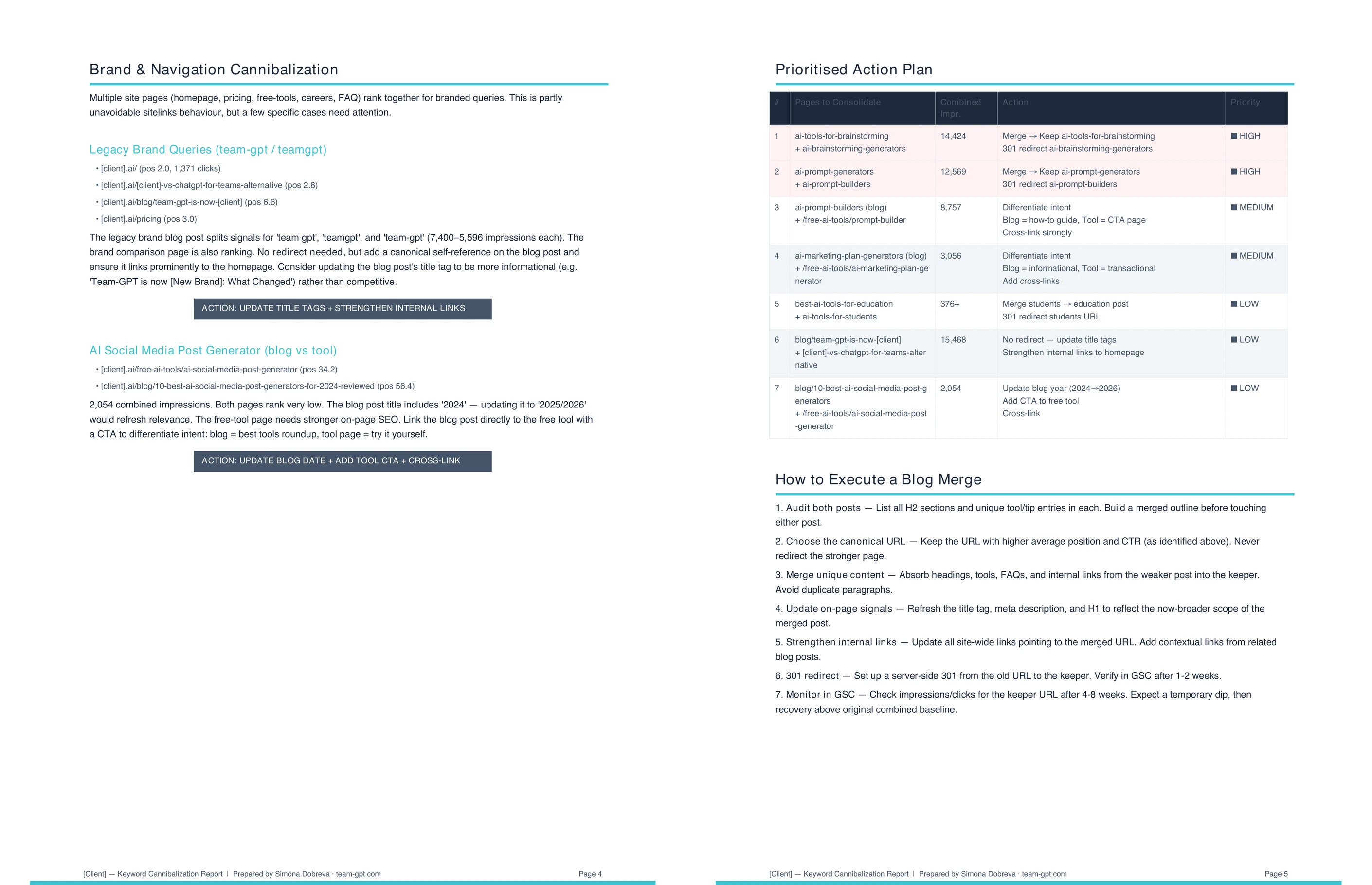
Every conflict receives one of three verdicts: merge (redirect the weaker page to the stronger one with a 301), differentiate (rewrite titles and metas so each page targets a distinct intent), or archive (remove the weaker page if it adds no unique value). Each verdict gives the team a clear path to fix keyword cannibalization on that specific conflict. The recommendation depends on content overlap, traffic levels, and each page's ranking potential.
Merge applies when two pages cover the same topic and intent, and neither adds unique value the other lacks. Combining them into one authoritative page is the strongest fix for critical conflicts. Differentiate applies when the pages serve genuinely different intents but are written too similarly for Google to rank them separately. Archive applies when the weaker page has no meaningful traffic, no inbound links, and no content the other page does not already cover.
Does the analysis work for sites that do not have a lot of existing content?
Keyword cannibalization analysis returns the most value for sites with 50 or more indexed pages covering overlapping topics. Smaller sites with fewer clearly distinct pages rarely generate enough query overlap to produce actionable conflicts. The Flow still runs accurately on smaller sites and will return no conflicts if none exist.
Large blogs, ecommerce category pages, multi-author publications, and agency client sites with years of archived content are the most common cases where the analysis surfaces a meaningful number of conflicts. The ideal site has a growing content library where the same broad topics appear across multiple pages, often written at different times by different authors. Over time, even well-organized sites develop cannibalization as the content library grows and keyword targeting decisions from earlier publishing phases stop matching the current strategy.
.webp)