Set up your client project: Brand Voice Guide, Audience Profile, Ad Performance History, Output Examples
LinkedIn ad copy gets written on repeat: new campaigns, new offers, same client voice and audience. A Juma project stores the brand context and performance history so every round of variants starts from what's already known about the client, not from scratch. If the client project already exists, add these items to it.
What to add
Brand Voice Guide
How the client sounds in ads: tone, vocabulary, what to avoid. With this in the project, copy drafts land in the right voice from the first pass without rounds of corrections.
Audience Profile
Who the ads target on LinkedIn: job titles, seniority, company size, and pain points. This context shapes which angles the AI leads with and which CTAs it recommends for the audience segment.
Ad Performance History
Past campaign results: CTR by variant, format, and hook type. The AI uses this to weight recommendations toward what has worked and away from what hasn't for this specific audience.
Output Examples
Two to four high-performing ads from past campaigns, with brief notes on what each was testing. These serve as structural references so new variants match the format and length the team knows performs.
Guide Juma with project info
Add a short description to each knowledge item in the project's info field so Juma knows what each file contains and when to use it. For example:
- Brand Voice Guide: "How the client sounds in ads: tone, vocabulary, what to avoid. Follow for all ad copy."
- Audience Profile: "LinkedIn targeting: job titles, seniority, company size, pain points. Use to shape hook angles and CTAs."
- Ad Performance History: "Past campaign results: CTR by variant, format, and hook type. Use to weight recommendations."
Write LinkedIn ads that earn the click before the fold
Frequently Asked Questions
What hook angles does the Flow test across the five variants?
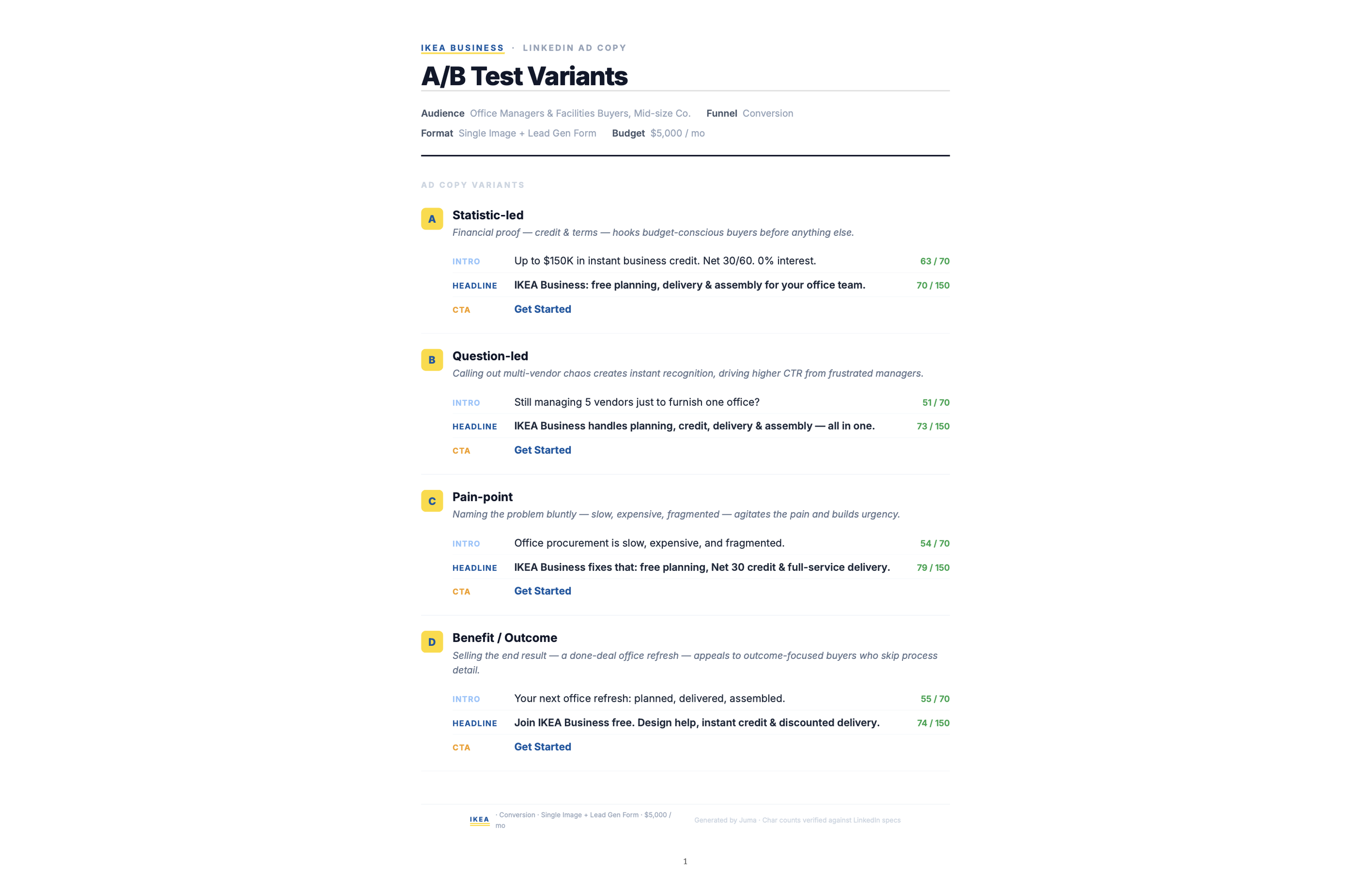
Each set of LinkedIn ad copy examples includes five variants, each testing a distinct angle: statistic-led hook, pain-point opener, social proof, curiosity gap, and direct benefit statement. The mix adapts to the client's product and audience, and every variant follows LinkedIn ad copy best practices for hook structure.
For a B2B product targeting operations teams, a statistic-led hook opens with a time-saving claim while a pain-point opener leads with the friction that exists before the product is in use. Every variant carries a labeled testing hypothesis so the team knows what it is designed to prove before allocating budget. If the first round does not produce five clearly distinct angles, a follow-up step adds data-driven or customer outcome variants to replace the weakest performers.
Why does LinkedIn ad copy performance depend on the first 150 characters?
LinkedIn truncates intro text after 150 characters on mobile, placing a "see more" break before the reader reaches the rest of the ad. The first two sentences carry the full weight of the hook. Copy that does not earn attention before that cut will not earn the click.
This constraint separates LinkedIn from other ad platforms. On Meta, a strong visual compensates for a slow-opening text block because the image loads before the copy. On Google Search, intent already exists and the user is actively looking for what the ad offers. LinkedIn ads appear in a passive scroll feed populated by organic content, so they compete for attention rather than intent, and the 150-character break is the primary performance variable in the intro text.
What are the LinkedIn ad copy character limits this Flow works within?
LinkedIn intro text supports up to 600 characters. Headlines are capped at 70 characters. The Flow writes within these linkedin ad copy character limits by default and includes per-element character counts in every variant so teams can verify limits before uploading to Campaign Manager.
Character limits on LinkedIn function differently from other platforms. The 600-character intro limit is generous enough for two or three substantive sentences, but the 150-character mobile truncation means only the first portion displays without expansion. The 70-character headline sits below the visual and carries less weight than the intro in scroll environments. The Flow accounts for all three constraints by default, so every variant is platform-ready on delivery.
How does providing the client's URL affect the LinkedIn ad copy output?
Providing the client URL aligns variants with the brand's actual positioning, product language, and audience signals. Variants reflect what the client actually says and sells, not just what you brief in. A brief with no URL produces more generic output that requires more revision rounds to match the brand voice.
The site research covers product descriptions, value propositions, and outcome claims the brand makes publicly. A statistic-led hook draws on a claim already on the homepage rather than inventing a figure. A pain-point opener uses the exact friction language the client uses in their own messaging. This alignment reduces revision rounds before approval and makes variants consistent with other brand touchpoints the audience has already encountered.
What does the run-first recommendation cover?
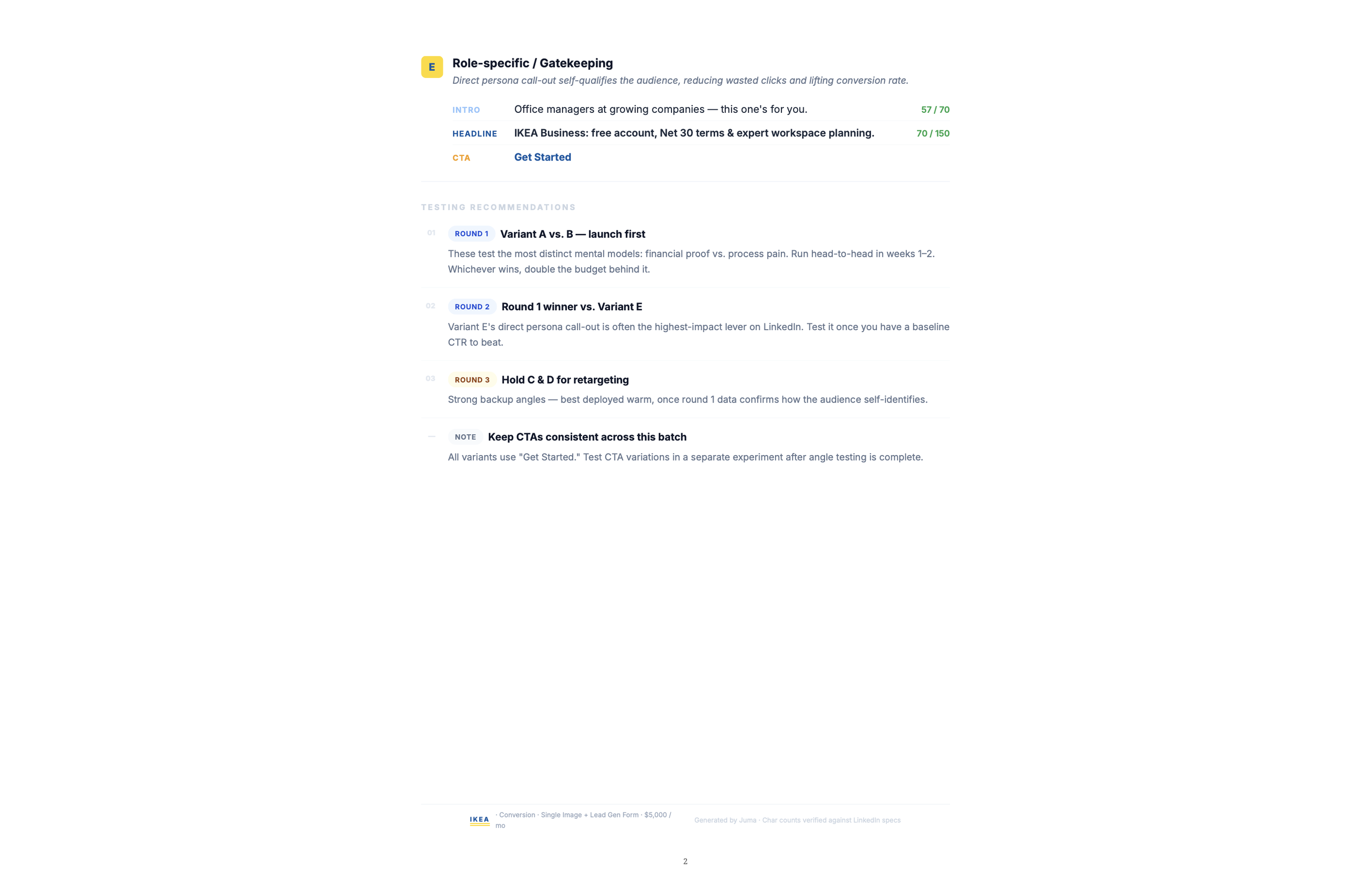
The run-first recommendation identifies which two to three variants to prioritize in Campaign Manager's first test, based on the campaign goal and audience segment. Running all five variants simultaneously splits budget too thin to produce a clear signal. The recommendation concentrates spend where data is most likely to confirm a winner quickly.
The recommendation accounts for both the testing hypothesis and the audience type. Variants built for cold audiences receive different prioritization than those built for retargeting segments. After the first test concludes, the remaining variants rotate in for the second test. This structured sequencing accumulates learning across rounds rather than producing inconclusive data from a single over-split test.

.webp)



.webp)