Set up your client project: Brand Voice Guide, Audience Profile, Platform Playbook, LinkedIn Post Examples, X Thread Examples
Content repurposing is a weekly task for most teams: new source material, same platforms, same voice, same audience. A Juma project keeps the brand context and platform conventions in one place so every repurposing set comes out publish-ready without re-explaining the rules. If the client project already exists, add these items to it.
What to add
Brand Voice Guide
How the client sounds across platforms: tone, vocabulary, what to avoid. With this in the project, every repurposed post comes out in the right voice from the first draft. No rounds of tone corrections.
Audience Profile
Who the content reaches: roles, industries, pain points, and how technical or accessible the language should be. This shapes how the same blog post gets translated differently for a LinkedIn audience versus an email subscriber list.
Platform Playbook
Which platforms the client uses, at what cadence, and in what formats. LinkedIn gets text posts and carousels, X gets threads, email gets newsletter sections. The playbook also sets defaults for how many pieces per platform.
LinkedIn Post Examples
A few real posts that represent what good looks like for this brand on LinkedIn. These serve as structural references, so repurposed posts match the hook style, formatting, and tone the team has actually published.
X Thread Examples
Same idea, different platform. Threads have their own conventions: hook tweets, self-contained follow-ups, lighter CTAs. Examples keep the format tight.
Guide Juma with project info
Add a short description to each knowledge item in the project's info field so Juma knows what each file contains and when to use it. For example:
- Brand Voice Guide: "How the client sounds across platforms: tone, vocabulary, what to avoid. Follow for all content."
- Audience Profile: "Who the content reaches: roles, industries, pain points. Use to shape language and tone per platform."
- Platform Playbook: "Which platforms, cadence, and formats. Use to determine output set and posting conventions."
Turn one piece of content into a week of posts
Frequently Asked Questions
How much time does content repurposing with Juma save compared to doing this manually?
Content repurposing with Juma saves 3 to 5 hours per piece compared to manual adaptation. Most teams spend that time rewriting the same ideas in different tones and adjusting formatting per platform. With this Flow, a full repurposing set for LinkedIn, X, and email comes back in one session, ready to review.
The time saving compounds across a content calendar. A team that repurposes one piece per week saves 10 to 15 hours per month without reducing the volume of content they publish. Most teams spend 20 to 30 minutes reviewing and finalizing the output before it goes out.
Setting up a Juma project with brand context stored in place reduces that review time further. The first draft gets closer to publish-ready with each session because Juma is working from stored brand rules rather than instructions re-typed into every prompt.
What does a full content repurposing set include?
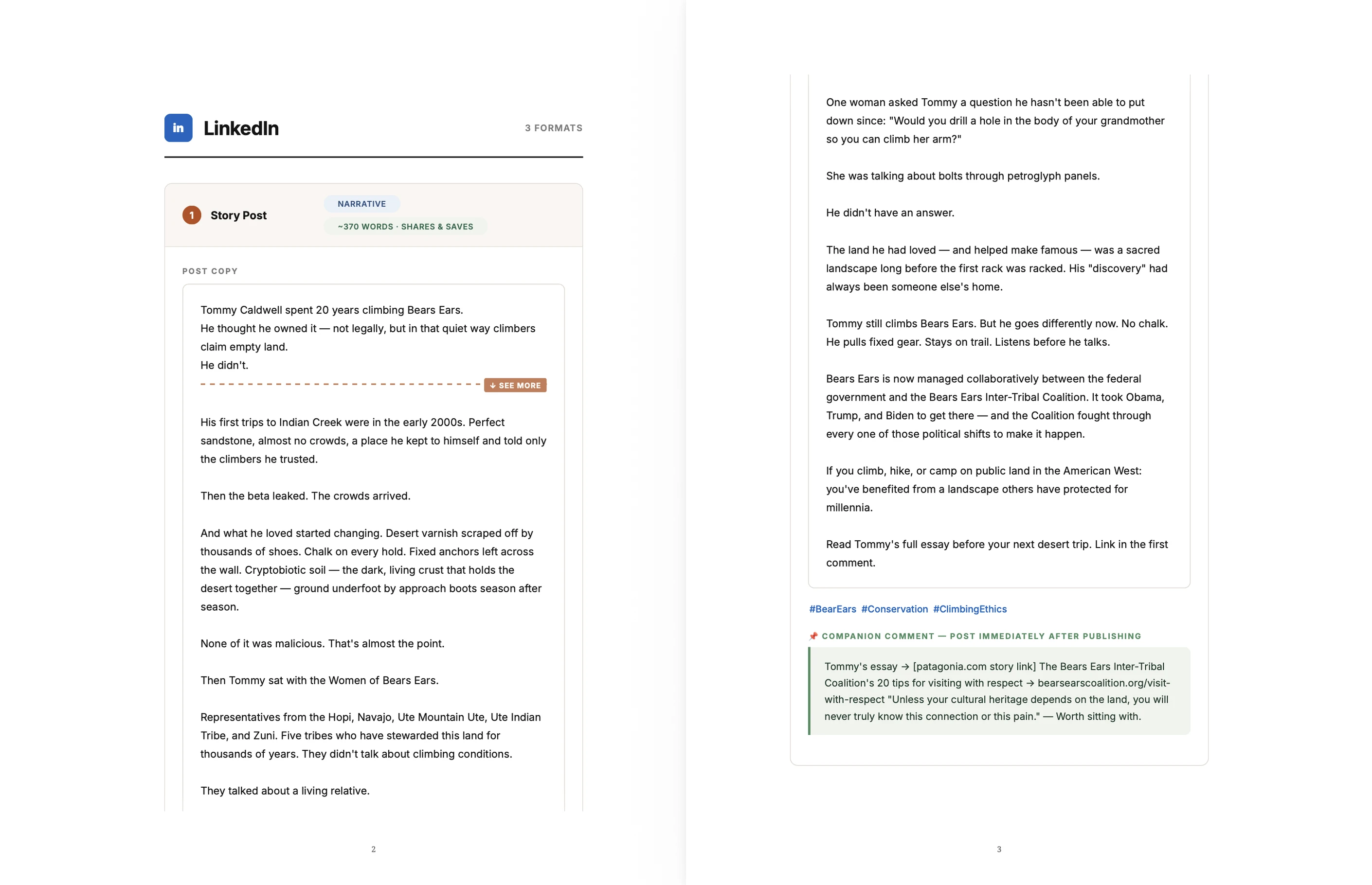
A content repurposing set includes platform-native posts for every channel in the brief. For LinkedIn: a long-form text post, a carousel outline, and a poll or question post. For X: a thread with a scroll-stopping hook and self-contained follow-up tweets. For email: a drop-in newsletter block. Visual briefs are included for any post that needs a graphic.
Each format is built for how people read on that platform, not adapted from the original. LinkedIn posts use bold opening lines and paragraph breaks for scanning. X threads open with a hook that works in isolation. Email sections match the length and structure of a mid-newsletter entry, ready to paste in without reformatting.
For any post that would perform better with a visual, the brief describes the subject, composition, and text overlay so a designer or image generation tool has clear direction.
What source content works best for content repurposing?
Blog posts, webinar transcripts, case studies, and long-form articles all produce strong repurposing sets. The key factor is specificity: content with named examples, concrete data points, or direct quotes gives Juma material that produces distinctive posts. Paste the full content rather than a summary to get the best output.
Summaries strip out the details that make each platform post stand out. A case study that names the client, describes the problem, and shares a specific result will repurpose into stronger LinkedIn posts than a general explainer with the same word count.
For webinars, paste the full transcript or the key sections rather than notes. For URLs, Juma reads the full page directly. This works equally well when repurposing content for social media as it does for email: the same source produces a full cross-channel set. Any content with a clear argument, a narrative, or specific recommendations is a strong candidate. Content that is primarily a list of definitions or a product overview will produce thinner output and may need more guidance in the prompt.
How does AI content repurposing work differently for LinkedIn, X, and email?
AI content repurposing adapts source material to each platform's specific reading conventions rather than reformatting the same text. LinkedIn posts use bold hooks and deliberate line breaks for people scanning quickly. X threads open with a standalone hook tweet, with each follow-up carrying one self-contained idea. Email sections are structured as drop-in newsletter blocks with a brief intro, core point, and CTA.
The distinction matters because repurposing is not reformatting. A LinkedIn post that reads like a shortened blog excerpt underperforms because it ignores how people consume content there. The same content on X needs a different structure entirely: a hook tweet that earns the click, followed by self-contained tweets that add one idea each.
Juma applies platform conventions by default. The result is output that reads like it was written for each platform because it was, not content the team cut down and reposted.
How do teams run a repeatable weekly content repurposing workflow with Juma?
Teams build a repeatable weekly workflow by storing brand rules in a Juma project once. The structure stays the same each session: share new content, confirm the platforms, review and publish. With a Brand Voice Guide and Platform Playbook in the project, the first draft comes back in the right voice and format without additional prompting.
For agency teams managing multiple clients, a separate project per client keeps brand rules isolated. One client's voice, platform preferences, and post examples never affect another's output. New team members can run the Flow without a client briefing because the project context handles it.
Teams that use this as a standing content repurposing tool report that review cycles shorten over time. The more sessions a project accumulates, the tighter the first draft. A team repurposing weekly that saves 30 minutes per session on review recovers more than 26 hours per year on a one-time project setup.






.webp)




.webp)

