Create a social media calendar with AI: Posting schedule, content pillars & platform copy
Juma is a social media calendar app: give it your brand and platforms, and get back a monthly posting schedule, content pillars, and platform copy.
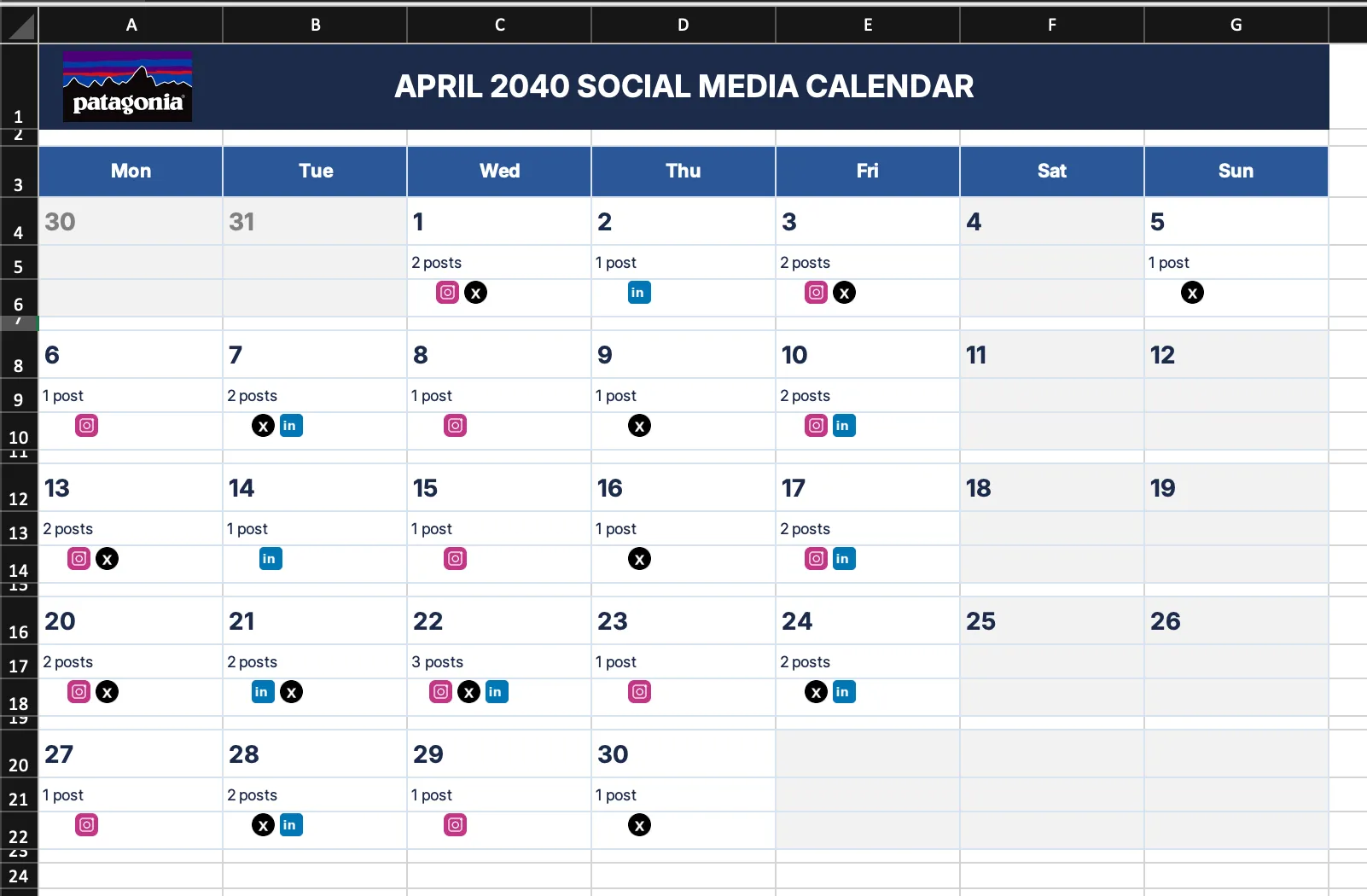
Start by describing your brand, the platforms you post on, and the time period you want to cover. Juma takes that brief and builds a structured, month-long social media calendar, complete with posting times, content pillars, and platform-specific formatting for every entry.
1
Plan a monthly social media calendar
Thank you! Your submission has been received!
Oops! Something went wrong while submitting the form.
Add post-performance data to your Project. Upload your top-performing posts from the last 3 months. Juma spots engagement patterns and uses them to shape the next calendar automatically.
Define your content mix upfront. Tell Juma your target ratio - for example, "60% educational, 30% behind-the-scenes, 10% promotional" - and the calendar distributes posts accordingly from the first draft.
Share your content pillars or build them together. If the client already has defined pillars, include them. If not, describe what the brand talks about and Juma will shape them into a structured pillar framework with target ratios.
Test two posting frequencies side by side. Ask for both a daily schedule and a 3x-weekly version. Compare them to find the cadence your team can actually sustain.
Include examples of what's worked. A few high-performing posts give Juma a concrete structural reference - output quality improves significantly when the AI has real examples to match, not just rules to follow.
2
How do you add timely hooks to a social media content calendar?
A strong social media content calendar connects content pillars to what is happening in the world. This step surfaces the external events that matter to your audience within your planning window. Events mapped include:
Relevant holidays and awareness days
Industry conference and launch dates
Cultural moments and trending topics
Platform-specific awareness days
Anything that needs creative lead time is flagged explicitly, so the team is never caught planning a timely post too late to execute.
Search for relevant holidays, awareness days, industry events, and trending topics happening in April that our audience would care about. Then go through the calendar and suggest where to weave these in — either replacing a weaker post or adding a timely angle to one that's already planned. Flag anything the team should jump on early because it needs creative lead time.
How do you integrate a product launch into an existing social media calendar?
When a launch needs to fit inside an existing calendar, this step integrates it without disrupting the content mix or pillar balance. Juma builds the campaign as a structured sequence across your active platforms. The sequence includes:
Teaser posts in the days or weeks before the launch date
A launch-day sequence with platform-appropriate executions
Follow-up posts to capture momentum without over-promoting
Juma shows what moved and what is new after the integration, so the team can review changes and approve before moving to production.
We have a product launch happening in the third week of April — a new integrations marketplace. Work it into the existing calendar: add teaser posts in the lead-up, a launch-day sequence across all platforms, and a few follow-up posts in the days after. Try to keep the overall content mix balanced — shift posts around rather than just adding on top. Show me what moved and what's new.
How do you refresh a social media planner with last month's performance data?
Share your engagement numbers, reach figures, and standout posts from the previous month. Juma identifies patterns across the data and applies them directly to the next calendar. Changes include:
Pillar rebalancing based on what drove engagement vs. what underperformed
Posting time adjustments for slots that consistently outperform the platform average
Format or frequency shifts on platforms with weak results
The output is an updated social media planner with every change already applied, not a report with recommendations to implement separately.
Here's how last month's posts performed — I'll share engagement numbers, reach, and any standout posts. Based on what worked and what didn't, adjust next month's calendar. Tell me which content pillars to lean into, which posting times to shift, whether the frequency is right for each platform, and where we should experiment. Update the calendar with your recommendations.
Create a Project: Stop re-explaining your context every month
Social media calendars are built on repeat — same brand, same platforms, same audience, month after month. Without a shared foundation, every new calendar starts from scratch: re-explaining the content pillars, the voice, the cadence, the format rules. A Juma Project eliminates that. Set up the brand context once, and every calendar your team builds after that starts from what's already there.
What goes in the project
Brand Voice Guide
How the client sounds across channels — tone, vocabulary, what to avoid. With this in the Project, Juma writes every post concept in the right voice from the first draft. No rounds of tone corrections.
Brand Voice Guide
How the client sounds across channels — tone, vocabulary, what to avoid. With this in the Project, Juma writes every post concept in the right voice from the first draft. No rounds of tone corrections.
Brand Voice Guide
How the client sounds across channels — tone, vocabulary, what to avoid. With this in the Project, Juma writes every post concept in the right voice from the first draft. No rounds of tone corrections.
Brand Voice Guide
How the client sounds across channels — tone, vocabulary, what to avoid. With this in the Project, Juma writes every post concept in the right voice from the first draft. No rounds of tone corrections.
How much time does building a social media calendar with Juma save compared to planning manually?
Building a monthly social media calendar with Juma takes under an hour, compared to several hours of manual work across research, drafting, per-platform formatting, and stakeholder review. The full structured calendar returns in one prompt, with posting times, content pillars, and platform-specific formatting for every entry. Juma compresses a half-day planning task into a single working session.
Most content teams split calendar planning across multiple sessions: research one day, draft the grid the next, format for each platform separately, then circulate for review. By the time the team signs off, a week has passed and the calendar is already running behind schedule.
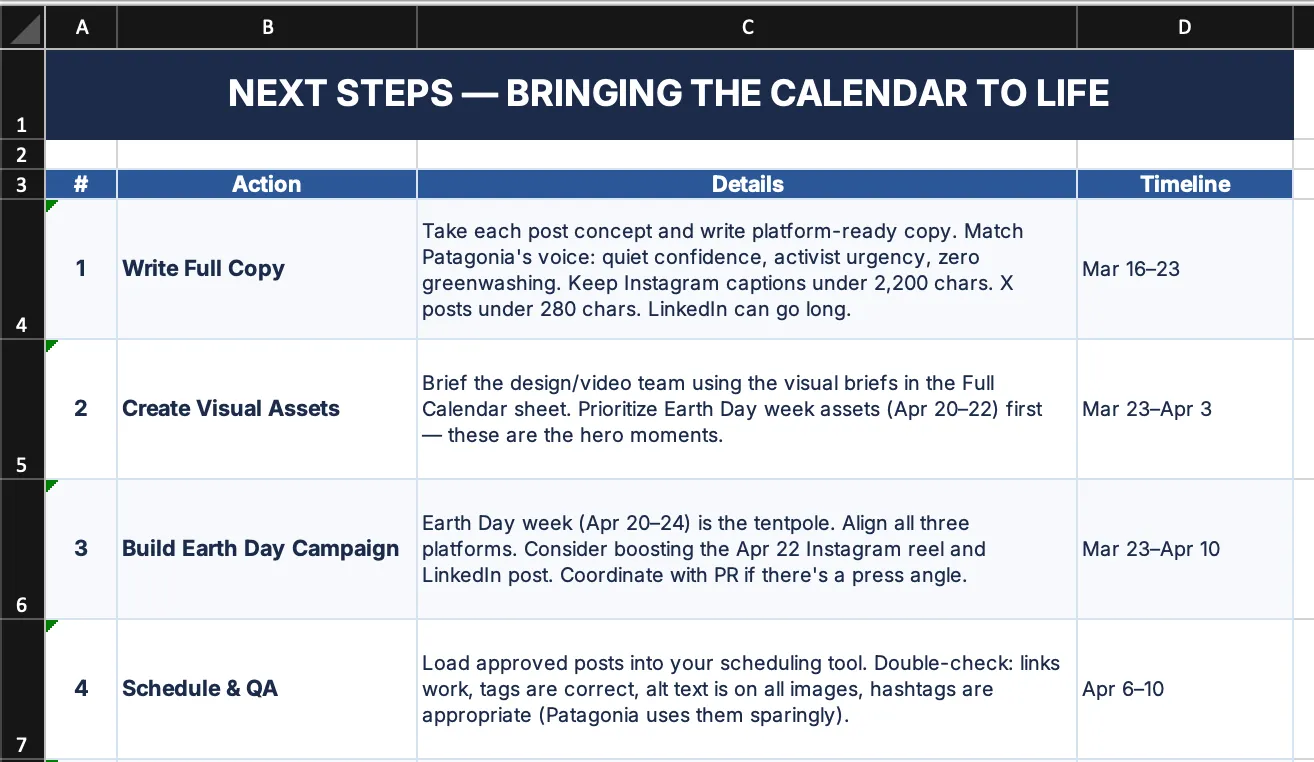
Each follow-up step adds depth without restarting the work. Adding timely hooks, integrating a campaign launch, or refreshing the plan with last month's performance data each take one additional prompt. The total time for a complete, data-informed social media calendar fits inside a single working session.
What does the social media content calendar include for each entry?
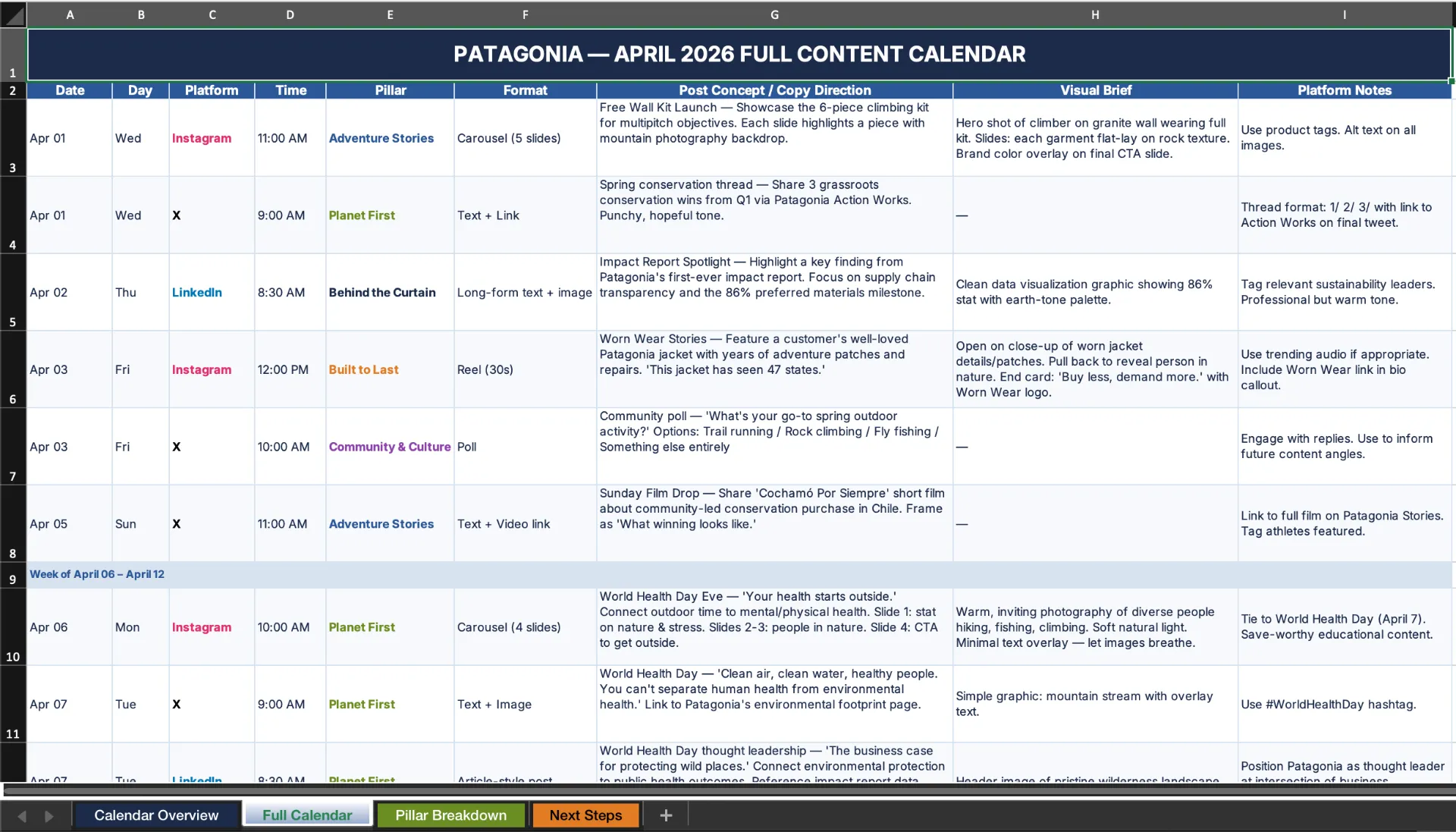
Every entry in Juma's social media content calendar includes six components: date, recommended posting time, platform, post concept or copy direction, content pillar assignment, and platform-specific formatting notes. Nothing is left as a placeholder. Every field is populated based on the brand brief you provide at the start of the flow.
Formatting notes are channel-specific throughout. LinkedIn entries specify whether the post is a single-image post, a carousel, or a text update. X entries distinguish threads from standalone posts and flag where a visual improves reach. Instagram entries note the format — static image, Reel concept, or carousel — and include a caption direction.
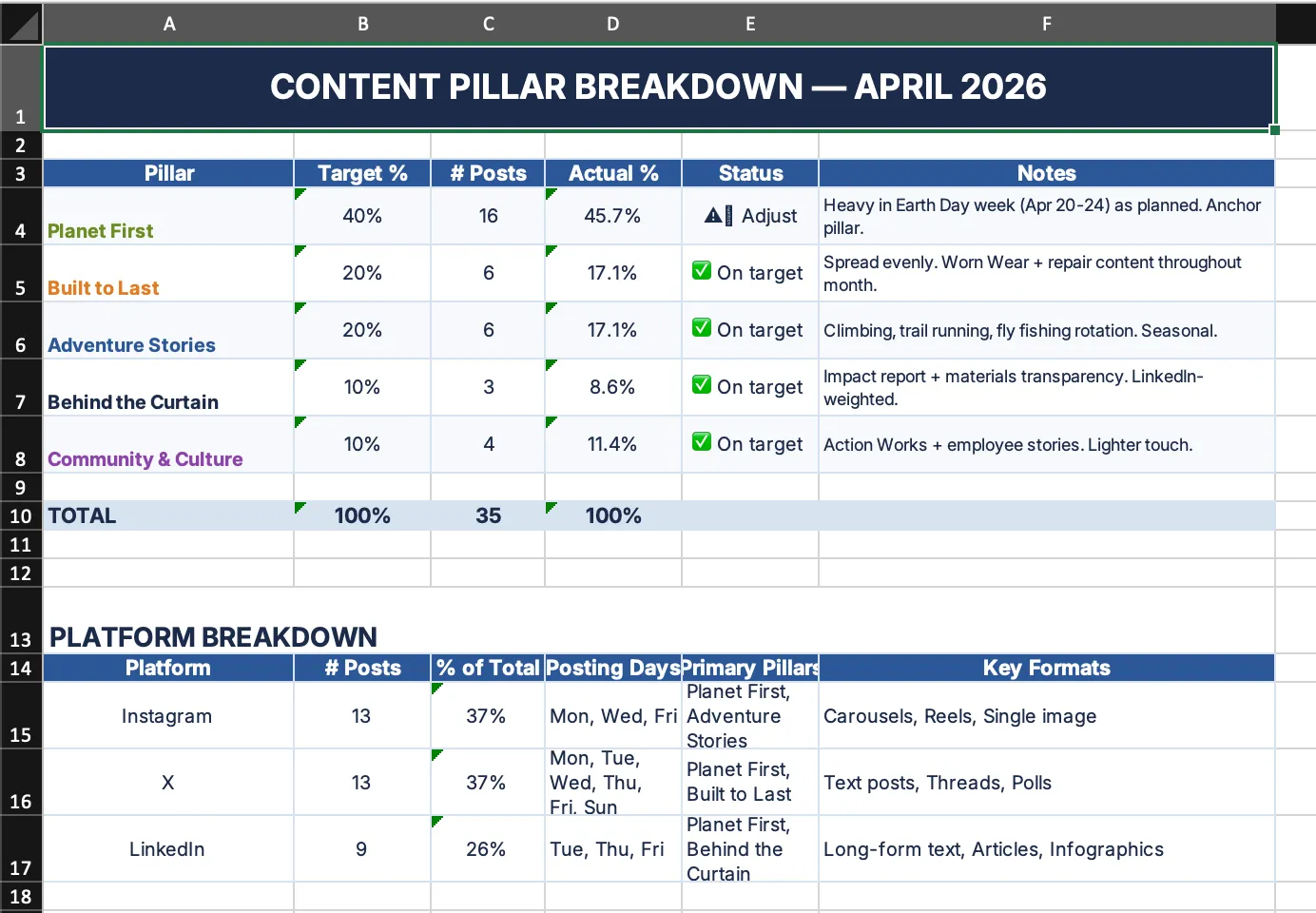
Pillar assignments run throughout the entire month. Once the calendar is built, you can see the full distribution at a glance and confirm the mix matches your target ratio before a single post goes live. If it does not, one follow-up prompt adjusts the balance.
Can this flow work as a social media calendar app for agencies managing multiple clients?
Yes. Each calendar run is scoped to a specific brand and time period, so building separate calendars for multiple clients in the same workspace is straightforward, with no bleed between accounts. Setting up a Juma Project for each client means every new calendar starts from the saved brand context, not from scratch.
The Project stores brand voice guidelines, content pillars, target audience notes, and platform preferences for each client. When a new month starts, the team opens the client's Project and the full brand context is already applied. No re-explaining the brief, no correcting tone in the first draft.
Performance data compounds over time when stored in the Project. As you add top-performing posts and engagement benchmarks month after month, the calendar outputs become progressively more tailored to what actually works for that client. Used this way, the social media calendar app becomes a system that improves with every monthly cycle.
Margarita Arsova
Product marketing @ Juma
Margarita combines marketing expertise with product knowledge to help teams use AI effectively. She focuses on practical applications of AI in marketing, showing companies how to boost productivity while addressing common implementation challenges.
Related Flows
Content Planning
Plan Instagram campaigns
Give Juma your brand and timeline. Get an instagram marketing campaign template with captions, hashtags, and a day-by-day posting schedule.
Web analysis
Web analysis
PDF
PDF
Social
Content Planning
Create LinkedIn ad campaigns
Provide a URL, campaign goal, and target audience. Get five LinkedIn ad copy variants following best practices, labeled for A/B testing in Campaign Manager.
Web analysis
Web analysis
LinkedIn Ads
LinkedIn Ads
PDF
PDF
Social
Content Planning
Content Writing
Repurpose content across platforms
Juma is the content repurposing tool that turns one blog post, webinar, or case study into publish-ready posts for LinkedIn, X, and email.
Web analysis
Web analysis
PDF
PDF
Custom
Create a custom Flow
Describe your marketing workflow and watch it Flow. Juma will turn your request into a step-by-step plan, execute it, and deliver a finished asset: a PDF, presentation, spreadsheet, carousel, landing page, and more.
Excel
Excel
Meta Ads
Meta Ads
YouTube
YouTube
Don't take our word for it
Ask AI about us
400+ marketing teams trust Juma. ChatGPT, Claude, and Perplexity know why. Ask them.
Ready when you are
What's on your plate today?
Start typing a task and Juma will figure out the rest.
Thank you! Your submission has been received!
Oops! Something went wrong while submitting the form.


.webp)




.webp)

