
Most marketing teams already use generative AI. 80% of marketers now use it for content creation, according to HubSpot's 2026 State of Marketing Report. But most teams still treat it like a vending machine: drop in a prompt, hope for something useful, get frustrated when the output sounds generic.
The problem is not the technology. The problem is the workflow. Teams that approach generative AI for content creation with a structured process produce 2x more publishable content than teams that use it ad hoc.
Teams without a system waste hours rewriting AI drafts that never match their brand voice.
It is built on what we have learned from 250+ marketing teams using Juma, a collaborative AI workspace backed by $4.5M from True Ventures, rated 4.9 on G2, and trusted by teams at Salesforce, Costa Coffee, and Maersk.
Key Takeaways
- Generative AI for content creation cuts production time by 50-70% per asset when paired with a structured human-review workflow, not when used as a standalone drafting tool.
- Different AI models excel at different content types. Claude Sonnet 4.5 handles brand-voice writing. GPT-5 excels at structured, logical output. Gemini 3 Pro processes high-volume content at the lowest cost.
- The biggest risk is using AI without context. Generic prompts produce generic content that erodes audience trust and dilutes brand authority.
- Centralizing AI content creation in a shared workspace eliminates the "copy-paste your brief into every chat" problem and keeps every team member working from the same brand foundation.
- A "Generate-Edit-Refine" (GER) framework with human checkpoints at each stage beats both fully manual and fully automated content production.
What Is Generative AI for Content Creation?
Generative AI for content creation is the use of large language models and multimodal AI systems to produce marketing content, including blog posts, social media copy, email sequences, ad creative, video scripts, and visual assets. Unlike template-based tools that fill in blanks, generative AI produces original text and images based on patterns learned from training data, then adapts to your specific context when properly prompted.
The technology has matured fast. In 2023, marketers used early GPT models as novelty writing assistants. In 2026, production-grade models like GPT-5, Claude Sonnet 4.5, and Gemini 3 Pro generate content that passes editorial review when given proper brand context.
93% of marketers now say AI helps them generate content faster, according to Statista data cited by Adobe. But "faster" does not mean "better" by default. The difference between AI-assisted content that builds authority and AI slop that tanks engagement comes down to three things: context quality, model selection, and editorial process.
What generative AI handles well vs. where it falls short
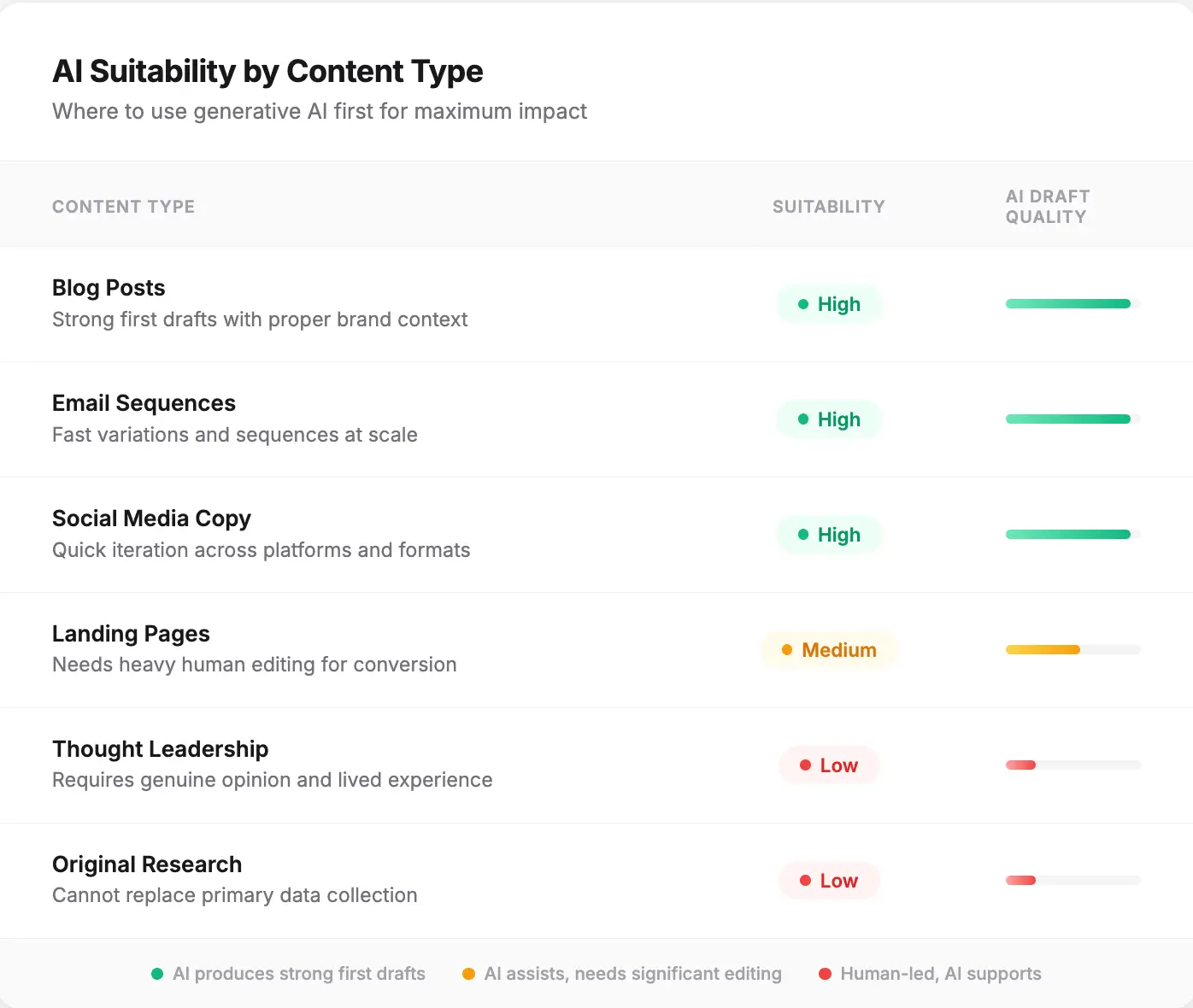
AI produces strong first drafts for structured content types: blog posts, product descriptions, email sequences, social media copy, and landing pages. It struggles with content that requires original reporting, lived experience, genuine opinion, or deep domain expertise. A product comparison blog post is a good use case. A founder's personal take on industry trends is not.
This means the core skill shift for content teams is not learning to prompt. It is learning to direct and edit. The best AI content teams treat the model like a junior writer who is fast, trainable, and never gets tired, but needs clear briefs and always needs a senior edit pass.
The biggest risk is not that AI writes bad content. It is that AI writes mediocre content that looks polished enough to publish. Generic, safe, and forgettable. That erodes audience trust faster than a typo ever will, because readers stop coming back when every article sounds interchangeable.
This is why context changes everything. When we analyzed content workflows across 1,200+ Juma users in Q4 2025, teams who loaded brand context before their first prompt produced publishable first drafts 3x more often than teams who started cold. Not better prompts. Not a better model. Just context.
The Generate-Edit-Refine (GER) Framework
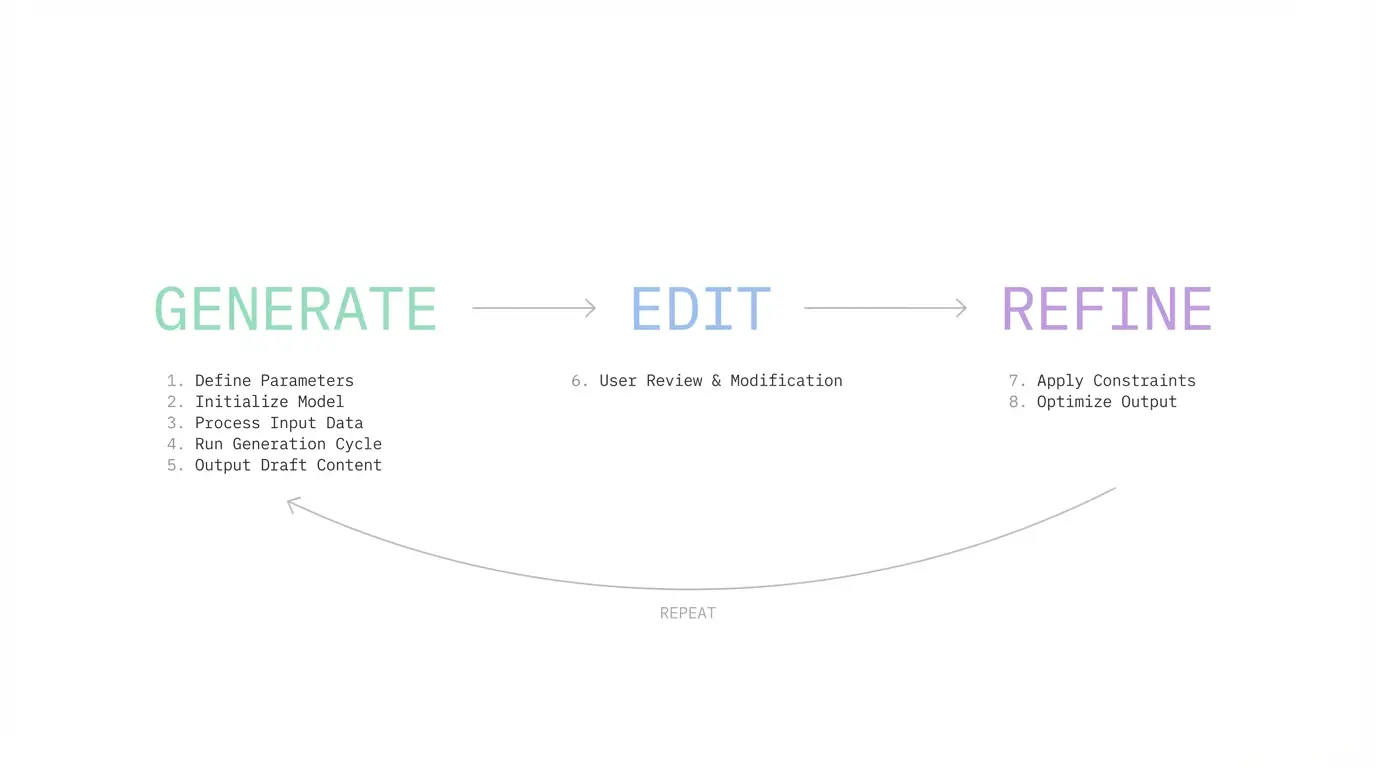
Every high-performing AI content team follows the same three-phase pattern, whether they realize it or not. After analyzing workflows across 250+ marketing teams, we identified three habits that separate teams producing publishable AI content from teams stuck rewriting generic drafts. We call this the Generate-Edit-Refine (GER) framework
The GER framework distills the 8 steps into three phases:
Generate: Gather your brand context, research the topic, and produce a complete first draft in a single AI conversation. The quality of this phase depends entirely on context depth. More context means fewer revisions.
Edit: Run every draft through three checkpoints before publishing: factual accuracy, brand voice alignment, and originality. Use AI to fix specific paragraphs inline instead of rewriting manually.
Refine: Repurpose the finished piece across formats, measure performance, and feed what worked back into your context files for the next cycle. The system improves every time you close this loop.
The teams that skip the Edit phase (publishing AI drafts without human review) see 34% lower engagement, according to HubSpot. The teams that skip the Refine phase plateau after month one. Both phases are required.
The step-by-step workflow below shows exactly how to execute each phase.
How to Use Generative AI for Content Creation (Step-by-Step)
The fastest way to get results from generative AI for content creation is to follow a structured workflow, not a random collection of prompts. The steps below work regardless of which AI tool you use. We will walk through a blog post as the primary example, then show how the same system adapts to social posts, emails, and ad copy.
We use Juma for this workflow internally and will show how each step works inside the platform. But the principles apply to any setup.
Step 1: Set Up Your Brand Context
Before you open any AI tool, gather three things: your brand voice guidelines, your audience profile, and 3-5 examples of your best published content. This context is what separates generic AI output from content that sounds like you wrote it.
Teams that load brand context before their first prompt produce publishable first drafts 3x more often than teams who start with blank-slate prompts.
Your context doc should answer: Who are we writing for? What tone do we use? What topics do we own? What words do we never use?
In Juma, this lives in Project knowledge. Create a Project, upload your brand files, and every chat in that Project automatically references all of it. Use the magic wand to generate a system prompt from a two-sentence brand description.
Step 2: Organize Your Knowledge by Content Type
Organize your reference materials by content type before you start prompting. Your SEO content needs different context than your email campaigns. Keyword research, competitor URLs, and content briefs go in one place. Email templates, subject line data, and A/B test results go in another.
This separation matters because AI models perform better with focused context than with everything dumped into one prompt. Feed the AI only what it needs for the specific task.
In Juma, use Folders inside Projects to split context by content type. Each Folder inherits your brand voice automatically but adds its own specialized files. When you chat inside a Folder, Juma references both layers without you having to re-upload anything.
Step 3: Research Before You Write
Every piece of AI content should start with research, not a writing prompt. For blog posts: validate your target keyword (check volume, difficulty, and intent), analyze the top 10 search results, and identify the gap. What has nobody said yet? For social content: study what's performing on the platform right now. For emails: review your open rate and click data from recent sends.
How to run this research in Juma
For SEO content (blog posts, guides, landing pages): Use the SEO Agent. It activates automatically when you type prompts like "research keywords for generative AI content creation" or "do a SERP analysis for AI writing tools." It runs keyword validation (volume, difficulty, traffic potential), analyzes the top 10 SERP results, identifies content gaps, and generates a content brief with recommended title, H2 structure, and target word count. Research that takes an SEO specialist 2-3 hours happens in minutes.
For any topic that needs depth: Use the Research Agent. Type "deep research" followed by your topic. It searches across dozens of sources, connects insights, validates information, and returns a comprehensive report with full source citations. Use it for market analysis, competitor positioning, industry trends, or data gathering.
For video and social content: Use the YouTube Research Tool. Paste a YouTube link and Juma pulls the full transcript. Extract expert quotes, analyze competitor messaging, study content structure, or gather talking points for your own scripts.
For fact-checking and real-time data: Use Web Browsing in any chat. Ask Juma to verify statistics, check competitor pricing, find recent studies, or scan industry news.
All of this research stays in your chat history inside the Project. The AI remembers every piece of it when you start creating. Stack multiple research tools in the same conversation: run the SEO Agent for keywords, then the Research Agent for industry context, then ask a follow-up question with Web Browsing. Everything compounds.
Step 4: Write Your First Draft With AI
With your research loaded and your Project Knowledge providing brand context, prompt the AI:
Write a 2,500-word blog post on generative AI for content creation." "Create five LinkedIn posts promoting our new feature." "Draft a 4-email welcome sequence for new trial users."
One prompt is enough to generate a complete first draft.
The quality of this draft depends entirely on Steps 1-3. If you loaded brand context and did your research first, the AI has real constraints to work with. That means fewer generic paragraphs and fewer rewrites.
In Juma, your Project Knowledge (brand voice, audience, strategy) and your research (keywords, SERP data, industry insights, competitor analysis) stack together automatically. The AI creates with your voice, for your audience, informed by real data. All in one pass.
Then you review. Read the output. Tell the AI what is wrong. "This section is too generic." "Add more detail about X." "The intro needs a stronger hook." "Make the tone more conversational." Juma rewrites based on your feedback, and the full context from the original draft carries through. This back-and-forth conversation is where the real quality happens.
In Juma, you can also switch models mid-conversation if needed. Click the model selector to change between Claude Sonnet 4.5 (best for creative, brand-sensitive writing), GPT-5 (best for structured, logical output), and Gemini 3 Pro (fastest and cheapest for high-volume work). Context carries through regardless of which model you pick.
| Decision Factor | Claude Sonnet 4.5 | GPT-5 | Gemini 3 Pro |
|---|---|---|---|
| Brand voice matters most | ✓ Best choice | ✗ | ✗ |
| Structured/formatted output | Good | ✓ Best choice | Good |
| High-volume content | Good | Good | ✓ Best (most cost-effective) |
| Creative/persuasive copy | ✓ Best choice | Good | Adequate |
| Research + data synthesis | Good | Good | ✓ Best (long context) |
| Budget-conscious teams | Moderate cost | Moderate cost | ✓ Lowest cost |
Step 5: Edit with AI
The biggest time sink in AI content is not the first draft. It's the editing. Most teams copy the draft into Google Docs and rewrite manually, which defeats the point. The better approach: use AI to edit specific paragraphs inline. Select a weak section, tell the AI what's wrong, and let it regenerate just that part while keeping the rest intact.
How this works in Juma's Pages editor
Once your draft is ready, hover over the AI response and click "Edit as page." This opens the Pages editor, where each paragraph becomes an interactive block.
Select any paragraph. Click "Ask AI" and choose from:
- Custom prompt: "Make this more conversational" or "Add a specific data point"
- Improve writing: Enhance text while keeping meaning
- Shorter / Longer: Adjust length
- Fix spelling and grammar: Clean up errors
After the AI edits, replace the original or insert the new version below. Drag and drop paragraphs to reorganize. Format with headings, lists, bold, links, and colors.
This is where generative AI for content creation actually saves time. Not at the drafting step. At the editing step. When your draft started with full brand context, editing takes 10-15 minutes per 1,000 words instead of 45-60.
Step 6: Repurpose One Piece Into Multiple Formats
A single blog post should become 5-8 content assets: a LinkedIn post with a different hook, an X thread pulling key insights, an email newsletter teaser, and 2-3 social media variations. The content already exists. You are reformatting, not creating from scratch. Prompt the AI with your finished post and specify the platform, format, and character limit for each piece.
How to repurpose in Juma
Activate the Content Agent from the icons below the chat input. Give it your blog post and ask it to create:
- A LinkedIn post with a different hook
- An X thread pulling the key insights
- An Instagram caption with a summary
- A Reel script based on the main takeaway
- An email newsletter teaser driving traffic to the post
The Content Agent generates multiple variations for each format. It knows platform best practices and adapts structure, length, and tone automatically. 73% of marketing teams now use generative AI for content creation tasks like this, according to Sopro's 2025 research.
For landing pages, use Juma's landing page Flow to walk through a step-by-step process with audience persona data loaded.
Step 7: Close the Feedback Loop
Publishing is not the finish line. The teams that get the most out of generative AI for content creation are the ones that close the feedback loop.
How to do this in Juma
Connect Google Analytics and Google Search Console directly to Juma. Once connected, you can ask questions about your content performance right inside the chat. "Which blog posts had the highest organic traffic this month?" "What keywords are we ranking for on page 2?" "Which articles have the highest bounce rate?" Juma pulls the data and answers in conversation, no tab-switching or dashboard digging required.
Use this data to identify patterns. Which topics drive the most traffic? Which content formats get the lowest bounce rates? Which articles rank on page 2 and need an optimization pass to break into page 1? Feed those insights back into your next content cycle.
Best Tools for Generative AI Content Creation
| Tool | Best For | Team Collaboration | Brand Voice Training | AI Models | Starting Price |
|---|---|---|---|---|---|
| Juma | Marketing teams needing a shared AI workspace with persistent brand context | ✓ Real-time, shared Projects | ✓ Examples + guidelines | GPT-5, Claude Sonnet 4.5, Gemini 3 Pro | Free / $20 per user/mo |
| ChatGPT (Plus/Business) | Individual writers or small teams wanting a general-purpose assistant | Limited (Business plan only) | Custom GPTs with instructions | GPT-5.2 Instant, GPT-5.2 Thinking | Free / $20 per user/mo (Plus) |
| Claude (Pro/Team) | Long-form writing that needs strong voice matching | Limited (Team plan, 5-75 seats) | Projects with uploaded docs | Sonnet 4.5, Opus 4.6, Haiku | Free / $20 per user/mo (Pro) |
| Jasper | High-volume teams focused on ad copy and short-form content | ✓ With campaigns (Business plan) | ✓ Brand Voice feature | Multiple (via LLM routing) | $59-69 per seat/mo (7-day trial) |
| Copy.ai | Sales and marketing teams automating workflows beyond writing | ✓ With workflows | ✓ Brand Voice feature | OpenAI, Anthropic, Gemini | $29/mo for 5 seats |
Generative AI Content Creation Quality Control: The Human-in-the-Loop Framework
Quality control is what separates AI-assisted content that builds authority from AI-generated content that erodes trust. 71% of businesses already use generative AI in their marketing. The ones losing audience trust are not the ones using AI. They are the ones publishing AI drafts without a structured review process. The checklist below is what we use internally and recommend to every team on our platform.
The 8-step workflow above builds quality control into Steps 5 and 6: conversational review in chat, then paragraph-level editing in Pages. Every draft should pass three checkpoints before publishing: factual accuracy, brand voice alignment, and originality.
Use this checklist before publishing any AI-generated content:
The 10-Point AI Content QA Checklist
The side-by-side test: Open your AI draft and your last three published pieces in separate tabs. Read the first paragraph of each. If you can immediately tell which one is the AI draft, your voice is off. The fix is usually specificity. AI writes in generalities ("marketing teams face challenges"). Your real voice uses concrete details ("our Q4 email campaign hit 4.2% CTR because we segmented by purchase history"). Add one specific detail per paragraph and the voice gap closes fast.
✗ Before: "It's worth noting that generative AI has become increasingly important for businesses looking to scale their content operations in today's competitive landscape."
✓ After: "Generative AI cuts content production time by 50-70% per asset. Teams that adopt structured workflows publish 2x more content without adding headcount."
The pattern to spot: If a sentence could be deleted without losing any specific information, it is filler. AI defaults to throat-clearing phrases that sound professional but say nothing. If a paragraph opens with "It's important to," "In today's," "When it comes to," or "As we all know," rewrite it with a concrete claim or cut it.
Common Generative AI Content Creation Mistakes
Every team we onboard makes at least one of these mistakes in their first month. They are predictable, and they are fixable.
Publishing AI drafts without human review. This is the most expensive mistake. AI-generated content that skips editorial review averages 34% lower engagement, according to HubSpot. The content looks fine on the surface. It reads smoothly. But it lacks the specificity and voice that makes your audience trust you. Every draft needs at least one human pass through the three checkpoints: factual accuracy, brand voice, and originality.
Treating AI like a one-shot tool. Most teams prompt once, get a draft, copy it out, and never come back. They miss the most valuable part: the conversation. Tell Juma what is wrong with the draft. Ask it to rewrite the weak sections. Push back on generic phrasing. The iterative back-and-forth inside a context-loaded Project produces dramatically better output than any single prompt ever will.
Using the same model for everything. Claude Sonnet 4.5 writes better marketing copy. GPT-5 formats better structured content. Gemini 3 Pro processes high-volume work faster and cheaper. Teams that default to one model for every task get mediocre results across the board. Switch models mid-conversation based on what the section needs.
Never closing the feedback loop. Most teams generate, publish, and move on. They never check which content performed best or which prompts produced the strongest drafts. The teams that improve month over month are the ones feeding performance data back into their Project Knowledge and Prompt Library.
House of Growth, an SEO agency using Juma, built all four fixes into their workflow. The result: 160 articles per month, 85 hours saved, and 2x revenue growth.
Your First Week: From Setup to Published Content
You do not need to overhaul your entire content operation to start using generative AI for content creation effectively. Follow the 8-step Juma workflow from the previous sections. Here is what a realistic first week looks like.
Day 1: Sign up for Juma and create your first Project (Steps 1-2 above). Upload your brand voice document, audience profile, and three to five examples of your best content. Use the magic wand to generate your system prompt. This takes 30 minutes.
Day 2: Create Folders for your two highest-volume content types (Step 3). Add task-specific files to each. Run one research query with the SEO Agent, Research Agent, or Web Browsing. Get familiar with how context flows from Project to Folder to chat.
Day 3-4: Write your first piece of content end-to-end using Steps 5-7. Draft in chat, edit in Pages, repurpose with the Content Agent. Time yourself. Compare to your current workflow. Most teams see a 40-50% time reduction on the first try, improving to 60%+ by week two.
Day 5: Share the Project with your team. Set permissions so collaborators can create chats inside the Project without editing the knowledge base. Save your best prompts to the Prompt Library. You now have a reusable system, not a one-time experiment.
Or book a demo to see how teams like yours set up their content workflows before you start.
FAQ: Generative AI for Content Creation
Is generative AI content creation legal to use commercially?
Yes. Content generated by AI tools is legally publishable in most jurisdictions. Copyright ownership varies by country.
In the US, purely AI-generated works without human creative input may not qualify for copyright protection. Content with substantial human direction and editing typically does.
Does Google penalize AI-generated content?
No. Google's guidance focuses on content quality, not how it was produced. AI-generated content that provides original value, demonstrates expertise, and serves user intent ranks well.
Thin or generic AI content performs poorly because it lacks quality, not because of its origin.
What is the primary advantage of using generative AI in content creation?
The primary advantage of using generative AI in content creation is speed-to-quality at scale. Marketing teams produce first drafts 50-70% faster while maintaining quality through structured review workflows. This lets smaller teams compete with larger content operations and lets larger teams reallocate editing time toward strategy and original research.
How much does generative AI content creation cost for a marketing team?
Costs range from $0 (free tiers of individual AI tools) to $20-35 per user per month for collaborative platforms like Juma that include multiple AI models, brand context features, and team collaboration.
The ROI is measured in hours saved: teams using structured AI workflows report saving 50-85 hours per month on content production.
{{blog-pricing}}
Can generative AI replace content writers?
No. Generative AI for content creation replaces the blank-page problem, not the writer. It handles first drafts, variant generation, and format adaptation.
Human writers provide brand voice expertise, original thinking, fact verification, and the editorial judgment that separates good content from great content.
Read More
LinkedIn Carousels

Competitor Analysis

GEO Optimized Articles

Google Analytics Reports


%20(1).webp)



Private cloud deployment - AWS, Azure, GCP
SSO / SAML + platform administration
Security review support + DPA
Custom contract & SLA
Dedicated account manager & priority onboarding
Invoicing + custom billing terms