Set up your client project: Brand Voice and Messaging Rules, Approved Value Propositions, Offer and Pricing Details, Competitive Positioning
Search ad copy gets refreshed every cycle, but the brand rules, approved messaging, and current offers stay relatively stable. A Juma project keeps that foundation in one place so every round of RSAs starts from the client's actual voice and positioning, not from a blank brief. If the client project already exists, add these items to it.
What to add
Brand Voice and Messaging Rules
Tone, approved language, words to avoid, and any legal disclaimers. With this in the project, every round of ad copy stays on-brand without re-explaining the rules.
Approved Value Propositions
Which messaging angles are current and which have been retired. Keeps copy consistent across campaigns and prevents the AI from reinventing the positioning each refresh.
Offer and Pricing Details
Current promotions, pricing tiers, and seasonal offers. A living document the team updates as offers change, so the ad copy always matches what's live.
Competitive Positioning
Differentiation points and what to say against specific alternatives. Keeps messaging consistent across ad groups and campaign cycles.
Guide Juma with project info
Add a short description to each knowledge item in the project's info field so Juma knows what each file contains and when to use it. For example:
- Brand Voice and Messaging Rules: "Tone, approved language, words to avoid, and legal disclaimers. Follow for all ad copy."
- Approved Value Propositions: "Current and retired messaging angles. Check before writing headlines to stay on-message."
- Offer and Pricing Details: "Current promotions, pricing tiers, and seasonal offers. Reference before writing any ad copy."
Write search ads informed by your actual account data
Frequently Asked Questions
How much time does this Flow save compared to writing RSAs manually?
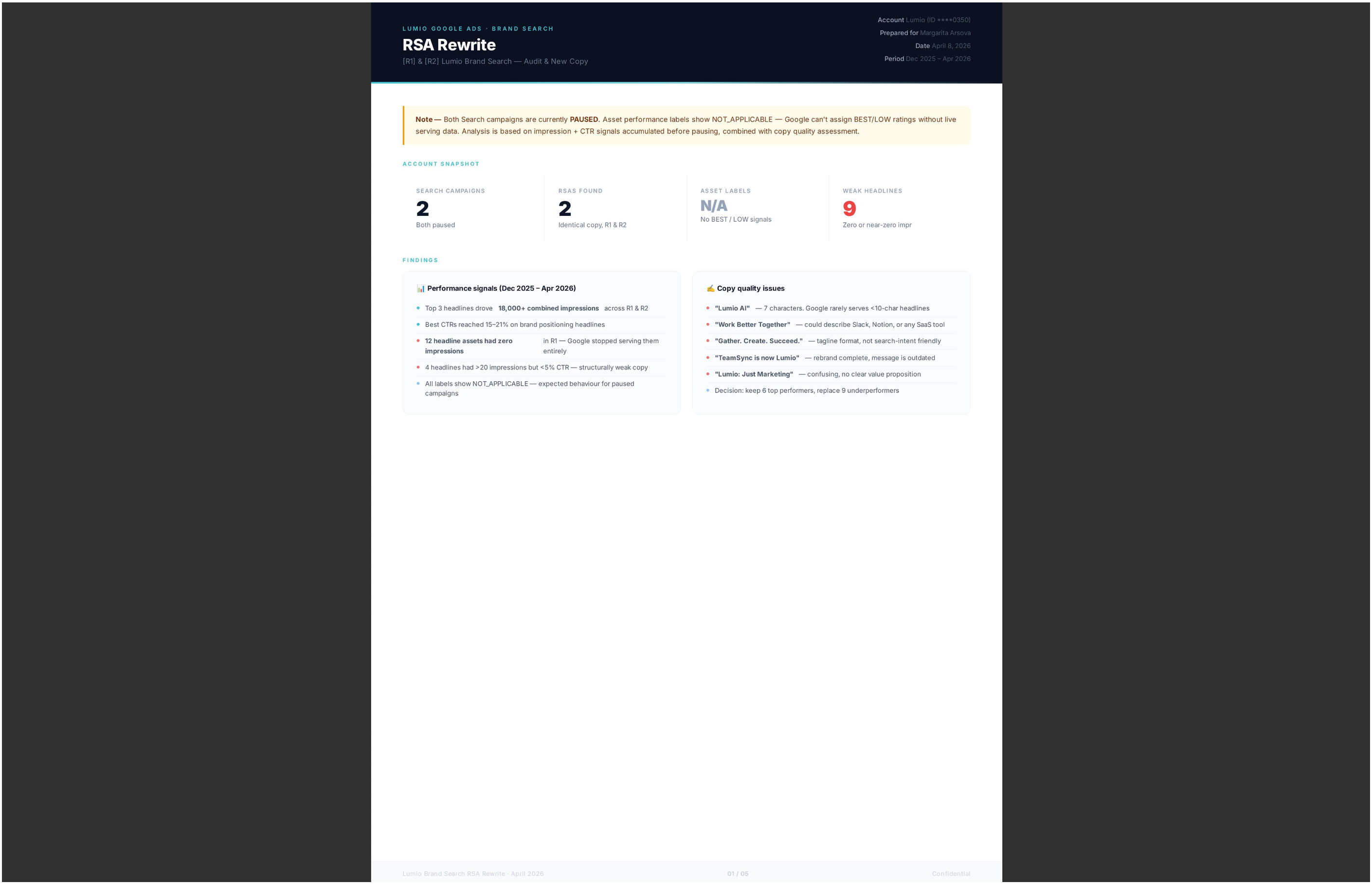
This Flow cuts RSA writing from two to three hours to under thirty minutes per ad group. Instead of manually reviewing asset ratings, checking the search terms report, and drafting new copy from scratch in separate browser tabs, Juma consolidates all three inputs and generates a complete replacement set in one session.
The manual process requires constant context switching: performance data lives in the Assets tab, search terms are in a separate report, and the creative brief is usually in a document or email thread. Consolidating those three sources before writing is what makes the output targeted rather than generic.
For agencies managing several accounts, the time savings compound further. A session that handles one account's asset review, gap identification, and google ads copywriting in under thirty minutes can be repeated across multiple clients in a single working session, without re-briefing from scratch each time.
What does Juma analyze before writing new headlines?
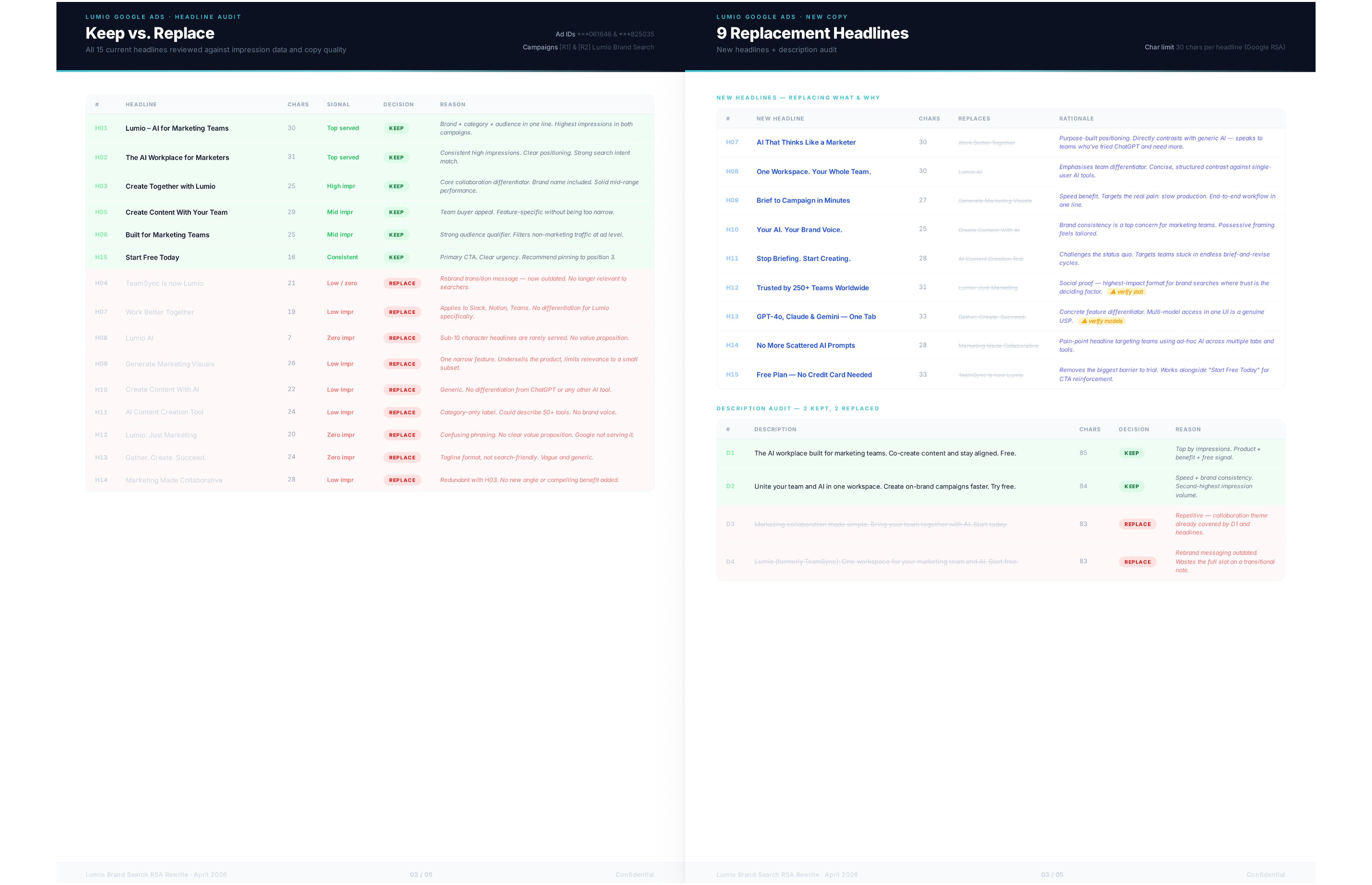
Juma reads three data sources before writing a single headline: asset performance ratings (BEST, GOOD, LOW, UNRATED), the search terms report for the selected ad group, and your current live copy. Assets rated BEST or GOOD are preserved automatically. LOW and UNRATED assets are flagged for replacement.
The BEST and GOOD thresholds reflect Google's own assessment of how often an asset serves and how well it converts relative to others in the set. Keeping those assets preserves the performance signal your account has already built, rather than discarding earned data to start fresh with a blank brief.
Search terms showing query themes not yet covered by current headlines represent the highest-impact gap. These are real queries your ads already win traffic from, but without a headline that directly addresses the intent. Juma prioritizes these gaps when writing new headline candidates, making the output more targeted than any standard google ads copy generator.
What does the completed RSA set include?
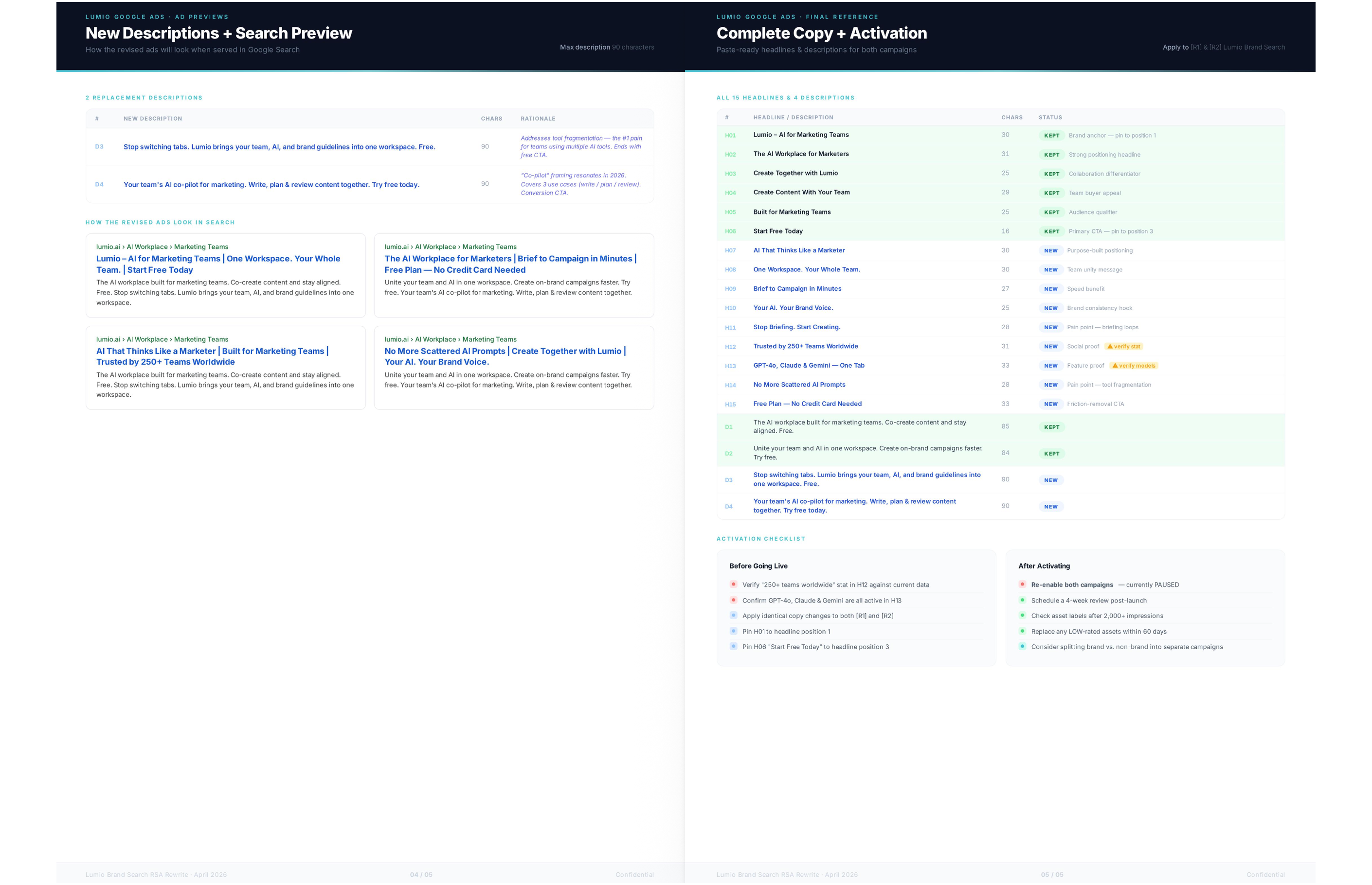
A complete RSA set from this Flow includes up to 15 headlines and 4 descriptions in a downloadable document. Each asset has a character count, role label (benefit, feature, CTA, social proof), and pinning recommendation. The document shows which assets were retained from the existing set and closes with an ad strength assessment.
Character counts matter because Google truncates headlines that exceed 30 characters and descriptions that exceed 90 characters. Having the count visible in the document means you can review the full set before uploading without opening the Google Ads interface to check each asset individually.
The ad strength assessment at the end scores the full set against Google's criteria and flags any remaining gaps. If the set is missing a strong CTA or has too many headlines covering the same theme, the assessment identifies it with a specific recommendation before you upload rather than leaving it to post-upload discovery.
What makes this Juma Flow different from a standard Google Ads copy generator?
Most Google Ads AI copy software generates headlines from a brief and stops there. Juma reads your live asset performance ratings first, preserving BEST and GOOD assets automatically and replacing only what is underperforming. The output reflects what is already working in your account, which changes both what gets written and what gets kept.
The practical difference shows up in replacement logic. A standard ad copy generator treats every asset as a candidate for replacement regardless of performance. Juma separates the decision: BEST and GOOD assets are preserved, and the creative focus goes entirely toward replacing what is underperforming. This produces a tighter, more efficient asset set rather than a full rewrite that resets the account's performance history.
The search terms layer adds a second differentiator. Generic tools write to the keywords you provide; Juma writes to the gaps your account has already identified through real traffic. That distinction is why the output tends to produce stronger ad strength scores on the first upload.

.webp)




.webp)
.webp)

