

See all release notes over here.
We've been busy shipping updates to make Juma work better for your team.
Let's walk through what's new.
The sidebar got smarter
We redesigned the sidebar to help your team access what matters most without the clutter.
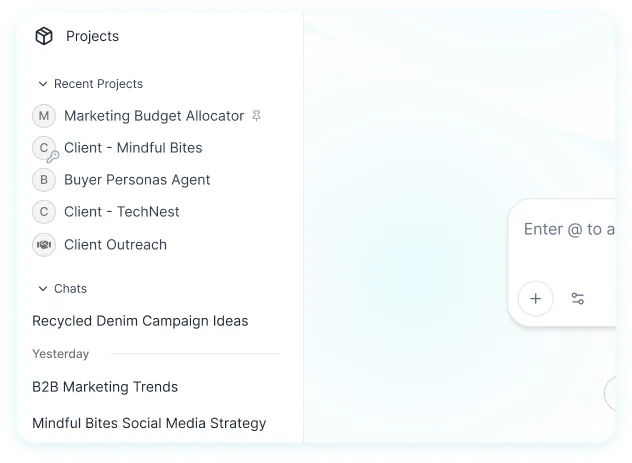
Pinned Projects stay at the top. Your most important work is always one click away. Pin the projects your team uses daily, and they'll never get buried.
Your most recent chats show up automatically. Makes it easier to continue a chat, check something you discussed earlier, or pick up right where you left off.
Less clutter, more clarity. We cleaned up the noise so you can focus on the work that moves your team forward.
Can't find something you need? We built a dedicated Projects page. Head to the Projects tab in the sidebar to browse, search, and organize both shared and private. Or hit Cmd + K (or Ctrl + K) to search.
Pro tip:
Pin any Project to keep it at the top of your sidebar for easy access.
Meet Nano Banana Pro
Nano Banana Pro is live in Juma for paid users.
This is Google's most advanced image generation model yet, built on Gemini 3 Pro.
What makes it special: it generates images with legible, accurate text in multiple languages. Perfect for mockups, posters, social graphics, and localized campaigns.
Deep Research Agent
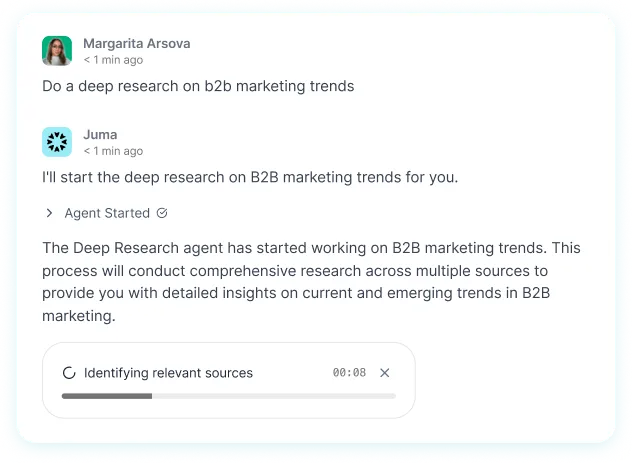
Your team can run deep research directly in Juma.
Just type "Deep research [your topic]" in any chat, and the agent will gather insights, analyze sources, and deliver a comprehensive report.
The full results appear right in the chat, and you can also export as a PDF.
Perfect for competitor analysis, market research, campaign planning, or any time you need to go beyond surface-level answers.
And a few more things
Use a Project directly from the chat input
No need to open the Project itself. Click the + button, select "Use a Project," and attach it to your chat. Work with your Project knowledge without leaving where you are.
Tool call results show up in chat history
This makes your chats more reliable when using image generation, web browsing, or Project knowledge.
Drag & drop for Project knowledge
Adding files to your Projects has gotten easier. Drag them in, and you're done.
Visual polish and behind-the-scenes improvements
We've made some thoughtful updates to make your experience cleaner and smoother.
Brand voice category preserved when duplicating Projects
If you've been working with Projects that use brand voice settings, the brand voice category now carries over properly when you duplicate a Project. No more manually resetting it each time.
Variables in split chat view now work correctly
We fixed an issue where variables in prompts weren't being applied correctly in split chat view. Everything works as expected now, so your customized prompts behave consistently across different chat modes.
Rebranding consistency
We made final adjustments to ensure our recent rebranding is consistent throughout the platform, including on the adoption reports page and in the Help Center.
HubSpot CRM toggle improvements
We moved and cleaned up the HubSpot CRM toggle for better organization of integration settings.
n8n workflow notification fixes
We fixed timing issues with n8n workflow notifications so everything runs more reliably.
While you won't see these changes directly, we've also been working on security improvements and infrastructure updates to keep everything running smoothly and safely. This includes better protection for embedded content and improvements to how certain integrations communicate with the platform.
That's it for this release!
We're always listening to how your team works and looking for ways to make Juma better.
LinkedIn Carousels

Competitor Analysis

GEO Optimized Articles

Google Analytics Reports


%20(1).webp)



Private cloud deployment - AWS, Azure, GCP
SSO / SAML + platform administration
Security review support + DPA
Custom contract & SLA
Dedicated account manager & priority onboarding
Invoicing + custom billing terms