AI agents configured around your team
Flows are pre-made. Juma Agents are yours to shape: bring your knowledge, connect your tools, assign your Flows. All run within your context, triggered by a single message in chat. Used by 400+ marketing teams. Credit-based pricing. Unlimited seats.










What makes Juma Agent different
How does Juma Agent become yours?
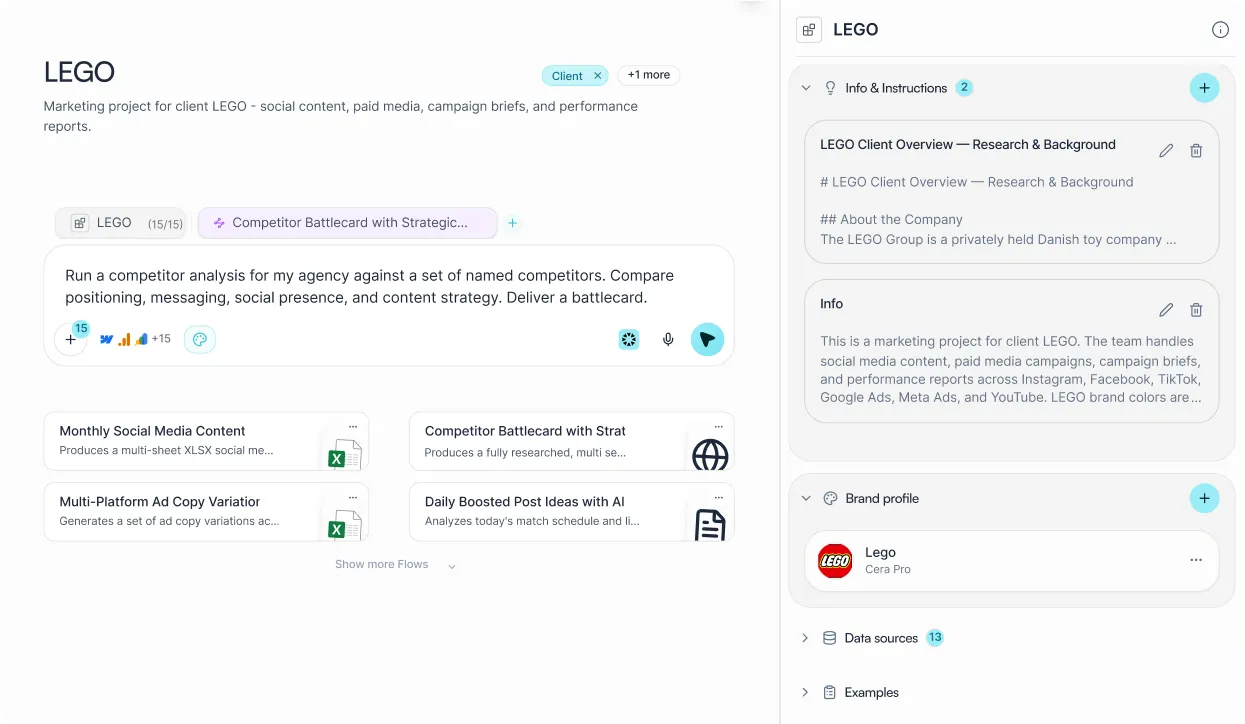
Flows are one-click tasks someone else designed. Juma Agent is different: you shape it by what you bring to the Project. Add your files and brand guidelines as Knowledge. Connect the tools it can pull live data from. Assign the Skills it can run on your behalf. Those three inputs are what make it yours.
Every time someone on your team triggers Juma Agent from chat, it starts from that context automatically. Different project means different context, different behaviour, without touching a settings panel.
What are the three inputs that configure your agent?
Set these up once per Project. Every agent in the Project draws on all three at runtime - no re-uploading, no re-briefing between sessions.
Knowledge
The context the agent draws from before it starts. Everything it needs to know about your brand, your client, and the work.
Project files, briefs, and playbooks
Brand Voice: tone, style, terminology
Past work and output examples
Custom instructions per project
Integrations
Live data sources the agent can pull from mid-task. No exports, no copy-paste between tabs.
Google Search Console and Ahrefs
HubSpot, Google Ads, Meta Ads
Google Analytics, LinkedIn Ads
27+ platforms at juma.ai/integrations
Flows
The tasks the agent can run as part of a larger job. Choose from 700+ pre-built Flows or build your own.
Content briefs, ad copy, email sequences
SEO audits and keyword reports
Competitor research and analysis
Custom Flows you build yourself
Juma Agent doesn't just pull data in. It pushes actions out.
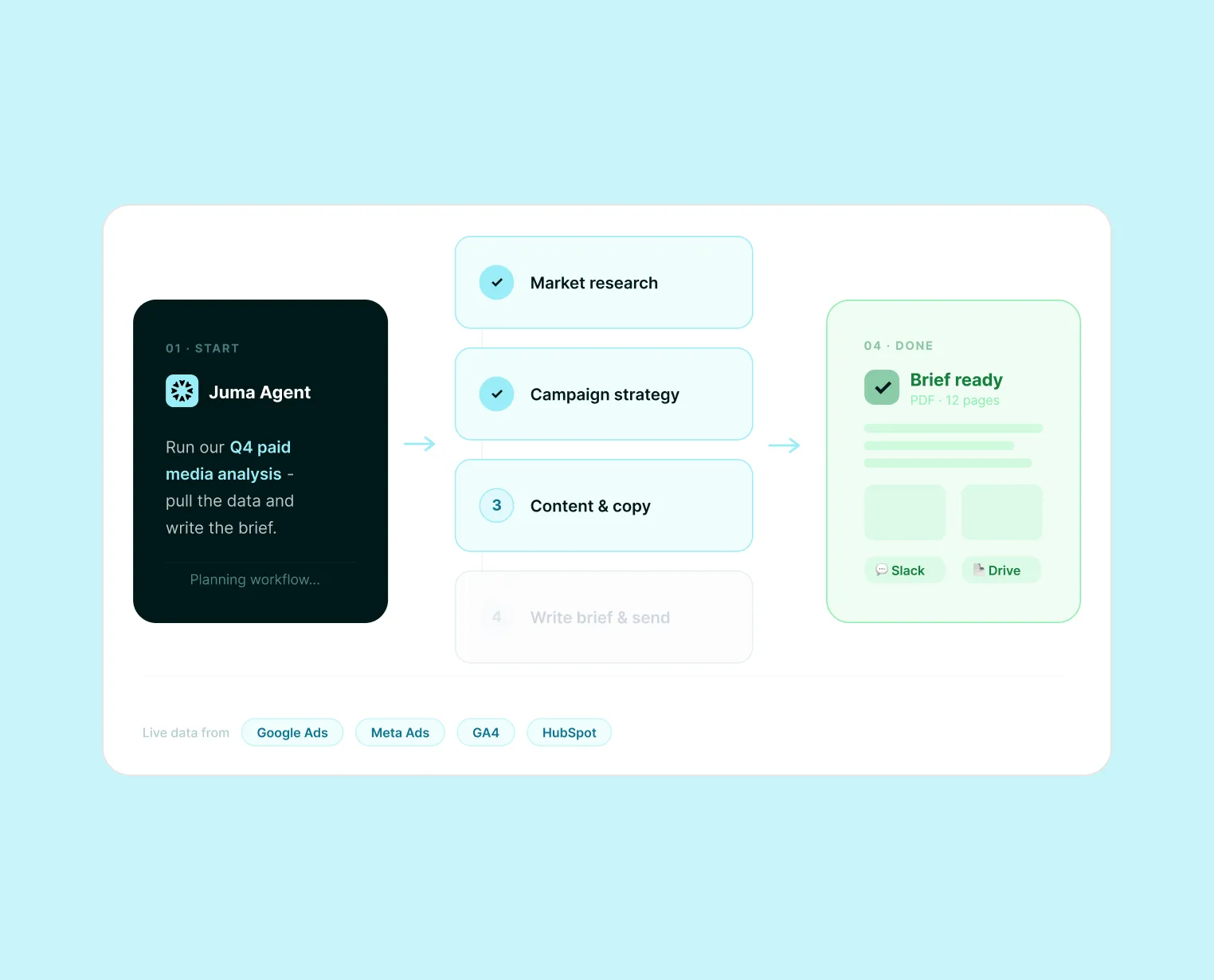
Most AI tools stop at the answer. Juma Agent completes the task - it can post a Slack update, publish content to your CMS, trigger a downstream workflow, and deliver a finished asset to the right place, all from a single instruction. The agent loop closes outside of Juma. When you describe a task, it does not return a draft for you to act on. It takes the action, and confirms when it is done.
Post to Slack
Campaign report finished. Agent posts the summary to your team channel automatically.
Publish to Webflow
SEO article written and approved. Agent publishes it directly to your CMS.
Trigger any connected workflow
Any action your integrations support, Juma Agent can execute. Not just generate - act.
How does Juma keep your work in motion?
Juma is an agentic platform with hundreds of specialized AI agents working in parallel behind every workspace.
Research Agent
Deep research across live web sources. Returns a fully cited PDF report and editable markdown, ready to present to a client or share with the team.
Strategy Agent
Build comprehensive marketing strategies and campaign frameworks. Exports as a polished PDF, structured for client presentation.
Content Agent
Social posts, blog articles, email sequences, scripts. Platform best practices and your Brand Voice are already in - no separate briefing needed.
Data Analysis Agent
Upload any spreadsheet or CSV. Returns charts, key insights, and a downloadable PDF report. No pivot tables or data skills required.
SEO Scout
Keyword opportunities, content gaps, and on-page recommendations, connected to your Google Search Console data. No separate SEO tool needed.
LinkedIn Intelligence Agent
Scrapes and analyzes competitor LinkedIn profiles. Extracts tone of voice, posting strategy, and content patterns - structured and ready to act on.
Google Ads Auditor
Full audit of your Google Ads spend. Surfaces wasted budget, underperforming keywords, and a prioritized action plan from your connected account.
Paid Media Planner
Multi-platform paid media launch plan with budget allocation and creative direction across Google, Meta, and LinkedIn, ready for client sign-off.
Audience and Persona Builder
Detailed buyer personas and ICPs grounded in your market context. Pulls from your Project Knowledge and any connected CRM data to reflect real customers.
Web Analysis Agent
Fetch and analyze any web page in seconds: competitor sites, landing pages, product pages. Returns structured insights without manual copy-paste.
Image Generation Agent
Describe a visual and Juma creates it: product imagery, social graphics, campaign visuals. No separate tool, no model switch, no extra steps.
YouTube Research Tool
Paste any YouTube URL and Juma pulls the full transcript for analysis. Summarize, extract key points, or repurpose the content from the same chat.
All of this from a single message in chat.
No menus, no tool-switching, no prompt templates. Type what you need - “run a competitor analysis” or “audit our Google Ads” - and the right agent picks it up. Every agent, every specialist, triggered the same way: from the Juma chat.
Flows your team runs together
Pick a Flow, run it in your shared Project. Everyone works from the same context and gets the same finished output.







How do you go from project setup to a finished deliverable?
No prompt engineering. No model selection. Set up the context once, then just describe what you need.
Set up your Project context
Upload files, set Brand Voice, and connect your integrations. Assign the Flows the agent can run. This is a one-time setup per client or campaign - not per task.
Describe the outcome you need
Type in plain language: “Audit our Google Ads” or “Build a 3-month content calendar.” No syntax, no templates, no prompt engineering required.
The Super Agent routes and runs
Juma's Super Agent breaks the task into steps, picks the right specialist for each, and runs them in sequence. You see progress in real time and can redirect at any point.
Get a finished deliverable
A PDF, a strategy doc, a content calendar, a set of ad variations - formatted and ready to send to a client or hand to your team. Not a draft that needs cleaning up.
Which marketing teams use Juma Brand Hub?
2x
Faster workflows on average
160
Articles/month, one SEO agency
90%
Team adoption at Die Crew
50hrs
Saved per project, copywriting teams
What teams ask before they start
Will someone help us get this working?
Yes. The hard part of deploying AI agents is not picking the tool. It is getting your team to actually use it. Juma's implementation specialists work alongside you to configure agents, connect your integrations, and build the habits your team needs to make it stick.
You can self-serve. Most teams do within the first week. But for teams that want hands-on help, Juma's implementation specialists are available to work directly with you.
How implementation works
Map your workflows
A discovery session to understand how your team works today and where agents will deliver the most impact.
Configure your agents
Set up Project Knowledge, connect your integrations, and assign Skills so every agent runs in your context from day one.
Run the first workflows live
Your specialist runs the first agent workflows with your team so everyone sees what good looks like before going solo.
Train each department
Live sessions per team so everyone leaves knowing how to use Juma for their actual work, not a generic walkthrough.
Ask AI about us
400+ marketing teams trust Juma.
ChatGPT, Claude, and Perplexity know why. Ask them.
Get started
Your context in. Finished work out.
Set up a Project once. Every agent runs within it for your whole team, on your brief. Every specialist included. Unlimited seats.