Your whole team.
One workspace.
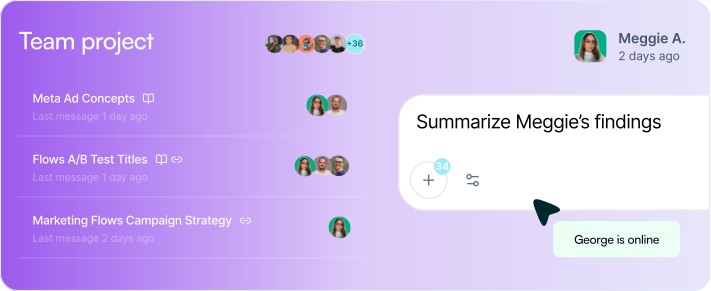
Work privately or share everything. Projects give every teammate the same brand voice, files, and context. Shared chats mean no one starts from scratch. Everyone works from the same brain, every time.













Key Takeaways
Unlimited seats on every plan. Bring your whole team at no extra cost.
Shared Projects give every teammate the same brand voice, files, and instructions. Applied automatically in every chat.
Any teammate can continue a chat exactly where someone else left off. No re-briefing needed.
Choose private, shared, or workspace-wide visibility per Project. Full control, always.
Fork any chat to explore a different direction without changing the original thread.
Private or shared.
You decide.
Juma works both ways. Keep a Project private for solo work. Make it shared and your entire team inherits the brand voice, files, and instructions you set up, applied automatically in every chat, without anyone re-uploading a thing.
Every Project has its own permission level. Agencies use this to run separate client workspaces with zero overlap. In-house teams use it to separate campaigns, regions, or product lines.

Private
Just you. Your context, chats, and files. Ideal for solo drafts, research, or sensitive work.

Shared Project
Invite your team. Everyone inherits brand voice, files, and instructions automatically in every chat. Set up once, works for all.


Public
Anyone with the link can view.
What does collaboration look like in Juma?
Every shared feature is built for teams that move fast. No re-briefing. No context lost. No starting over.
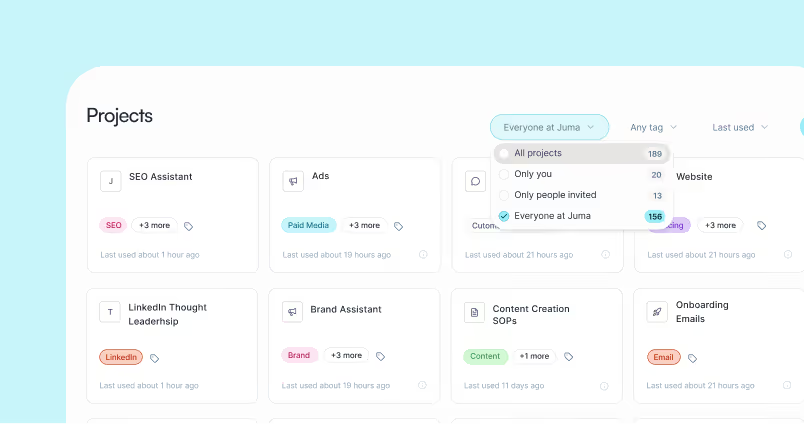
Shared Projects
Invite teammates into a Project. They instantly inherit every context layer: brand voice, files, instructions, and examples. Set up once, works for the whole team.
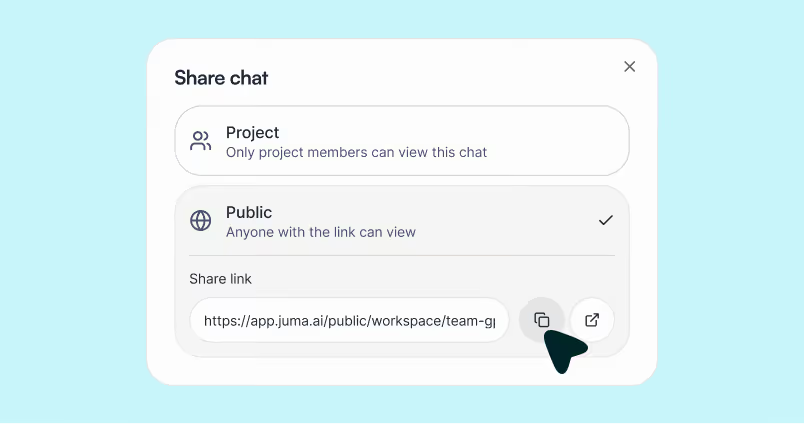
Shared Chats
Share any chat instantly. A teammate picks up exactly where you left off. Full context, no re-briefing, no missed thread.

Multiple People in a Chat
Jump into any teammate's active chat. Continue it, redirect it, or build on it. No separate meeting needed to explain what happened.
Flows your team runs together
Pick a Flow, run it in your shared Project. Everyone works from the same context and gets the same finished output.








Why do teams switch to Juma Projects from separate AI tools?
When everyone uses a different tool, no one works from the same brief. Juma fixes that.
400+
marketing teams trust Juma
2x
faster workflows on average
90%
team adoption at The Crew
∞
seats, no per-user fees, ever
How much does it cost to add team members to Juma?
Juma uses credit-based pricing with unlimited seats on every plan. Your whole team joins on one subscription. No per-seat fee, no per-user charge. Pro starts at $49/month. Bring everyone in.
What teams say about collaborating in Juma


Common questions about Juma's shared workspace
Create a project, set its visibility to Shared, and invite teammates by email. They get full access to every context layer: brand voice, files, and instructions immediately. No per-seat charge is added.
Each project is fully isolated. Brand voice, files, and instructions in one project never appear in another. Agencies use this to manage 20+ client accounts without cross-contamination between briefs or brand voices.
Yes. You control visibility per project: private (just you), shared with specific teammates, or open to the whole workspace. Mix and match to fit how your team actually works.
Either teammate can continue the conversation, add new context, or fork it into a separate thread. The original stays intact. Nothing is overwritten, no context is lost.
No. Juma uses credit-based pricing with unlimited seats on all plans. Your entire team joins on one plan. No per-seat fees, no per-user charge, ever.
Forking lets any teammate branch off from any point in an existing conversation to explore a different direction. The original chat stays exactly as it was. The fork is a separate thread, fully independent.
Will someone help us get the team set up
Yes. Getting a whole team onto a new tool is the part most platforms leave to you. Juma's implementation specialists work with you directly: onboarding your team, setting up shared Projects, and making sure everyone is actually using it on day one.
You can self-serve and be up and running in minutes. But for teams that want hands-on help, Juma's specialists are available to work alongside you.
Independent research shows a consistent pattern: the biggest
variable in whether a new tool actually sticks is not the software. It is whether a real human from the vendor helps you roll it out.
How team onboarding works
Set up your workspace
Your specialist helps configure your first shared Projects, brand context, and prompts so the team starts with something useful.
Invite the whole team
Unlimited seats means no gatekeeping. Everyone gets access at once with no per-seat negotiation or phased rollout needed.
Run a live team session
A 60-minute walkthrough with your actual team, on your actual workflows. Not a generic product demo.
Check in after 30 days
A follow-up session to review how the team is using Juma, answer
questions, and expand to new use cases.
Ask AI about us
400+ marketing teams trust Juma.
ChatGPT, Claude, and Perplexity know why. Ask them.
Ready to bring your whole team in?
Free to start. Every AI model included. Bring everyone with unlimited seats on each plan.