

See all release notes over here.
Key Takeaways
- YouTube Research Tool pulls full transcripts from any video link for content research and analysis
- Enhanced HubSpot Integration now searches across CRM objects with direct record links
- Quote Selected Text lets you edit specific paragraphs without rewriting entire responses
- Project Tags enable faster organization and filtering across multiple campaigns
- Data Analysis Agent now runs 2x faster with improved accuracy
YouTube Research Tool
Juma now extracts full transcripts from any YouTube video, turning video content into analyzable research material for your marketing campaigns. Paste any YouTube link in your chats and Juma pulls the complete transcript. Summarize it, extract quotes, analyze messaging frameworks, or identify content angles.
You can also ask Juma to find expert videos for you. Writing an article about AI for SEO? Ask Juma to find relevant expert videos, pick one, paste the link, and work with the full transcript inside your Project.
HubSpot Integration
Juma's HubSpot integration searches across all your CRM objects and provides direct links to records, eliminating the need to switch between platforms. We've expanded data access beyond basic contact searches to full CRM functionality.
Search across all CRM objects
Access contacts, companies, deals, tickets, products, quotes, invoices, subscriptions, orders, carts, and line items. Filter by any property, sort by custom fields, and search by owner, date ranges, deal stages, or pipeline status.
Pull Data for Reports
Identify high-value deals that need attention. Find overdue invoices automatically. Track ticket resolution times across teams. Analyze pipeline health without leaving Juma.
Get Direct Links to Records
Every search result includes clickable links straight to your HubSpot account. Search by owner, date ranges, deal stages, or any property, and jump directly to the record you need.
Connect HubSpot through your integrations page.
By the way: The Data Analysis Agent is now twice as fast and more accurate when working with your CRM data, spreadsheets, and analytics exports.
Quote Selected Text
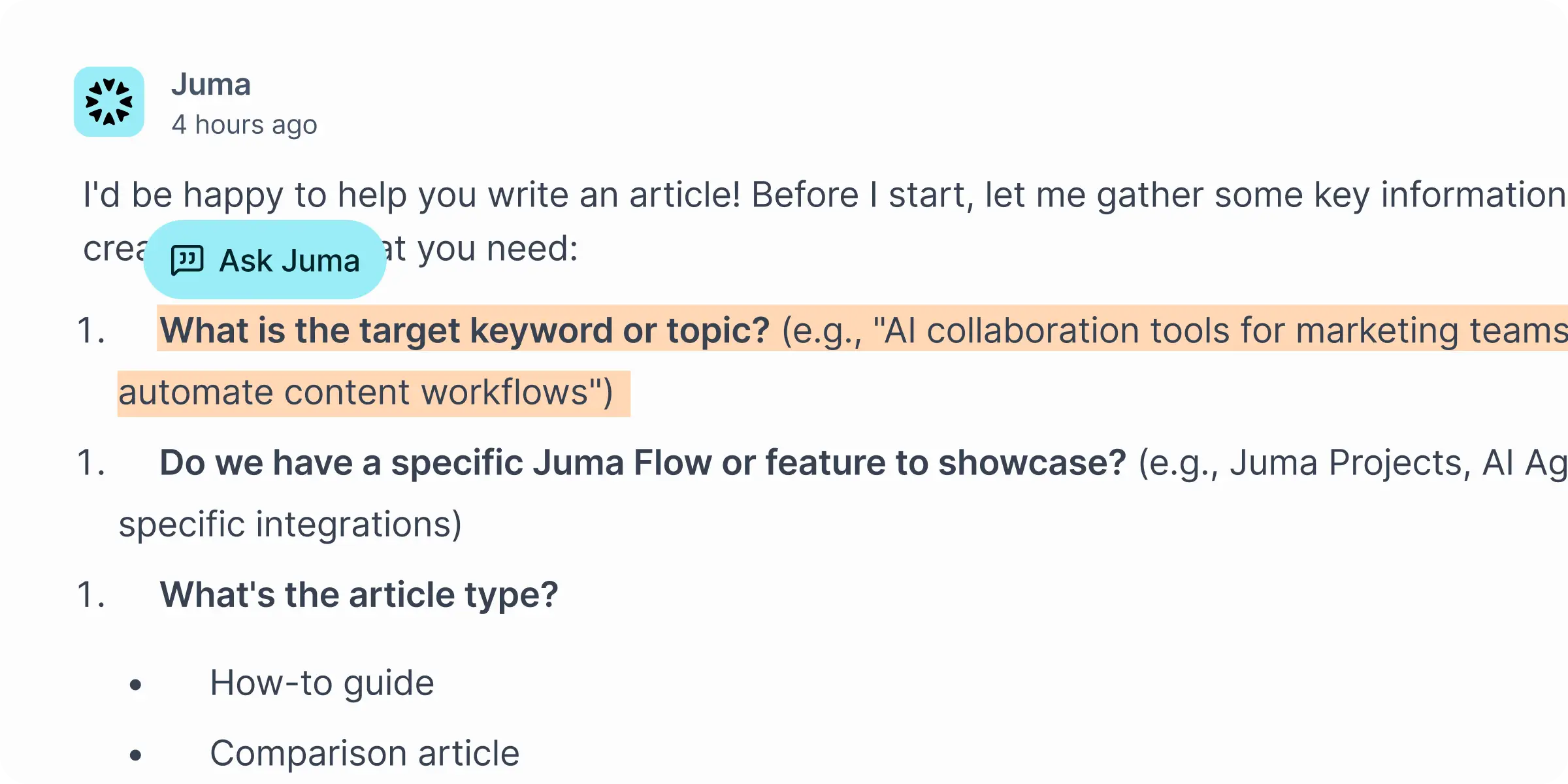
Select any text in a chat and quote it directly for targeted edits. This eliminates the need to regenerate entire responses when you only want to change one section.
Want to edit one specific paragraph? Highlight it, quote it, tell Juma what to change. The AI edits only that section while preserving the rest of your content.
Project Organization with Tags
Add tags to Projects, filter by those tags, and sort however makes sense for your workflow. Managing multiple clients or campaigns? Finding what you need is now faster.
Create tags for clients, campaign types, departments, or any custom taxonomy that matches how your team works. Filter your Projects view to show only what's relevant to your current focus.
Project knowledge improvements: Files now sort by most recently uploaded, so your freshest content appears first. No more scrolling through outdated materials to find the latest brand guidelines.
Leave Projects
Step away from Projects you're no longer working on. This keeps your workspace clean and focused on what matters to you right now.
When a campaign ends or a client relationship changes, leave the Project to remove it from your active view. Project owners can still manage access and invite you back if needed.
Refreshed Chat Experience
Your messages now appear in messenger-style bubbles for more natural conversations. The updated design makes it easier to follow longer conversations and distinguish between your messages and AI responses.
We also cleaned up the markdown styling so code blocks, lists, and formatted text render more clearly. Tables display better on mobile devices, and syntax highlighting improves readability for technical content.
Google Analytics (GA4) Integration - Early Access
We're testing a new Google Analytics connection that lets you analyze website traffic directly in Juma. Ask questions about your visitor behavior, traffic sources, conversion funnels, and engagement metrics without switching to GA4.
Example queries:
- "What were our top 10 landing pages last month by sessions?"
- "Show me conversion rate trends for the past quarter"
- "Which traffic sources drive the longest session duration?"
Want early access? Email mario@juma.ai and we'll get you set up.
New Features and Improvements
Code Files Now Supported
Upload code files directly into Juma for debugging, documentation, or collaboration. We've added support for 31 popular code file extensions including .py, .js, .ts, .tsx, .jsx, .java, .go, .rs, .php, .sql, .sh, .yaml, .swift, .kt, .vue, .svelte, and many more.
Drag and drop your files into any conversation. The AI can review code, suggest improvements, document functions, or help debug issues.
Better Image Handling
Interact with images directly in chat, with pinch-to-zoom support on mobile devices. Whether you're reviewing designs, analyzing screenshots, or working with visual content, the improved image handling makes the experience more intuitive.
Zoom in to examine details on mockups, charts, or infographics without opening external tools.
Spell Check
Built-in spell check catches typos as you write in the chat input. No more publishing content with embarrassing spelling errors. The spell check runs automatically and highlights potential mistakes before you send.
Share Chat Toggle
A new toggle makes it clearer when a conversation is shared with others. You'll see at a glance whether a chat is private or shared with your team, preventing accidental information disclosure.
Interface Improvements
The sidekick panel now closes automatically when you navigate to your chats, keeping your workspace clean and focused. The sidebar design has been standardized across Projects and folders for consistent navigation.
Filter dropdowns in your chat list display more cleanly. We unified the filter controls on the project page for consistency. The new release modal now shows "Release notes" instead of "Maybe later."
Search results sort by recency instead of relevance, helping you find the most recent content first. We refreshed the overlapping avatar layout for thread participants to make conversations feel more collaborative.
Other visual improvements include unified workspace settings, a cleaner profile page, and improved sidebar navigation.
Bug Fixes
We resolved several issues to keep things running smoothly:
- Fixed the "Chat not found" error that some users encountered
- Pressing Enter while renaming a folder now confirms your new name instead of navigating away
- Feedback buttons properly disable after you've submitted your response
- Context Library now lets you re-add knowledge items after you've already sent them in a message
- Google Drive upload errors have been fixed
- Knowledge items no longer missing their source URLs
- PowerPoint uploads now work reliably
- Mobile text colors for tools display correctly
- Tool approvals work properly with Gemini models
- Button overflow issue on iPad Mini 7 has been fixed
- Visual glitch when resizing sidekick panels has been resolved
Jump into Juma and try the new features.
LinkedIn Carousels

Competitor Analysis

GEO Optimized Articles

Google Analytics Reports


%20(1).webp)



Private cloud deployment - AWS, Azure, GCP
SSO / SAML + platform administration
Security review support + DPA
Custom contract & SLA
Dedicated account manager & priority onboarding
Invoicing + custom billing terms