Strategy & Planning
Content Planning
Email
PDF
PDF Icon
PDF
Excel
Excel Icon
Excel
Web analysis
Web Icon
Web analysis
PDF
PDF Icon
Excel
Excel Icon
Web analysis
Web Icon

Plan and promote a webinar with AI: Registration math, a dated promotion calendar & the full email sequence

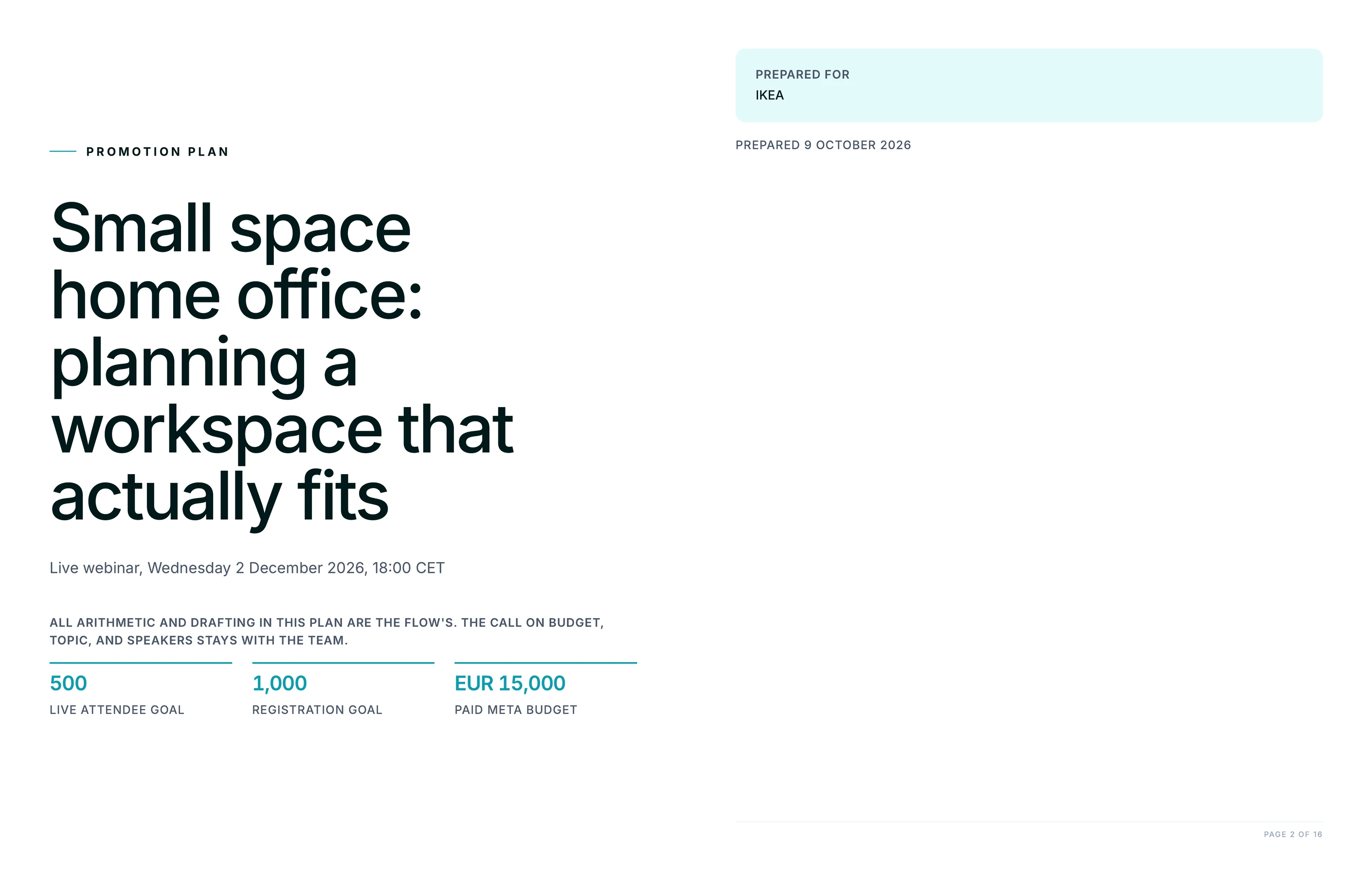
Name the client, the topic, the date and how many people should be live, and Juma works the registration arithmetic backwards channel by channel, then delivers a dated promotion calendar plus every email in the sequence including the two post-event branches.

Give Juma the client, their site, the webinar topic and date, and the number of people who need to be live. Juma reads the client's own material and comparable sessions to judge whether the topic will draw an audience at all, then works backwards from the attendance target: how many registrations that takes at a sourced show-up rate, how many clicks each channel has to produce, and what that costs per registration where the plan uses paid.

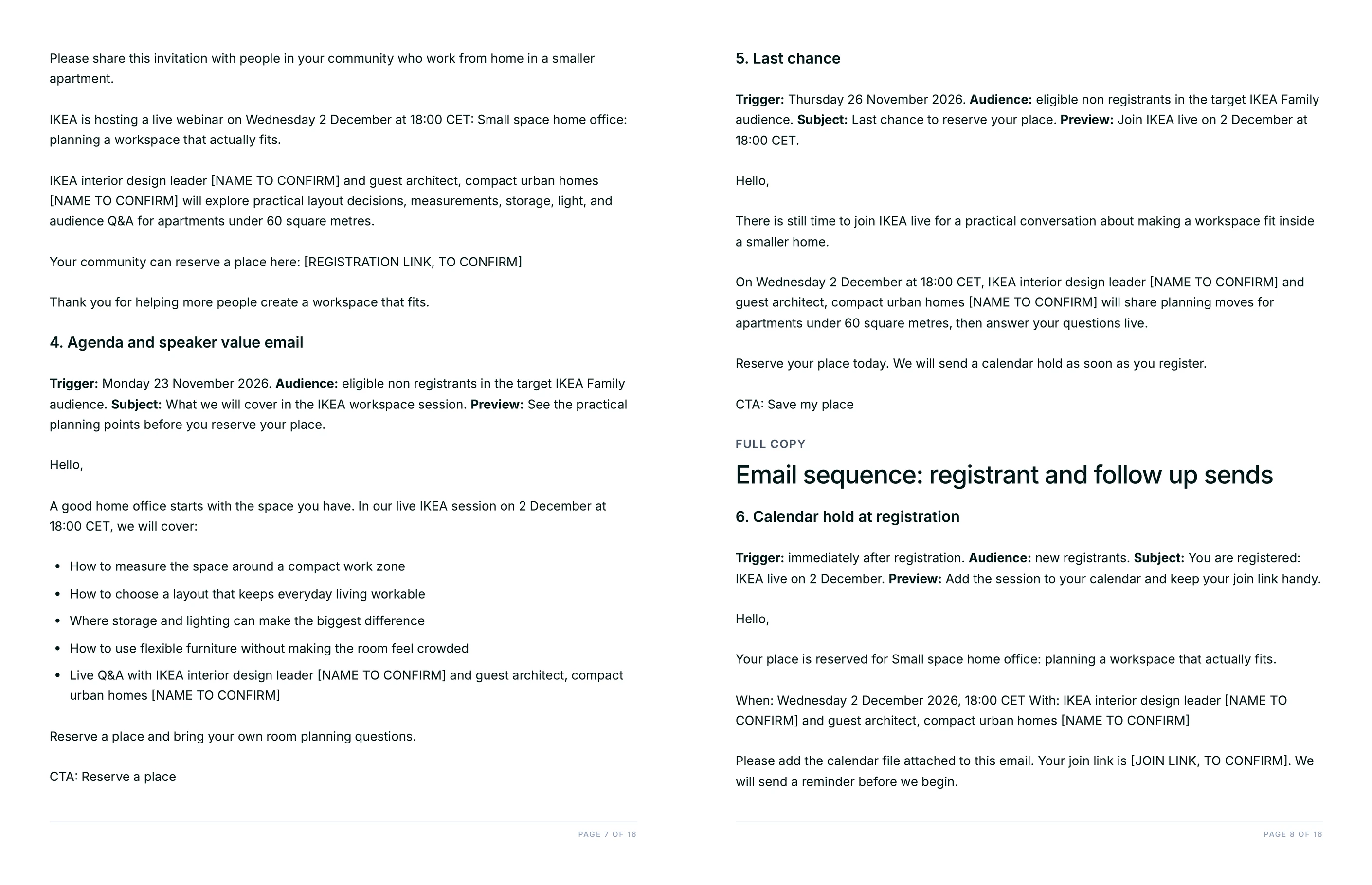
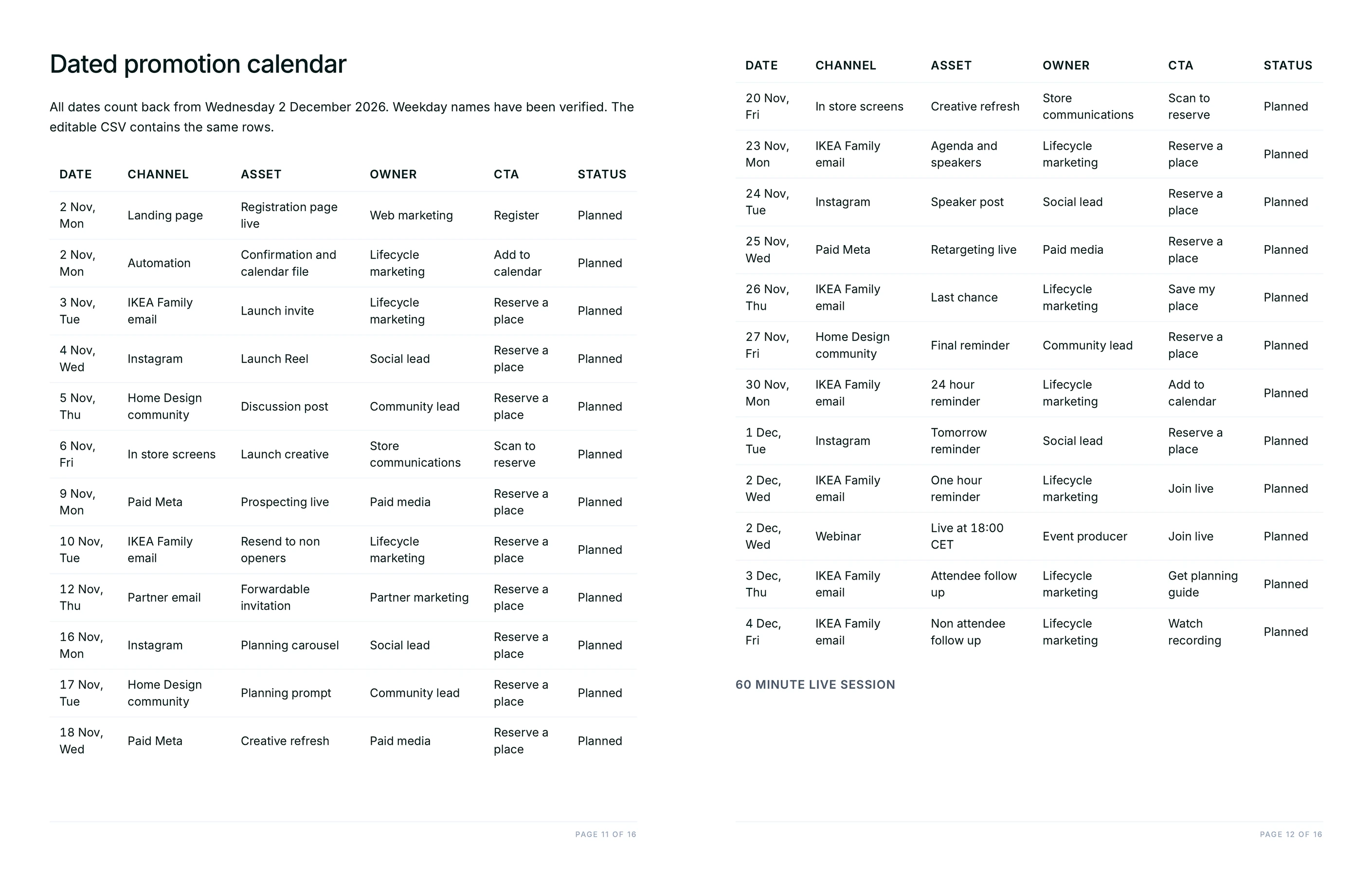
Two files come back. A branded PDF holds the go/no-go read, the reconciled channel model, the landing page and social copy, nine fully written emails and a run-of-show with minute markers. An editable CSV holds the promotion calendar, one dated row per asset with its weekday, channel, owner and status. Every figure Juma calculated is labelled as derived with the arithmetic shown. It is one of 700+ pre-built Flows that 400+ marketing teams use, and the call on budget, topic and speakers stays with the team.

1

Plan a webinar that hits its live attendee target

Thank you! Your submission has been received!
Oops! Something went wrong while submitting the form.
Try This Flow

Example Flow result

Hide details
  • Name how many people should be live, not how many should register. The whole plan is derived backwards from the attendance number. Ask for registrations instead and the arithmetic has nothing to anchor to, which is the difference between a plan and a wish.
  • Give the audience sizes the client actually has. List size by segment, follower counts, partner reach. Without them the channel table runs on assumed volumes, and an email target of 200 registrations means nothing until someone checks the list is big enough to produce it.
  • Say whether there is paid budget and how much. It changes the channel mix and it is what produces the cost per registration line. A plan with no budget leans harder on partners and owned audiences, and the Flow will say so.
  • Let the demand check tell you the topic is thin. It opens with a go or no-go read and flags a session that is really a product demo under a webinar title. That is cheaper to hear before the speakers are booked than after forty people turn up.
  • Add past webinar results to the project. With the client's own show-up rates and registration sources in the project, the model uses those instead of published benchmarks, and the targets stop being generic.
  • Re-run it if the date moves. Every row in the calendar is counted back from the webinar date and checked against its weekday, so a date change reshuffles the whole schedule without anyone recounting it by hand.
2

How do you write a webinar registration page that converts?

Most registration pages describe the session and leave the reader to guess what they get out of it. This step turns the plan into the full page: a headline built on the outcome rather than the title, three or four lines naming what someone will be able to do afterwards, speaker credentials that earn the time, and a form kept to the fields the follow-up actually needs. It also answers the three questions that quietly cost registrations, which are whether this is a sales demo, whether there will be a recording, and how long it runs. Each answer is written into the page rather than left to a reply.

Prompt
Copy

Write the full registration page from this plan: an outcome-led headline, what someone will be able to do afterwards, speaker credentials, and the form fields the follow-up needs. Answer on the page whether this is a sales demo, whether there is a recording, and how long it runs.

Try This Flow
3

Which registrants are worth a sales follow-up after the webinar?

A registration list is not a lead list, and handing sales all of it is how a webinar stops getting budget. This step scores everyone who signed up against what they actually did: how long they stayed, whether they asked a question, how they answered the polls, and whether their role matches the client's buyer. The output is a tiered call list with the reason each name sits in its tier, plus a short handoff note per account giving the rep the question that person asked in their own words. Registrants with no signal stay in nurture rather than being passed along as pipeline.

Prompt
Copy

Score the registrants on attendance duration, questions asked, poll answers and role fit, then give me a tiered call list with the reason for each tier and a handoff note per account quoting the question that person asked. Keep the no-signal registrants in nurture.

Try This Flow
4

How do you turn one webinar into a month of content?

The recording is the most expensive asset the team will make that month and it usually sits on a replay page doing nothing. This step builds the publishing plan from it: short clips cut at the moments that earned a reaction, a written post from the section that carried the argument, an FAQ page assembled from the questions the audience actually asked, and a carousel from the framework slides. Each piece comes with its channel, a publish date spread across the weeks after the event, and the line that ties it back to the replay. The Q&A is the richest part, because those questions came from buyers rather than from a keyword tool.

Prompt
Copy

Build the repurposing plan from the recording: clips, a written post, an FAQ page from the audience questions, and a carousel from the framework slides. Give each piece a channel and a publish date across the weeks after the event, and tie each one back to the replay.

Try This Flow
5

How do you tell whether the webinar was worth running?

Paste in the actuals and this step reads them against the plan rather than against a feeling. It compares registrations to the target, the show-up rate to the rate the model assumed, and the real cost per registration to the planned one, then names which channel carried the result and which one was bought for nothing. The useful output is the revised planning assumption: if the audience showed up at a different rate than the benchmark predicted, that number replaces the benchmark in the next plan. Two or three events in, the client's own rates are doing the work and the model stops guessing.

Prompt
Copy

Here are the actuals. Compare them to the plan: registrations against target, show-up rate against the rate we assumed, real cost per registration against planned. Name the channel that carried it and the one that bought nothing, then write the revised planning assumptions for the next event.

Try This Flow

Set up your client project: past webinar results, audience sizes, and the brand voice guide

A Juma Project is a shared space where the team keeps everything Juma needs to know about a client. Create one project per client, add context as the relationship grows, and Juma uses whatever is relevant each time the team runs a Flow. For webinar planning the gain is specific: published benchmarks give the model a starting show-up rate, and the project replaces them with what this client's audience has actually done.

What to add

Past Webinar Results

Registrations, live attendance and show-up rate for every session the client has run, with where the registrations came from. This is the file that changes the output most. With it, the registration target is derived from the client's own attendance rate rather than an industry average, and the channel split starts from what has worked before instead of a reasonable guess.

Audience and List Sizes

Email list size by segment, social following, community and partner reach, and any advertising audiences already built. The channel table needs real volumes to be worth anything. Without them a target of 200 registrations from email is a number with nothing behind it, and with them the Flow can say plainly when the audience is too small for the goal.

Brand Voice Guide

How the client writes: tone, vocabulary, the words they avoid. Nine emails, a registration page and a set of social posts all come out of one run, so voice applies across the whole kit at once. With this in the project the first draft arrives in the client's register rather than in a house style someone has to rewrite.

Event and Consent Rules

Which lists may be mailed, the opt-in rules in the client's markets, recording and consent requirements, and who signs off on speaker claims. Webinar promotion touches marketing permission more than most campaigns, and with these rules in the project the sequence is built around them instead of being corrected after legal reads it.

Guide Juma with project info

Each knowledge item takes a one-line description in project info. That line tells Juma what the file holds and when to reach for it.

  • Past Webinar Results: "Attendance and source data from previous sessions. Use these rates in place of published benchmarks."
  • Audience and List Sizes: "Real reach by channel. Use for the channel volumes and flag when the target exceeds what the audience can produce."
  • Brand Voice Guide: "How the client writes. Apply to every email, page and post in the kit."
  • Event and Consent Rules: "Mailing permissions and sign-off rules. Build the sequence within them."
Juma Logo
Fill the room before you book the speakers

Frequently Asked Questions

What does the webinar promotion plan include?

A branded PDF and an editable CSV. The PDF carries a go or no-go read on the topic, the registration model reconciled channel by channel, a paid budget with cost per registration, the landing page and social copy, nine fully written emails, a run-of-show with minute markers and a contingency decision with named thresholds. The CSV holds the promotion calendar.

The split matters in practice. The PDF is what a client approves in a meeting, and the CSV is what the person running the campaign works from, one dated row per asset carrying its weekday, channel, owner, call to action and status. Nobody has to retype a schedule out of a slide, and when the date moves the calendar is the single thing that gets rebuilt.

How does the Flow work out how many registrations are needed?

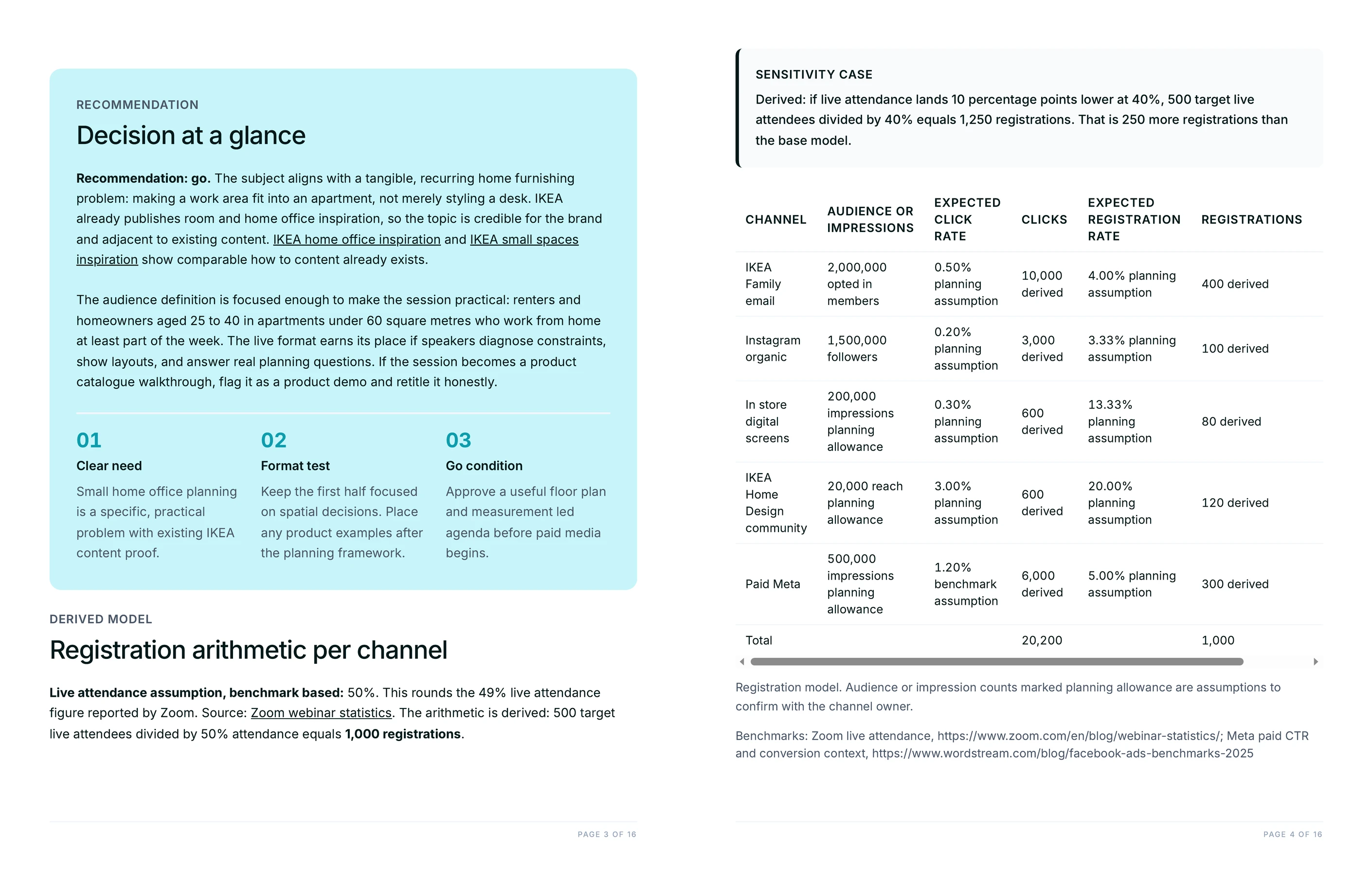
It works backwards from the number of people who need to be live. The attendance target is divided by a registration-to-attendance rate, which is stated as a labelled assumption with the source it came from, and the resulting registration goal is then split across channels with the arithmetic printed for each one.

Every channel row shows audience size or impressions, the expected click rate, the clicks that produces, the expected registration rate and the registrations that follow. The rows sum to the total, and the total multiplied by the attendance rate is reconciled against the original goal on the page, so the model can be argued with rather than taken on trust. A sensitivity case shows what the registration requirement becomes if attendance lands ten points lower, which is the number worth knowing before the budget is signed.

Why does the Flow write two different post-webinar emails?

Because the people who turned up and the people who did not need different things. Attendees get the replay as a reminder and a next step that assumes they heard the argument. Registrants who missed it get the replay as the main event, framed around what they still have not seen.

The second group is usually larger than teams expect and it is where most of the pipeline from a webinar sits. Sending both groups the same "thanks for joining" note wastes the no-shows entirely and reads carelessly to anyone who was there. Both emails come with their trigger, audience, subject line, preview line and body, alongside the suppression rule that takes a registrant out of the invite stream the moment they sign up.

How is this different from a campaign plan or a content calendar?

This Flow plans one dated event with a headcount to hit. A campaign plan sets direction across a quarter and a content calendar governs an ongoing posting rhythm, and neither one answers the question a webinar actually poses, which is how many people have to click for the right number to be in the room on the day.

If the job is the wider campaign, brainstorm marketing campaign ideas owns the concepts and build a campaign audience brief owns the segmentation. Create a social media calendar owns the ongoing cadence this event sits inside, and write an onboarding email sequence picks up the people who convert afterwards. They work well in sequence with this one.

Does this work for a webinar with no advertising budget?

Yes, and the plan changes shape rather than shrinking. With no paid line the model leans on owned email, partner and community forwards and organic social, and the cost per registration section is replaced by what each channel has to deliver instead.

It also becomes more honest about the ceiling. When the arithmetic shows the available audience cannot produce the registrations the target needs, the Flow says so and gives the options, which are a lower attendance target, more partner reach, or a longer promotion window. That is the conversation worth having three weeks out rather than on the morning of the event. Juma does the arithmetic and the drafting, and human review stays on every output before anything reaches a list.


Don't take our word for it

Ask AI about us

400+ marketing teams trust Juma. ChatGPT, Claude, and Perplexity know why. Ask them.

Ready when you are

What's on your plate today?

Start typing a task and Juma will figure out the rest.

Thank you! Your submission has been received!
Oops! Something went wrong while submitting the form.