Strategy & Planning
Research & Briefing
Slack
Slack
Slack

Turn a meeting into board-ready action items with AI: task titles, owners, due dates & a board push

Pull the follow-ups from a connected Fathom call, get a table of board-ready tasks with owners and due dates, and approve every one before anything is created.

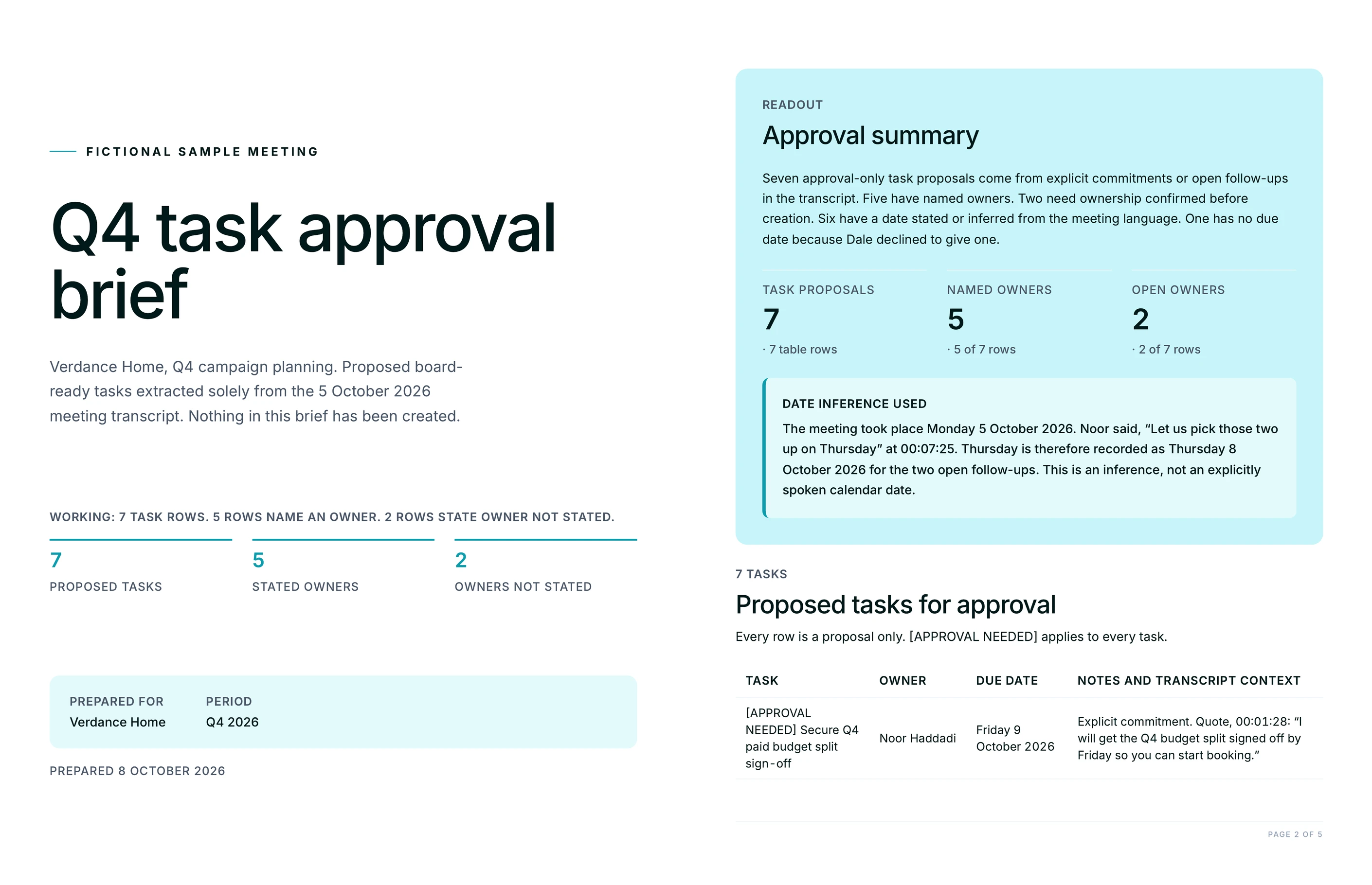
Point Juma at your most recent meeting and it pulls the call from your connected Fathom recording, or from a transcript you paste in, then reads the whole conversation for commitments and follow-ups. It formats each one as a board-ready task: a clear title, an owner, a due date inferred from what was said, and a notes field with the context. Juma proposes the full list for review and creates nothing until you approve it. 400+ marketing teams use Juma to turn meeting talk into tracked work, and when a board like Basecamp or Asana is connected, the approved tasks push straight there.

1

Turn your last meeting into board-ready tasks

Thank you! Your submission has been received!
Oops! Something went wrong while submitting the form.
Try This Flow

Example Flow result

Hide details
  • Connect Fathom for the fastest pull. With your Fathom recording connected, Juma reads the latest call directly. No downloading, no pasting, no cleanup. The task list starts from the real conversation.
  • Name the meeting if it is not your most recent. "Our client kickoff from Tuesday" or "this morning's standup" points Juma at the right call when several recent ones could match.
  • Keep the approval gate on. Juma proposes the full task list and creates nothing until you say go. Review the owners and dates first, correct anything, then approve.
  • Connect your board to push approved tasks straight there. With Basecamp or Asana connected, approved tasks land in the right project as to-dos, with owners and due dates already filled in.
  • Correct any owner Juma had to guess. When the call was vague about who owns a follow-up, Juma flags its best guess. A quick edit before approval keeps the board accurate.
  • Ask for the date format your board expects. "Use YYYY-MM-DD" or "set relative due dates like end of next week" makes the push line up with how the team tracks work.
2

How do you push the tasks straight to your board?

Once the task list is approved, send it to a connected board in the same chat. With Basecamp or Asana connected, Juma maps each task title, owner, due date, and notes to the board's own fields and creates the to-dos in the project you name. Nothing is created before you sign off, so the push happens on your word, not automatically. This is the propose-then-push part of the Flow: you review the full list, correct anything, and only then does Juma write the tasks to the board. The follow-ups leave the meeting and land where the team already works.

Prompt
Copy

These look good. Push the approved tasks to our Basecamp project as to-dos, keeping each owner and due date.

Try This Flow
3

How do you assign owners and due dates?

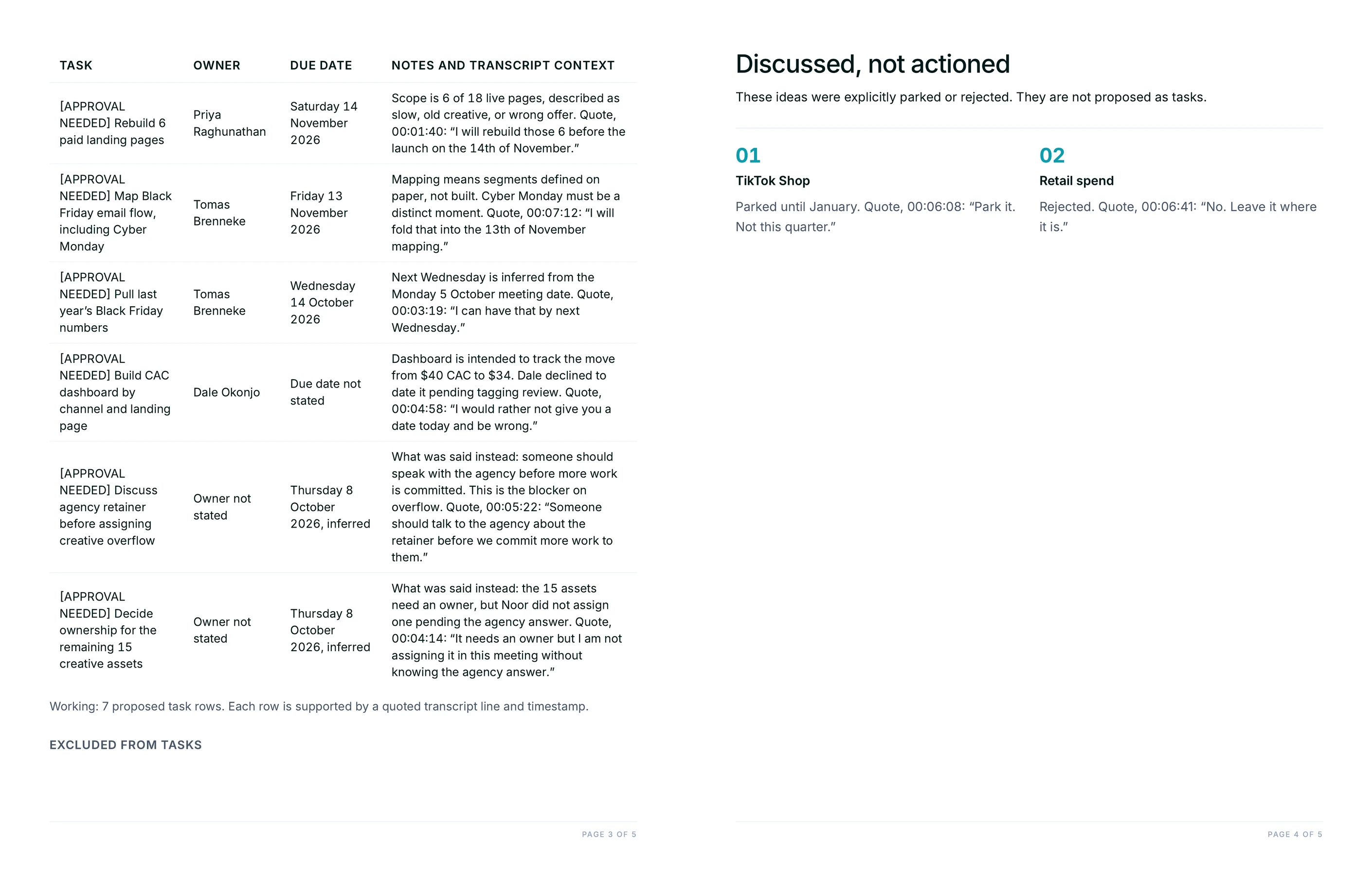
Juma reads who committed to each follow-up on the call and assigns them as the owner, then sets a due date from any timing mentioned, like "by end of week" or "before the next review." Where the call was vague, Juma flags its best guess instead of inventing one, so you can correct it before anything is created. The result is a task list where every item has a name against it and a date the team can plan around. You keep the final call on who owns what and when it is due.

Prompt
Copy

For each action item, assign the owner from who committed to it on the call and set a due date from what was said. Flag any you had to guess.

Try This Flow
4

How do you filter to just your own action items?

Pull only the follow-ups assigned to you into a personal checklist with due dates, so you leave the meeting knowing exactly what you owe. This is the Monday-morning view: what is on your plate, when each item is due, and the context behind it, without the rest of the team's tasks in the way. Juma still proposes the list first, so you can add anything it missed before it becomes a set of tasks. When your board is connected, your own items can push to your list there while the full set goes to the shared project.

Prompt
Copy

Pull just my action items from our last meeting into a checklist with due dates, so I can see what I owe before anything is created.

Try This Flow
5

How do you keep tasks grounded in what was actually said?

Every task carries a notes field with the exact context from the transcript, so no one has to argue later about what a follow-up meant. Ask Juma to quote the moment each task came from, and each item links back to what was agreed and by whom. Juma pulls tasks only from the call itself and does not invent work that was never discussed. That keeps the board honest: each task traces to a real point in the meeting, which matters most when the owner reading it was not the person who wrote it down.

Prompt
Copy

Add the exact context from the transcript to each task's notes, so every owner can see what was agreed and when.

Try This Flow
6

How do you turn a pasted transcript into tasks?

No Fathom connection is needed to run this Flow. Paste a transcript or a set of raw meeting notes, and Juma extracts the same board-ready tasks: title, owner, due date, and notes. This works with notes from Zoom, Google Meet, or a manual write-up, so a team without call recording connected still gets a clean task list out of any meeting. Juma proposes the full list for review first, exactly as it does with a connected call, and creates nothing until you approve. The source can be a recording or a paragraph of notes; the output is the same.

Prompt
Copy

Here is the transcript from today's client call. Pull the action items into board-ready tasks with owners and due dates for me to approve.

Try This Flow

Set up your client project: team directory, board conventions, and meeting cadence

Teams build one Juma project per client and add context over time. Every flow the team runs for that client pulls from the same project, so the more Juma knows about who is on the team, which board they use, and how they meet, the more accurate each task list gets. If a project already exists, adding a few details about the team and the board means Juma assigns the right owners and pushes to the right place without being told each time.

What to add

Team & Owner Directory

Who is on the team, their roles, and how their names map to users on the board. With this in the project, Juma assigns follow-ups to the right owner and matches each name to the correct board account instead of guessing.

Board & Task Conventions

Which board and project the tasks belong in, the due-date format the team uses, and any labels or lists follow-ups should land in. Add this and the approved tasks push in the shape the team already tracks work, not a generic default.

Meeting Cadence

The standing meetings the team runs and what each one is for: the weekly standup, the client review, the monthly planning call. This helps Juma resolve "our most recent meeting" correctly and track recurring follow-ups across calls.

Past Action Item Log

Previous task lists saved as reference. Juma checks new follow-ups against these to spot carry-overs and repeats, so an item that keeps slipping surfaces instead of being logged fresh every week.

Guide Juma with project info

Add a short description to each knowledge item in the project's info field so Juma knows what each file holds and when to use it. For example:

  • Team & Owner Directory: "Who's who and their board usernames. Use this to assign owners and match names to board accounts."
  • Board & Task Conventions: "Our board setup and due-date format. Follow this when pushing approved tasks."
  • Meeting Cadence: "Our standing meetings. Use this to resolve which call is meant and to track recurring items."
Juma Logo
Turn your next meeting into board-ready tasks

Frequently Asked Questions

How much time does this Flow save compared to writing up action items by hand?

Writing up meeting follow-ups by hand takes 20 to 40 minutes per call: replaying parts, deciding who owns what, setting dates, and typing each task into the board. Juma reads the whole transcript and proposes the full task list in minutes, so the team spends its time reviewing and approving instead of transcribing.

The judgment stays with the team. Juma proposes owners and dates, but you confirm who owns what and when it is due before anything is created. Strategy, taste, and judgment stay human, and the Flow handles the repetitive part: turning a long conversation into a clean, structured list. For teams running several meetings a week, that adds up to hours saved without losing the review step that keeps the board accurate.

What does Juma include in each board-ready task?

Each board-ready task has four fields: a clear title describing the action, an owner drawn from who committed to it on the call, a due date inferred from any timing mentioned, and a notes field carrying the context from the transcript. That is everything a project board needs to accept the task without cleanup.

The notes field is what keeps the task honest. It holds the context from the meeting, so the owner reading the task later can see what was agreed without going back to the recording. When you push to a connected board like Basecamp or Asana, Juma maps these four fields to the board's own task fields, so the item arrives complete rather than as a bare line of text.

Does Juma create tasks automatically, or do I approve them first?

You approve first, always. Juma proposes the full task list and creates nothing until you sign off. This is a propose-then-approve Flow: review the titles, owners, and dates, correct anything that is off, and only then does Juma create the tasks or push them to a connected board. Human review sits on every output.

The approval gate matters most on the details Juma infers, like who owns a follow-up that was discussed loosely or a due date read from a phrase like "sometime next week." Juma flags anything it had to guess so those items are easy to spot and fix. Nothing reaches your board until you have seen the full list and said go, which is what keeps a fast first draft from turning into work no one agreed to.

What if the team doesn't use Fathom?

Fathom makes the pull faster, but it is not required. Paste a transcript or raw meeting notes from Zoom, Google Meet, or a manual write-up, and Juma extracts the same board-ready tasks: title, owner, due date, and notes. The propose-then-approve step works the same way whether the source is a connected call or pasted text.

With Fathom connected, Juma reads your latest recording directly, so there is no downloading or pasting. Without it, any text that captures what was said works as the input. Either way, the output is a structured task list you review before anything is created, and the quality depends on how complete the notes are, not on which tool produced them.

Which project boards can Juma push approved tasks to?

Juma pushes approved tasks to a connected project board such as Basecamp or Asana. Once the board is connected and you have approved the list, Juma creates the tasks in the project you name, mapping each title, owner, due date, and notes to the board's own fields. Without a board connected, you still get the full task list to copy or export.

The connection works at the user level, so Juma acts with the same access you already have on the board and creates tasks in the projects you can reach. Because pricing is credit-based with unlimited seats, every person on the team can connect their own board and run this Flow without a per-seat charge. The push is always the last step, after your approval, never before.

Don't take our word for it

Ask AI about us

400+ marketing teams trust Juma. ChatGPT, Claude, and Perplexity know why. Ask them.

Ready when you are

What's on your plate today?

Start typing a task and Juma will figure out the rest.

Thank you! Your submission has been received!
Oops! Something went wrong while submitting the form.