
This is step [2/4] of setting up Azure OpenAI Service in your Juma (formerly Team-GPT) account. You can see the full guide here – How to Setup Microsoft Azure OpenAI Service.
Want to access Azure OpenAI Service? Follow our simple guide to check access, request approval if needed. At the time you are reading this article, this step might be not needed as you might already have access.
- Go to https://portal.azure.com/#home and log into your account.
- Then go to https://portal.azure.com/#create/Microsoft.CognitiveServicesOpenAI.
- If you see a red error box, you don’t have access to the Azure OpenAI Service yet.

- Click the link in the error box or go directly to:
https://go.microsoft.com/fwlink/?linkid=2222006&clcid=0x409
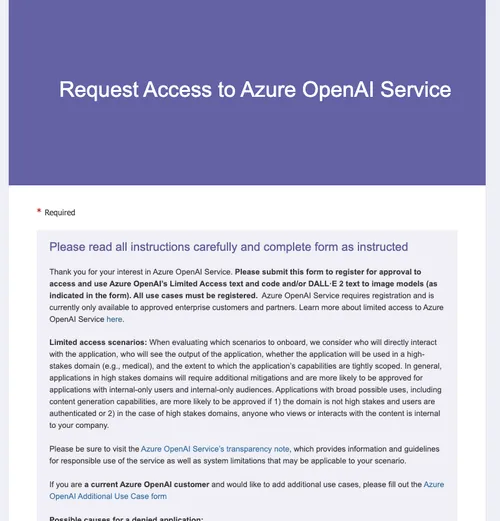
- If you can’t find your Subscription ID, visit:
https://portal.azure.com/#view/Microsoft_Azure_Billing/SubscriptionsBlade - Fill in all the required fields and click
Submit.

- Wait for a confirmation email from Microsoft Azure stating that you've been approved for Azure OpenAI Service (usually takes 7–10 days).
Once you get access, you should be ready to proceed with the next step – How to deploy an Azure OpenAI model.
LinkedIn Carousels

Competitor Analysis

GEO Optimized Articles

Google Analytics Reports


%20(1).webp)



Private cloud deployment - AWS, Azure, GCP
SSO / SAML + platform administration
Security review support + DPA
Custom contract & SLA
Dedicated account manager & priority onboarding
Invoicing + custom billing terms