
See all release notes over here.
Connect Your Entire Marketing Stack to Juma
Your marketing data now lives inside Juma.
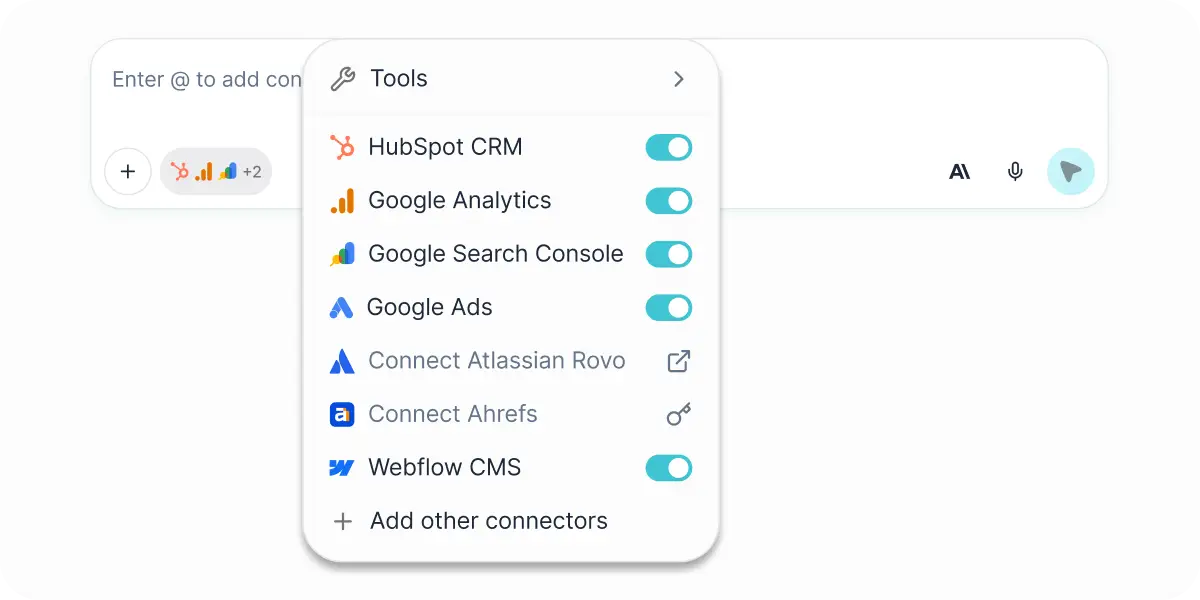
We've rolled out five integrations this month: Google Analytics 4, Google Ads, Google Search Console, Webflow, and PostHog. That covers a big chunk of the tools most marketing teams are switching between every single day — and now they're all connected to your workspace.
Here's what each one brings:
Google Analytics 4
Pull in your site traffic, user behavior, session data, and conversion events. Ask Juma to break down what's driving performance, where you're losing visitors, or how a specific campaign moved the needle.
Google Ads
Bring your campaign data into the conversation. Analyze ad performance, compare spend against results, and get answers without digging through the Ads interface.
Google Search Console
See how your content is performing in search. Impressions, clicks, average position, top queries — all accessible from your chat.
Webflow
Pull in your site data and work with it directly inside Juma. Great for content and web teams who manage pages, collections, and CMS entries.
PostHog
For teams tracking product analytics and user behavior, PostHog data is now part of the picture too.
Pair GA4, Google Ads, and Search Console together and you've got a pretty complete view of your digital marketing performance, all in one place, without a single tab switch. Add PostHog if your team also tracks product metrics, and everything starts talking to each other in a way that's actually useful.
P.S. Meta Ads and more are coming soon. If you have suggestions on what we should ship next, reach out to mario@juma.ai.
Meet the Juma Agent
This one's been a long time coming.
The Juma Agent is a built-in AI assistant that knows your marketing stack and can pull from your connected integrations to give you real answers. Ask it how your latest campaign is performing, where traffic is dropping, or what your top-converting pages are, and it'll pull the data and walk you through it.
It's not a dashboard. It's a teammate that knows how to read the numbers.
Enable it from the agent stack below the chat input.
.webp)
Pin Your Favorite Chats
You can now pin chats both inside Projects and in the sidebar. If you've got conversations you keep coming back to — key references, ongoing threads, or just something you don't want to lose — pinning keeps them right at the top. No more scrolling to find that one important chat.
Smarter Tool Handling
This one's behind the scenes, but you'll feel the difference. Juma can now dynamically discover and use the right tools for each conversation without needing every single one loaded upfront. What that means in practice: faster responses and better quality, even as we keep adding new integrations.
On top of that, tool calls are now more communicative. When Juma is pulling data, running a search, or executing an action, it tells you what it's doing and why — so you're never left wondering what's happening in the background.
Tags in the Context Library
We've added a tagging system to the context library with restyled filters to match. Tag your knowledge items for easier organization, and
Project-level tags now show up correctly for all Project members, not just the owner.
And a few more things
Create prompts straight from search.
If you're searching for a prompt and realize it doesn't exist yet, you can now create it right there without navigating away. A small workflow improvement that saves a few clicks every time.
Escape key confirmation.
Pressing Escape while a response is generating now shows a confirmation dialog before stopping, so you won't accidentally cancel something you were waiting for.
YouTube links work better.
Juma now correctly uses the YouTube Transcript tool when you drop in a video URL, so transcript extractions are cleaner and more accurate.
Connector icons are now dynamic.
Instead of a generic settings gear, your chat settings button shows the actual icons of the tools you have connected, making it easier to see what's active at a glance.
Onboarding got smarter.
The quick setup experience now includes a tools survey, and based on your answers, Juma personalizes the order of MCP connectors shown to you, so the most relevant integrations appear first.
Agent Skills (Beta) and Skills Catalog (Beta).
We're laying the foundation for a library of reusable AI skills that extend what Juma can do. The first entry is a PowerPoint template skill, making it easier to generate structured presentations from your conversations. Agent Skills are currently being tested with selected workspaces and will roll out to everyone soon.
Better token and context handling.
Juma now does a better job estimating token usage when your conversations include reasoning steps, images, or file attachments — fewer unexpected context-limit issues during longer chats.
Visual polish.
The Project page has a cleaner layout and decluttered header. Brand names like YouTube now display correctly in tool labels. Action tooltips on messages now appear below the icons for a cleaner feel. Integration token handling is more reliable too, so stale tokens are detected early and your integrations stay healthy.
Bug Fixes
- Fixed a crash in Google Ads MCP that could occur when a connected account had no accessible ad accounts.
- Fixed an issue where MCP connections scoped to your workspace or user level weren't showing up correctly in the chat dropdown.
- Tool names in message history now display cleanly without stray prefixes.
- Skill file uploads now process faster thanks to improved async handling.
- Fixed Google Ads MCC access for Manager accounts - multi-account management now works as expected.
- Projects sorted by "Last Used" now display correctly - no more disappearing Project lists.
- Pop-up modals on Chrome now show their full text content instead of cutting things off.
- Fixed file URLs not working correctly when exporting chats to PDF or copying to clipboard.
- Fixed misplaced refresh and close icons on integration files with long names.
- Fixed scrolling in the prompt variables modal.
- Fixed notification popups overflowing or causing awkward scrolling with longer messages.
- The Google Search Console icon is back where it belongs in your chats.
- The plan panel in chat now resets properly when you stop a stream mid-way, instead of getting stuck on an incomplete state.
That's everything for March.
Jump into Juma and try the new features.
LinkedIn Carousels

Competitor Analysis

GEO Optimized Articles

Google Analytics Reports


%20(1).webp)



Private cloud deployment - AWS, Azure, GCP
SSO / SAML + platform administration
Security review support + DPA
Custom contract & SLA
Dedicated account manager & priority onboarding
Invoicing + custom billing terms