Analytics & Reporting
Website
No items found.

Audit your website tracking setup with AI: Tag inventories, event coverage gaps & developer-ready fix plans

Give Juma a client URL and get back every tracking tag their site actually loads, which reported numbers are safe to act on, and the fixes a developer can start on Monday.

Name the client and their URL, and Juma reads what their live site genuinely loads: the tag and pixel IDs exposed in the page source, the consent platform and how it is configured, and the tracking that sits on the real path from product page to cart to checkout. Nothing is uploaded and no account access is needed.

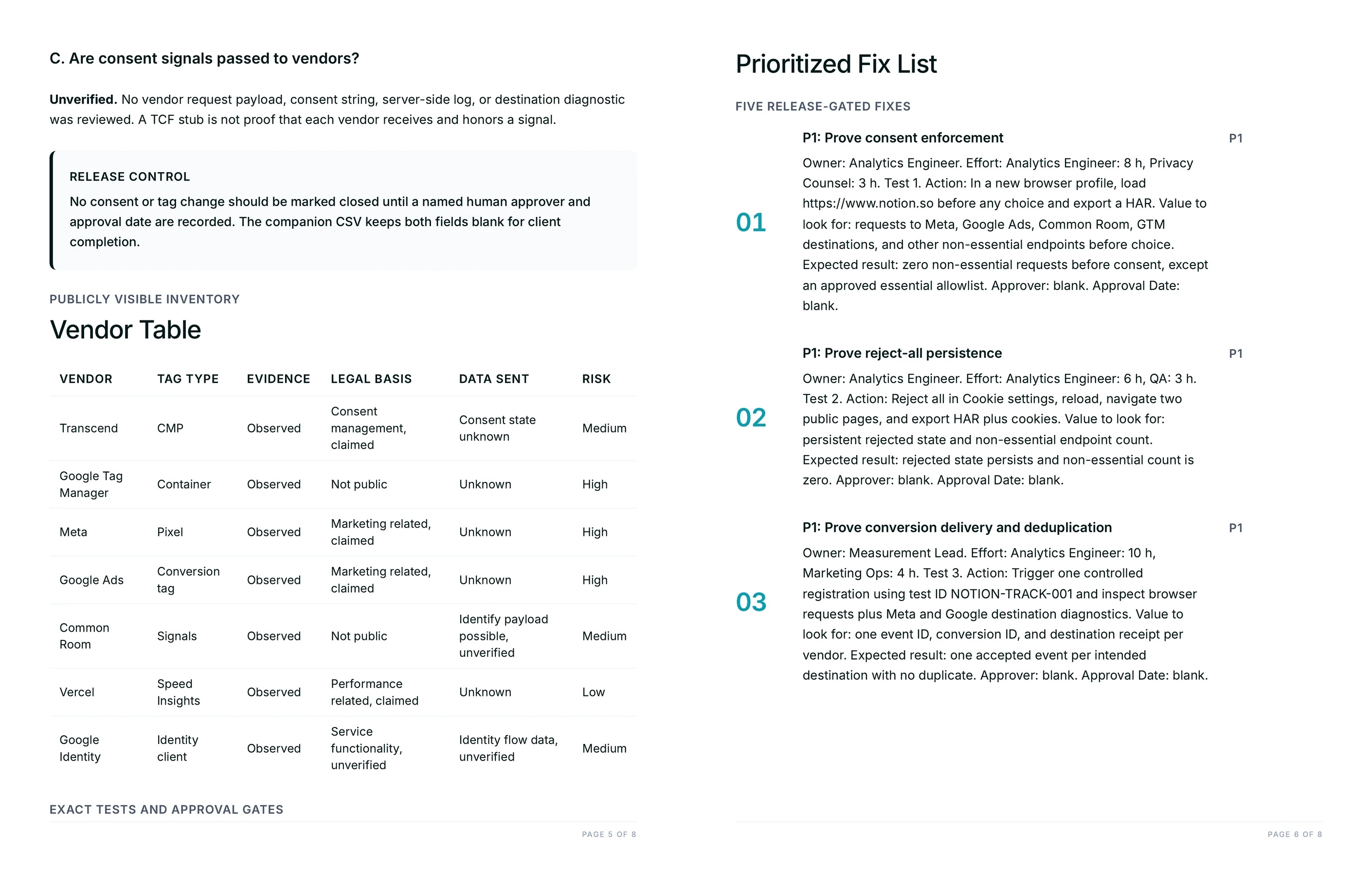
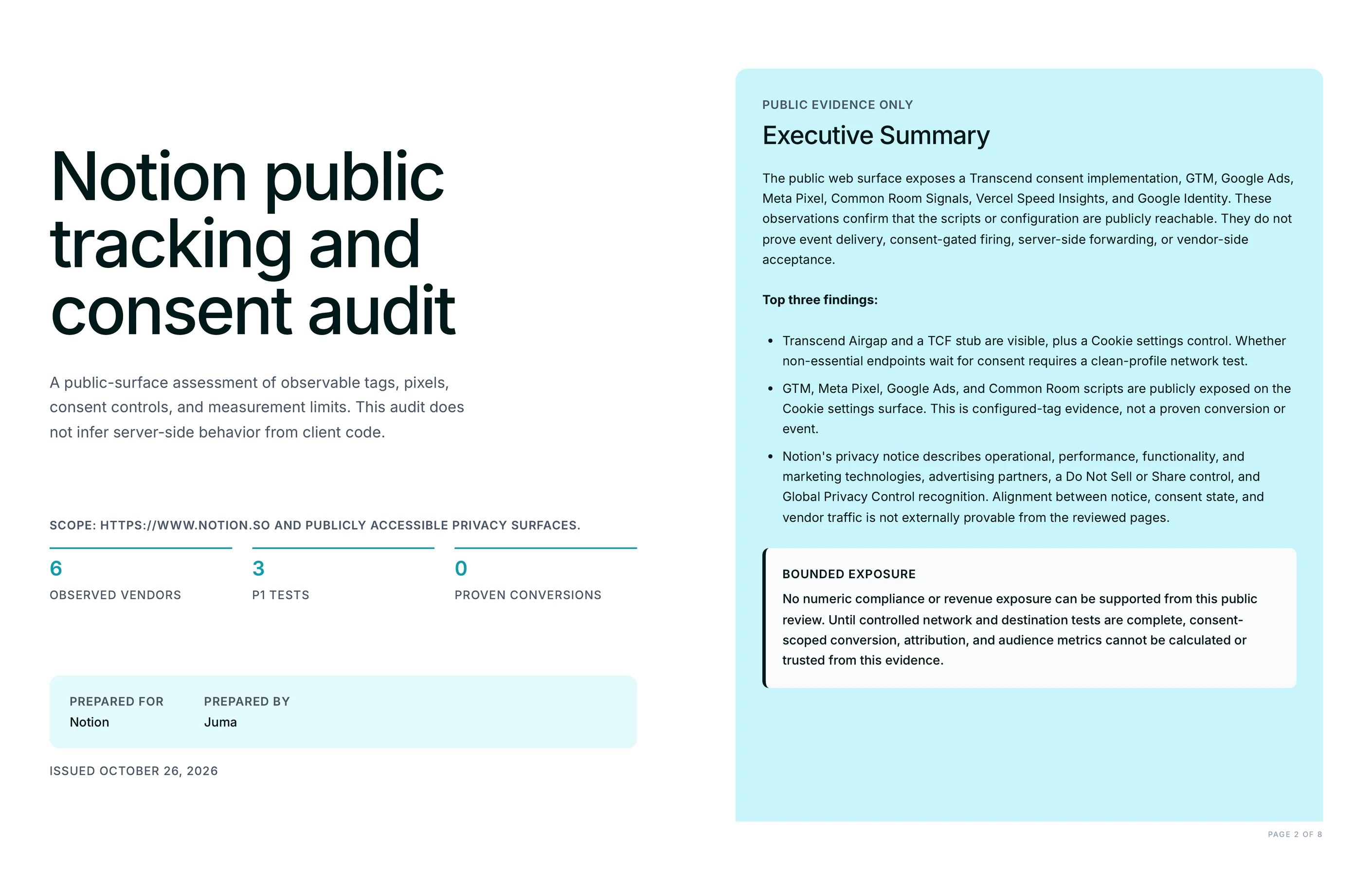
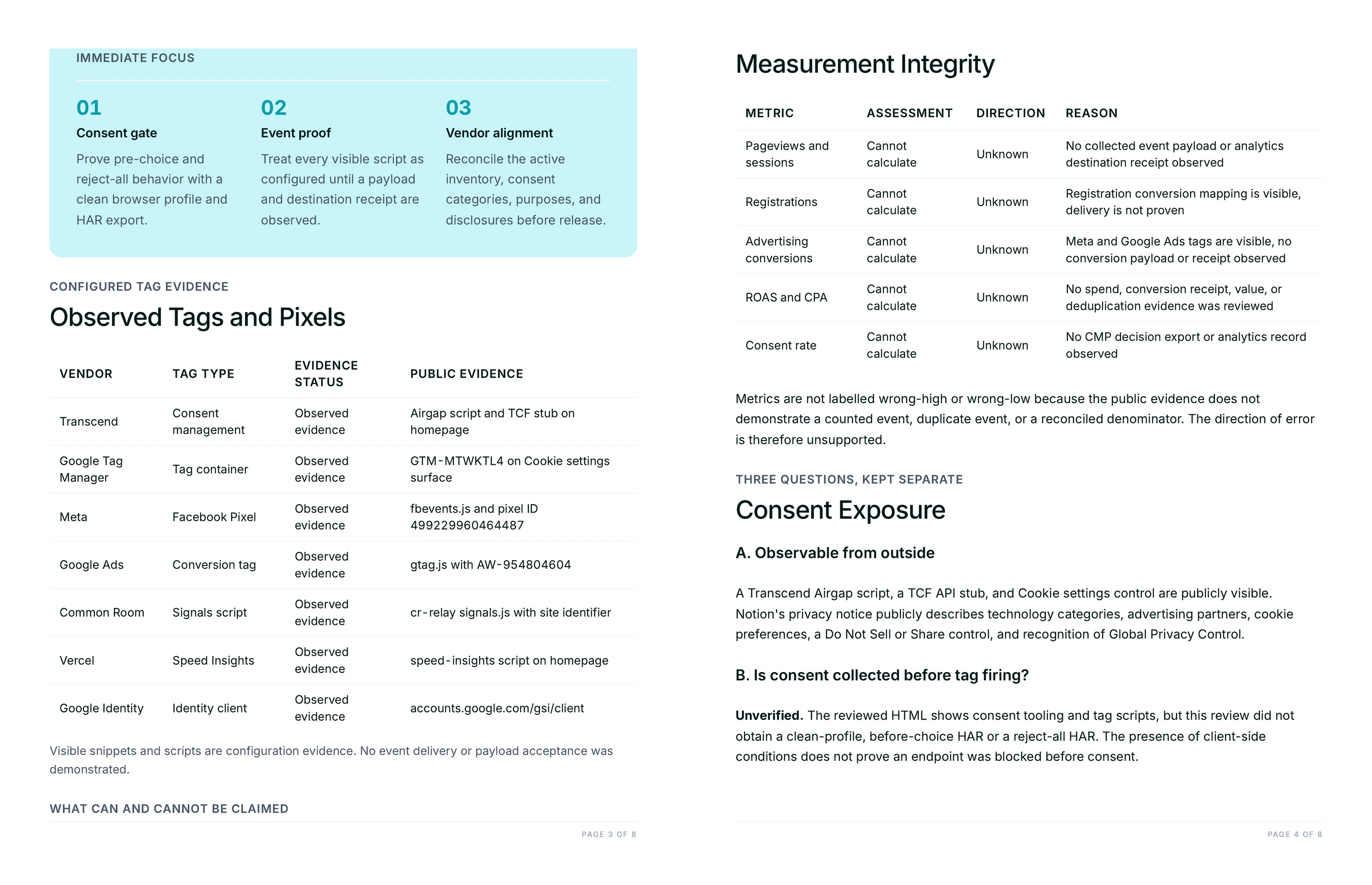
What comes back is a branded PDF audit plus an editable CSV findings register: every tag with the evidence that proves it, the events missing against the actual purchase path, the duplicate routes that can double-count a sale, the consent exposure, and a prioritized fix list where each item carries a test that proves it is fixed. Across 400+ marketing teams, the pattern we see most is not missing tracking. It is three tools reporting the same order and nobody able to say which number is the real one.

1

Audit what a client's site actually loads for tracking

Thank you! Your submission has been received!
Oops! Something went wrong while submitting the form.
Try This Flow

Example Flow result

Hide details
  • Name the pages that carry the money. A product page, a cart and a checkout entry point tell the audit far more than a homepage does. Juma walks the path a real buyer takes, so naming it gets the coverage table right the first time.
  • Say which markets the client sells in. Consent rules differ between the US, the UK and the EEA, and the audit writes its test grid per region. Without the markets, the grid defaults to a general case that the privacy reviewer will send back.
  • Say what finance counts as a sale. Paid, captured, fulfilled, net of refunds: each gives a different number. Naming the definition turns a vague reconciliation note into a specific tolerance the team can hold a report to.
  • Ask for the test script by name. The audit can return a numbered verification script, the exact action and the exact value to look for, which is what makes each fix provable rather than merely done.
  • Re-run it after every theme or app change. Tracking breaks quietly on releases. A second run compares against the first and shows what moved, which is cheaper than finding out from a month of wrong reporting.
  • Run it before commissioning a dashboard. A dashboard built on events that fire twice is worse than no dashboard, because it looks authoritative. The audit settles what is safe to build on.
2

How do you tell which reported numbers you can actually trust?

Get a decision table that rates every metric the client reports on: booked revenue, product views, add-to-cart rate, checkout starts, ad-platform purchases and experiment lift. Each row carries a trust level, what the number is safe to use for, and the one condition that would move it up a level. The table also separates two things teams usually blur together: metrics that are unreliable, and metrics that cannot be calculated at all because the event behind them was never implemented. A cart abandonment rate built on a missing begin_checkout event is not a low-confidence figure, it is arithmetic on a number that does not exist. Knowing which is which decides what the team reports this quarter.

Prompt
Copy

Turn the findings into a decision table for every metric this client reports: the trust level, what each number is safe to use for, and the condition that would raise it. Separate the metrics that are merely unreliable from the ones that cannot be calculated at all.

Try This Flow
3

Why don't GA4, the ad platforms and finance ever agree?

Ask for the discrepancy diagnosis and get a pattern table that reads the shape of the disagreement and names the likely fault. Ad platform far above both analytics and finance points first at browser and server events failing to deduplicate. Analytics and ad platform both above finance points at duplicate event routes plus finance excluding cancellations and test orders. Finance above analytics points at consent loss, blocked scripts or a wallet checkout completing without a browser event. The table also marks which differences are real faults and which are expected, because attributed ad conversions and finalized orders answer different questions and were never going to match one for one.

Prompt
Copy

Our analytics, our ad platforms and finance all report different conversion numbers. Map each possible discrepancy pattern to its likely cause, mark which causes you can confirm or rule out from the evidence you can see, and say which differences are expected rather than faults.

Try This Flow
4

How do you check consent is really blocking tags before someone opts in?

Get the consent test grid written out rather than described: every consent state the banner offers, crossed with each market the client sells in, crossed with the surfaces that matter, and a pass criterion written into each cell. The audit separates the three questions that usually arrive tangled together, because only one of them is answerable from outside: whether non-essential storage happens before a choice is made, whether the consent signal actually reaches each vendor, and whether the consent platform's own record would hold up. It also adds a legal-basis column per vendor, so a fraud-prevention script and a marketing pixel stop being treated as the same problem.

Prompt
Copy

Write the consent test grid in full: every consent state by every market this client sells in by each surface, with a pass criterion in each cell. Add a legal-basis column per vendor, and keep what the public evidence proves separate from what has to be confirmed in their own records.

Try This Flow
5

What does a developer need to implement the fixes without guessing?

Ask for the event specification and the findings turn into something buildable: one worked example payload per canonical event, every field named with its type and marked required or optional, so nobody has to infer the shape from a bullet list. Alongside it comes a single chosen deduplication strategy per platform with the reason it was chosen, rather than two options left open for the engineer to decide. Each fix carries effort in hours by role instead of a calendar window, which is what a client approves against. The result is a handoff an engineer can start from and a budget an account lead can get signed.

Prompt
Copy

Write the event specification for the developer: one worked example payload per canonical event with every field, its type and whether it is required. Choose one deduplication strategy per platform and say why. Give effort per fix in hours by role.

Try This Flow
6

How do you prove a tracking fix actually worked?

Get a numbered verification script: the exact action to take, the exact request or value to look for, and the result that counts as a pass. It covers the checks teams most often skip, including whether a purchase event fires a second time when someone refreshes the order confirmation page or navigates back to it, which is one of the quieter ways a conversion count inflates. Run the script before the fixes to record the starting state, then again after each one. The same script becomes the release gate, so the next theme update or app install has to pass it before it ships.

Prompt
Copy

Write the verification script for these fixes as numbered steps: the exact action, the exact request or value to look for, and the expected result. Include the order confirmation refresh and back-navigation test, and format it so it can be used as a release gate.

Try This Flow

Set up your client project: measurement definitions, consent requirements and past findings

Juma projects work per client rather than per task. The team builds one project for each client, adds context to it over time, and every Flow run inside it starts from that shared ground. For a tracking audit the context that changes the output most is the client's own definitions: what counts as a sale, which markets they sell in, and what was already found and fixed last time. If the project already exists, these are additions to it rather than a fresh setup.

What to add

Reporting Definitions

How the client counts a sale and revenue: paid, captured or fulfilled, gross or net of refunds, which order types are excluded. With this in the project, the reconciliation section states a real tolerance instead of listing the options.

Consent and Privacy Requirements

The markets the client sells in, the consent policy they have agreed, and who signs off on anything that touches it. This is what turns the consent grid from a general template into the specific test their reviewer asked for.

Measurement Plan

The events the team intended to collect and what each one feeds. The coverage table compares what the site actually loads against this, so a gap reads as a gap rather than a guess about what should have been there.

Previous Audit Findings

What the last audit flagged and what was fixed. The next run opens with what moved, which is the view that shows whether tracking quality is improving or quietly sliding back.

Guide Juma with project info

Each file in a project can carry a short description in the project info field. Those descriptions tell Juma what a file holds and when it matters, so the right context gets picked up for the task at hand rather than everything at once.

  • Reporting Definitions: "How we count orders and revenue, and which order types we exclude. Use for any reconciliation or trust rating."
  • Consent and Privacy Requirements: "Markets we sell in and the consent policy we have agreed. Use for every consent test and legal-basis column."
  • Measurement Plan: "The events we intended to collect and what each feeds. Compare observed coverage against this."
  • Previous Audit Findings: "What the last audit flagged and what was fixed. Open the next audit with what changed."
Juma Logo
Find out whether your numbers can be trusted

Frequently Asked Questions

What can this audit see without access to the client's analytics accounts?

It reads the live site: the tag and pixel IDs exposed in the page source, the consent platform and its configuration flags, the data layer, and the tracking present on the real path from product page to cart to checkout. That is enough to prove which tags are configured and to find duplicate routes that can double-count a sale.

What it cannot do is prove delivery. A configured tag is not a fired event, and no amount of reading the public site settles whether a purchase reached the ad platform once, twice or not at all. The audit holds that line explicitly: every finding is labelled either as observed evidence or as a check that needs account access, so nobody acts on a conclusion the evidence does not support.

In practice this is the half of the work that is usually skipped. Teams go straight into the accounts and never establish what the site is actually loading, which is where duplicate routes hide.

What does the findings register include?

One row per finding in an editable CSV: the finding, the evidence behind it, severity, the reporting consequence in plain terms, the owner role, the effort in hours, the test that proves it fixed, and an approver with an approval date. It opens in any spreadsheet and drops straight into a ticket tracker.

The register is deliberately separate from the PDF. The PDF is the document that goes to the client and the stakeholders who decide; the register is the working file the engineer and the analyst actually move through. Different readers, different artifacts.

How is this different from running a browser tag assistant?

A tag assistant tells you what fired on the page you are standing on. This audit covers the whole purchase path, cross-references what it finds against the events the reporting depends on, and ends with a prioritized plan that names the owner, the effort and the test for each fix.

The other difference is the write-up. A browser extension produces a view on a screen that one person reads and then closes. The audit produces a document a client can approve and a register a team can work through, which is what turns a finding into a fix that someone is accountable for.

Does this work for sites that are not on Shopify?

Yes. The audit starts from what the site loads rather than from a platform checklist, so it works the same way on a custom build, a headless storefront or a marketing site with lead forms instead of a cart. The funnel stages change and the method does not.

For a lead-generation site the purchase path becomes the form path: form view, field interaction, submit, thank-you, and the qualified-lead event that the sales system actually counts. The same questions apply, including whether the thank-you page can fire its event twice.

How long does this take compared with a manual audit?

A careful manual tracking audit is usually two to four days of an analyst's time, most of it spent inventorying tags and writing the findings up. Running this Flow gets the inventory, the coverage table, the consent grid and the fix plan back in one working session, with the time that remains going into judgment rather than collection.

That judgment is the part that stays with the team. Deciding which fixes are worth the engineering, what tolerance a client's reporting has to hold, and whether a consent change needs legal review before it ships are calls a person makes. Strategy, taste and judgment stay human, and the audit is built to be reviewed: every finding carries its evidence so a reviewer can disagree with it on the facts.

Teams running this across a client portfolio tend to run it on a schedule rather than once, because tracking breaks on releases and the second run is the one that shows what moved.
Don't take our word for it

Ask AI about us

400+ marketing teams trust Juma. ChatGPT, Claude, and Perplexity know why. Ask them.

Ready when you are

What's on your plate today?

Start typing a task and Juma will figure out the rest.

Thank you! Your submission has been received!
Oops! Something went wrong while submitting the form.