Set up your project: performance targets, Slack routing, and campaign context
Teams build one Juma project per brand or client and add context over time. Every digest the team runs pulls from the same project, so the recap already knows the targets, the right Slack channel, and which campaigns matter. Set it up once and each digest starts from the client's goals instead of asking about them every time.
What to add
Performance Targets
Target CPL, CPA, ROAS, and spend caps by channel. With these in the project, every digest judges results against the client's own goals, so "what's working" and "what's not working" mean something specific instead of a generic benchmark.
Slack Routing and Cadence
Which channel each digest posts to, how often it runs, and who gets tagged. With this saved, "post the digest" lands in the right place without naming the channel each time.
Campaign Context
Which campaigns matter most, their objectives, and their target audiences. This is what lets the "what's not working" section catch an objective mismatch, a lead campaign set to the wrong optimization event, instead of just flagging a high number.
Guide Juma with project info
Add a short description to each knowledge item in the project's info field so Juma knows what each one holds and when to use it. For example:
- Performance Targets: "CPL, CPA, and ROAS goals by channel. Judge every digest against these."
- Slack Routing and Cadence: "Default channel and posting schedule for this client's digests."
- Campaign Context: "Which campaigns matter and which conversion event each targets. Use for the what's-not-working read."
Send your team the digest, not the dashboard
Frequently Asked Questions
How much time does this Flow save compared to writing the recap by hand?
Building a campaign recap by hand takes 20 to 40 minutes: open the dashboard, pull the numbers, spot the mover, and write it up readably. Juma delivers the same Slack-ready digest in under a minute, straight from live data, so the team spends the time acting on the recap instead of assembling it.
For teams posting a digest daily or weekly across several accounts, that adds up fast. An agency running a Monday recap for eight clients recovers a few hours every week, and every digest follows the same shape, so the headline, the wins, the misses, and the next move sit in the same place no matter who would have written it.
Can Juma post the digest to Slack automatically?
Yes. With Slack connected, Juma posts the digest straight to a channel you name, formatted and ready to read. It works on a propose-then-push model: Juma shows you the exact message first and waits for approval before anything lands in the channel, so the team keeps human review on every output.
You can also set it to run on a schedule, weekly before the Monday sync or daily before standup, so the recap is waiting when the team opens Slack. Prefer to keep a hand on it? Skip the auto-post and ask for the text block instead, then paste it yourself. Strategy, taste, and judgment stay human either way.
What data does Juma need to build the digest?
Juma needs campaign performance data for the period you name. The simplest path is a connected Meta Ads account: the integration pulls spend, leads, cost per lead, and campaign-level results live, with no export step. Prefer not to connect? Upload a standard Meta Ads CSV and the digest runs from that instead.
With the account connected, the data reflects the state of the campaigns the moment the Flow runs, which matters for a daily or weekly recap. Add GA4 or HubSpot to the same project and Juma folds those numbers in too, so the leads count can tie back to pipeline rather than platform-reported conversions alone.
Can I combine Meta Ads with GA4 or CRM data?
Yes. Connect GA4 and HubSpot alongside Meta Ads and Juma blends all three into one digest: spend from the ad platform, sessions and conversions from GA4, and qualified or won deals from the CRM. Cost per lead and cost per opportunity then recalculate against the source your team actually trusts.
This is where the digest stops being a platform report and starts being a business read. The "what's working" section can name the campaign driving qualified pipeline, not just cheap clicks, and the next move points at the channel earning revenue. Connect a source once and it is available across every project and chat, so the same setup carries into reporting, briefs, and planning across 700+ Flows.
How is this different from Slack's own reminders or a scheduled dashboard export?
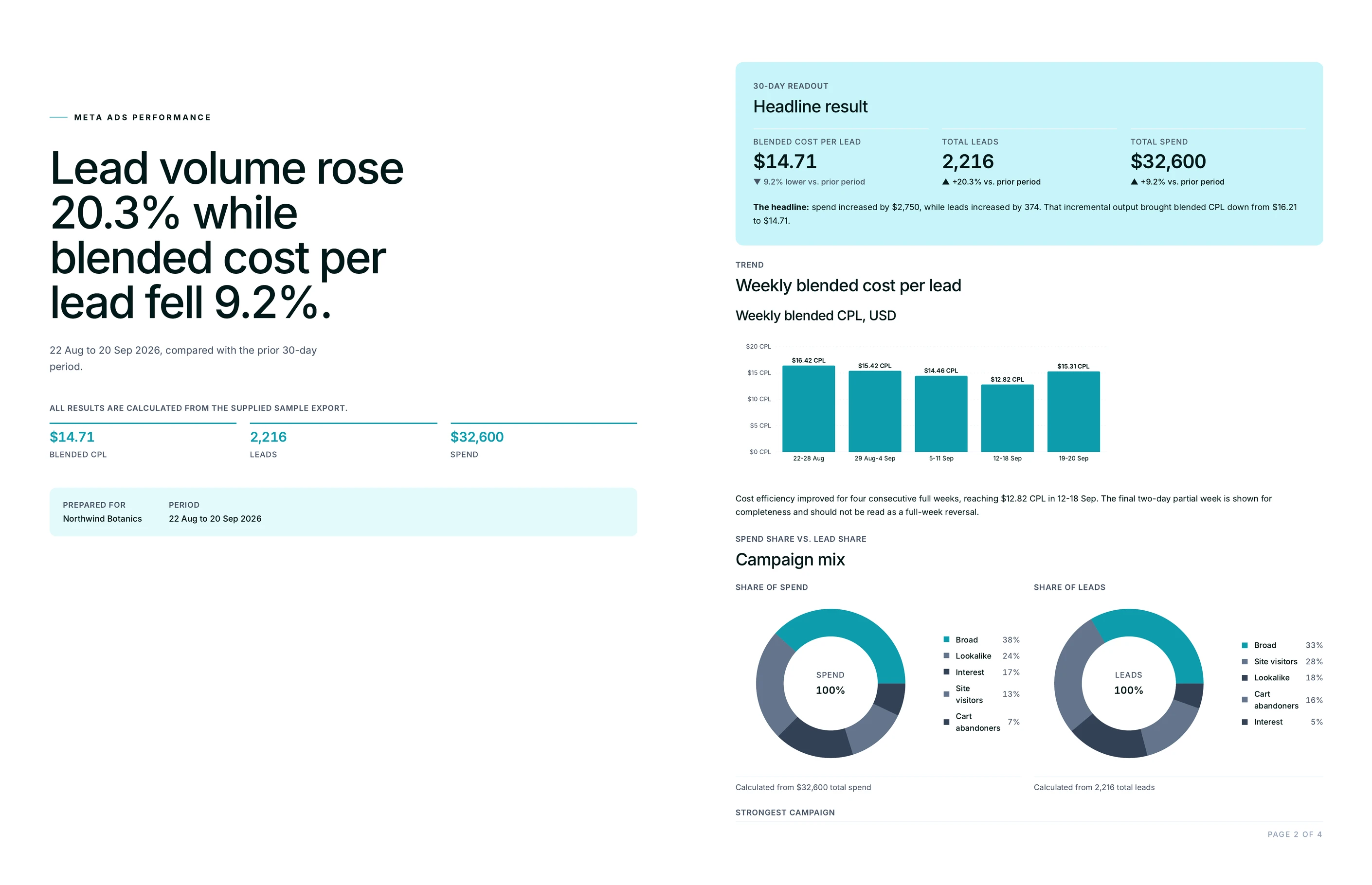
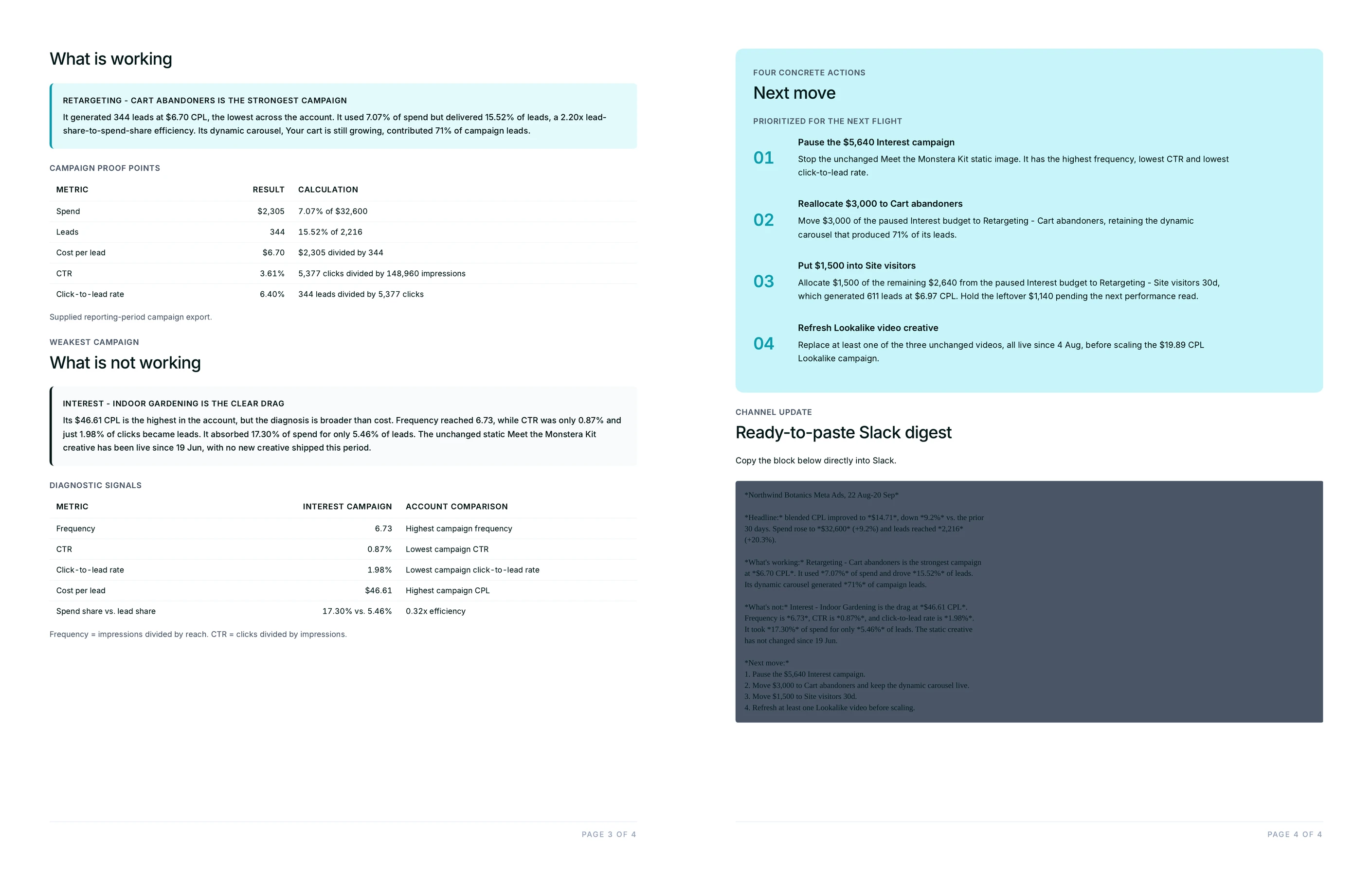
A scheduled dashboard export drops raw numbers or a static chart into the channel and leaves the reading to whoever opens it. This Flow delivers the interpretation: the headline result, the campaign carrying performance, the one dragging it and why, and a numbered next move. It reads like a teammate wrote it, because it does the thinking, not just the pulling.
Slack reminders and dashboard schedules move data around; they do not judge it against the client's targets or explain an objective mismatch. Juma does both, then posts the result where the team already works. And because pricing is credit-based with unlimited seats, the whole team can run and read digests without anyone counting logins.

.webp)
.webp)



.webp)