Set up your client project: reporting cadence, status rules, and stakeholders
A Juma Project is a shared space where the team keeps everything Juma needs to know about a client. Build one project per client and every status report pulls from the same context, so the report reads the same whether it's run by the account lead or someone covering for them. Add these items once and the weekly report stops asking the same setup questions.
What to add
Reporting Cadence & Format
How often the report goes out, the period it covers, and the sections the client expects. With this in the project, every report matches the format the client already signed off on instead of starting from a blank page.
Status & Blocker Definitions
What counts as on-track, at-risk, or blocked for this account, plus any RAG thresholds. This gives the report one consistent rule for flagging problems, so the same kind of item gets called out the same way every week.
Stakeholder List
Who owns what, who the report is written for, and who should never be named in a client-facing version. The report attributes work to the right people and keeps internal notes out of the client copy.
Brand Voice Guide
How the agency writes to this client: tone, level of detail, and words to avoid. Every report and Slack digest comes out in the right voice from the first draft.
Guide Juma with project info
Add a short description to each knowledge item in the project's info field so Juma knows what each file is and when to use it. For example:
- Reporting Cadence & Format: "Weekly client report structure and sections. Follow this layout every time."
- Status & Blocker Definitions: "The rule for flagging at-risk and blocked work. Apply before writing the blocker list."
- Stakeholder List: "Who owns what and who the report is for. Use for attribution and for the client-safe version."
- Brand Voice Guide: "How we write to this client. Apply to the report and the Slack digest."
Turn your board into a status report in minutes
Frequently Asked Questions
How much time does this Flow save compared to writing a status report manually?
Writing a weekly client status report by hand takes 30 to 60 minutes per project: opening the board, checking what moved, chasing owners for blockers, and formatting it into something client-ready. Juma reads the board and returns the formatted report and a Slack digest in a couple of minutes. An agency running one report per client per week across ten accounts recovers most of a working day every week.
The savings compound because the structure stays identical from week to week and from account to account. The same sections get filled the same way no matter who runs it, so a covering account manager produces the same report the client is used to. Strategy, taste, and judgment stay human: the team reviews and edits every report before it goes out.
What's in the status report?
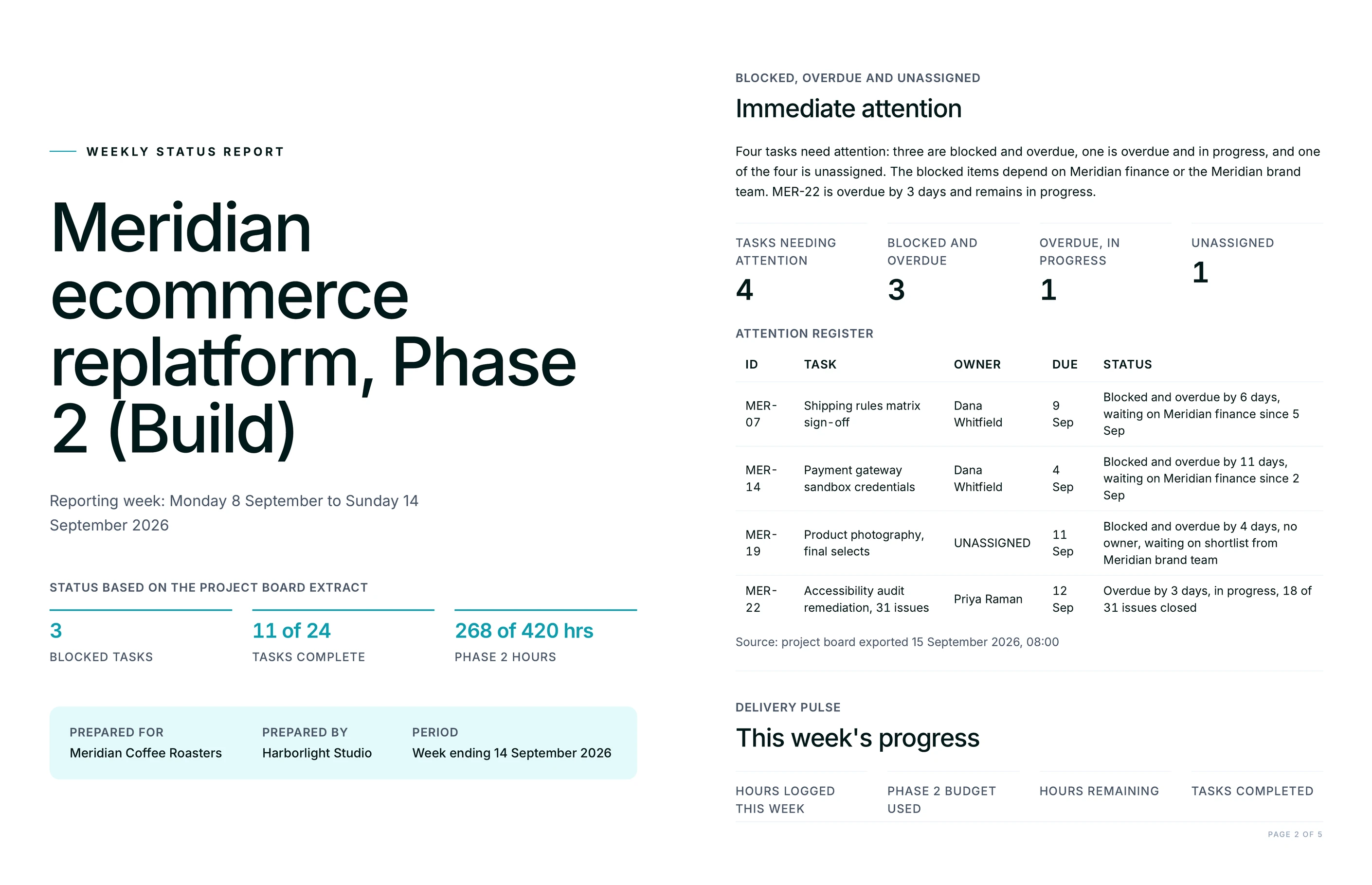
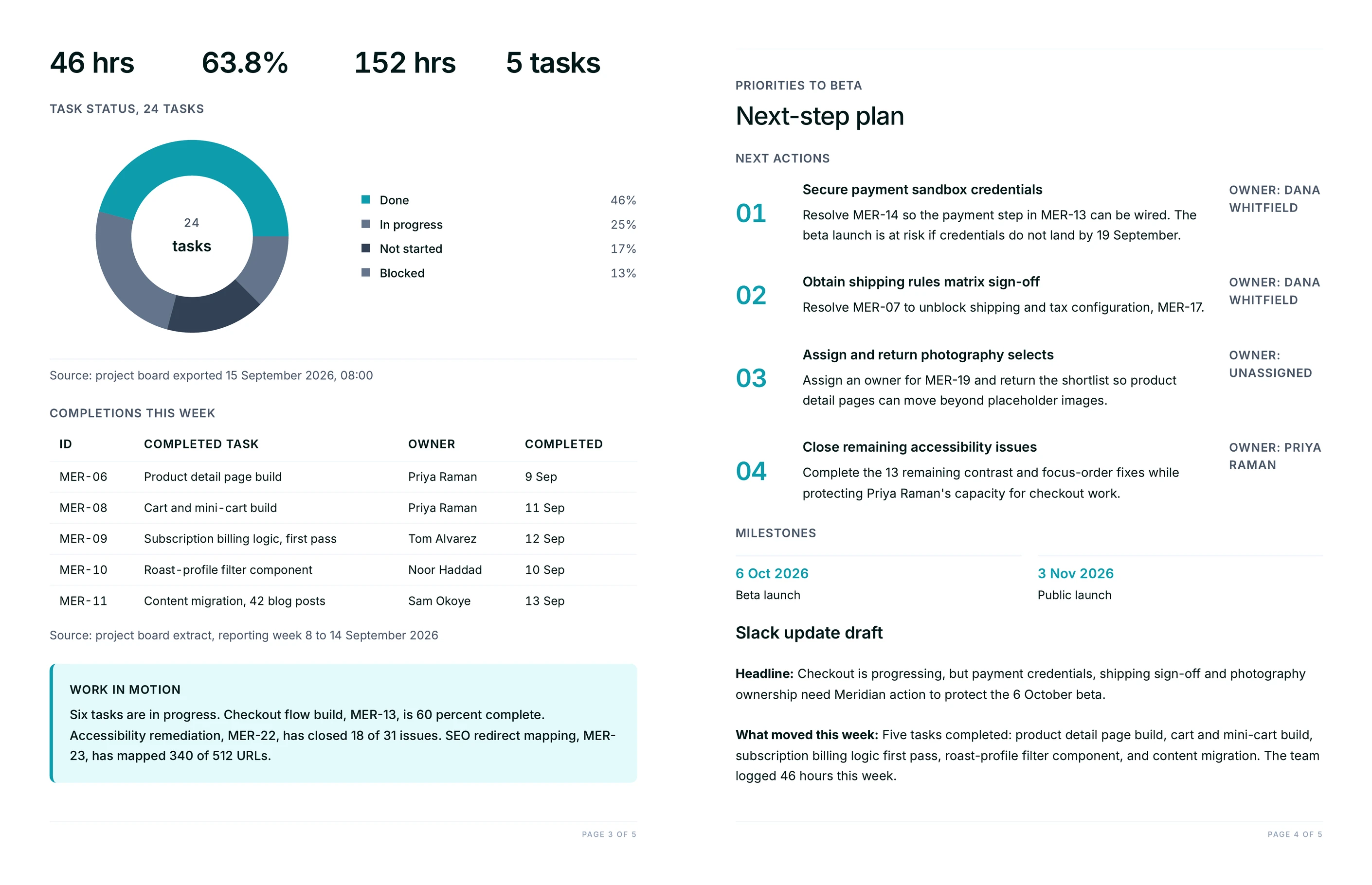
The report groups the board into completed work, open or in-review items, blockers, and what's due next, with each item attributed to an owner and a date. It opens with an at-a-glance summary (tasks complete, items open, anything at risk), includes a timeline of the project's phases, and ends with recommended next steps. The branded PDF is the client-facing version and the Slack digest is the short update for the channel.
Because it reads live board data, the report reflects the real state of the work at the moment it runs. When a board is fully on track it says so plainly rather than padding the report, and when items are slipping it names them with the owner and the number of days overdue.
Which project management tools does this work with?
It works with the board the team already uses. Juma connects to Basecamp, Asana, monday, ClickUp, Notion, Jira, and Trello, and reads task status, owners, and due dates directly from whichever one is connected. There's no need to move the team onto a new tool or maintain a separate reporting spreadsheet.
The report is board-agnostic by design, so an agency with one client on Asana and another on Basecamp runs the same Flow for both and gets the same report format. If a board isn't connected yet, the team can connect it in Juma or paste an export, and the report runs from that instead.
Can Juma update the board, or does it only read it?
Both, on the team's terms. By default the report only reads the board. When the team asks Juma to create follow-up tasks for overdue items or post the summary to Slack, it drafts the change and shows it first, then acts once someone confirms. Nothing is written to the board or sent to a channel without a yes.
This keeps the weekly report safe to run on a live client board. The read-and-summarize step never changes anything, and the write-back step is always a proposal the team reviews. Human review sits on every output that leaves the chat.
How does this compare to the reporting built into our project tool?
Most project tools show progress bars and completion counts, but they don't write the narrative a client reads. This Flow turns the same board data into a written status report, groups it into completed, blocked, and upcoming, flags what's slipping with an owner and a reason, and delivers it as a branded PDF and a Slack digest. That written, client-ready layer is what the built-in dashboards leave to the account manager.
It also spans tools a single dashboard can't. An agency reporting across several clients on different boards gets one consistent format for all of them, and a single leadership rollup across every account, which no individual tool's native reporting produces on its own.
.webp)


.webp)

.webp)