Set up your channel project: voice guide, past titles, CTA block, and brand
A Juma Project is a shared space where the team stores everything Juma needs to know about a channel. Create one project per channel (or per client, if the agency manages multiple), add context as the team learns more, and Juma uses what's relevant every time a flow runs. For YouTube, this is what turns a generic title set into one that sounds like the channel's existing voice.
What to add
Channel Voice Guide
How the channel sounds: formal or conversational, slang or buttoned-up, fast cuts or slow burns, sentence case or title case. With this in the project, variants come back in the channel's tone instead of a generic YouTube voice.
Past Top-Performing Titles
A list of the channel's top 10 to 20 videos by retention and click-through rate, with their actual titles. Juma uses these to anchor new variants in the patterns that already work for this audience, instead of defaulting to broad YouTube best practice.
CTA / Link Block
The standard subscribe text, sponsor and affiliate links, lead magnet URLs, and social handles the team appends to every description. With this in the project, the CTA block in every description is consistent without rewriting it each time.
Brand Guidelines
Voice, banned phrases, hashtag conventions, naming for product features. Keeps every title and description aligned to brand standards without manual review for every release.
Guide Juma with project info
Add a short description to each knowledge item in the project's info field so Juma knows what each file contains and when to use it. For example:
- Channel Voice Guide: "Apply on every title and description generation. Match the channel's tone exactly."
- Past Top-Performing Titles: "Use as the success reference. New variants should anchor in these patterns."
- CTA / Link Block: "Drop into the description verbatim. Update this file when subscribe text or sponsor links change."
- Brand Guidelines: "Apply on every release. Use the words in the USE list and avoid the words in the AVOID list."
Ship a YouTube title set in one session
Frequently Asked Questions
How does Juma write titles when the video has no captions or thin transcript?
Juma reads the transcript first and pivots to web research when the dialogue is sparse. Cinematic product launch videos, montages, and music-led intros often have minimal narration. When that happens, Juma reads the video's metadata (title, description, channel context), searches for the announcement or campaign the video supports, and grounds the variants in that broader context instead of guessing.
Output quality drops less than expected because most title generators never had the transcript to begin with. The cinematic launch is a real-world case, not an edge case: many of the highest-stakes videos a marketing team publishes are short, music-heavy teasers. Juma adapts and delivers either way.
How many title variants does Juma produce, and how should the team pick which to test?
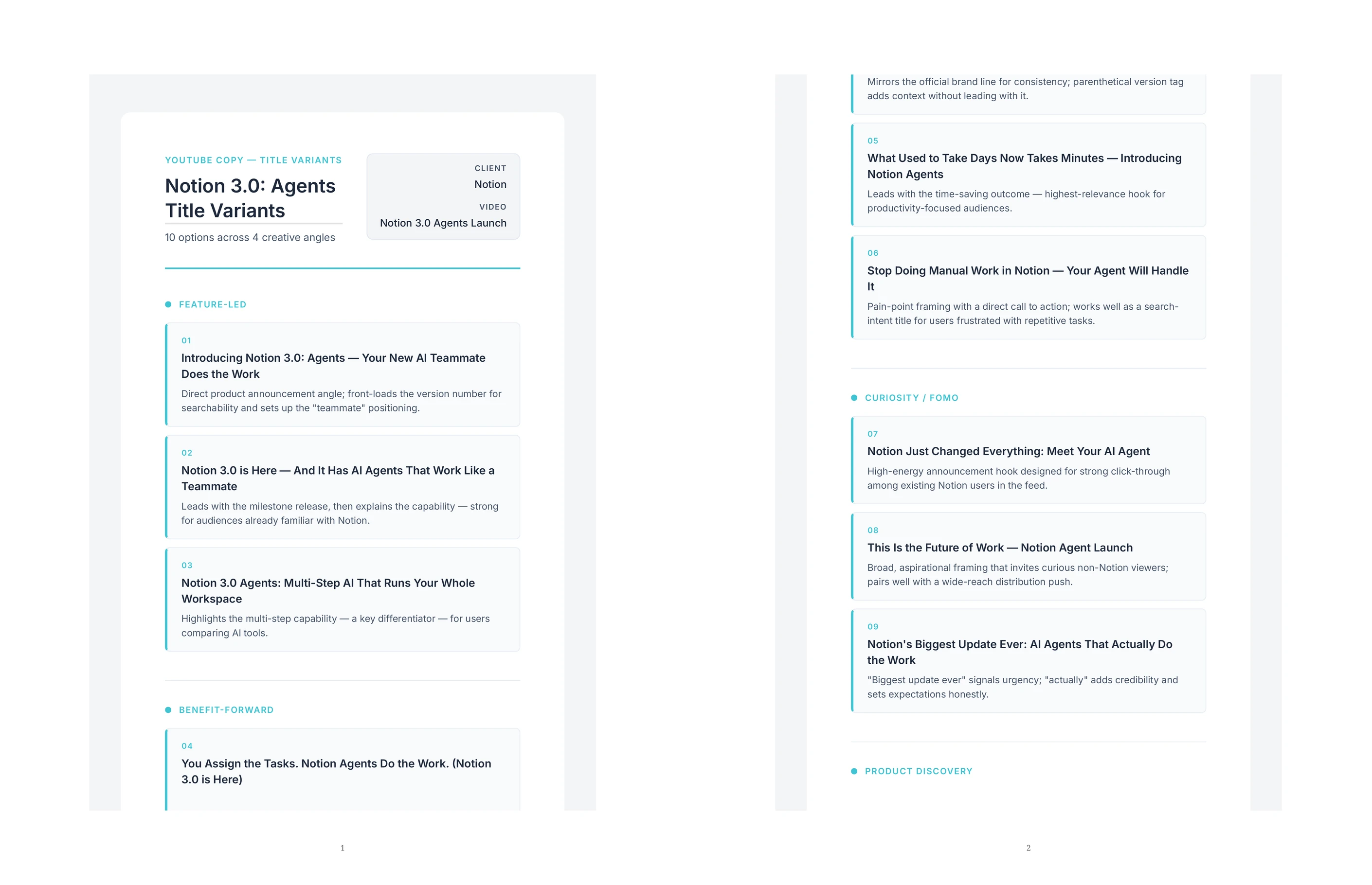
Juma produces ten variants per run, each tagged by a hook angle. The angles span curiosity, transformation, identity, official launch, use-case, urgency, and community framing among others. Every variant includes character count and a one-line note explaining why the hook works for that angle.
For picking what to test, the recommendation is to pair the two variants that target the widest spread of audience emotion. If variant 1 is curiosity and variant 7 is identity, those two pull different viewer types, and the A/B reveals which audience segment is dominant on the channel right now. Step 3 builds the full A/B test plan once the team has picked the pair.
Can Juma match the channel's existing voice and naming conventions?
Yes, when the team adds a Channel Voice Guide and Past Top-Performing Titles to the project. With those in place, the variants come back in the same tone the channel has already established, with the same conventions for capitalization, punctuation, and product naming. Strategy, taste, and judgment stay human: the team still picks which variant to publish.
Without a voice guide, Juma defaults to a generic YouTube tone (sentence case, action verb, light curiosity). That's fine for early-stage channels still finding voice. For established channels with consistent naming conventions, loading the voice guide is what changes generic output into channel-native output.
Does this Flow work for shorts and long-form videos equally?
Yes. The same prompt works for both, though Juma adapts the variant set to the format. For shorts (under 60 seconds), variants skew toward immediate-payoff hooks and lean on the platform's vertical scroll mechanics: curiosity gaps, contrarian openers, and one-line value props. For long-form (ten minutes and up), variants include more capability-list and tutorial-style angles where the title sets expectations for a deeper watch.
The transcript handling stays the same: Juma reads what's available, pivots to web context when the audio is thin, and writes ten variants either way. For batch operations across mixed-format channels, the CSV output in Step 6 keeps shorts and long-form variants in the same file so the team can sort by format before review.
Will Juma respect YouTube character limits and SEO best practices?
Yes. YouTube truncates titles after 60 characters on most surfaces and 70 on a few. Juma keeps every variant under 60 by default and flags any that pushes the limit. Character counts appear next to every variant, so the team can see immediately which ones survive truncation on mobile.
SEO best practices are handled implicitly: the variants include the primary keyword early when the topic has clear search intent, vary between question-style and statement-style hooks (the top YouTube SERP mixes both), and avoid the patterns that get demoted (all-caps shouting, clickbait without payoff, misleading curiosity gaps). Human review on every output: the team picks which variants align with the channel's content standards.