Set up your team's project: ICP, scoring rules, disqualifiers, and past closed-won deals
A Juma Project is a shared space where the team stores everything Juma needs to know about how the team sells. Create one project per team (or per business unit if scoring rules differ), add context as the team learns more, and Juma uses what's relevant every time the flow runs. For lead scoring, this is what anchors the model in what actually closed for this team, not a generic best-practice composite.
What to add
ICP / Buyer Persona
Who you want to call. Industry, company size, title seniority, geography, technographic signals. With this in the project, scoring filters out leads outside ICP before ranking. Without it, Juma ranks all SQLs and the team filters manually each week.
Scoring Rules & Weights
How the team weighs signals. If recent email opens matter more than deal stage for this team, say so. Juma defaults to a reasonable composite, but the team can override weights by storing them in the project. The override applies every time the flow runs.
Hot Disqualifiers
The conditions that auto-disqualify a lead regardless of other signals: wrong industry, sub-X employees, lost-deal-in-the-last-12-months, current customer of a competitor with a 3-year contract. Save the team from scoring leads they'll never close.
Past Closed-Won Deals
A list of the team's last 20 to 50 closed-won deals with the companies, titles, deal sizes, and the signals that led to close. Juma uses this to refine the scoring model: the signals that predicted wins last quarter weigh more this quarter.
Guide Juma with project info
Add a short description to each knowledge item in the project's info field so Juma knows what each file contains and when to use it. For example:
- ICP / Buyer Persona: "Use to filter the SQL list before scoring. Demote anyone outside ICP."
- Scoring Rules & Weights: "Apply these weights to the composite model. Override the defaults."
- Hot Disqualifiers: "Auto-disqualify any lead that matches. Move to deprioritization list with reason."
- Past Closed-Won Deals: "Reference for what closed last. Refine signal weights based on actual outcomes."
Ship a priority call list every Monday morning
Frequently Asked Questions
How does Juma score leads when HubSpot's built-in Score property is not configured?
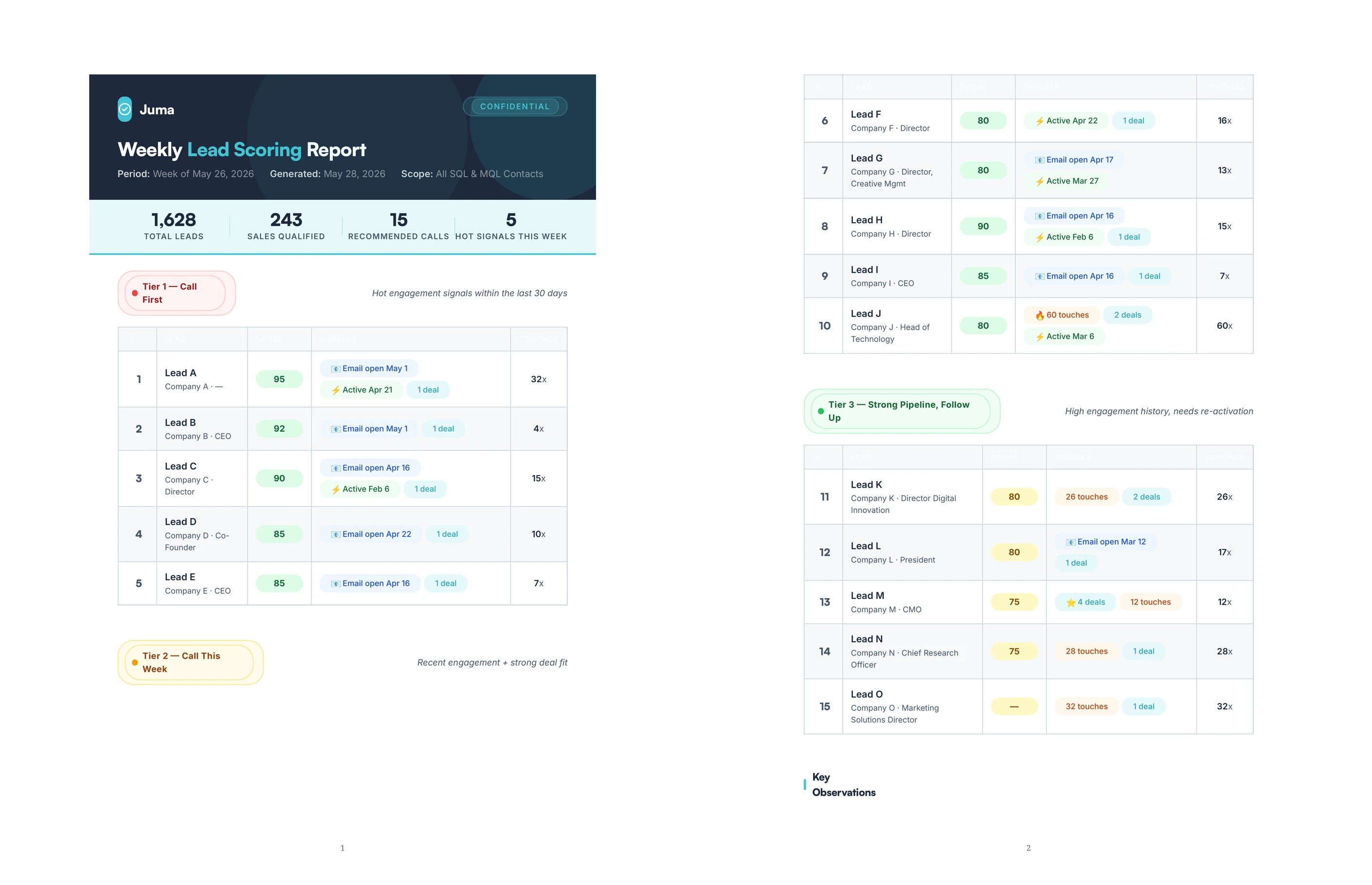
Most HubSpot accounts have the HubSpot Score property as N/A across all contacts because nobody set up the scoring rules. Juma does not depend on the Score property. It pulls the engagement and lifecycle properties that already exist on every HubSpot contact (lifecycle stage, last activity timestamp, last email open, contact frequency, associated deals, lead status, job title, company), then builds a composite score across those signals with reasonable default weights.
The composite model is transparent and explainable. The output names each signal that fed into a lead's score and the weight it received. The team can audit the model, override weights, or ask Juma to re-score with different signal priorities for a specific use case. A re-engagement campaign weighs recent email opens differently than a top-of-funnel push. Strategy, taste, and judgment about which signals matter stay human.
What signals does the composite scoring model use?
Juma's default composite covers eight signals when HubSpot Score is not configured:
- Lifecycle stage (SQL > MQL > Lead)
- Recent email open recency (last 14 days, 30, 60, 90)
- Last activity recency (notes_last_updated or hs_last_sales_activity_timestamp)
- Contact frequency (num_contacted_notes)
- Associated deal count
- Job title seniority (C-level, VP, Director > Manager > IC)
- Lead status (CONNECTED, IN_PROGRESS > NEW > OPEN)
- Company quality (named company vs blank)
With Mixpanel or PostHog connected, product activation signals layer in: key feature use, repeat sessions, recent app activity. Those are the strongest signals for PLG sales teams. The team can also add custom signals by naming them in the prompt or storing them as scoring rules in the team's Juma project.
Does Juma write the scores back to HubSpot, or is the call list a separate deliverable?
The call list is a deliverable, not a back-write to HubSpot properties. Juma's HubSpot integration is read-only by design: it pulls contact data, runs the scoring model, and returns a ranked output, but it does not update HubSpot records. The team can copy the scored list into a Notion page, paste it into Slack, export to CSV, or recreate the scoring in HubSpot's workflow tool using the same logic.
This is a meaningful difference from paid platforms like Madkudu or Apollo that write scores back to HubSpot custom properties. Juma augments the team's prioritization with an explainable scoring layer that takes no setup. The trade-off is that the team is responsible for keeping the call list visible in their daily workflow (a shared doc, a Slack channel, a weekly cadence), not a HubSpot property they passively browse.
How is Juma's lead scoring different from Madkudu, Apollo, or HubSpot's own workflows?
Three differences. First, no setup: the scoring runs the first time you ask, with sensible defaults the team adjusts in conversation. Madkudu and Apollo require a 4 to 6 week implementation. HubSpot workflows require an admin to configure rules in a UI most teams never invest in.
Second, the model is explainable. Every lead's score has a per-signal breakdown the team can audit. Madkudu's predictive scores are black-box. Apollo's data signals are bundled into a single fit-score number. Juma shows which signals fed into each lead's score and the weight each received.
Third, the cost structure: Juma is part of an unlimited-seat marketing AI workspace, not a per-record charge for enrichment. For a team scoring 1,000 leads a week, the per-lead cost is meaningful at scale. Juma augments the prioritization layer with an explainable model. The team's strategic judgment about which signals to trust stays human.
Does the flow work for teams with deep HubSpot setups vs. lean or new HubSpot accounts?
Both. For deep setups with custom contact properties and HubSpot Score configured, Juma reads the existing properties and respects them: if Score is configured and the team trusts it, the composite layer becomes optional or an overlay that adds context. For lean setups where most contacts only have basic properties (name, email, company, lifecycle stage), the composite model is the difference between an unranked list and a prioritized one.
The transition from lean to deep does not require a re-implementation. The same prompt works as the team adds more properties over time. Each new custom property becomes a new signal the model can consider. Human review on every output: the team decides which signals to trust based on the team's actual outcomes, and adjusts the weights as the CRM matures.