Content Writing
Social
No items found.

Write a press release with AI: Headline, executive quotes, journalist pitch & social copy

Name the client and the news. Juma writes the press release, drafts the journalist pitch, builds a quote bank for each spokesperson, and adapts the announcement into LinkedIn, X, and Instagram copy.

Share the client, the news angle, and the spokesperson. Juma researches the brand's prior releases, public executive bios, and the announcement's industry context, then asks two short questions about target media and output format before writing. The result is a complete launch comms kit, not a single document.

1

Write a press release for a product launch

Thank you! Your submission has been received!
Oops! Something went wrong while submitting the form.
Try This Flow

Example Flow result

Hide details
  • Name the news angle clearly. Product launch, funding round, executive hire, or partnership: each shapes the headline structure and the journalists Juma writes the pitch to.
  • Drop the anchor number. "$50M Series C" or "30% recycled content" gives the lead paragraph something concrete to open with. Specific numbers earn pickup; round adjectives don't.
  • Add the spokesperson names. Juma matches the title to public bios, attributes quotes correctly, and adapts the formality of the language to how that spokesperson sounds in past press coverage.
  • Connect Google Calendar to start from a launch date. When the embargo date or launch window lives on a shared marketing calendar, Juma can pull it directly instead of asking. Useful for the cases where the date is the trigger, not the news itself.
  • Connect Gmail to push the pitch into drafts. Once the journalist pitch is written, Juma can drop it straight into Gmail drafts, addressed to the right beat reporter, ready for review before send.
2

How do you write the journalist pitch email?

The press release goes wide. The journalist pitch goes narrow, to one beat reporter at a time. Juma writes an 80 to 120 word pitch with a subject line that earns the open and a three-paragraph body that explains why this story matters to that specific reporter's coverage area.

For each target outlet you name, the pitch covers:

  • A subject line written to clear a busy inbox
  • One paragraph framing why this matters to that reporter's beat
  • One paragraph with the news hook and the anchor number
  • One paragraph offering the spokesperson, embargo terms, and assets

The team can paste the pitch into Gmail manually, or connect Gmail to the workspace so Juma drops the drafts straight into your outbox for final review.

Prompt
Copy

Now draft a journalist pitch email for the same announcement, targeted at outdoor and lifestyle press (Outside, Adventure Journal, AFAR). Subject line plus three short paragraphs: why this matters to their beat, the news hook with the anchor number, and the spokesperson offer with embargo terms. Keep it under 120 words.

Try This Flow
3

How do you build a quote bank for each spokesperson?

Most press releases use one quote per spokesperson. The team usually wants more, drafted in different registers, so the spokesperson can pick the version that sounds like them. Juma builds a quote bank with three to four variants per voice, each written for a different angle.

For each spokesperson involved in the announcement, the bank delivers:

  • A visionary quote framing the long arc of the work
  • A data-led quote anchored to the launch's hardest number
  • A customer-centric quote that puts the buyer or beneficiary at the center
  • A short, quotable line built for social pull-through

Quotes are attributed to the right title from each spokesperson's public bio. The team can hand the bank to the spokesperson for approval, then drop the chosen line back into the release.

Prompt
Copy

Build a quote bank for this announcement. For each spokesperson (CEO, head of product, lead supplier), give me three to four quote variants in different registers: visionary, data-led, customer-centric, and one short quotable line for social. Attribute each to the right title from their public bio.

Try This Flow
4

How do you build a press release around an existing executive quote?

Sometimes the quote comes first. A CEO drops a line in a leadership meeting, a board memo, or an internal Slack, and the comms team is asked to build the release around it. Juma reverses the standard build: instead of writing the release and then drafting quotes, it takes the quote as the spine and constructs the announcement so the language already belongs to the leader.

Paste the quote, name the spokesperson, and add a sentence of context about what news is being announced. Juma writes the headline, lede, and body to lead into the quote naturally, then keeps the rest of the release in the same register. The result reads like the leader's own voice, not an AI's interpretation of it.

Prompt
Copy

Our CEO said this in last week's leadership offsite: "[paste quote]." We want to build the announcement around it. Write the press release with this quote as the spine, in the same register as the quote itself.

Try This Flow
5

How do you adapt the press release into social copy?

One announcement, four channels. The release reads one way for press. LinkedIn wants long-form context. X wants a tight thread. Instagram wants a visual-first caption. Juma rewrites the announcement for each platform instead of copy-pasting the same paragraph everywhere.

The social pack includes:

  • A 200 to 300 word LinkedIn post written from the spokesperson's voice, with a hook in the first two lines
  • A three to five tweet X thread that opens with the headline and ends with a clear next step
  • An Instagram caption around 150 words with a paragraph break and a clear call to follow the launch
  • A short internal Slack or email note for the team launching the news

Each piece carries the same anchor number and spokesperson voice as the release. The team reviews and posts, no rewriting required.

Prompt
Copy

Now adapt the press release into a social pack. Give me a 200 to 300 word LinkedIn post in the CEO's voice with a hook in the first two lines, a three to five tweet X thread, an Instagram caption around 150 words, and a short internal Slack note for the team. Keep the anchor number consistent across all four.

Try This Flow
6

How do you write a rebuttal or correction press release?

Not every release announces good news. A story breaks unfavorably, a previous statement needs correcting, or coverage misrepresents the work. The rebuttal release uses the same structure as a launch release but inverts the angle: it leads with the correction or the company's position, not with the news being responded to.

Juma writes the rebuttal in the same voice as the brand's prior releases, anchors the response to verifiable facts, and avoids the defensive tone that turns a correction into a second news cycle. For full crisis sequencing across sentiment monitoring, holding statements, and stakeholder messaging, the team can hand off to the crisis comms flow.

Prompt
Copy

A story published yesterday in [outlet] misrepresented our position on [issue]. Write a rebuttal press release that corrects the record, anchored to these facts: [paste]. Keep the tone steady, lead with the correction, and avoid feeding a second news cycle.

Try This Flow

Set up your client project: boilerplate, past releases, spokesperson bios, and brand voice

A Juma Project is a shared space where the team stores everything Juma needs to know about a client. Create one project per client, add context as the team learns more, and Juma uses what's relevant every time a flow runs. For press, this is what changes a generic release into one that sounds like the brand's prior coverage.

What to add

Boilerplate

The standard "About [Company]" paragraph that closes every release. With this in the project, Juma drops it in automatically and keeps it consistent across announcements, instead of paraphrasing it differently each time.

Past Press Releases

Three to five recent releases the team is proud of. Juma uses them to match the brand's tone, sentence rhythm, and structural conventions: how headlines are phrased, whether quotes lead the body or follow it, what's left to the boilerplate and what gets spelled out up top.

Spokesperson Bios

Titles, attribution lines, and one or two paragraphs of background for each leader the team quotes. This shapes how quotes are attributed and what register feels natural for each voice. A CEO quote reads differently than a head of sustainability quote.

Brand Voice Guide

How the brand sounds: formal or conversational, AP style or Chicago, what adjectives are on-brand and what's off. With this in the project, every release comes out in the right voice from the first draft.

Guide Juma with project info

Add a short description to each knowledge item in the project's info field so Juma knows what each file contains and when to use it. For example:

  • Boilerplate: "Standard About paragraph. Drop in at the end of every press release verbatim."
  • Past Press Releases: "Reference set for tone and structure. Match the rhythm, not the literal copy."
  • Spokesperson Bios: "Use to attribute quotes correctly and match each spokesperson's register."
  • Brand Voice Guide: "Apply on every release. Use the words in the USE list and avoid the words in the AVOID list."
Juma Logo
Ship a complete press kit in one session

Frequently Asked Questions

How much time does this Flow save compared to drafting a press release manually?

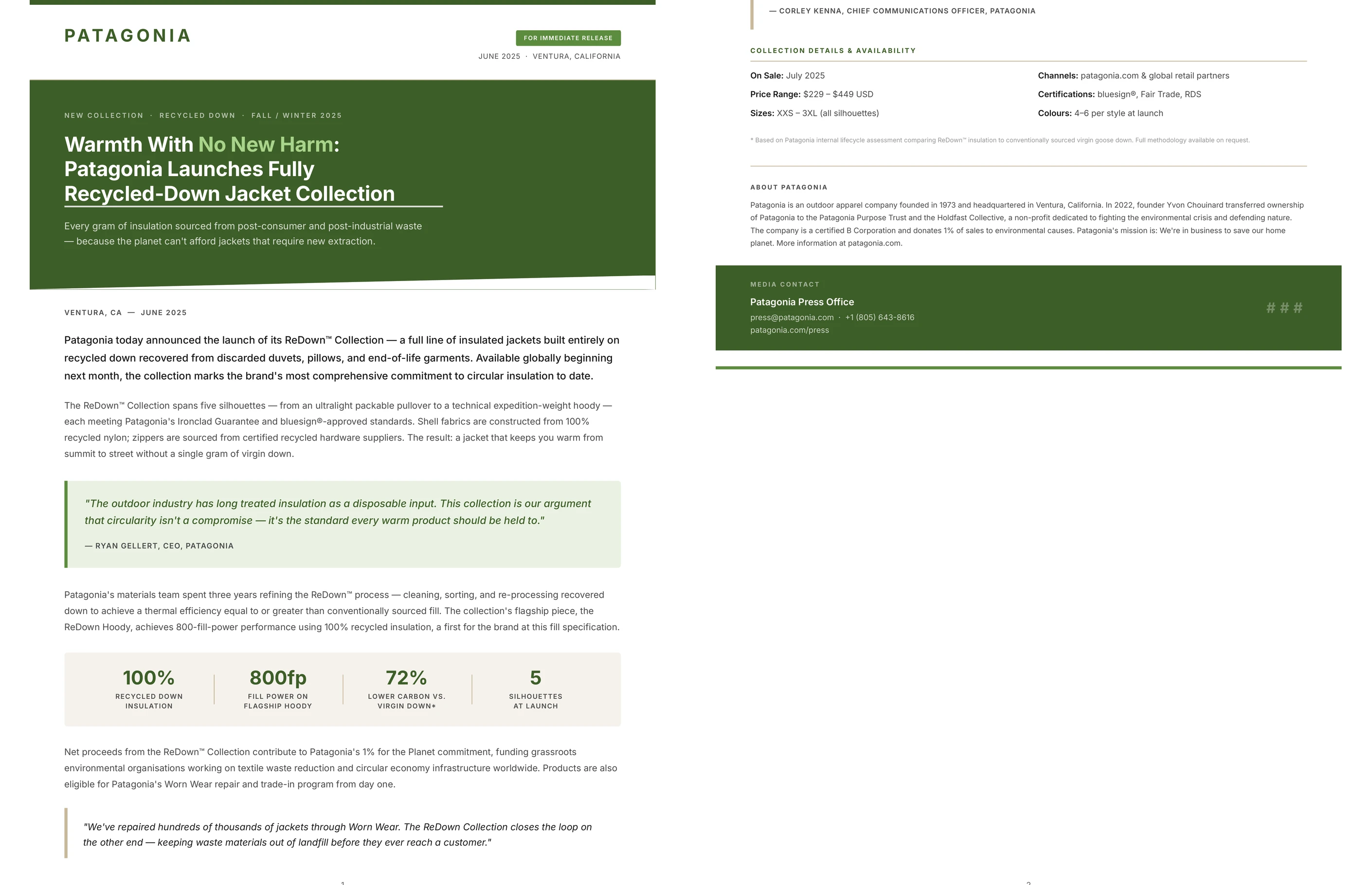
This Flow turns a half-day or full-day press kit into a single working session. Juma writes the release, the journalist pitch, the quote bank, and the social pack from one prompt, then renders the release as a polished PDF. The team reviews, adjusts the quotes with the spokesperson, and ships.

Manual press work typically involves drafting the release, writing tailored pitches per outlet, drafting alternate quote versions for the spokesperson to choose from, adapting the announcement into LinkedIn, X, and Instagram copy, and writing the internal note for the team. Each piece is its own deliverable. Strategy, taste, and judgment stay human: the comms lead still decides the angle, picks the quote, and signs off on the final pitch. Juma handles the drafting layer so the lead spends time on calls and revisions, not on a blank document.

What does a complete press kit include?

A complete kit covers six deliverables: the press release in inverted-pyramid format, an 80 to 120 word journalist pitch email, a quote bank with three to four variants per spokesperson, a social pack for LinkedIn, X, and Instagram, an internal launch note for the team, and a branded PDF of the release for distribution.

The release itself follows AP-style conventions: an SEO-friendly headline, a dateline, a lead sentence answering who, what, where, when, and why, two to three body paragraphs with embedded quotes, the boilerplate, and a media contact block. Quote attribution matches the spokesperson's public title. Each social piece is rewritten for its platform, not copy-pasted from the release. The PDF carries the brand's color palette and uses the boilerplate from the project.

Can Juma match the tone of our prior press releases?

Yes. Add three to five recent releases to the Juma Project for the client, and Juma uses them to match the brand's tone, sentence rhythm, and structural conventions. The output reads like the next release in the same series, not like a template.

The tone-matching layer covers how headlines are phrased, whether the lede is a single long sentence or two short ones, how quotes are introduced ("said" versus more elaborate verbs), and what level of jargon is acceptable for the industry. Without past releases in the project, Juma defaults to AP style and a neutral business register. With them in the project, the AI extracts a register the brand has already publicly committed to.

Does this Flow work for crisis statements, or is that a different Flow?

This Flow covers rebuttal and correction press releases through Step 6. For a full crisis sequence (sentiment monitoring across news and social, holding statements, stakeholder messaging, and post-incident analysis), the crisis communications flow is the right tool. The two are designed to hand off cleanly.

The boundary is straightforward. A correction or rebuttal release is one document responding to one piece of coverage. A crisis response is a sequenced communications plan across multiple channels and audiences over hours or days. If the team needs to draft a single statement, this Flow handles it. If the team needs to monitor what's being said, draft holding statements for different stakeholder groups, and coordinate a response across PR, social, and customer support, the crisis comms flow is the entry point.

How does the Google Workspace integration help, and what happens if Calendar and Gmail are connected?

Connecting Google Calendar lets Juma pull launch dates directly from the team's marketing calendar instead of asking. Connecting Gmail lets Juma drop the journalist pitch straight into the team's drafts folder, addressed to the right reporter, ready for review before send. Together, the two surfaces compress the press release loop from "find the date, write the release, copy the pitch into Gmail" into a single chat.

Each integration is its own connection: the team can connect Calendar without Gmail, or Gmail without Calendar. Drafts always land in Gmail for human review before send. No email goes out without a person clicking Send. Human review on every output. For teams that prefer to keep press work outside of email tooling, the prompts in Steps 1 through 6 work fully without any Workspace connection.

Don't take our word for it

Ask AI about us

400+ marketing teams trust Juma. ChatGPT, Claude, and Perplexity know why. Ask them.

Ready when you are

What's on your plate today?

Start typing a task and Juma will figure out the rest.

Thank you! Your submission has been received!
Oops! Something went wrong while submitting the form.