Content Writing
SEO
Web analysis
Web Icon
Web analysis
PDF
PDF Icon
PDF
Excel
Excel Icon
Excel
Web analysis
Web Icon
PDF
PDF Icon
Excel
Excel Icon

Write product descriptions with AI: PDP copy, SEO metadata & import-ready CSVs

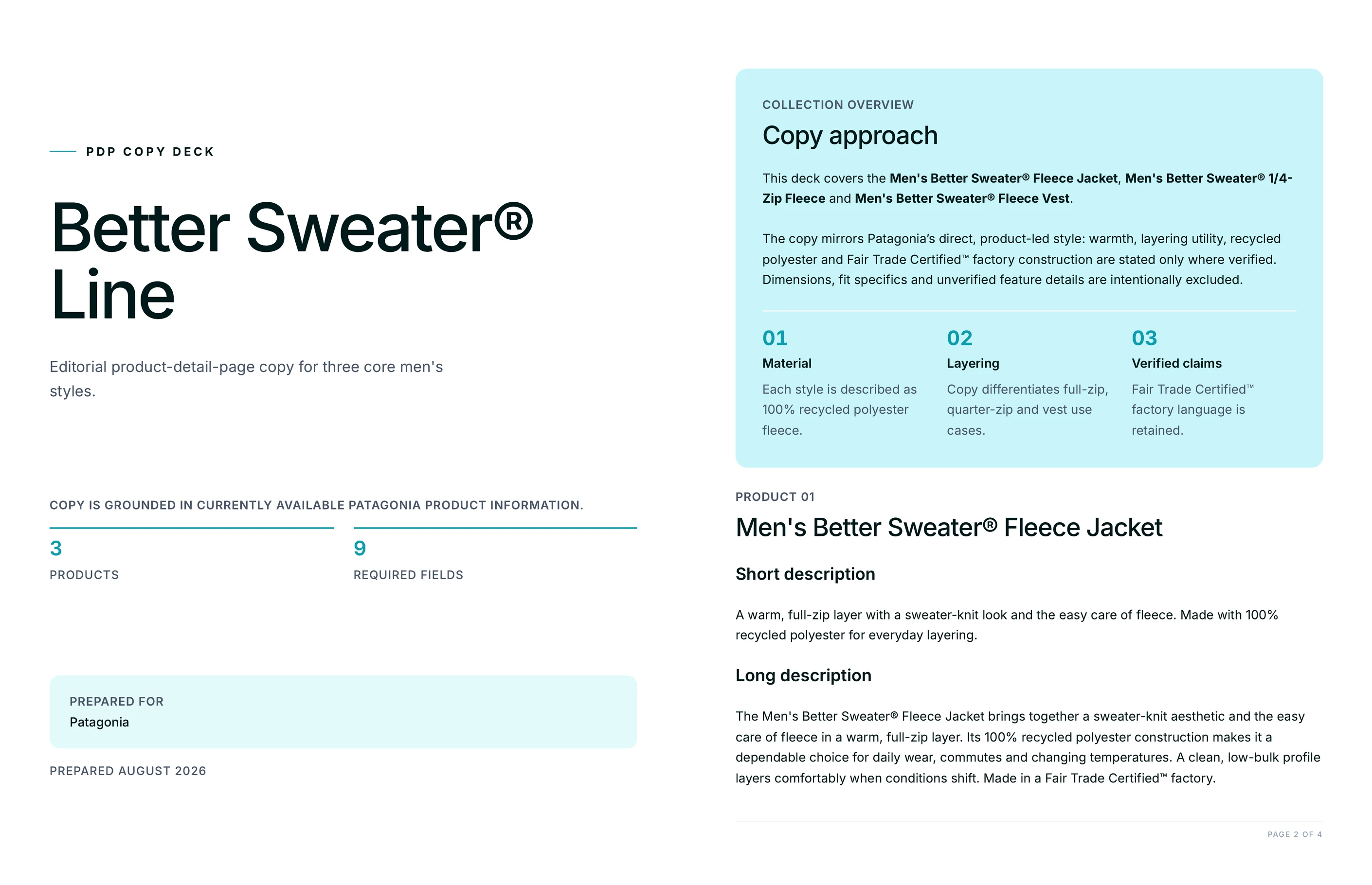
Name the client, collection, and products. Juma verifies live product details, writes full PDP copy, and delivers a branded PDF plus an import-ready CSV.

Give Juma the brand, the collection, and the products that need copy. Before writing a word, it verifies each product on the live site: names, materials, dimensions, and the brand's own product language. Every claim in the copy traces back to a source page, and unverified material or sustainability claims stay out.

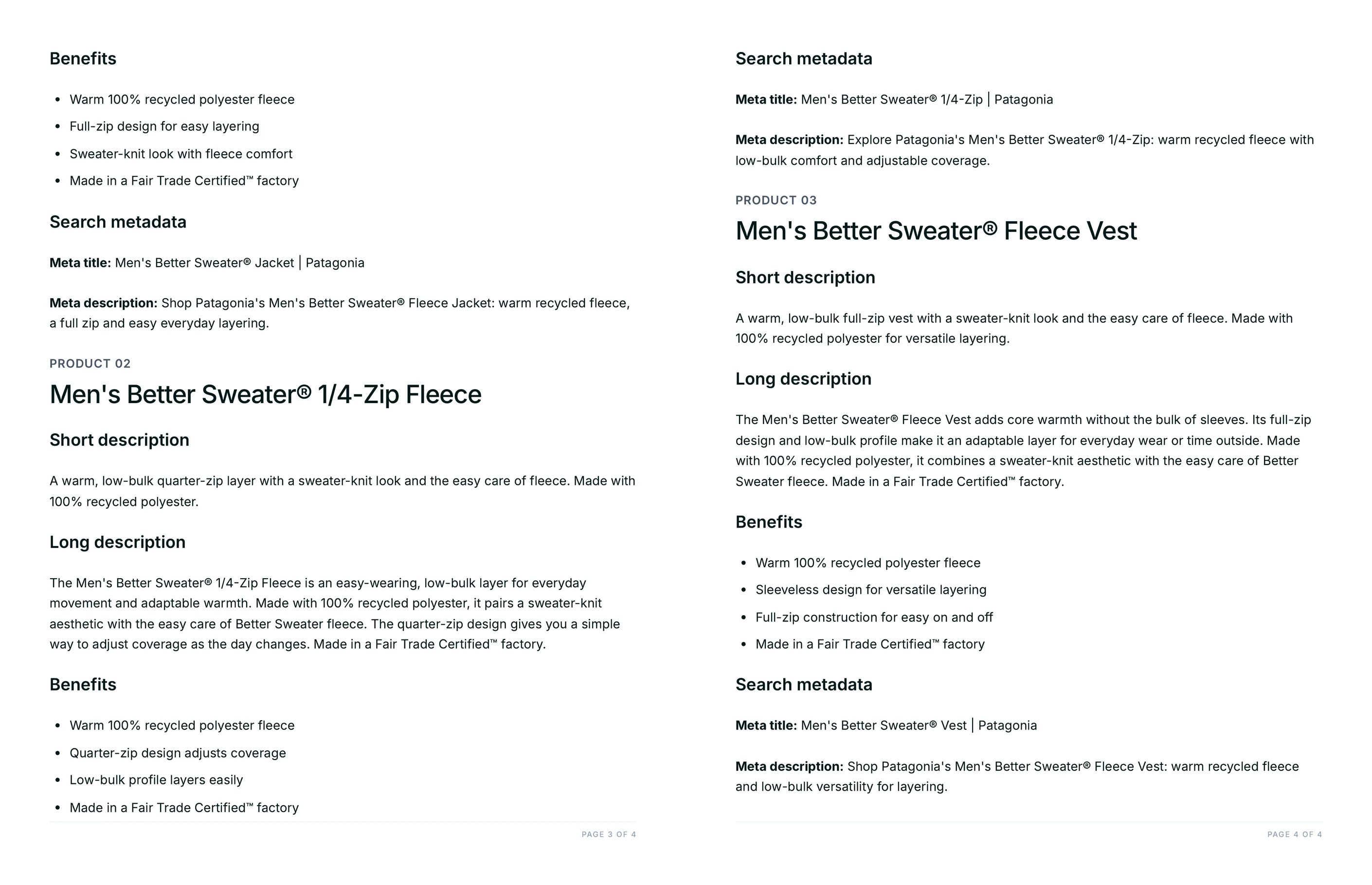
The result is one complete copy set per product: title, short and long description, benefit bullets, meta title, and meta description, packaged as a branded PDF for client review and a CSV built for store import. It is one of the Juma Flows that 400+ marketing teams use to move catalog work from days to a working session.

1

Write PDP copy for a product collection

Thank you! Your submission has been received!
Oops! Something went wrong while submitting the form.
Try This Flow

Example Flow result

Hide details
  • Name every product. The product list sets the CSV rows and the PDF sections. "The sofa, armchair, and coffee table" produces three complete copy sets; "the new collection" makes Juma pick for you.
  • Paste product URLs for brand-new launches. If the products are not on the live site yet, give Juma the staging or press URLs, or paste the spec sheet, so the copy stays grounded in real details instead of guesses.
  • Say which store platform you import into. Shopify, WooCommerce, and PIM templates use different column names. Name the platform and the CSV arrives ready to map.
  • Keep price and availability out. The Flow leaves both out of the copy by default, so the same descriptions work across markets, currencies, and promotions.
  • Ask for review mining on established products. When a product has real customer reviews, Juma can rewrite the description in the language buyers actually use. That version reads less like a catalog and more like a recommendation.
2

How do you rewrite product descriptions using real customer review language?

Rewrite an established product's description in the words customers already use. Juma reads the product's reviews, groups them into themes, and pulls the recurring phrases buyers repeat: how the product fits, when they reach for it, and the caveats they flag. The rewrite keeps the facts from the product page but swaps catalog language for customer language, and the sizing or usage warnings stay in, because copy that acknowledges them turns returns into informed purchases. You get the theme summary with example phrasing and the rewritten description together, so the team can see which review evidence shaped each line.

Prompt
Copy

Mine the customer reviews for these products and rewrite each description in the customers' own language. Group the reviews into themes with the phrases buyers repeat, note the caveats they flag, and keep every factual claim from the product page.

Try This Flow
3

How do you make the CSV match your store's import template?

Turn the default CSV into a file your store accepts on the first try. Name your platform and paste or upload the import template, and Juma reshapes the export to match: Shopify's Handle, Title, and Body (HTML) columns, a WooCommerce product CSV, or your PIM's field names. Benefit bullets move into the right column as formatted HTML, metadata lands in the SEO fields, and any required column the copy set does not cover gets flagged instead of silently left blank. The goal is a file the e-commerce manager imports without opening it in a spreadsheet first.

Prompt
Copy

Reformat the CSV to match our Shopify product import template: Handle, Title, Body (HTML), Vendor, Tags, and the SEO fields. One row per product, benefit bullets as an HTML list inside Body (HTML), and flag any required column you could not fill.

Try This Flow
4

How do you A/B test different description angles?

Test what actually sells instead of debating it. Juma writes two alternative long descriptions per product: one benefit-led, built around how the product feels in use, and one concise and spec-led for buyers who scan. Titles, bullets, and metadata stay fixed, so the test isolates body copy. Each variant comes labeled and CSV-ready, so the team can run it in the store's testing tool or split it across similar products and compare add-to-cart rates. When a winner emerges, ask Juma to apply that angle across the rest of the catalog.

Prompt
Copy

Write two alternative long descriptions for each product: version A benefit-led and sensory, version B concise and spec-led. Keep titles, bullets, and metadata unchanged, and label the variants so we can A/B test body copy only.

Try This Flow
5

How do you keep descriptions consistent across a whole catalog?

Extend the copy set from three products to the whole line without the voice drifting. Paste the next batch of products, or upload the catalog export, and Juma applies the same structure, tone, and field set to every row. Products it can verify on the live site get fully grounded copy; products it cannot verify come back flagged with what is missing rather than padded with invented details. Every batch keeps the same CSV schema, so each new file appends cleanly to the last import and the PDF deck grows by section instead of starting over.

Prompt
Copy

Here is the next batch of products from the catalog. Apply the same voice, structure, and field set to each one, flag any product you could not verify on the live site, and append the results to the same CSV schema.

Try This Flow

Set up your client project: brand voice, product specs, and your import template

A Juma Project is a shared space where the team stores everything Juma needs to know about a client. Create one project per client or per store, add context as you go, and Juma uses what is relevant every time the team runs a flow. The more the team adds over time, the sharper every copy set gets.

What to add

Brand Voice Guide

The client's tone, vocabulary, phrases to avoid, and a few sentences that sound exactly like them. With a voice guide in the project, every description across every batch reads like one writer produced it. Without one, Juma extracts the voice from the brand's live site during research.

Product Spec Sheets

The catalog export, line sheet, or spec document with materials, dimensions, care instructions, and article numbers. This is what grounds copy for products that are not on the live site yet, and it is the source Juma trusts for claims the website does not confirm.

Top-Performing PDPs

Two or three existing product pages that convert well, saved as links or text. Juma reads them as the structural benchmark: how long the descriptions run, how technical the bullets get, and how much personality the brand allows on the page.

Store Import Template

The CSV template your platform actually accepts, with the exact column names. When it is in the project, every batch arrives pre-mapped to your store instead of in the default schema.

Guide Juma with project info

Add a short description to each knowledge item in the project's info field so Juma knows what each file contains and when to use it. For example:

  • Brand Voice Guide: "Client tone and vocabulary rules. Apply to all customer-facing copy."
  • Product Spec Sheet: "2026 spring line sheet. Source of truth for materials and dimensions."
  • Import Template: "Shopify product CSV headers. Match this schema on every export."
Juma Logo
Turn product specs into PDP copy that converts

Frequently Asked Questions

How much time does this Flow save compared to writing product descriptions manually?

A collection of three products goes from roughly a day of writing, spec-checking, and formatting to one working session. Juma verifies the product details, writes every PDP field, and packages the PDF and CSV in a single run, so the team's time goes to review instead of drafting.

The manual version of this job is rarely just writing. It means pulling specs from a line sheet, checking them against the site, drafting each field to different length limits, keeping the voice consistent across products, and then reformatting everything for the store import. The Flow runs those stages as one pass, and batches of twenty products take the same review effort as batches of three.

What does the import-ready CSV include?

One row per product, with columns for title, short description, long description, benefit bullets, meta title, and meta description. Bullets are pipe-delimited for PIM mapping, the file is UTF-8 and comma-delimited, and Juma reshapes it to your store's own import template on request.

The CSV is the working file; the branded PDF that arrives with it is the review copy. Stakeholders read and mark up the PDF, the approved changes get applied once, and the CSV is what actually enters Shopify, WooCommerce, or the PIM. Keeping the two in sync is part of the Flow, not the team's job.

How does Juma keep product claims accurate?

Juma writes from verified sources: the live product pages, the URLs you provide, or the spec sheet in your project. Materials, dimensions, and care details come from those sources, and claims it cannot verify, like sustainability certifications, stay out of the copy until you confirm them.

That restraint is deliberate. An invented "FSC-certified" or a wrong fabric blend on a product page is a compliance problem, not a typo. When a detail is missing, the copy set flags the gap and leaves the field for validated input rather than filling it with something plausible.

Can Juma match our brand voice?

Yes. Add a brand voice guide or a few top-performing PDPs to the Juma project and every description follows them, across products and across batches. Without project knowledge, Juma extracts the voice from the brand's live site during research. Strategy, taste, and judgment stay human: the team reviews the PDF before anything reaches the store.

Voice matching works best with examples rather than adjectives. Three sentences the brand would actually publish teach Juma more than a page of "warm but authoritative" descriptors, which is why the project section above asks for real PDPs alongside the voice guide.

Does this Flow work for marketplaces like Amazon?

Yes. Ask for the marketplace format in the prompt and Juma restructures the copy set to match: Amazon listings swap the long description for five benefit bullets and backend search terms, while the verified product facts stay unchanged.

Marketplace and store copy can come out of the same run. One CSV for the brand's own store, one file in the marketplace's format, both grounded in the same verified product details, so the catalog tells one story wherever a customer finds it.

Don't take our word for it

Ask AI about us

400+ marketing teams trust Juma. ChatGPT, Claude, and Perplexity know why. Ask them.

Ready when you are

What's on your plate today?

Start typing a task and Juma will figure out the rest.

Thank you! Your submission has been received!
Oops! Something went wrong while submitting the form.