Set up your client project: the collection map, the last audit, who can change what, and the content standards
Teams build one Juma Project per client and add context over time. A Webflow audit benefits from four items in particular, and the first one is what turns "the integrations template is thin" into "the integrations template is thin across 48 live URLs."
What to add
The site's collection map
Which CMS collections exist, how many items each one holds, and the URL pattern each template publishes to. With it in the project, every template finding arrives with a real affected-URL count instead of an estimate read off an archive page that only shows the first screenful.
The last audit and what shipped from it
The previous backlog with its closed rows marked. The new audit then reads as a diff: what the last round of template edits actually changed, what reopened after a publish, and what has been sitting in Later for three sprints and should either be done or dropped.
Who can change what in Webflow
Who holds Designer access, who only has the Editor, whether the site is on a plan that allows custom code in the page head, and who reviews before a publish. The backlog then assigns each fix to someone who can actually make it rather than to a role that does not exist on this account.
Brand and content standards
Title and meta conventions, how the client names their own products, and the heading patterns the site already uses. New titles and descriptions written during the fix pass come out in the client's existing conventions instead of introducing a second style across half the collection.
Guide Juma with project info
Add a short description to each knowledge item in the project's info field so the right file gets picked for the right task. For example:
- Collection map: "Every CMS collection, its item count and its URL pattern. Use it to count affected URLs on template findings."
- Last audit and shipped fixes: "The previous backlog with closed rows marked. Compare new findings against it."
- Webflow access and plan: "Who can edit what, and what the plan allows. Use it to assign each fix an owner."
- Brand and content standards: "Title and meta conventions and product naming. Apply to every title and description written here."
Find the one template fix that repairs a hundred pages
Frequently Asked Questions
What does the Webflow SEO audit include?
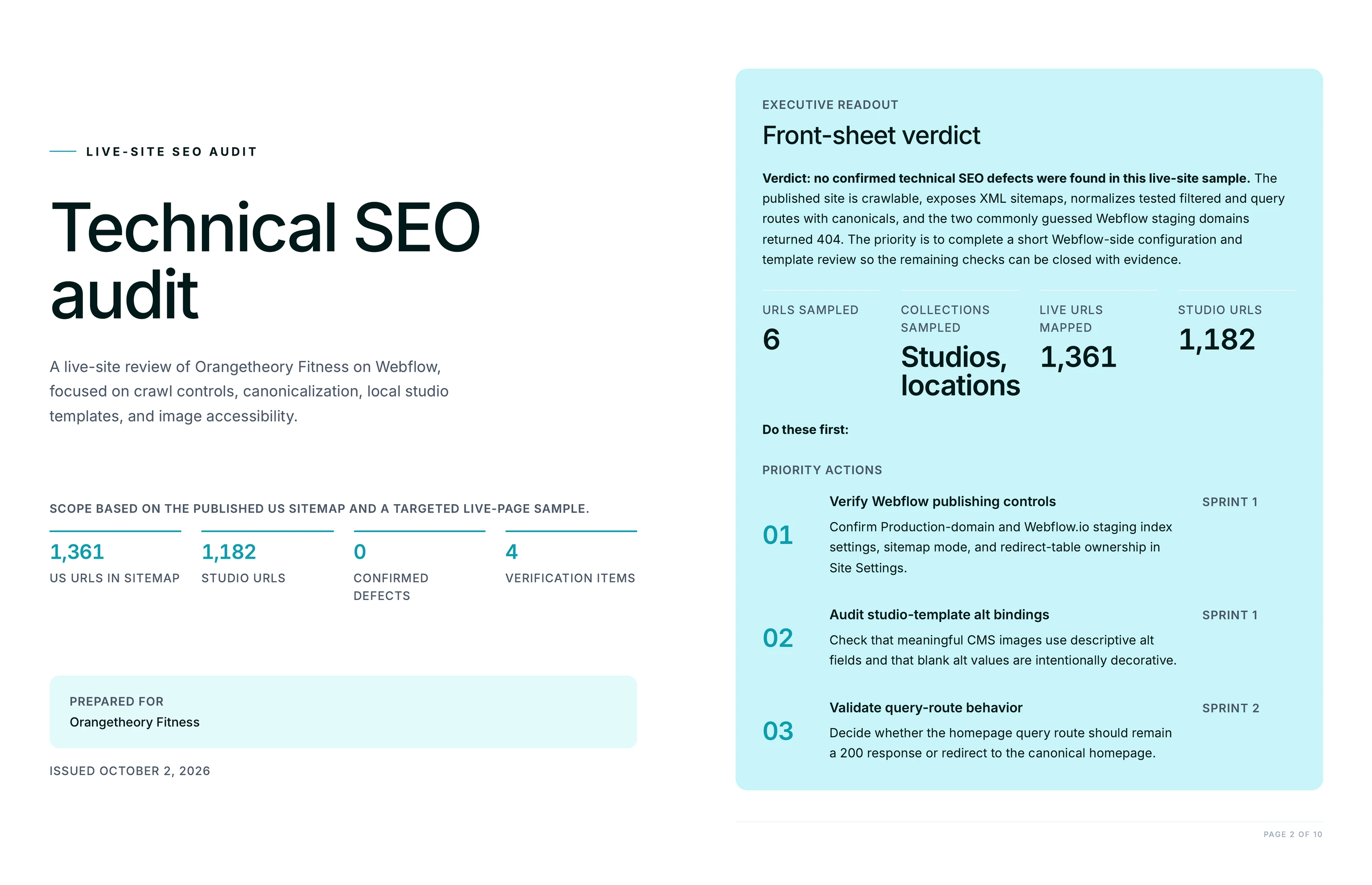
Two files. A branded PDF opening with a one-page front sheet that carries the verdict, the URLs sampled and the collections they came from, the total live URLs affected and the three fixes to do first, then the findings split into template-level and page-level. Alongside it, an editable XLSX backlog with one row per fix.
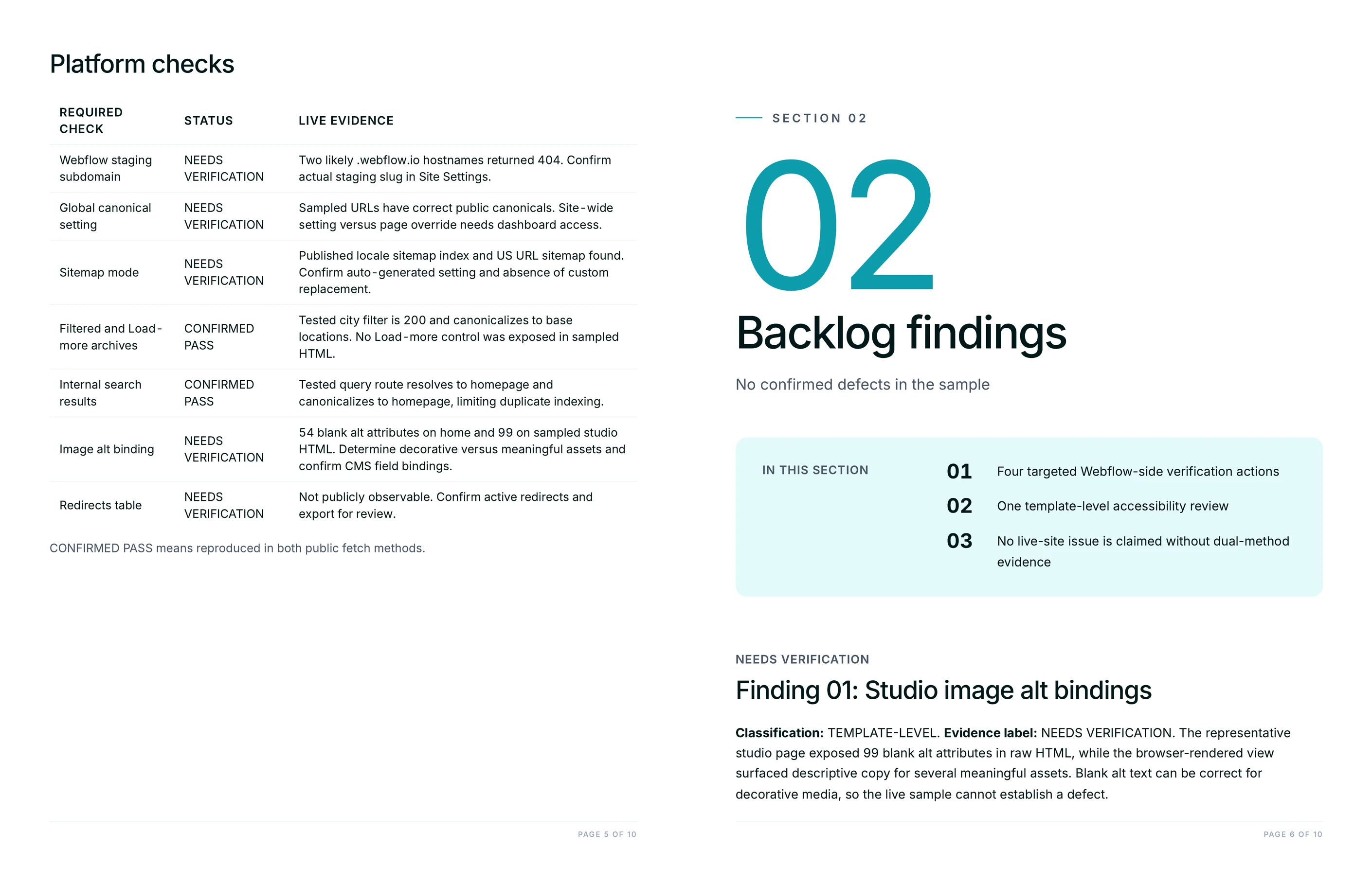
Each template-level finding states how many live URLs carry the defect and how that count was reached, from the sitemap or from the collection archive. Each fix names where it gets made: the Designer element and which template, Page Settings > SEO, the CMS field binding, Site Settings > SEO or Publishing, an HTML embed inside the Collection List item, or a developer ticket. Every row is scored for severity against effort and tagged Sprint 1, Sprint 2 or Later.
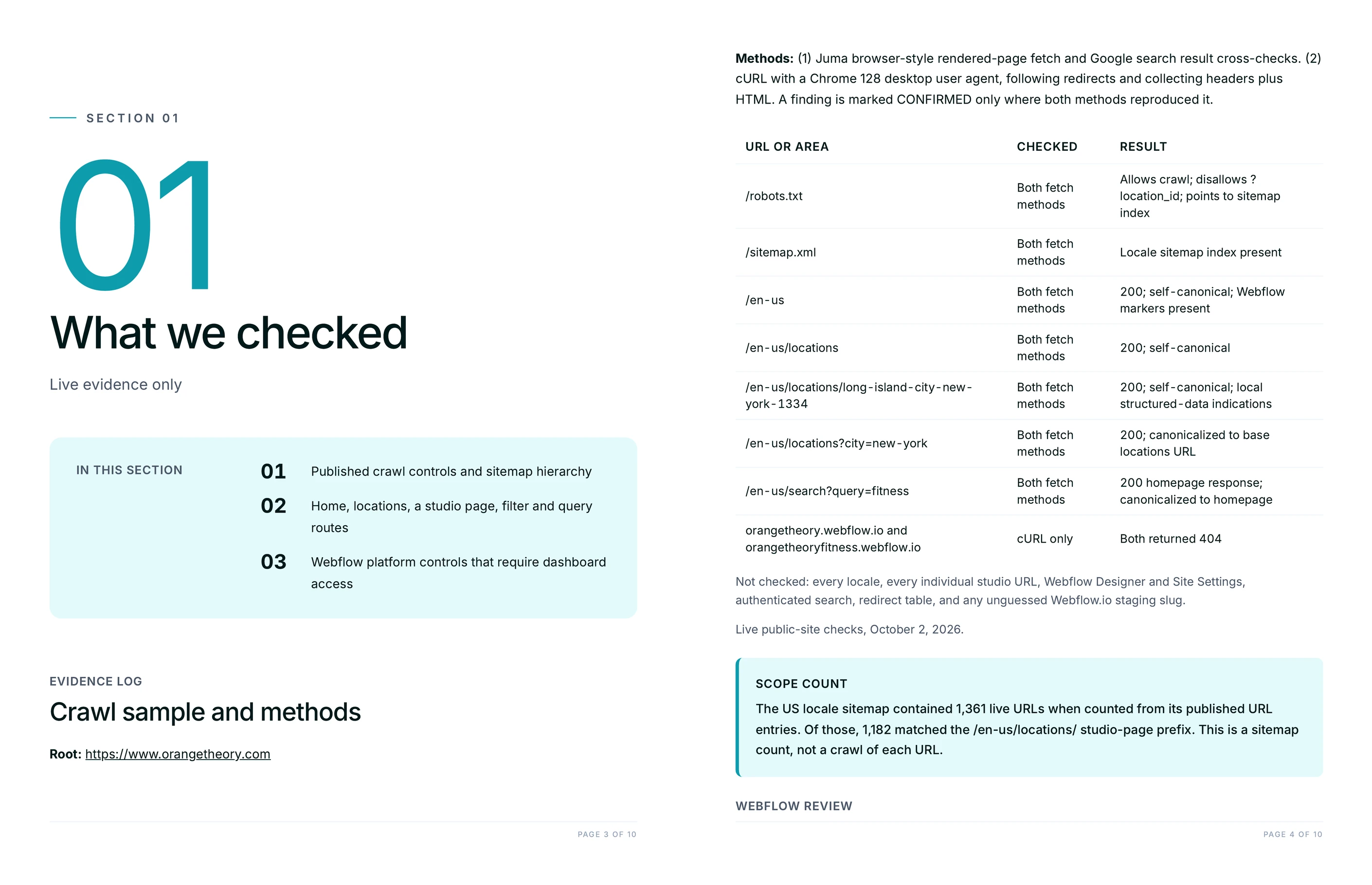
The audit also states its own sample: the URLs it checked and the ones it did not. An audit that does not bound its sample cannot be defended in a client call, and a finding on two pages presented as a site-wide pattern is the fastest way to lose the room.
Does this Flow need access to the client's Webflow Designer?
No. The audit works from the published site: robots.txt, the sitemap, the rendered HTML of the collection templates and the archive pages. That means it runs on a prospect's site before any contract is signed, and on a client project nobody has been invited to yet.
Designer access changes what happens next, not what the audit can see. The fixes name the panels to open, so whoever holds access can work straight down the backlog. Adding the collection map and the access list to the client's Juma Project is what sharpens the affected-URL counts and puts a real owner on each row.
How is this different from running a generic SEO crawler on a Webflow site?
A generic crawler reports per URL, so one template defect arrives as forty-eight identical rows and the reader has to work out that they are the same fix. This audit groups by cause instead: one finding, the count of URLs behind it, and the single edit that closes all of them.
The fixes are also written in Webflow's own terms. A crawler says "multiple H1 elements detected." This audit says which heading in which collection template was split into separate H1 elements in the Designer, and that the fix is one H1 with the CMS field as a styled span inside it. It checks the things that are specific to the platform too: the .webflow.io staging subdomain's indexability, the global canonical setting, auto-generated against custom sitemap, filtered and Load-more archives, the search results page, alt text still bound to the image filename, and the redirects table.
How much time does this save compared with auditing a Webflow site by hand?
Across Juma, teams report 60% faster workflows and 50+ hours saved monthly. A manual Webflow audit is slow in a specific place: proving that a defect is template-level rather than page-level means opening item after item in the same collection and comparing rendered source. That comparison is what gets automated here.
What does not get automated is the judgment. Deciding whether to rebuild a collection's field model or leave it alone for a quarter is a call about the client's roadmap, their team's capacity and what the next sprint is already carrying. Juma augments the team, it does not replace it: the audit brings the evidence and the counts, the person brings the decision, and every output gets human review before it reaches a client.
Does it work on a Webflow site that barely uses CMS collections?
Yes. On a site built mostly from static pages the template-level section comes back short and the page-level section carries the weight, which is the correct shape for that site rather than a failure of the audit.
The platform-level checks matter just as much there. Staging-subdomain indexability, the global canonical, the sitemap setting, the search page and the redirects table are site-wide and apply whether the site has forty collections or none. On a static Webflow build the components and symbols take the place of collection templates: a heading or a meta pattern wired into a reused component still repeats everywhere it appears, and the audit counts those the same way.






.webp)
