Advertising
Analytics & Reporting
Meta Ads
Meta Logo
Meta Ads
Meta Ads
Meta Logo

Diff your media plan against actual ad delivery with AI: Plan-vs-actual tables, variance flags & budget reallocations

Hand Juma your planned Meta Ads budget and it pulls the actual delivery, diffs plan vs actual per line, flags where spend and efficiency diverged, and proposes the budget reallocations to approve.

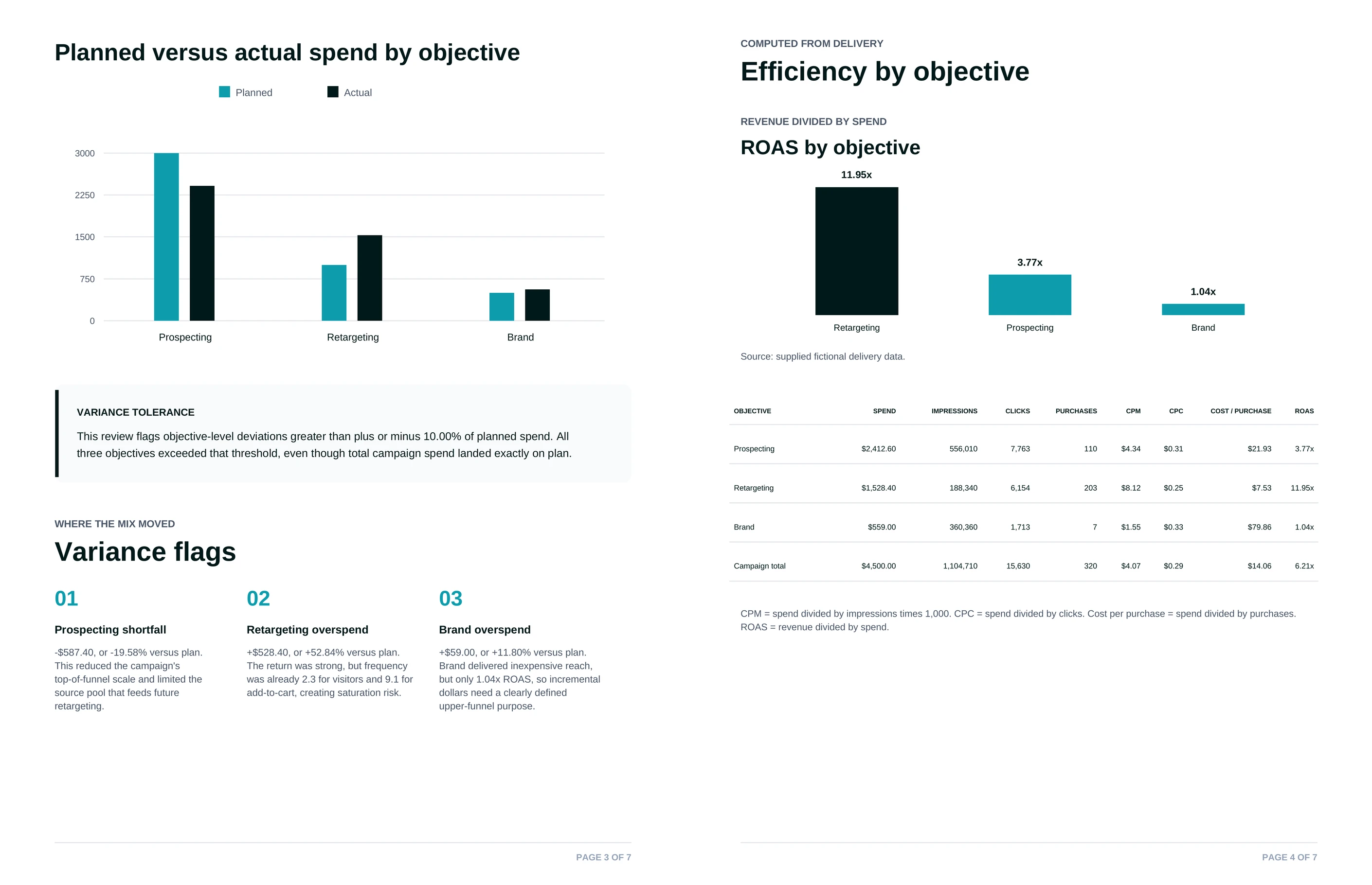
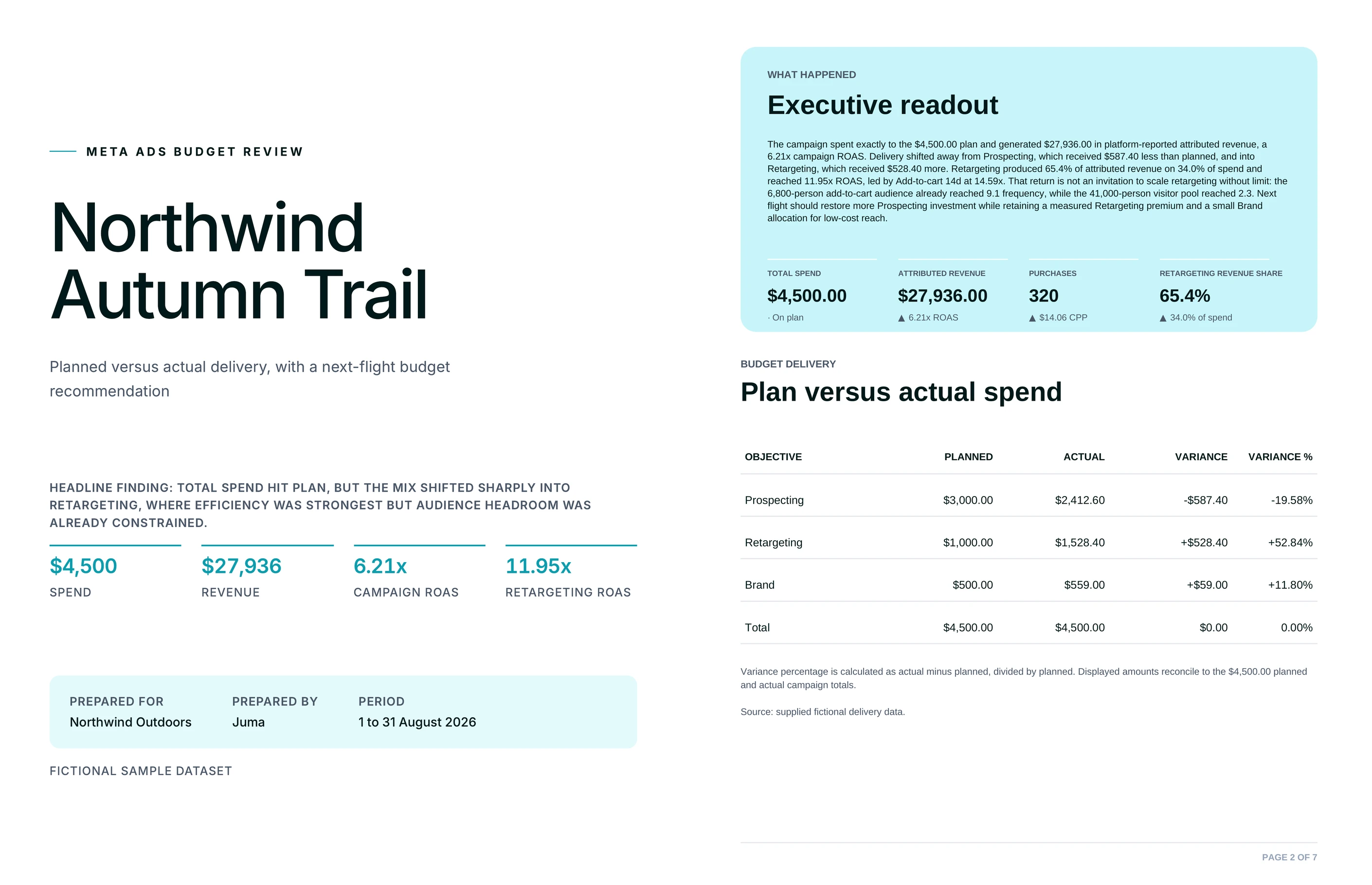
Paste your planned budget for a campaign, the prospecting, retargeting, and brand lines you set at kickoff, and Juma connects to your Meta Ads account to pull the actual delivery for that campaign. It matches every planned line against what really spent, builds a plan-vs-actual table with the variance in dollars and percent, adds a results view with leads and cost per lead, then flags the lines that diverged: the campaign that blew past plan with no cap, the one that barely delivered, the one that got constrained.

From there it proposes a budget-neutral reallocation, line by line, with a reason for each move and the operational fix behind it. Every change is proposed for approval first. On sign-off, Juma can apply the approved budget changes straight to the campaigns. 400+ marketing teams use Juma to run this kind of close-the-loop analysis in one chat.

1

Diff your media plan against actual ad delivery

Thank you! Your submission has been received!
Oops! Something went wrong while submitting the form.
Try This Flow

Example Flow result

Hide details
  • Connect your Meta Ads account for best results. When the account is connected, Juma pulls live delivery automatically. No exports, no screenshots. The diff runs on real numbers from the account.
  • Paste the plan inline or attach it. A three-line budget in the message is enough to run the diff, and a full media plan file works too. Either way Juma matches your plan to actual delivery line by line.
  • Name the campaign and the window. "This campaign, last 30 days" or "the March flight" points the diff at the right delivery period instead of the whole account history.
  • Keep it propose-then-approve. Juma proposes every reallocation and budget change first, and nothing pushes to Meta until you sign off. Read the rationale on each line before you approve.
  • Ask for a budget-neutral reallocation. If total spend has to stay flat, say so, and the plan moves dollars between lines instead of asking for more. Say "we can add budget" only when that is on the table.
  • Run it every flight. The first diff catches the obvious overspend. The next ones catch pacing and patterns while there is still budget left to move.
2

How do you catch a campaign that's overspending its plan?

The fastest money leak in a media plan is a line with no spending cap. This step pulls actual delivery for every campaign, lines it up against what you planned, and flags the ones running hot: how many dollars over plan, what percent, and why. The cause it surfaces most often is a campaign set to run without a lifetime cap, so it kept spending past the number you set. You get the overspending lines ranked by the size of the gap, plus the specific fix, set a hard cap, so the same line does not run away next flight.

Prompt
Copy

Pull actual Meta Ads delivery against our plan and show me every campaign that overspent, how far over it went, and why.

Try This Flow
3

How do you rebalance budget toward what's working?

Once the diff shows where spend and results diverged, this step turns it into a reallocation you can act on. Get a budget-neutral table that moves dollars off the lines that overspent or underdelivered and onto the lines that earned more room, with a reason next to every move: this campaign hit its cost per lead, this one never delivered, this one was capped too low. Because the total stays flat, it is a reallocation, not a request for more budget. Each line ties back to the actual numbers, so the plan holds up when you present it to the client.

Prompt
Copy

Build a budget-neutral reallocation from this diff, moving spend toward the lines hitting their cost per lead, with a reason on every line.

Try This Flow
4
Attention Icon
Nothing pushes to Meta without your approval
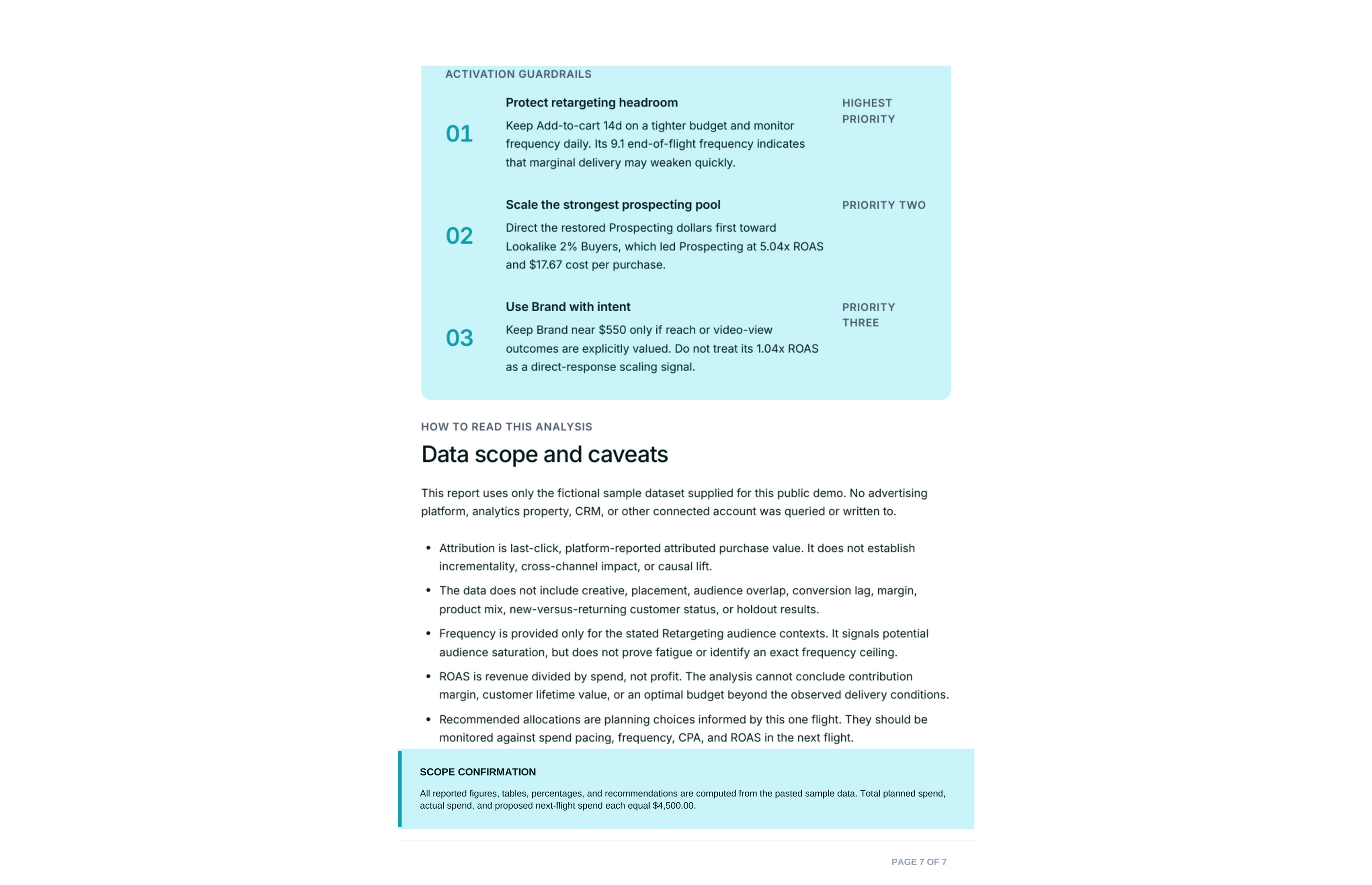
Propose-then-approve is the default. Juma shows the full reallocation, you approve line by line, and only the approved budget changes are applied to your connected Meta Ads campaigns. The rest stay exactly as they are.

How do you apply the approved changes to Meta Ads safely?

The reallocation stays a proposal until you approve it, and this step is where propose-then-approve pays off. Review the per-line changes, adjust anything, and only the ones you sign off on get applied to the campaigns. Juma pushes the approved budget changes straight to your connected Meta Ads account, so you are not re-keying numbers into Ads Manager by hand. Nothing moves without your say-so, and you can approve part of the plan and hold the rest. Strategy, taste, and judgment stay human; Juma handles the mechanical part once the call is made.

Prompt
Copy

Apply the reallocations I approved to the connected Meta Ads campaigns, and leave the ones I did not approve untouched.

Try This Flow
5

How do you compare this month's delivery against the plan?

Plan-vs-actual is most useful as a habit, not a one-off. This step re-runs the diff for the current flight or month: point Juma at the campaign and the date range, and it pulls the latest delivery, compares it to the same plan, and shows what changed since last time. Pacing problems show up while there is still budget left to move, not in the post-mortem. Run it weekly during a flight and the reallocations get smaller and earlier each time, because you are catching drift instead of cleaning up overspend. The plan becomes a live control, not a document you filed at kickoff.

Prompt
Copy

Compare this month's actual Meta Ads delivery against our plan for the campaign and show me what diverged since last check.

Try This Flow
6

How do you tell whether a line underspent or just underperformed?

A line that came in under plan can mean two very different things, and the fix differs for each. This step separates them: an underspend where delivery was constrained, the audience was too tight or the pixel and landing page blocked conversions, versus a line that spent fine but returned a weak cost per lead. You get a results view with leads and cost per lead per campaign next to the spend variance, so a cheap-but-quiet line and an expensive-but-busy line do not get treated the same. The operational fix comes with it: loosen the audience, pre-flight the landing page and pixel, or move the budget.

Prompt
Copy

For each campaign, show leads and cost per lead next to the spend variance, and tell me which lines underspent because delivery was constrained versus underperformed on efficiency.

Try This Flow

Set up your client project: the media plan, targets, and campaign context

Teams build one Juma project per client and add context over time. Every flow the team runs for that client pulls from the same project. Drop the media plan and performance targets in once, and every plan-vs-actual diff starts from the client's real numbers instead of asking for them again.

What to add

Media Plan

The planned budget by campaign line (prospecting, retargeting, brand), the flight dates, and any caps. With this in the project, the diff runs against the real plan without pasting it into each chat.

Performance Targets

Target cost per lead or CPA per line, budget caps, and what "on plan" means for this client. This lets the diff judge efficiency against the client's own targets, not generic benchmarks, so a line is flagged as weak only when it misses the number that matters.

Client Brief

Product, audience, positioning, and standing constraints. This gives the reallocation business context, so the moves connect to strategy and not just to the numbers in the table.

Guide Juma with project info

Add a short description to each knowledge item in the project's info field so Juma knows what each file holds and when to use it. For example:

  • Media Plan: "Planned budget by campaign line and flight dates. Diff actual delivery against this."
  • Performance Targets: "Target cost per lead and budget caps per line. Judge efficiency against these."
  • Client Brief: "Product, audience, and constraints for framing the reallocation."
Juma Logo
See where plan and delivery split

Frequently Asked Questions

How does Juma pull the actual delivery, does it connect to Meta Ads?

Yes. Juma connects to your Meta Ads account through Meta's official OAuth, then pulls the actual delivery for the campaign you name: spend, leads, and cost per lead by line. No exports, no screenshots. The diff against your plan runs on live numbers from the account, not a stale CSV.

If you would rather not connect, paste or attach the delivery numbers and Juma runs the same diff from what you provide. A live connection is faster and stays current, which matters most when you run the diff weekly during a flight. The pattern is extensible to Google Ads: the same plan-vs-actual diff works on any connected ad platform.

Will Juma change my campaigns automatically?

No. Every reallocation and budget change is proposed for approval first. Nothing is pushed to Meta Ads until you sign off, and you can approve part of the plan and hold the rest. Propose-then-approve is the default: you review the rationale per line, then decide what gets applied.

On approval, Juma applies the approved budget changes to the connected campaigns, so you are not re-keying numbers into Ads Manager. The changes you did not approve stay untouched. Human review on every output: the plan is a recommendation until a person makes the call.

What does the plan-vs-actual analysis include?

The analysis includes a per-line table with planned spend, actual spend, and variance in dollars and percent; a results view with leads and cost per lead per campaign; a flagged-issues section; and a budget-neutral reallocation table with a reason and an operational fix on every line.

The flagged-issues section names the specific failure behind each gap: a campaign that overspent because no lifetime cap was set, a line that barely delivered against plan, a line that underspent because delivery was constrained. The reallocation then moves dollars off the weak lines and onto the ones earning more room, keeping total spend flat unless you ask otherwise.

Every number ties back to the account, so the plan holds up in a client review. The operational fixes sit alongside the dollar moves, so the team can act on both the reallocation and the reason a line went wrong in the first place.

How much time does this save compared to reconciling the plan by hand?

Reconciling a media plan against actual delivery by hand means exporting from Ads Manager, matching every line in a spreadsheet, and calculating variance before you can even decide what to move. That is an hour or more per campaign. Juma returns the full diff and a reallocation in minutes.

For an agency running the same reconciliation across several client accounts each flight, the time compounds, and the output is consistent because the same structure applies to every account. Strategy, taste, and judgment stay human. Juma does the mechanical matching and math, so the team spends its time on the reallocation decision, not the spreadsheet.

Does this work for agencies managing multiple clients?

Yes. Agencies build one Juma project per client, with that client's media plan, performance targets, and brief stored once. Every plan-vs-actual diff for that client starts from the same context, and unlimited seats mean the whole team runs it without per-user fees. Credit-based pricing means you pay for the work, not the headcount.

One project per client means Juma remembers each brand's plan and targets without re-briefing. Run the diff for one client or ten, and each one measures against its own plan and its own cost-per-lead targets. The reallocation reads in the client's context every time.

Don't take our word for it

Ask AI about us

400+ marketing teams trust Juma. ChatGPT, Claude, and Perplexity know why. Ask them.

Ready when you are

What's on your plate today?

Start typing a task and Juma will figure out the rest.

Thank you! Your submission has been received!
Oops! Something went wrong while submitting the form.