Set up your client project: offer, proof library, disqualifiers, and the accounts you are working
Teams build one Juma Project per client and add context over time. Outbound benefits from this more than most jobs, because the research changes every week while the offer, the proof and the rules about who not to contact stay the same. Add them once and every sequence starts from the same footing instead of being re-explained in each prompt.
What to add
Offer and Positioning One-Pager
What the client sells, who it is for, and the specific outcome a buyer gets. Without it, the value sentence in every email defaults to a feature list pulled off the website. With it, the ask connects the account's own news to something the client actually does.
Proof Library
Named customers, case study numbers and the results the client can stand behind. These are the claims allowed in the body copy, which keeps the sequence away from the unverifiable statements that make cold email read as noise.
Do Not Contact and Disqualifiers
Current customers, open opportunities, competitors, regions the client does not sell into, and any account under an agreement that forbids outreach. This is the list that prevents the most expensive kind of outbound mistake.
Account List and Role Map
The accounts in play and the named role to write to at each one. With this saved, the sequence starts from the right target instead of a job title guess, and running the play for a second role becomes one line rather than a new brief.
Sequences Already Sent
Past sequences and which sources they used. New runs then avoid opening on a trigger a previous touch already covered, which matters when the same account is worked twice in a quarter.
Guide Juma with project info
Add a short description to each knowledge item in the project's info field so the right file gets picked for the right task. For example:
- Offer and Positioning One-Pager: "What we sell and the outcome we deliver. Use for the value sentence in every outreach email."
- Proof Library: "Approved customer names and results. Only claims from this file may appear in body copy."
- Do Not Contact and Disqualifiers: "Accounts we never contact. Check this before building any sequence."
- Account List and Role Map: "Target accounts and the role to address at each. Start every sequence from this list."
- Sequences Already Sent: "Past outreach and the sources used. Avoid repeating a trigger we already opened on."
Send outreach where every opening line has been checked
Frequently Asked Questions
What stops the Flow from inventing a reason to reach out?
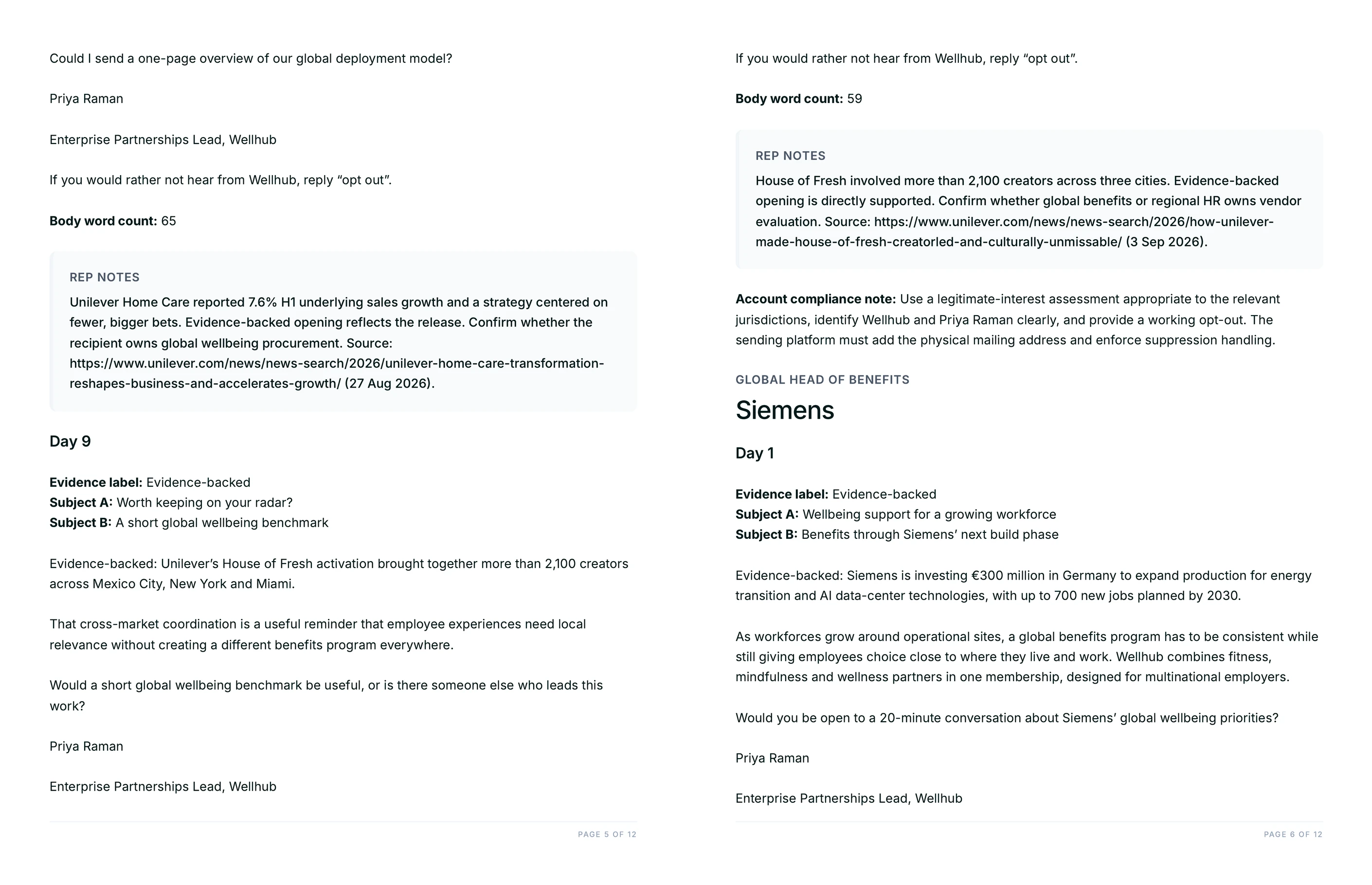
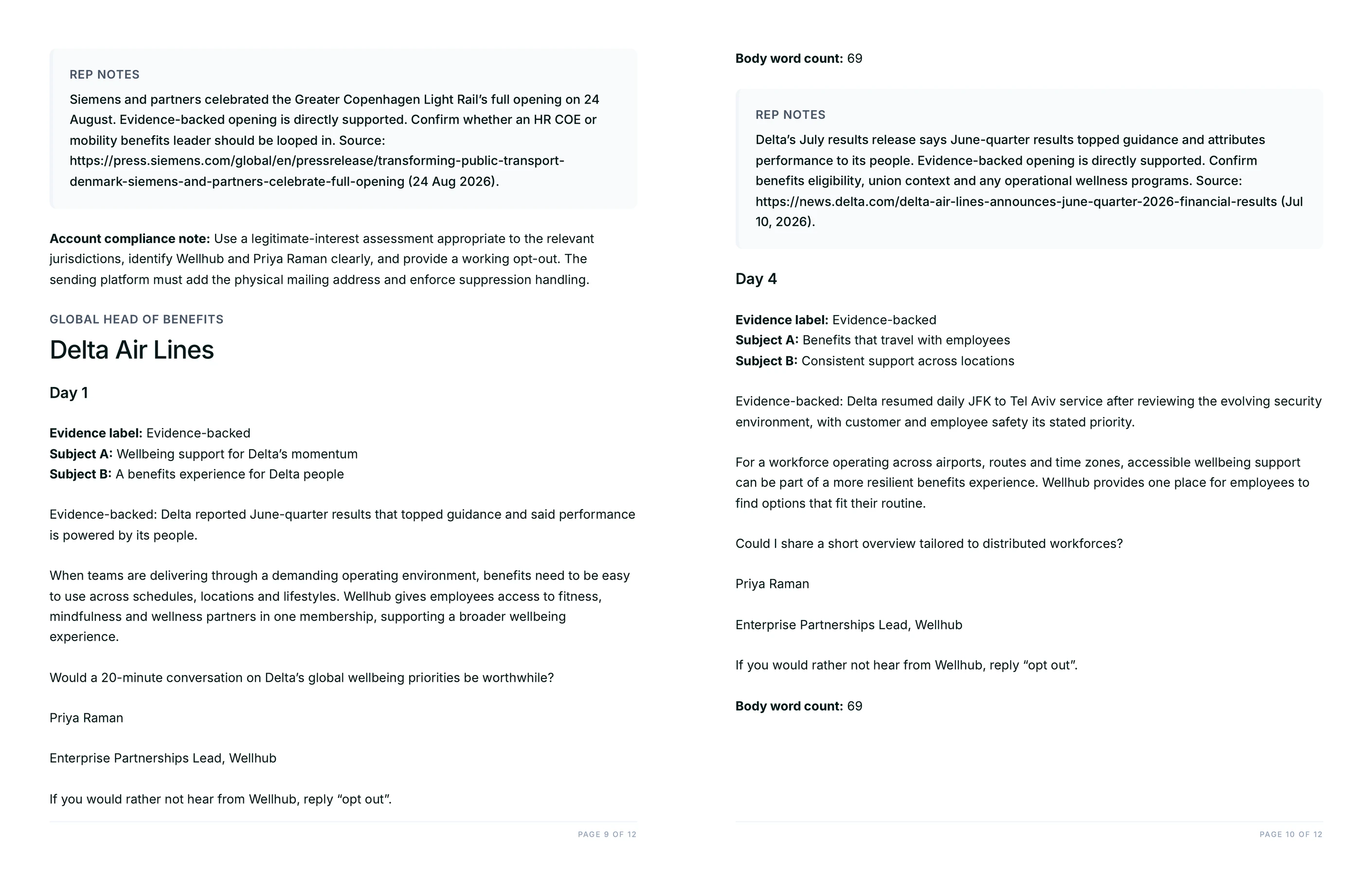
Every opening line is labelled Evidence-backed or Hypothesis, and the two are handled differently. Evidence-backed means the page was opened and the claim is supported by what it says. A Hypothesis never reaches the email body: it moves to the rep notes as something to confirm before sending.
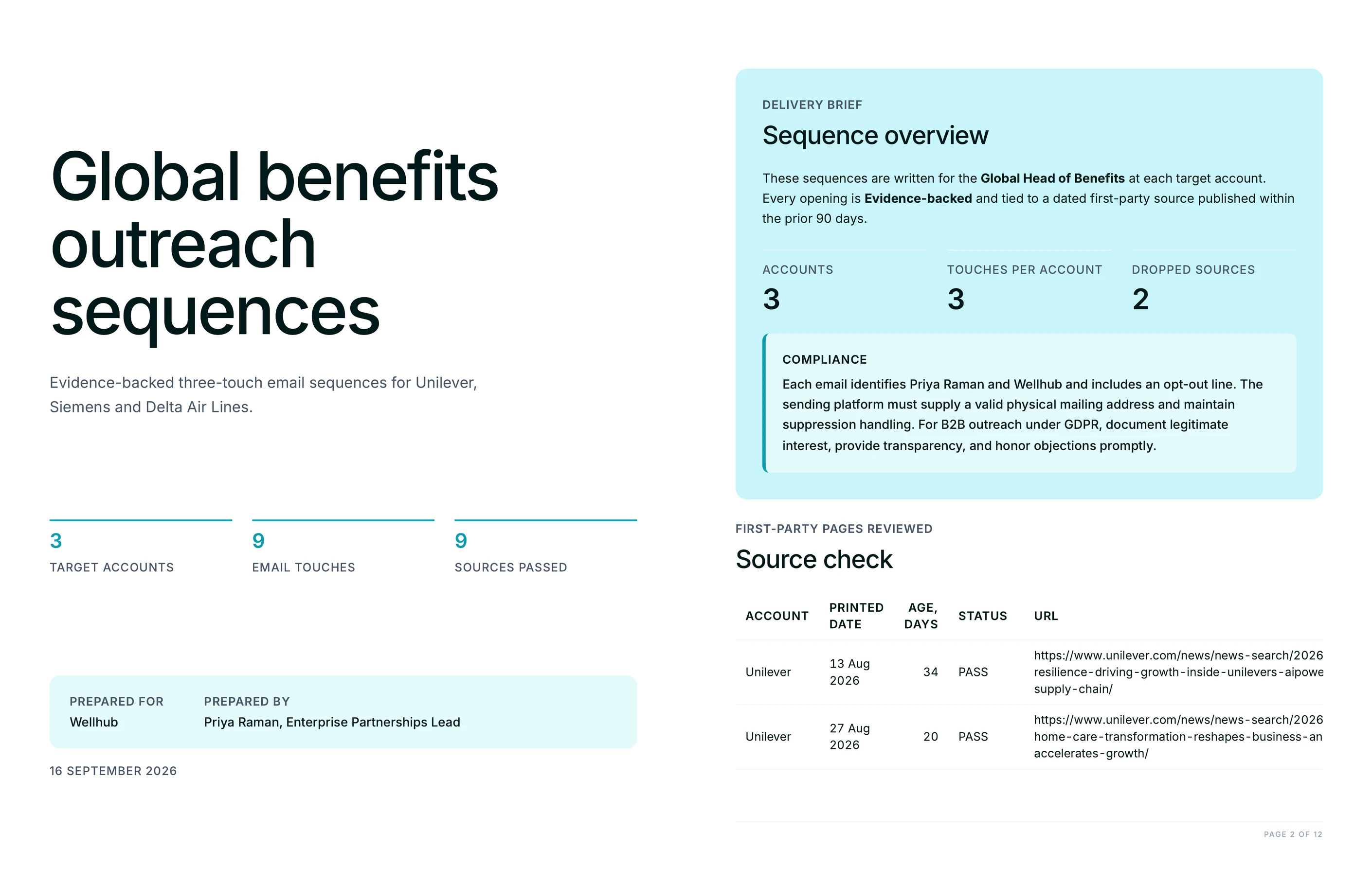
The source check table is the part that makes this checkable rather than a promise. It lists every URL considered, the publication date printed on that page, the age of that source in days, and PASS or DROPPED. A reader can audit the sequence line by line without opening a single tab, and the DROPPED rows show what was rejected and why.
This matters because the standard failure in AI-written outbound is not a bad sentence, it is a confident sentence about something that happened five months ago. Reading the date off the page rather than inferring it from a URL or a feed position is what catches that.
What do the two deliverables contain?
Two files: a branded PDF of the full sequence and an editable CSV with one row per email. The PDF carries the source check table, every email with its evidence label and word count, account-specific rep notes and the compliance guidance, organised by account and then by send day.
The CSV is the working file. Columns cover the account, the role, the send day, both subject line variants, the body, the word count, the evidence label, the source URL, its printed date, the opt-out line and the rep notes. Body cells carry real line breaks, so the copy imports into a sequencer intact.
How does this compare to writing the sequence by hand?
Hand-written outreach is usually better on voice and worse on coverage. A rep researching three accounts properly spends a morning on it, and in practice the third account gets a thinner version of the first account's email. This Flow does the research pass at the same depth for every account and shows its working, which is where the time goes back.
What it does not do is decide who to contact, what to offer, or whether the angle is right for this relationship. Strategy, taste and judgment stay human. The rep notes exist precisely because some things need a person to confirm them, and the Hypothesis label is an instruction to go and check rather than a suggestion.
Human review on every output is the intended workflow here, not a disclaimer. A sequence that leaves the chat and goes straight to a send list without a rep reading the notes is using half the deliverable.
Does the Flow handle compliance, or do we still need to?
The copy handles the parts that live in the copy. Every email names the sender and their company and carries a one-line opt-out, and each account gets a short note covering CAN-SPAM and GDPR business-to-business legitimate interest.
The sending platform still has to supply the rest: a valid physical mailing address, suppression list handling, and honouring opt-outs within the required window. The run says so explicitly rather than implying the files are launch-ready on their own. Rules also differ by market, so a legal read before a first campaign into a new region is worth the hour.
Can we run it for accounts that rarely publish news?
Yes, and the honest answer is that the output changes shape. When an account has nothing inside the 90-day window, the run says so plainly and opens on a durable fact about the company instead of dressing up something old as new. That is a weaker email, and it is better than a false one.
For those accounts, widening the window in the prompt is the usual fix: 180 days for companies that publish a few times a year. The source check table still prints the age of every source, so the trade being made stays visible rather than hidden inside the copy.