Set up your sales project: pipeline stages, discovery framework, and CRM conventions
Teams build one Juma Project for their sales motion and add context over time. Every run of this Flow pulls from the same project, so the proposed updates match how the team actually keeps HubSpot rather than a generic guess. If the project already exists, adding a few reference files means each post-call draft lands closer to ready and needs fewer corrections.
What to add
Pipeline & Stage Definitions
What each deal stage means and the criteria to enter it. Add this and the stage Juma proposes maps to how the team runs its pipeline, instead of a best guess from the transcript.
Discovery Framework
The qualification questions the team asks on every call, whether that's MEDDIC, BANT, or your own list. This shapes how notes and pain points are structured so they land in the fields HubSpot already tracks.
CRM Field Conventions
Required fields, custom properties, and naming rules. Add this and every proposed update follows the team's format, which keeps the CRM clean instead of introducing a second way of writing the same thing.
Product & Pricing Sheet
Packages, tiers, and price ranges. The value estimate Juma draws from the call lands in a sensible range when it can check what the team actually sells, and stays blank when pricing never came up.
Guide Juma with project info
Add a short description to each knowledge item in the project's info field so Juma knows what each file holds and when to use it. For example:
- Pipeline & Stage Definitions: "Our deal stages and what qualifies a deal for each. Always map the proposed stage to this."
- Discovery Framework: "The questions we ask on every discovery call. Structure the notes and pain points around these."
- CRM Field Conventions: "Our required HubSpot fields and naming rules. Follow these on every proposed update."
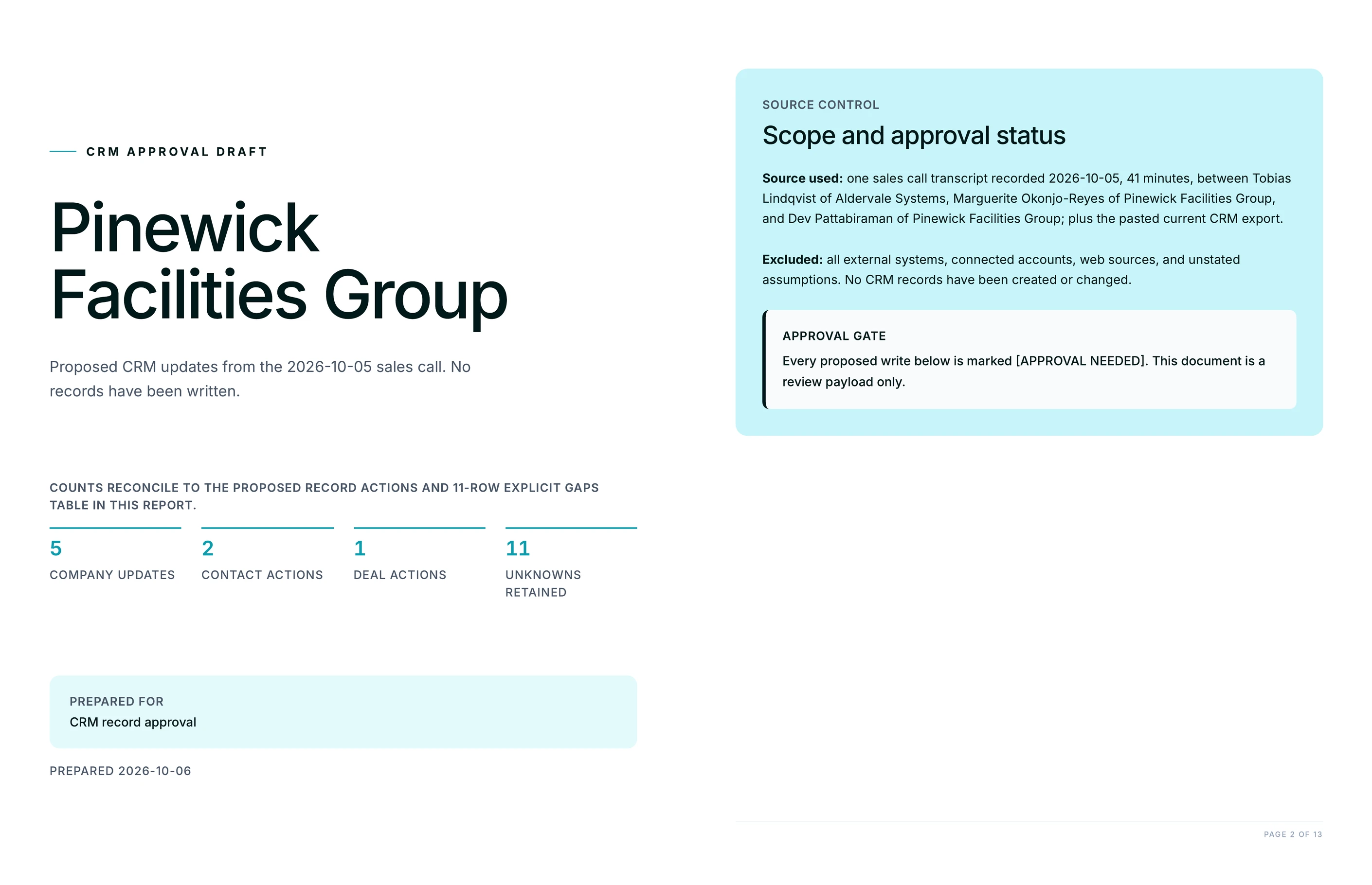
Turn your last call into CRM updates you approve
Frequently Asked Questions
How much time does updating your CRM after a sales call with Juma save?
Most reps lose 10 to 15 minutes per call on CRM admin, and many skip it entirely when the day is packed. Drafting the company, contacts, and deal straight from the transcript turns that into a two-minute review. Strategy, taste, and judgment stay human; the typing does not.
The saving compounds across a full week of calls. A rep taking five discovery calls a day recovers close to an hour of admin daily, and the records that used to get skipped now exist. For a team, that is the difference between a pipeline you can forecast from and one built on half-filled deals. The point is not just speed: it is that the CRM finally reflects what was actually said, because capturing it stopped being a chore the rep has to force themselves to do.
What does Juma propose after a sales call?
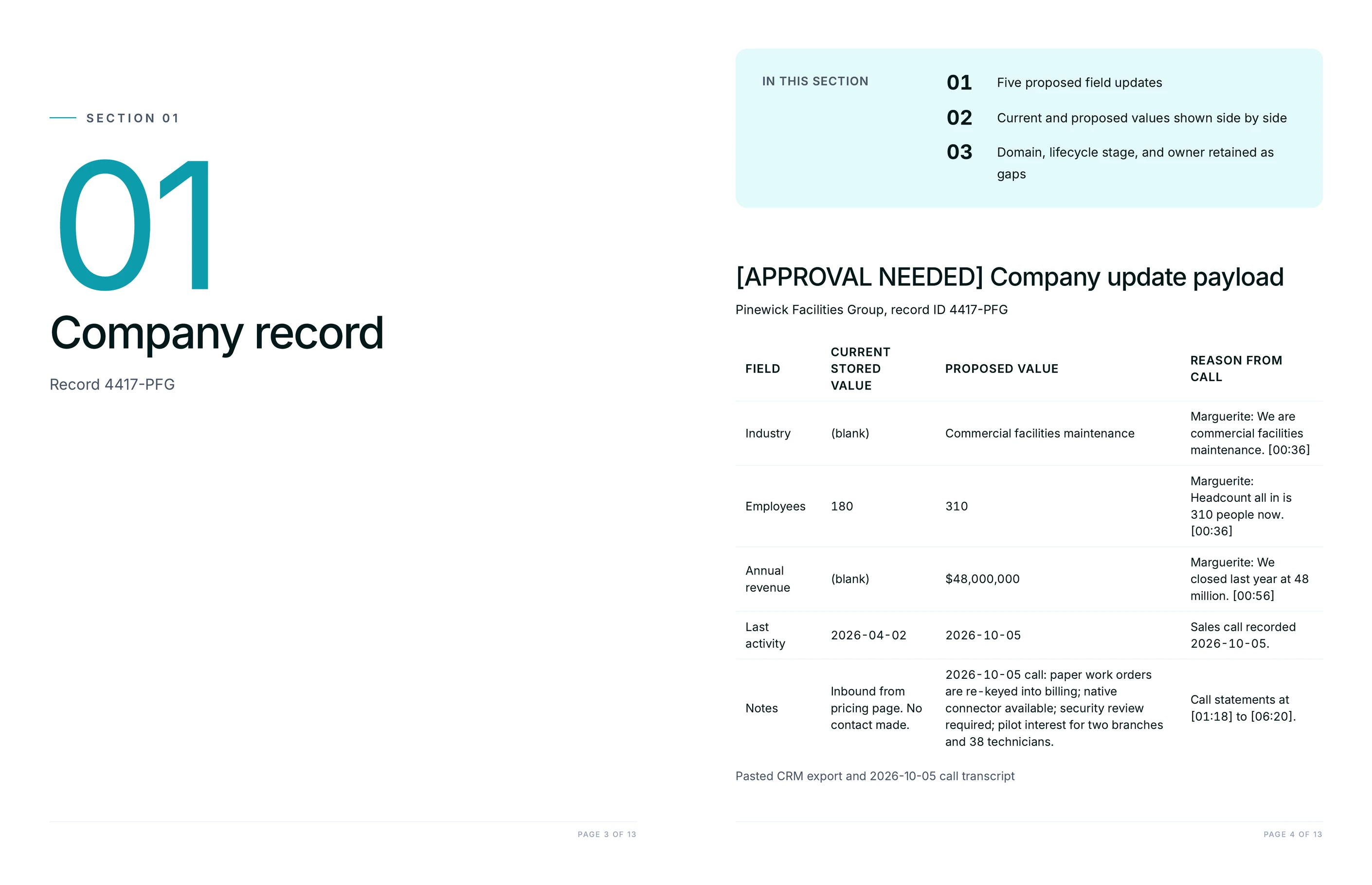
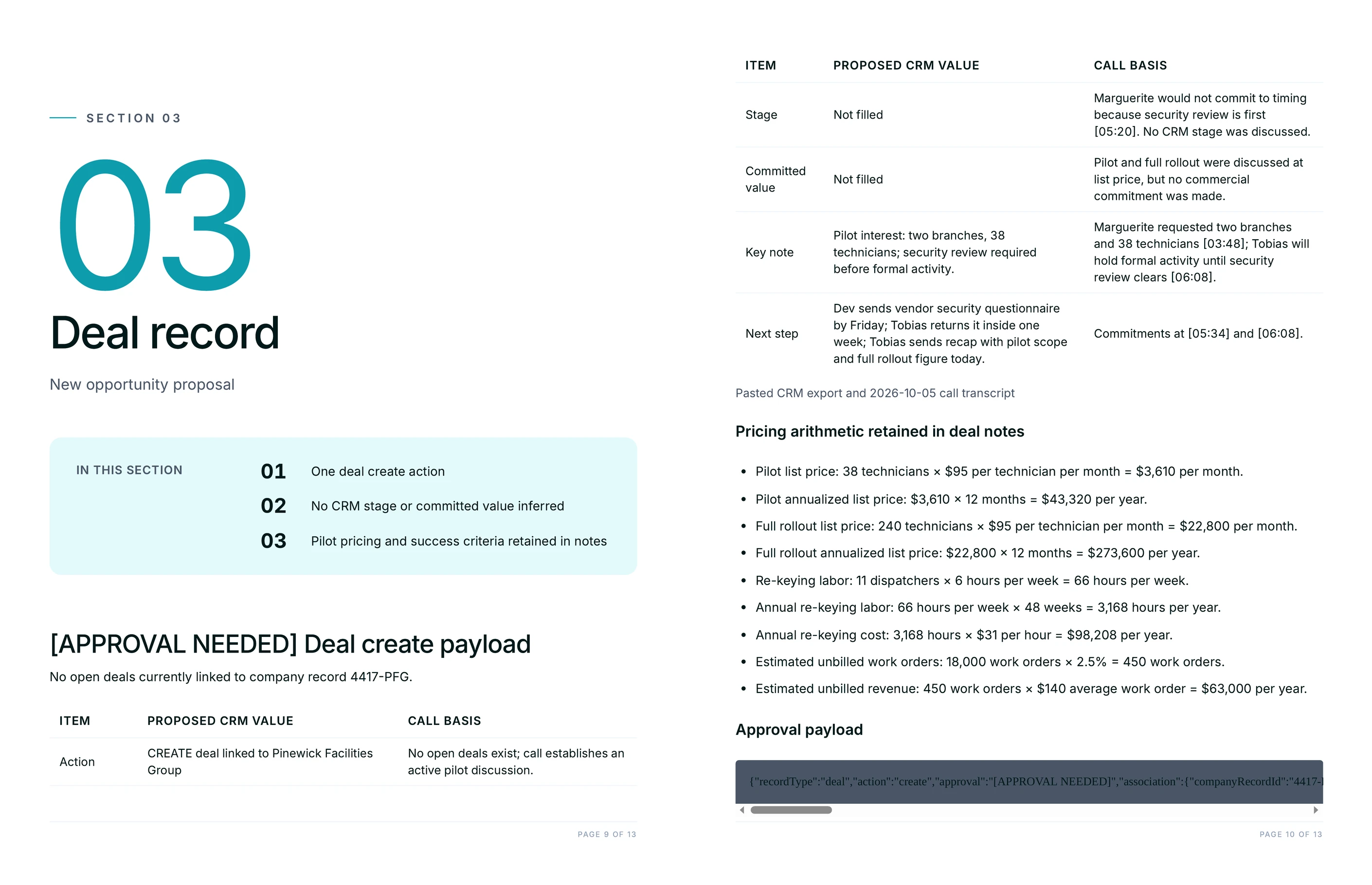
Juma proposes a full set of HubSpot updates for approval: the company record with industry, description, and lifecycle stage; the contacts with inferred roles to confirm; and a deal with a name, pipeline, a sensible stage, a value estimate drawn from the call, a close date, discovery notes, a ranked list of pain points, and a next-steps checklist.
It also flags the things a rushed rep misses. If the call was a competitive, multi-vendor situation, Juma surfaces that as a flag on the deal. If a record already exists, it says so and proposes an edit rather than a duplicate. Every element arrives as a proposal, so the rep reviews a structured draft and approves what is right instead of building the record from a blank form.
Does Juma write to HubSpot on its own, or do I approve first?
You approve first, always. This Flow is propose-then-approve by design: Juma reads the connected HubSpot to spot existing versus new records, drafts every change as a proposal, and writes only what the team signs off on. Nothing lands in the CRM without a human yes.
Human review on every output is the point, not a safeguard bolted on afterward. Reps stay in control of their own pipeline, which is what makes the Flow safe to run on live deals rather than a sandbox. The proposal shows current values next to proposed ones, so approving is a quick scan rather than an act of faith. The team can approve the whole draft, approve part of it, or send corrections back before anything is committed.
What does Juma need to draft CRM updates from a call?
Two connections cover it: a connected Fathom, so Juma pulls the most recent call transcript, and a connected HubSpot, so it can see which records already exist. No connected Fathom? Paste the transcript into the chat and the Flow runs the same way, minus the automatic pull.
There is nothing to export and no spreadsheet to prepare. Juma reads the transcript, checks the CRM for matches, and drafts the proposal in one chat. Adding a few project files, the pipeline stage definitions and discovery framework, makes the draft sharper, but the Flow works on the first run without them.
Can I use this if my team qualifies deals with MEDDIC or BANT?
Yes. Name your framework in the prompt or add it to the project, and Juma structures the discovery notes and pain points around it. MEDDIC pulls out metrics, economic buyer, decision criteria, and the rest; BANT frames budget, authority, need, and timeline. The notes land in the shape the team already uses.
This is where the project setup earns its keep. With the Discovery Framework saved as a knowledge item, every rep's post-call draft comes back in the same structure, so the CRM stays consistent across the team instead of reflecting each rep's personal note-taking style. Change frameworks later and you update one file, not a habit across the whole sales floor.