Set up your client project: brand voice, ICP, sales playbook, and VoC taxonomy
Teams build one Juma Project per client and add context over time. Voice of customer analysis works best when the project carries four things: how the team writes about the brand, who the team is selling to, what counts as a pain versus an objection in this specific sales motion, and any custom tags the team already uses. Add these once and every weekly run gets sharper.
What to add
Brand Voice Guide
How the team writes about the brand and how the product is positioned. Used in the positioning step when turning VoC quotes into ad copy or headlines, so the output keeps the brand's voice while mirroring the prospect's language.
ICP / Target Buyer Profile
Who the team is selling to: role, company stage, key triggers, must-have signals. The Flow weighs every quote against this profile, so a quote from an off-ICP prospect gets flagged for context rather than mixed in with on-ICP signal.
Sales Playbook
How the team defines a pain versus an objection versus a feature request in this specific sales motion. Without this, the tagging defaults to a generic taxonomy. With it, the categories match how the sales team already thinks about the funnel.
VoC Taxonomy
A custom tag set if the team already runs one, with one-line definitions per tag. Common additions: pricing reaction, switching trigger, buyer-stage signal, expansion signal. The default works fine without this; the custom set sharpens the output for teams who already have a research framework.
Guide Juma with project info
Add a short description to each knowledge item in the project's info field so Juma picks the right files for the right task. For example:
- Brand Voice Guide: "Brand voice and positioning rules. Use when turning VoC quotes into ad or positioning copy."
- ICP / Target Buyer Profile: "Target buyer definition. Tag every quote against this so off-ICP signal gets flagged."
- Sales Playbook: "What counts as a pain, objection, or feature request in our sales motion. Use to define tag boundaries."
- VoC Taxonomy: "Custom tag set with definitions. Apply on every run."
See what your prospects are actually saying
Frequently Asked Questions
How is this different from Dovetail or Enterpret for voice of customer analysis?
Standalone VoC platforms are research repositories: drop call recordings in, tag them, search later. Juma runs the entire flow inside the project context, so every tag, theme, and downstream use of the repository is shaped by the team's brand voice, ICP, and sales playbook. Strategy, taste, and judgment stay human; the Flow handles the tagging and the cross-call synthesis.
The other practical difference is workflow continuity. The Notion repository, the call transcripts in Fathom, and the downstream uses (positioning briefs, ad copy, ICP refinements) all live in the same workspace. Teams running VoC inside Juma report compressing the research-to-output cycle from weeks to the same day, because the repository is queryable in chat and the next deliverable starts from the quote, not from a screenshot.
Standalone platforms also charge per seat. Juma's credit-based pricing with unlimited seats means the whole sales, marketing, and product team can query the repository without seat-by-seat budget conversations.
What does the voice of customer analysis actually cover?
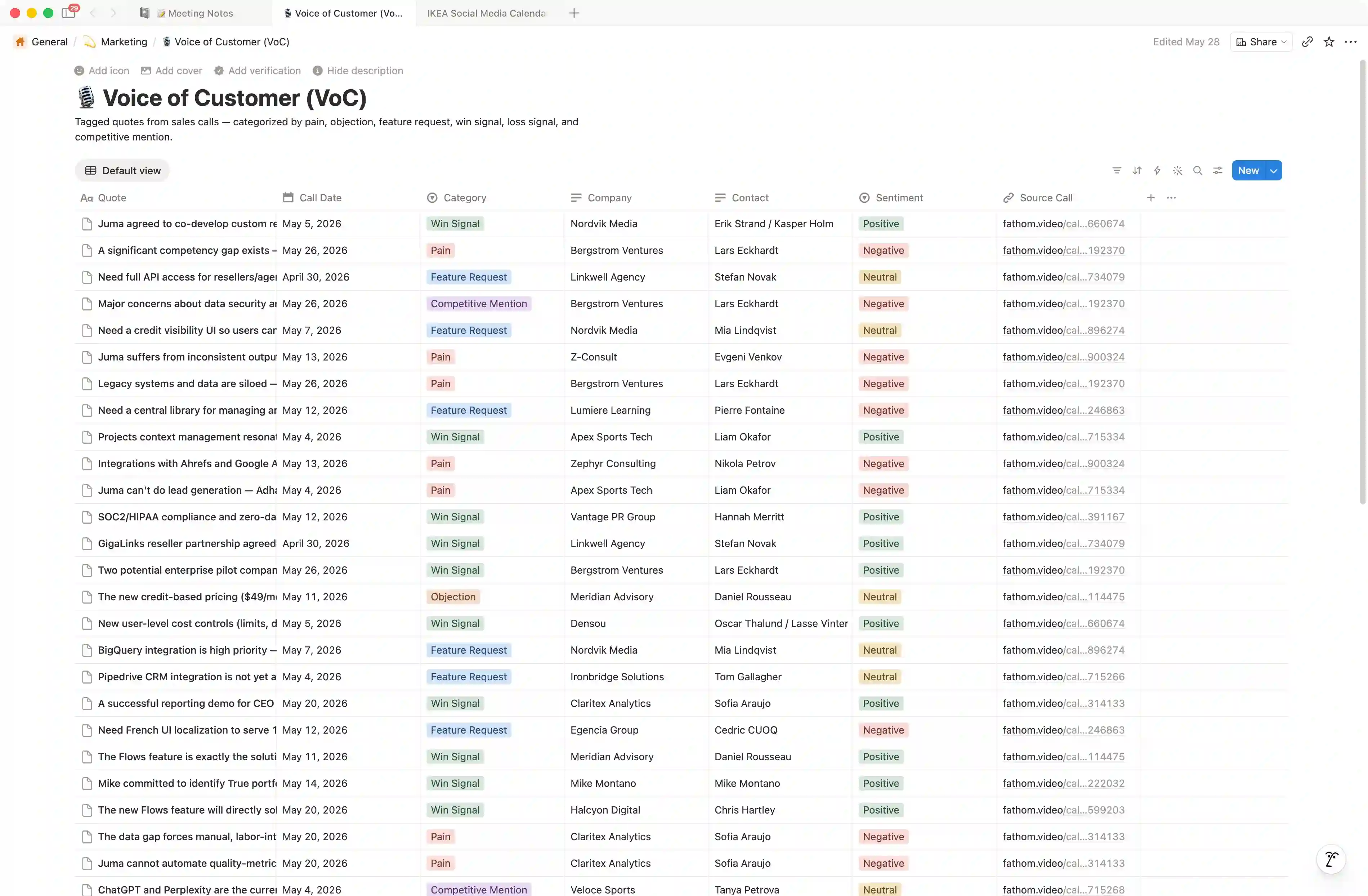
Each run lists meetings from Fathom across the time range named in the prompt, then pulls summaries in parallel and mines each one for quotes that map to the default tag set: pain, objection, feature request, win signal, loss signal, and competitive mention. Every quote is written to the Notion database with category, sentiment, source call link, company, contact, and date.
The taxonomy is configurable. Teams running a defined VoC framework add their custom tags to the project knowledge once, and every run uses them. The repository becomes searchable across all dimensions: by theme, by company, by competitor named, by sentiment. The point of running this weekly is that the database stops being a static report and starts being a queryable record of what the market is saying right now.
Does Juma create a new Notion database every run, or write to an existing one?
If the project knowledge points to an existing VoC database in Notion, the Flow appends new quotes as rows to that database. If no database is named, the Flow first searches the connected Notion workspace for a likely VoC database, then creates one under a sensible parent page (often Marketing or Product) with the standard schema if nothing exists yet.
The appending behavior is what makes the weekly run pattern work. Each Monday's tagging adds the previous week's quotes to the same database, so the repository grows linearly without manual deduplication or merging. Teams that run multi-client VoC create one database per client and point each weekly run at the right database in the prompt.
How often should we run this voice of customer analysis flow?
Weekly is the cadence that matches how sales conversations actually evolve. Monthly works for low-volume teams, but most B2B sales motions shift fast enough that quarterly creates a three-month blind spot on objections, feature requests, and competitive signals. By the time the quarterly read confirms what changed, the conversation has already moved on.
The advantage of running this weekly inside Juma is that the repository builds a trendline. A new objection that appears in three calls one week, six the next, and twelve the week after is a signal the team can act on before the quarterly read confirms it. Teams already running win/loss analysis (a separate Flow) often pair the two: VoC catches the signal across all calls, win/loss confirms what changed when deals closed.
Does this Flow work with Fireflies, Gong, or Chorus too, or Fathom only?
This Flow runs on Fathom transcripts today through Juma's Fathom integration. Fireflies, Gong, and Chorus support are on the roadmap as integration coverage expands. Teams using a different call recorder can still run the Flow by exporting transcripts as text files and adding them to the Juma Project, but the bulk-across-calls mode requires a native integration.
For teams running multiple recorders across sales and customer success, the practical pattern today is to standardize the sales motion on Fathom for the calls that feed VoC, then bring in the other sources once integration support ships. The Notion database schema does not change based on the call source, so the repository remains consistent as new integrations come online.