Set up your client project: ICP definition, closed-won history, and account ownership
Teams run one Juma project per client and add context to it over time, so every flow for that client draws on the same material. For account selection the useful additions are the ones public research cannot reach: who the client actually wins against, which accounts are already spoken for, and where the team has decided not to sell. The project may already exist, in which case these are additions to it rather than a fresh setup.
What to add
ICP definition and size bands
The segments the client sells into, the employee and revenue bands that count, and the geographies in scope. With this in the project the register applies the client's own bar instead of inferring one, and anything outside it is excluded with that reason rather than quietly included.
Closed-won and closed-lost history
Which accounts the client won, which they lost, and the reason recorded against each. This is the only reliable description of what good fit looks like for this business, and it moves the qualification criteria off general market logic and onto the client's own evidence.
CRM account ownership export
Current customers, open opportunities, and the rep or partner who owns each. A public customer directory catches the logos a company chooses to publish. This catches everything else, which is where the duplicated outreach actually happens.
Territory and exclusion rules
Named accounts, partner-managed relationships, and the industries the team will not sell into. These are decisions rather than research findings, and holding them in the project keeps them out of every future list without anyone having to remember to say so.
Guide Juma with project info
Each file in a project can carry a short description telling Juma what it holds and when to use it. For account selection these descriptions matter more than usual, because several of the files look similar and get used at different moments in the work.
- ICP definition and size bands: "The segments, employee bands and geographies in scope. Apply as a hard filter and exclude anything outside it with that reason."
- Closed-won and closed-lost history: "Past deals with outcomes and reasons. Use to derive qualification criteria, not as a source of target accounts."
- CRM account ownership export: "Current customers, open opportunities and their owners. Check every candidate against this before tiering."
- Territory and exclusion rules: "Accounts and industries we do not prospect. Treat as absolute and list anything removed by it."
Build an account list your sales team will not hand back
Frequently Asked Questions
What does the target account list actually contain?
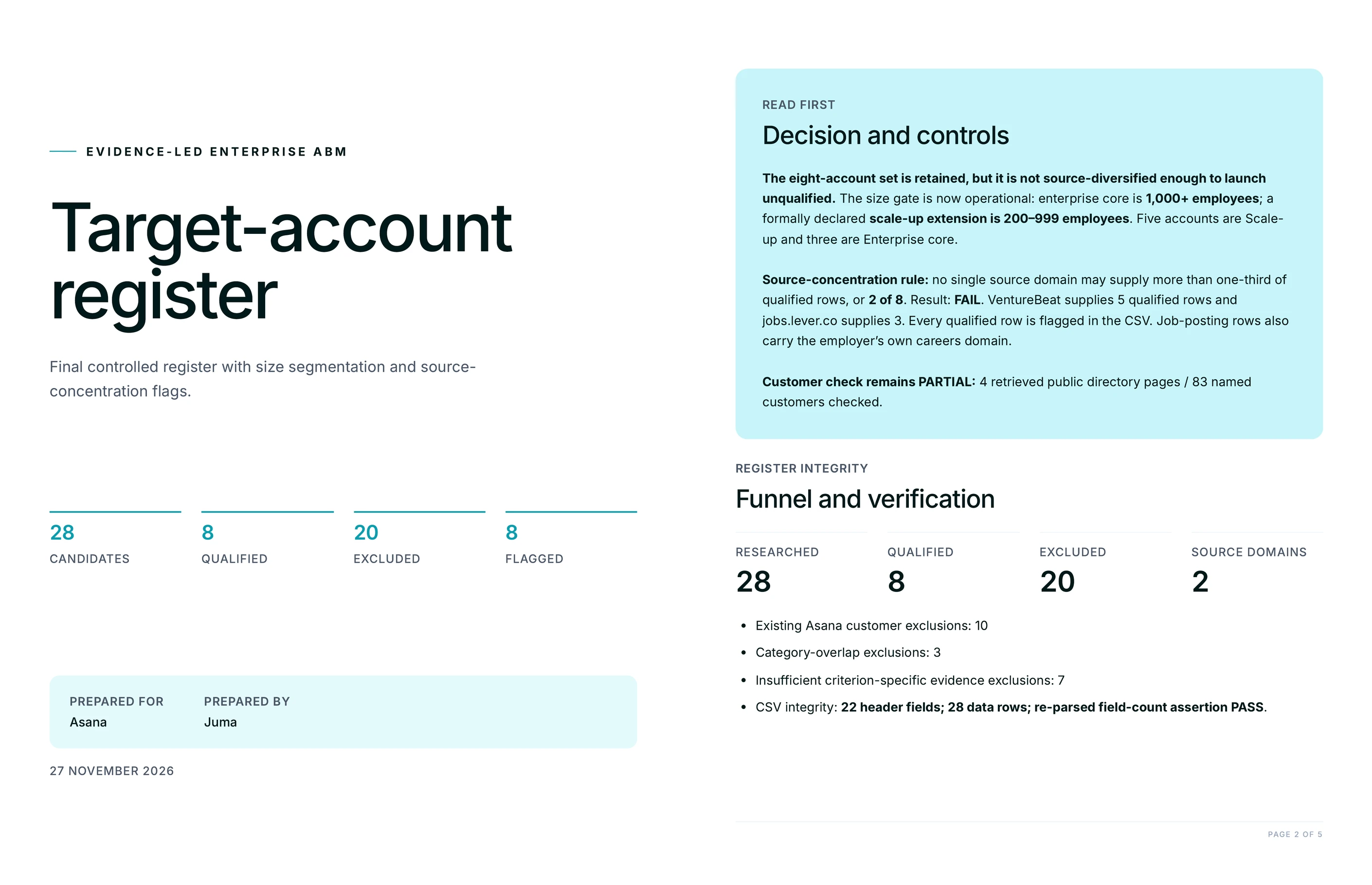
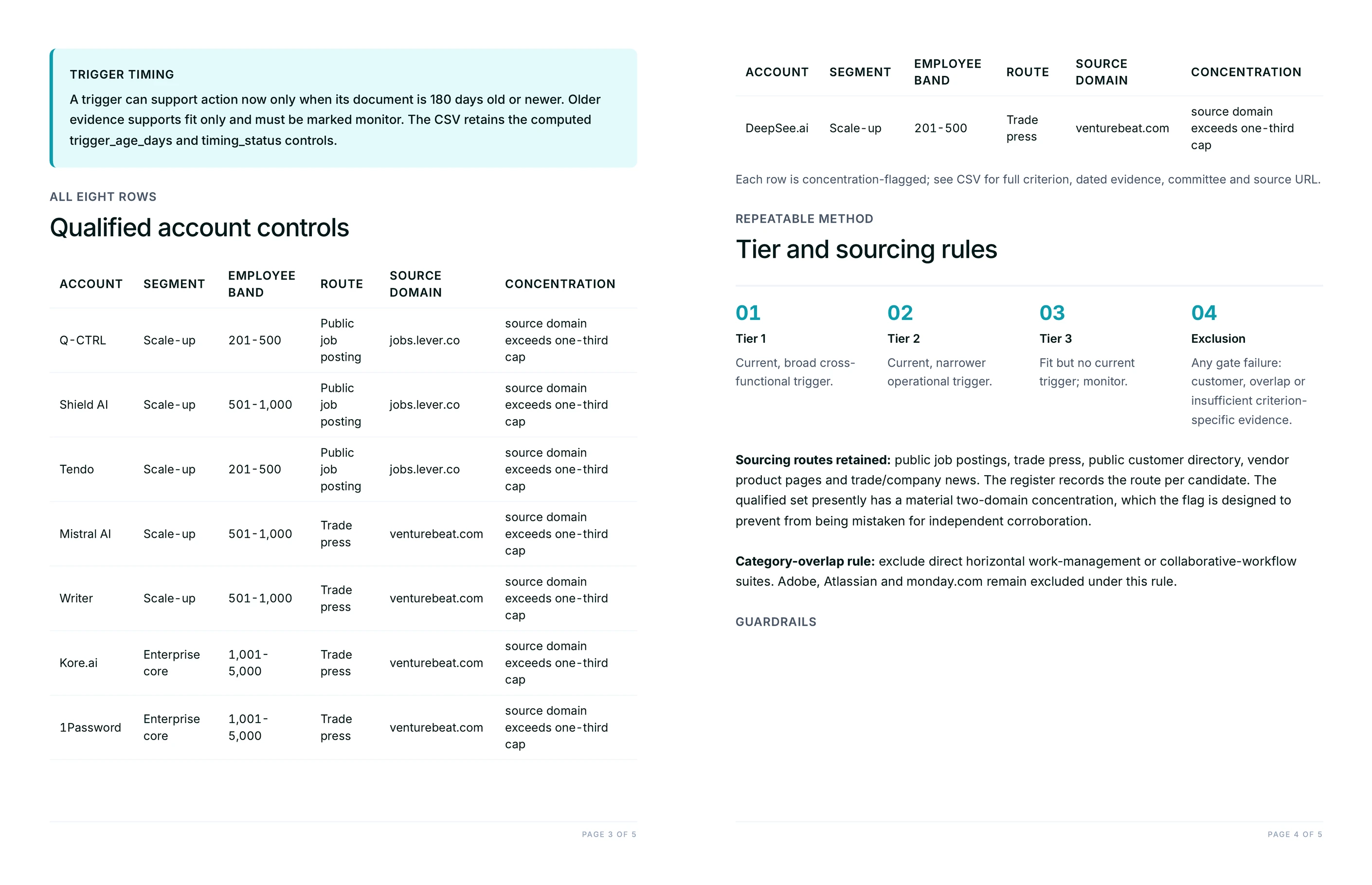
Two files. A branded PDF holding the method, the qualification criteria, the tier rule and the funnel counts, and an editable CSV with one row per candidate researched, qualified and excluded alike. Each row carries the criterion it was judged on, a dated source specific to that account, the trigger's age, the buying committee as job titles, and the checks it passed or failed.
Keeping the excluded candidates in the same file is deliberate. An account list that shows only the survivors hides its own selection, and the excluded rows are often the more useful half: they tell the team which accounts were considered and rejected, which stops the same names being re-researched next quarter.
How is this different from pulling a list from a sales intelligence database?
A database filter returns everything matching a firmographic query, which is a population rather than a target list. This produces a shorter set where each account is attached to a specific, dated reason it belongs there, plus the reasons the others were dropped.
The two work well together. Run the database query to assemble the candidate pool, then use the flow to qualify it: name the criterion per account, attach the evidence, check for existing customers and category overlap, and apply the staleness rule. The database answers who exists. This answers who is worth a programme this quarter, and shows the arithmetic behind the answer.
What stops it recommending accounts we already sell to?
An explicit check against the client's own public customer directory, run on every candidate before tiering, with existing customers moved into their own excluded group and routed to expansion rather than new business. The register states how many directory pages and named customers were read, and labels the check partial when the whole directory could not be enumerated.
A public directory only lists what a company has chosen to publish, so the check is honest about its own limits rather than implying full coverage. Adding a CRM account export to the client project closes most of the remaining gap, because that covers accounts under contract and live opportunities that no public page shows.
How current does the account research stay?
Every row carries the publication date of the document it rests on and the age of that trigger in days, measured against a stated cutoff. Inside the cutoff the account is marked as worth acting on now. Outside it, the row says the fit is evidenced and the timing is not, and the account moves to a watch list rather than quietly keeping its place in the outreach queue.
Two habits keep the register useful. Re-run it before each quarter's planning, since triggers age out faster than firmographics do. And treat the existing-customer check as the part that goes stale first, because a prospect that became a customer last month is the error that costs the team the most.
Which parts of this still need a person?
Three, and the register names them. Whether an account is genuinely comparable to the client's best customers is judgment, because similar firmographics hide very different buying behaviour. Whether to run a one-to-one programme or a one-to-many play against a tier is a resourcing decision. And territory, ownership and the accounts the team has agreed not to touch come from the business, not from public sources.
Everything around those three is worth handing over: assembling the candidate pool across several sourcing routes, attaching a dated account-specific document to each criterion, running the customer and category-overlap checks, computing trigger ages, measuring source concentration, and writing the register out in a form the team can load and work. Juma augments the team, it does not replace it.