Set up your client project: the field dictionary, the email style guide, and the suppression policy
A Juma Project is a shared space where the team keeps everything Juma needs to know about a client. Create one project per client, add context as the relationship grows, and Juma draws on whatever is relevant each time the team runs a Flow. For a segmented campaign the gain is specific: the open web supplies the client's positioning, and the project supplies the three things it cannot, which are the field names in the CRM, the rules the client's own email programme already follows, and who must not be mailed.
What to add
CRM Field Dictionary
The exact field names, their types, and roughly how often each one is populated. With this in the project the merge-field map is built from tokens that exist rather than plausible guesses, and a field that is blank on half the database stops being used in subject lines.
Email Style Guide
Subject-line length, sentence case or title case, how the client signs off, the legal footer, and the words their brand refuses. This is the difference between copy that reads as a continuation of the client's programme and copy that reads as something imported from outside it.
Segment and Suppression Policy
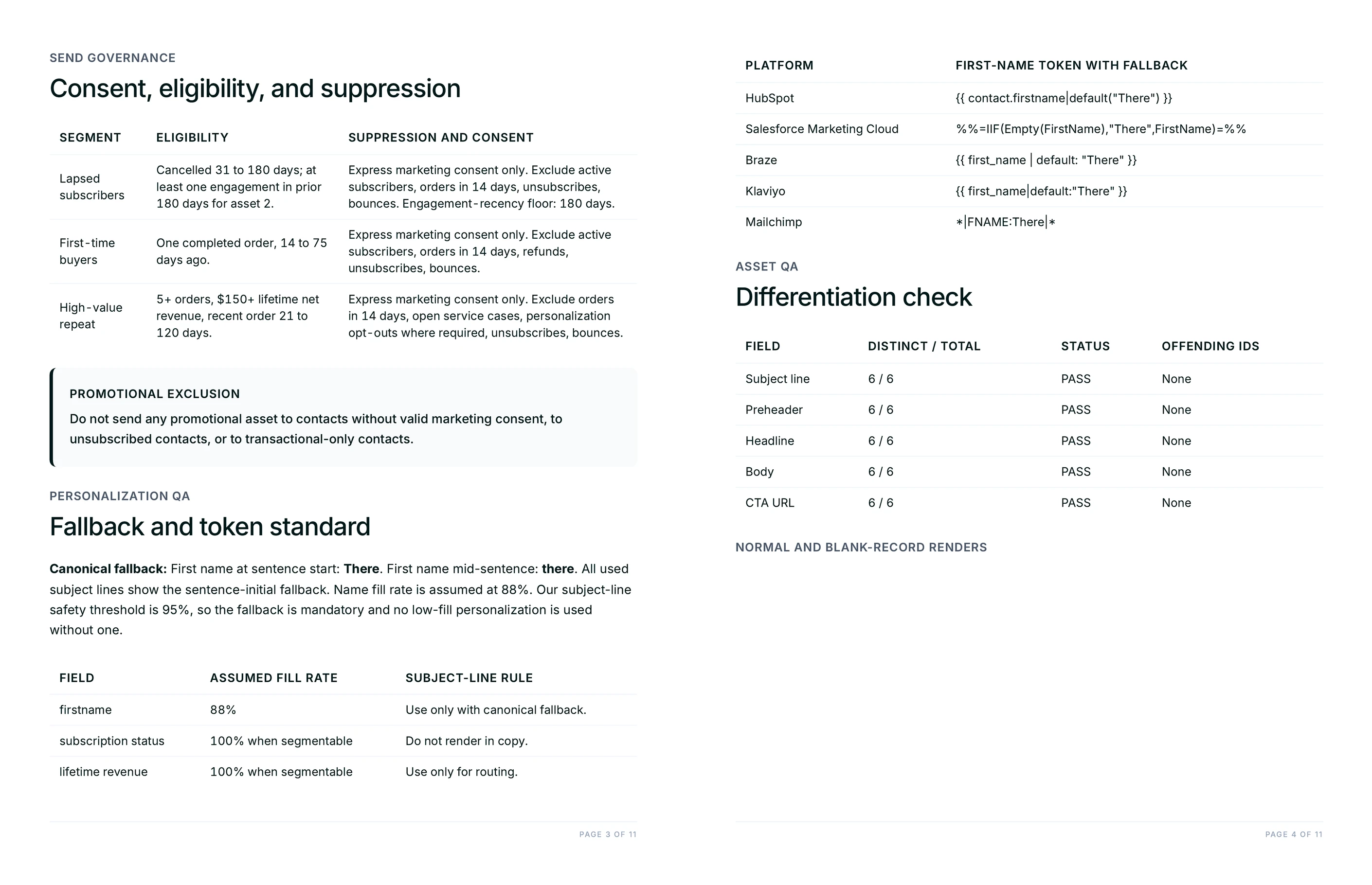
The segments that already exist in the CRM, the consent basis behind each list, the frequency cap, and anyone excluded from promotional sending. The campaign is then written to the rules the client is actually operating under, and the review stops rediscovering them one by one.
Guide Juma with project info
Each knowledge item has a short description field. One line telling Juma what the file is and when to reach for it is enough to change which document it opens first.
- CRM Field Dictionary: "Live field names and fill rates. Use these exact tokens and never put a field below 80 percent fill into a subject line."
- Email Style Guide: "The client's own email rules. Apply to every subject line, body and sign-off before voice decisions are made from the website."
- Segment and Suppression Policy: "Existing segments, consent basis and caps. Treat as binding and flag anything the campaign would breach."
Send copy that changes with the segment, not just the name
Frequently Asked Questions
What does this Flow deliver?
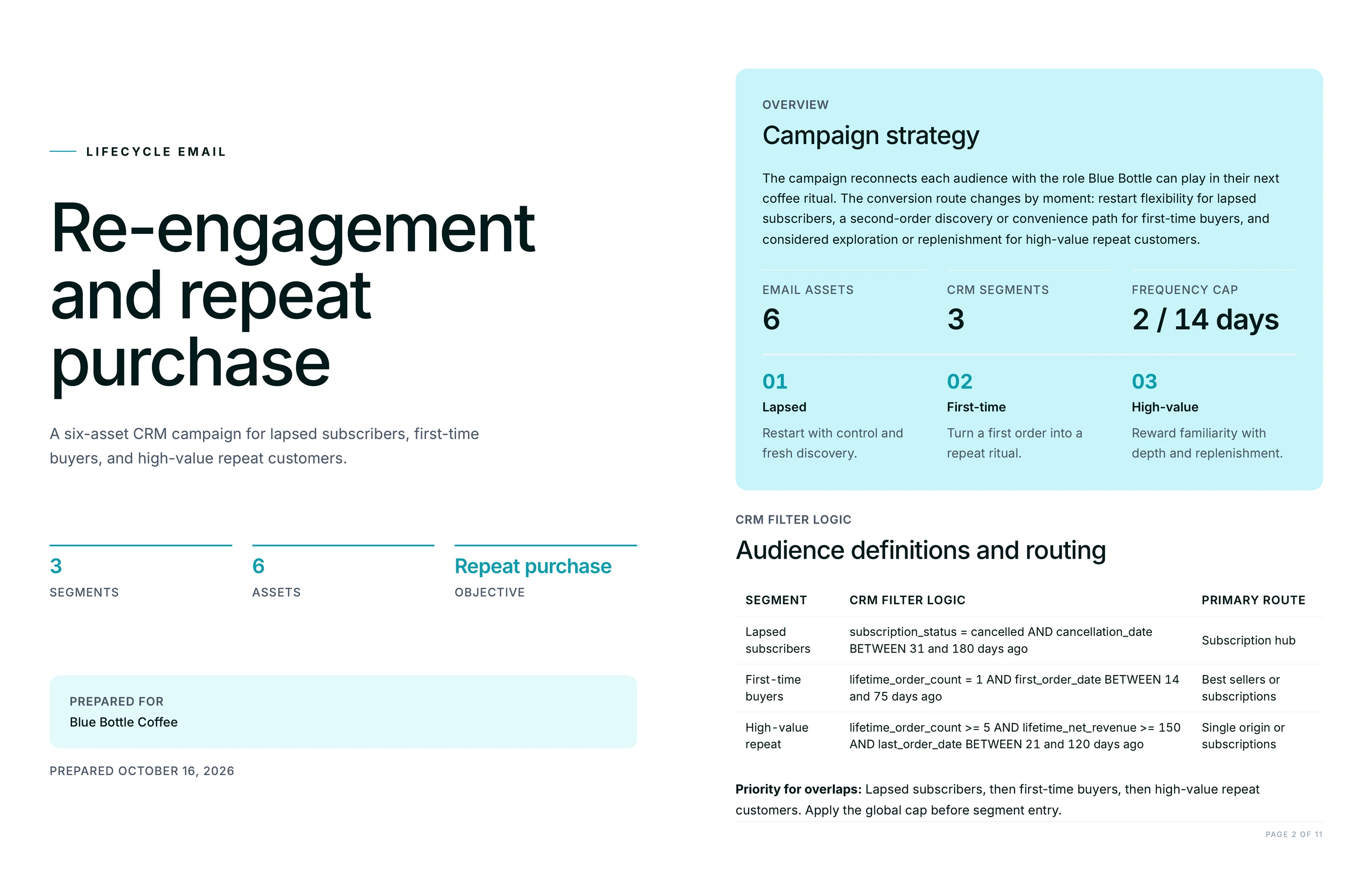
Two files. A branded campaign PDF holding the segment definitions as CRM filter logic, the merge-field map with one canonical fallback per field, the platform translation table, the per-segment suppression rules, and a differentiation check. Alongside it, an editable CSV with one loadable row per segment and asset.
Each CSV row carries the subject line, preheader, headline, body, CTA label and destination, the tokens used, their fallbacks, the entry trigger, the exit rule, and the blank-record render of that asset. The row is the unit of work: a marketing-ops lead can load it, and a copywriter can rewrite one line in it without touching the other seventeen.
Does this need a connection to our CRM?
No. The Flow works from field names rather than from a live connection, so the campaign can be built before anyone has credentials and it stays portable between clients on different platforms. Naming the real fields in the prompt or keeping a field dictionary in the project is what makes the output loadable.
Teams who do want the connection have it: HubSpot and Salesforce are among the platforms Juma connects to, which is useful for pulling real segment counts and fill rates into the same conversation. The deliverable does not depend on it, and a campaign written against guessed field names is the one failure that connection prevents.
What is a blank-record render and why does it matter?
It is each asset printed a second time with every merge token empty and the approved fallbacks in place. It shows what a contact with a missing first name or a missing company name opens, which for most databases is a meaningful share of the list rather than an edge case.
Reviewing only the data-filled version is how a subject line built around a company name ships to several thousand people as a limp generic greeting. Printed side by side, the weak line is obvious in seconds, and the fix is a rewrite of that line rather than a rule added after the complaints.
How is this different from writing one email and inserting a first-name token?
The argument changes, not the greeting. A trial user who has not finished a first project needs one small next step, an account quiet for six months needs a reason to return with no plan pitch at all, and an expansion-ready account needs the cross-team case. Those are four different emails, not one email with four names in it.
The differentiation check keeps that honest by counting distinct values per field and flagging anything shared between segments. A campaign that cannot produce distinct subject lines for its own segments has discovered something useful: those segments are not actually different audiences, and the segmentation needs the rework rather than the copy.
Can a lifecycle marketer trust the segment logic?
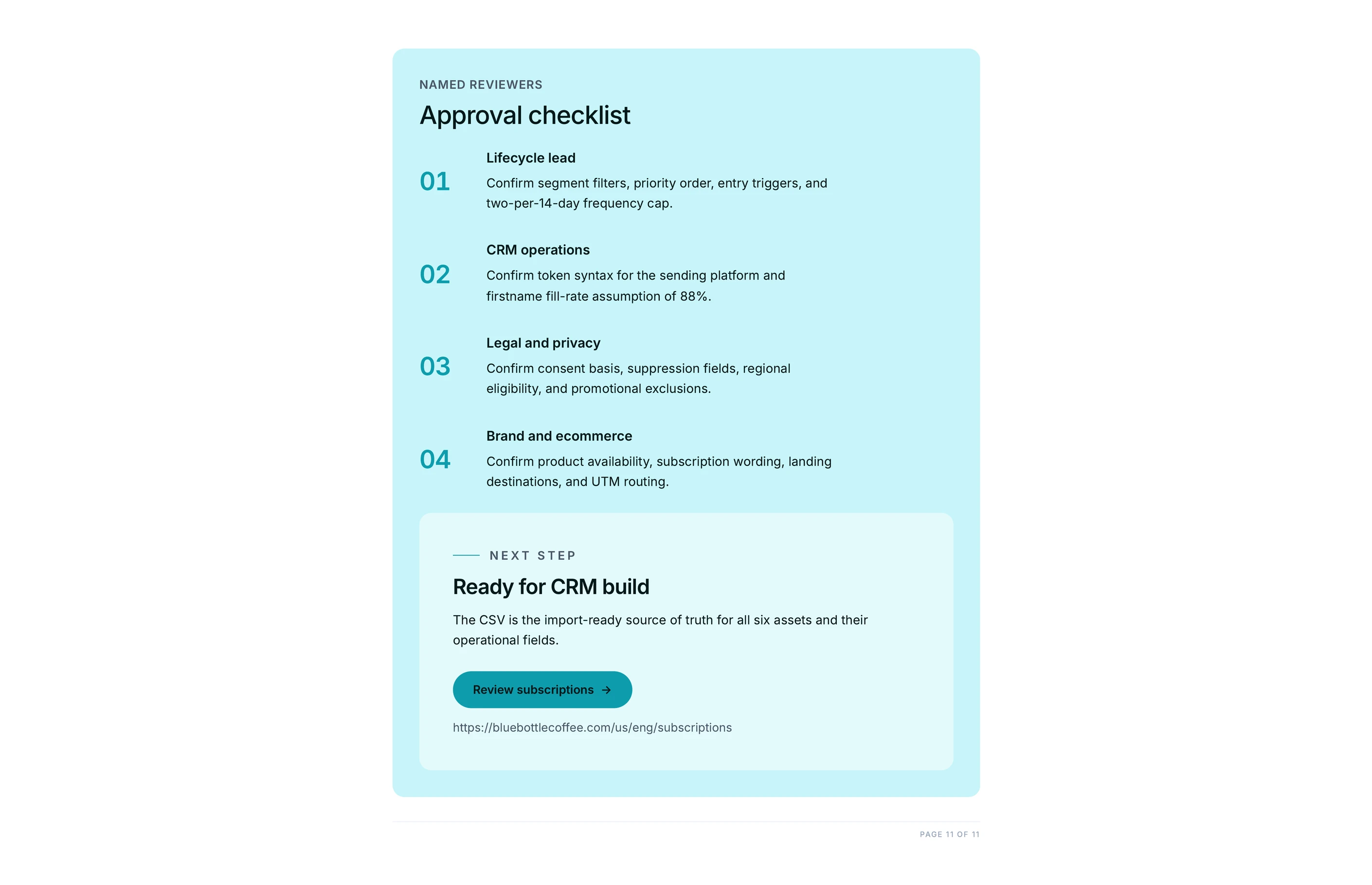
They should check it, and the deliverable is built to be checked. Segment definitions arrive as explicit filter logic, every positioning claim carries the source URL it came from, and the document closes with an approval list naming what the client still has to confirm before anything sends.
What the Flow covers is the mechanical weight: writing the variants, keeping the tokens consistent, computing the renders, translating the syntax, and catching the repetition. Which segments are worth running, what the offer should be, and whether a win-back is the right call this quarter stay with the team. Strategy, taste, and judgment stay human, and every output goes through human review before a send.