Set up your client project: property dictionary, brand voice, consent rules, past performance and the live pricing page
Teams build one Juma Project per client and add context over time. A HubSpot campaign benefits from five items in particular, and the first one removes most of the manual translation between what the package says and what the portal actually contains.
What to add
HubSpot property dictionary
An export of the account's contact and company properties with their internal names and types. Add it and the list filters and tokens reference fields that exist, rather than arriving flagged as custom properties the portal may not have. This is the single item that changes how much ops work is left.
Brand voice guide
How the client writes email: sentence length, what they call their own features, and the phrases that never appear. Marketing email is the shortest-form copy a brand publishes, so a voice miss is more visible here than anywhere else.
Consent and suppression rules
Which lists never receive marketing email, the consent basis by region, the sending domain and the reply-to address. Add it once and the compliance line on each email states what is actually true for this client instead of a generic placeholder.
Past campaign performance
Open and click rates by segment, and which subject patterns worked. The sequence builds on what already performed for this audience rather than on category averages, and the playbook says which prior result each choice came from.
The client's live pricing and plan page
Saved as a knowledge item, it becomes the reference every product claim is checked against. Plan names and limits move, and an upgrade email that describes a plan the client no longer sells is the fastest way to lose a campaign's credibility.
Guide Juma with project info
Add a short description to each knowledge item in the project's info field so the right file gets picked for the right task. For example:
- HubSpot property dictionary: "This account's real contact and company properties. Use these internal names in every list filter and token."
- Brand voice guide: "How this client writes email. Apply to every subject line, preview and body."
- Consent and suppression rules: "Consent basis, suppression lists, sending domain. Use for the compliance line on every email."
- Past campaign performance: "What has worked on this audience. Use to choose the sequence and the subject patterns."
- Live pricing and plan page: "The client's current plans and limits. Check every product claim against this."
Hand ops a campaign they can build, not a document they have to translate
Frequently Asked Questions
What does the HubSpot email campaign package include?
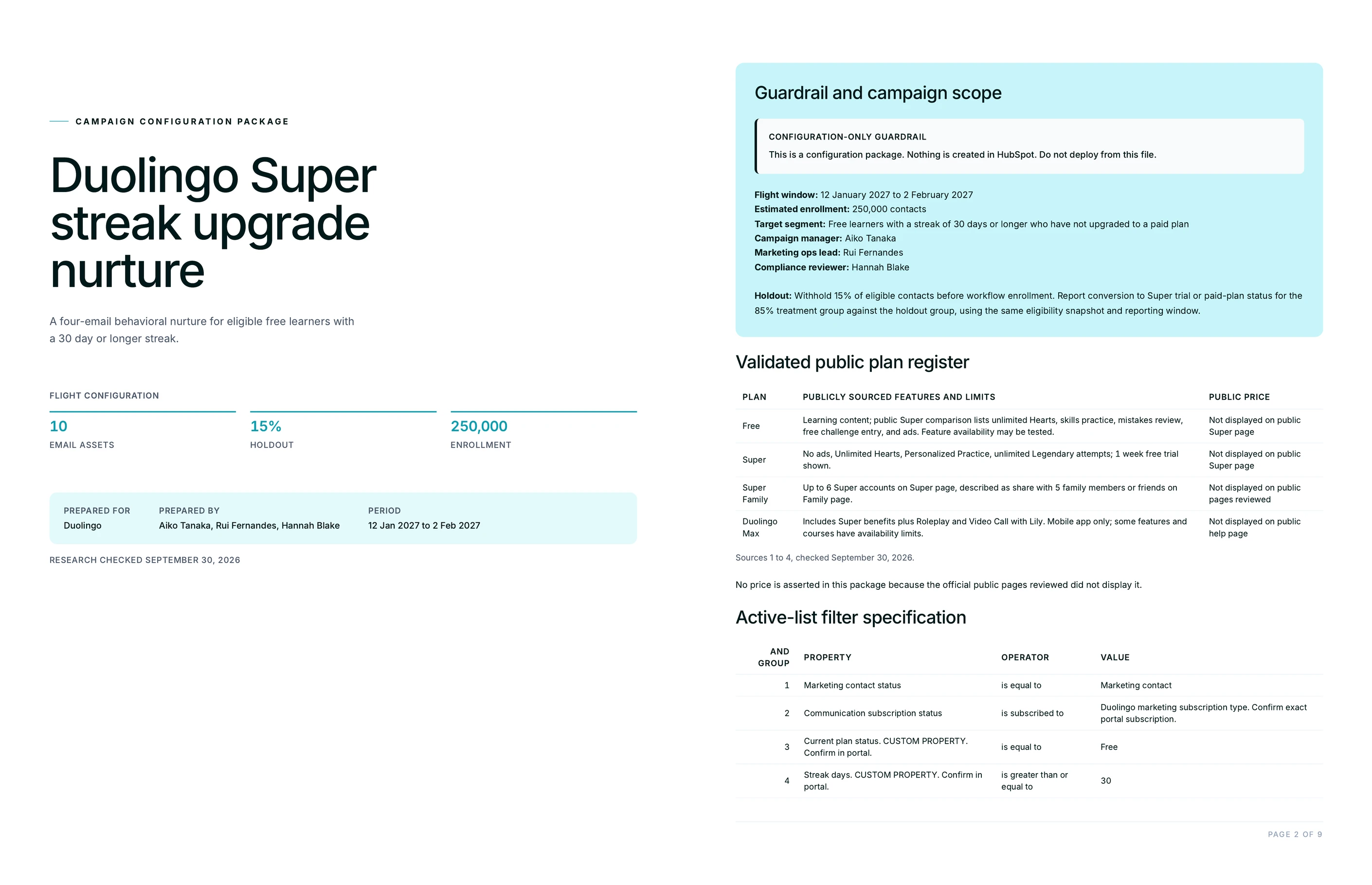
Two files. A branded PDF playbook holding the sequence, the segment definitions as active list filters, the token audit table, the workflow map and the pre-send checklist, plus an editable CSV with one row per email carrying the send offset, subject, preview, body, CTA and tokens.
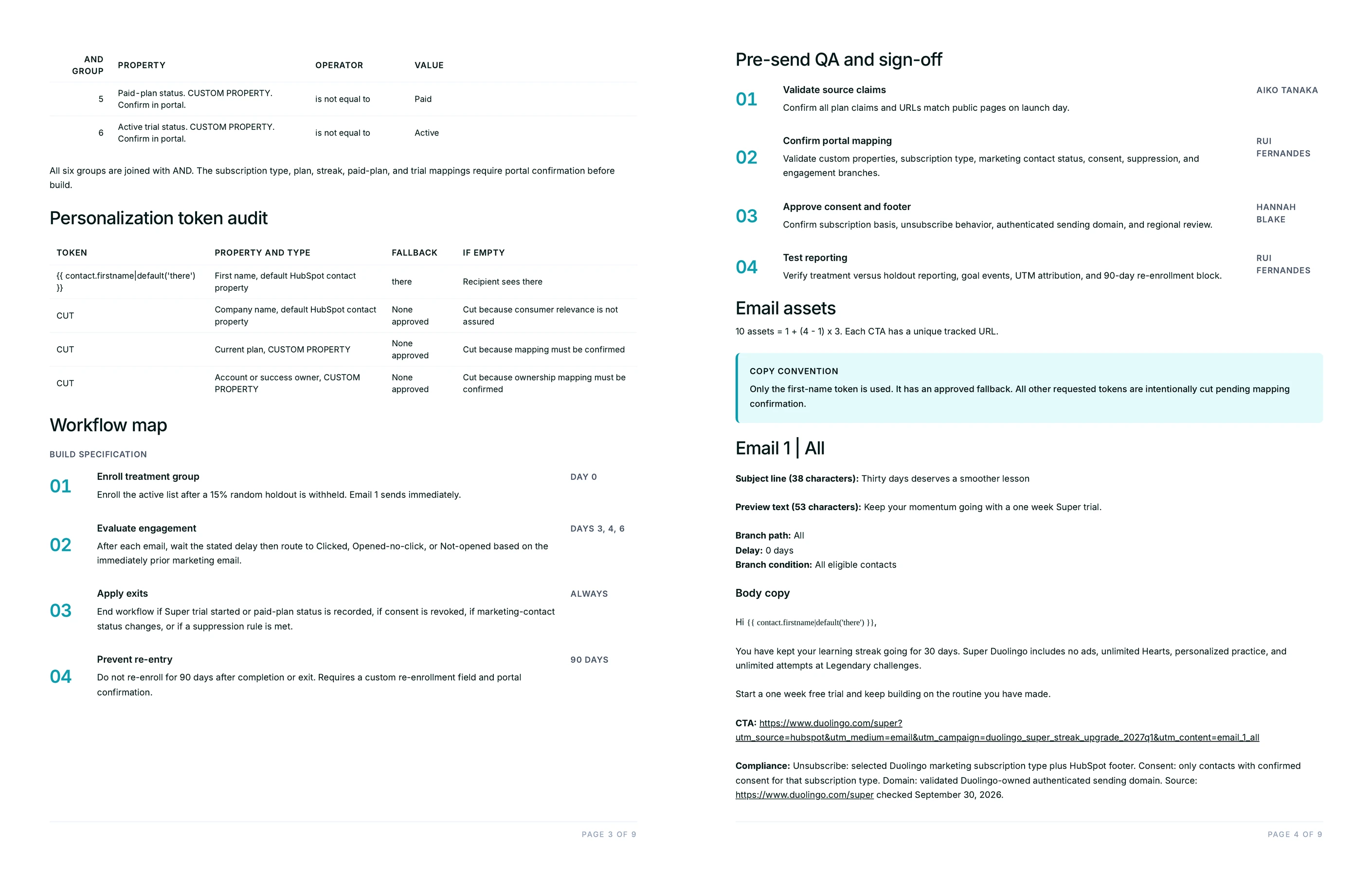
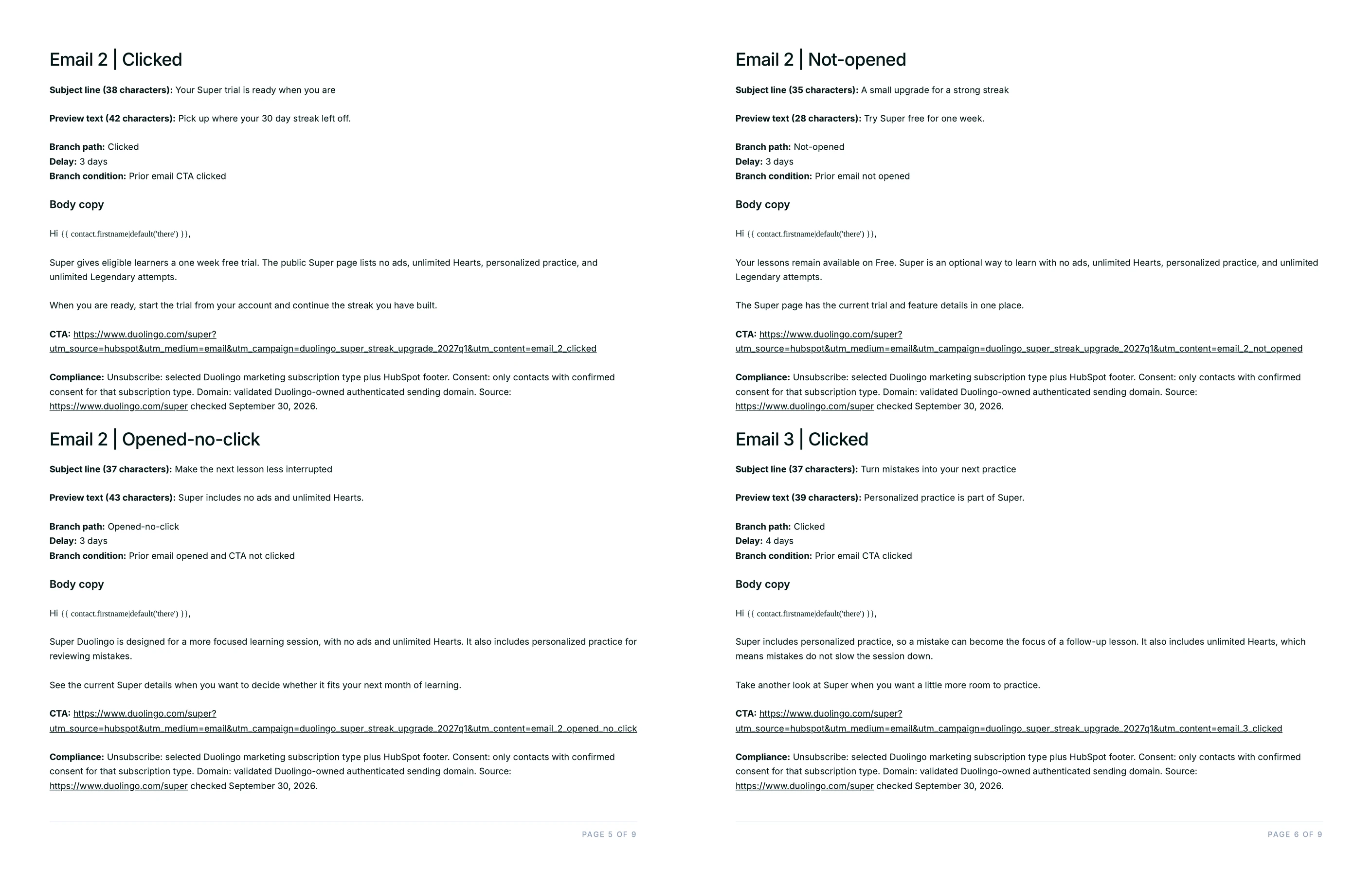
Inside the playbook, each email arrives with its send day offset, its subject line and preview text with character counts printed beside them, its body copy, one CTA with the link target and UTM parameters, and the compliance line covering unsubscribe handling, consent basis and sending domain. The workflow map names the enrollment trigger, the delay before each send, the branch conditions on opens and clicks, the goal and exit criteria, the suppression rules and the re-enrollment policy.
The CSV is the part ops touches first. One row per email in a flat structure means the sequence can be sorted, edited, diffed against the previous version, or pasted into a build sheet without anyone retyping copy out of a PDF.
Does this Flow need a connected HubSpot account?
No. The Flow produces the build package and writes nothing to the portal: no emails created, no lists built, no workflow enabled. The primary prompt says so explicitly, which keeps a campaign from appearing in a live account before a person has read it.
Connecting HubSpot to Juma is still useful for other work, and adding the account's property dictionary to the client's Juma Project is what removes the custom-property flags from the filter tables. Neither is required to run this Flow. The package is deliberately configuration-ready rather than configured, because reversing a campaign that already exists in a portal costs more than building one that does not.
Why do personalization tokens break in HubSpot, and what stops it here?
A token breaks when the property behind it is empty and no fallback was set. HubSpot renders nothing, so the recipient reads "Hi ," or a sentence with a hole in it. The token audit table forces a fallback decision on every token before the send.
Each row names the token, the property it reads, that property's type, whether it is a default HubSpot field or a custom one, the fallback text, and the exact string a recipient sees when the property is empty. Reading that last column out loud is usually enough: a fallback of "there" reads fine, a fallback of "valued customer" reads like a mail merge, and a token nobody can guarantee gets cut instead of shipped hopefully.
The same table is what makes the campaign portable. Run it for a second client and the token dictionary tells you which fields that account has to carry before the sequence will resolve.
How is this different from writing the email copy itself?
This Flow stops at the build package, not the send, and its output is mostly not copy. The five emails are a fifth of the deliverable. The rest is the ops layer: filters, tokens, branches, suppression, schedule and the QA pass that catches what the copy review misses.
The copy Flows own the writing. Onboarding email sequences, product launch emails and cold outreach each produce finished copy for one job, aimed at one audience, with no segmentation or workflow layer attached. Reach for those when the ask is words. Reach for this one when the ask is a campaign somebody has to configure, and when the expensive part is the translation between a document and a portal.
Lead scoring sits upstream of all of them. If the question is which contacts deserve the sequence at all, the HubSpot lead scoring Flow answers it first and this one builds the campaign the score enrolls people into.
Who signs off before the campaign sends?
A person, always. The playbook carries a pre-send checklist with a named owner on the sign-off row, and the Flow produces no send of any kind, so nothing reaches an inbox without someone approving it in the portal.
Juma augments the team, it does not replace it. The Flow does the translation work that eats an afternoon: turning an audience sentence into filters, giving every token a fallback, counting every subject line, writing the branch map in the portal's own terms. The judgment calls that matter, whether this offer is right for this segment and whether these five emails are worth a customer's attention, stay with the marketer whose name is on the sign-off row.