Set up your client project: brand voice, audience, and past winners
A Juma Project is the shared space where the agency stores everything Juma needs to know about a client. Create one project per client, add context over time, and Juma uses what is relevant every time the team runs a flow. The more the team adds, the sharper every variant gets.
What to add
Brand Voice Guide
How the client sounds across channels: tone, vocabulary, signature phrases, what to avoid. With this loaded, every variant comes out in the right voice from the first draft. Without it, Juma uses a sensible default that may not match how the brand actually speaks.
Audience Profile
Who the campaign is targeting: job titles, age bands, interests, behaviours, pain points, and any lookalike sources the team has used before. This shapes the hook angles every variant tests, so the variants stay grounded in the audience instead of defaulting to generic marketing language.
Past Meta Ads with Performance
Two or three winning ads from past campaigns, plus the same number of clear losers, with the performance numbers and the team's read on why each one worked or did not. This trains the variants on the client's real signal, not industry assumptions. If the client's ad account is connected, Juma can pull this directly, so the file becomes optional.
Offer and Promotion Details
Active promotions, pricing tiers, urgency triggers, and any disclaimers the client requires in paid copy. With these loaded, the variants land at the right offer with the right legal language attached the first time. Without them, every variant goes through a revision cycle just to fix the offer line.
Guide Juma with project info
Add a short description to each knowledge item in the project info field so Juma knows what each file contains and when to use it. For example:
- Brand Voice Guide: "How the client sounds in paid copy. Apply to every variant."
- Audience Profile: "Who we're targeting. Use to shape hook angles."
- Past Meta Ads with Performance: "Winners and losers with the numbers. Read before drafting new variants."
- Offer and Promotion Details: "Active promotions and required disclaimers. Use in the offer line."
Skip the blank-page phase on every campaign launch
Frequently Asked Questions
How much time does this Flow save compared to writing Facebook ads manually?
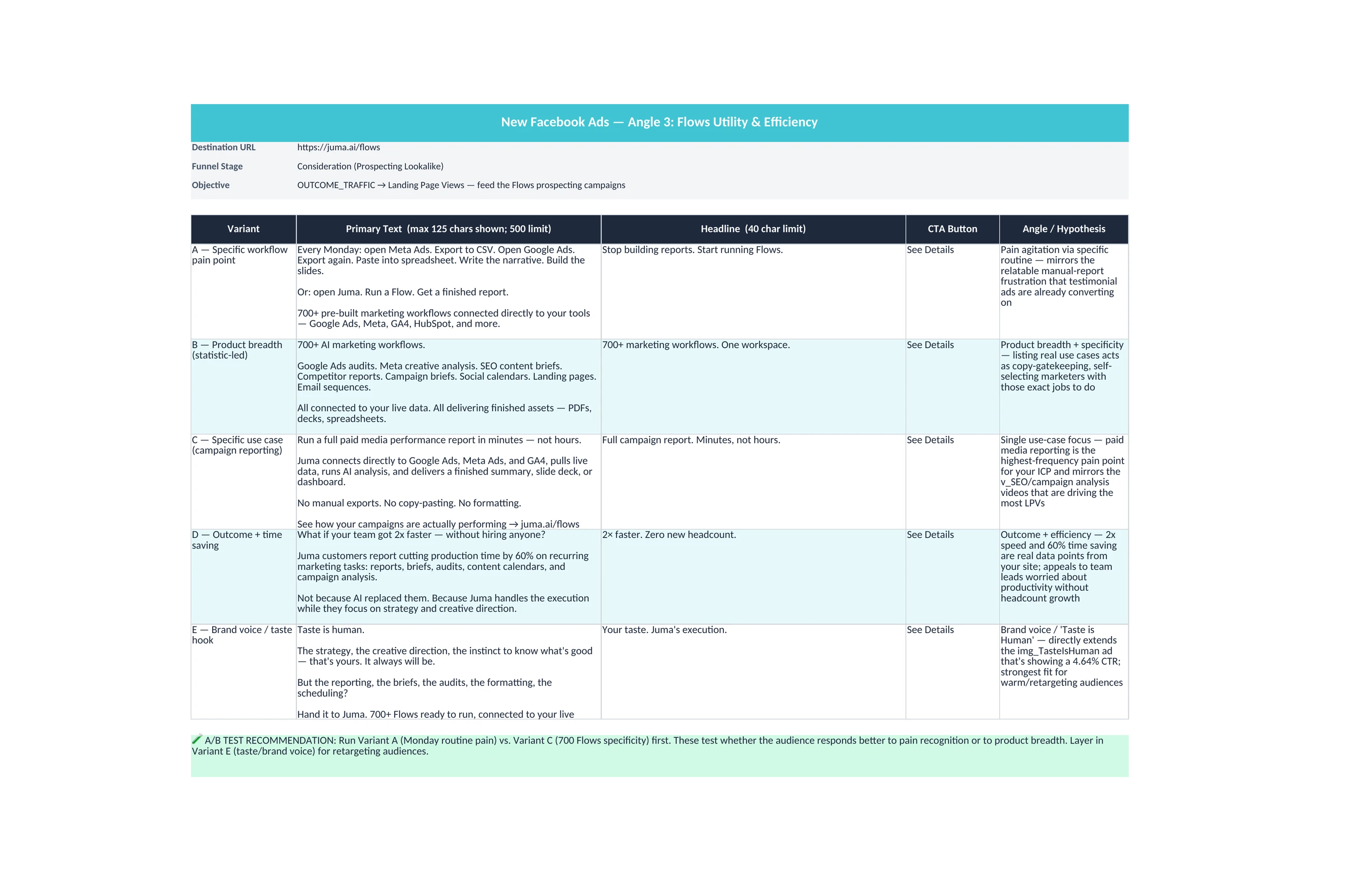
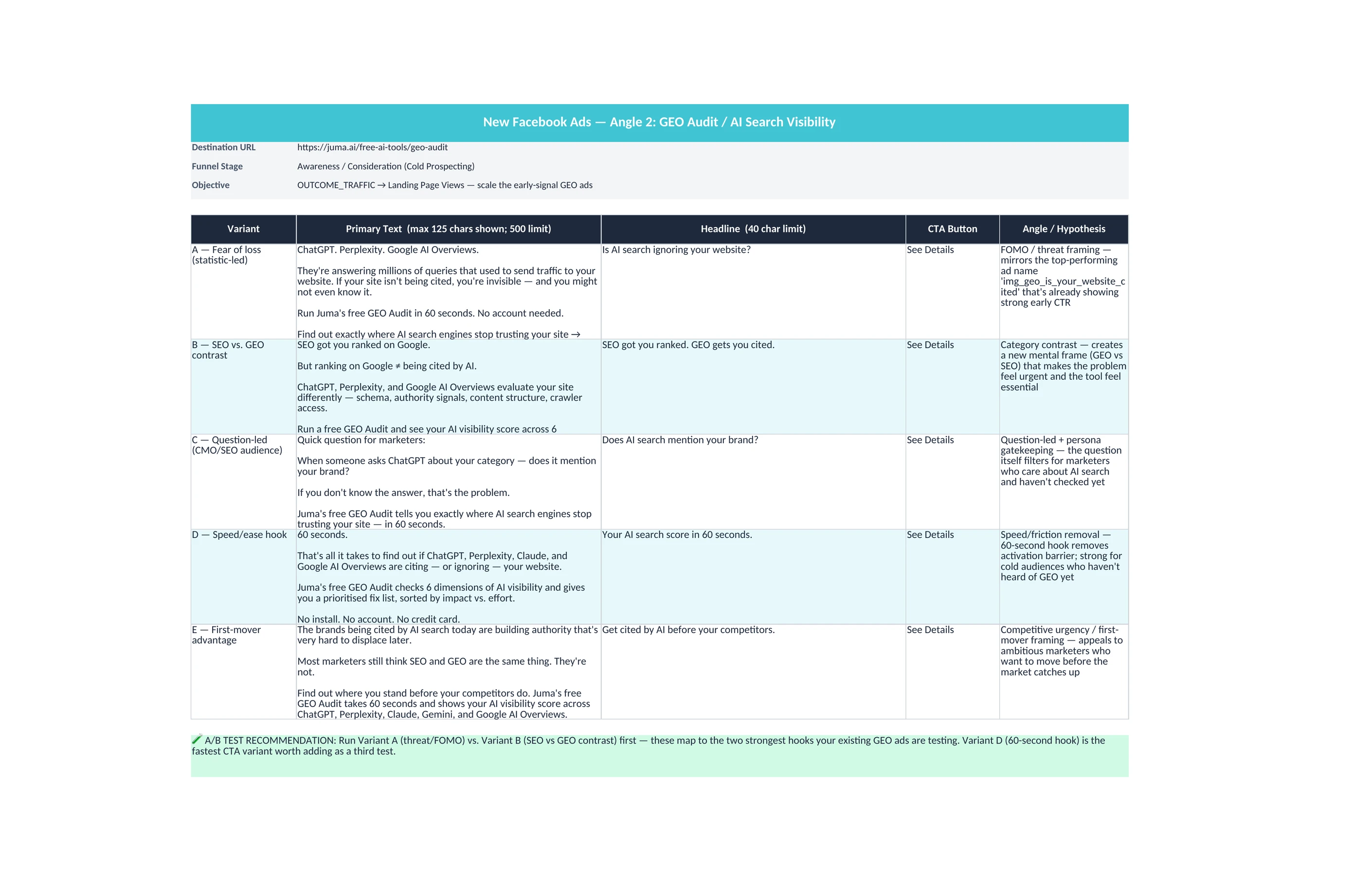
Writing five Facebook ad variants manually typically takes a creative team two to four hours per campaign across briefing, drafting, character count checks, and senior review. This Flow compresses the drafting work into a single session: Juma writes five variants with distinct hook angles, validates every character count against Facebook's limits (Primary Text 500, Headline 40, Description 30), and recommends which two to test first.
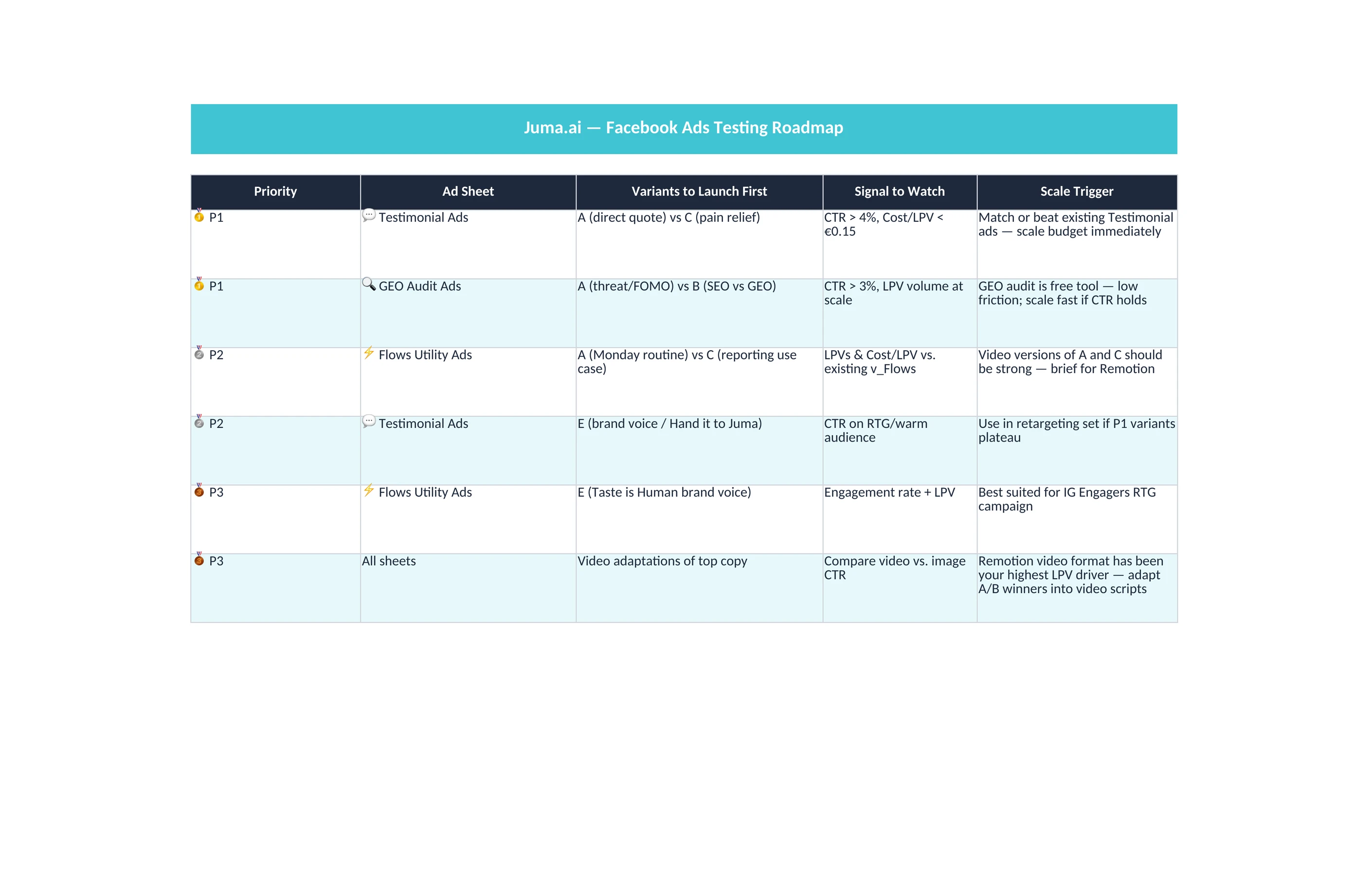
The savings come from three places. The blank-page phase is skipped because every variant lands with a researched angle. The character count check is done before the senior review, so the revision cycle is on substance, not formatting. And the first-test recommendation gives the media buyer a defensible starting point instead of picking variants by gut.
What does the final deliverable include?
The default deliverable is an Excel file with five ad copy variants, each labeled with its hook angle and recommended audience use case. Every variant includes Primary Text, Headline, Description, and a CTA recommendation, with character counts shown next to each field so the upload to Ads Manager is one paste per cell with no last-minute trims.
A short briefing note above the variants names the recommended first test pair, the reasoning behind it, and which variants to hold back for later cycles. This is the artifact the senior media buyer reviews before approving the test plan.
Optional follow-up steps add per-placement adaptation, audience targeting suggestions with reach estimates, and the ability to build the campaign in the connected ad account paused for review. Each follow-up runs from the same chat session without re-briefing.
Can Juma read what's already working in our Meta Ads account?
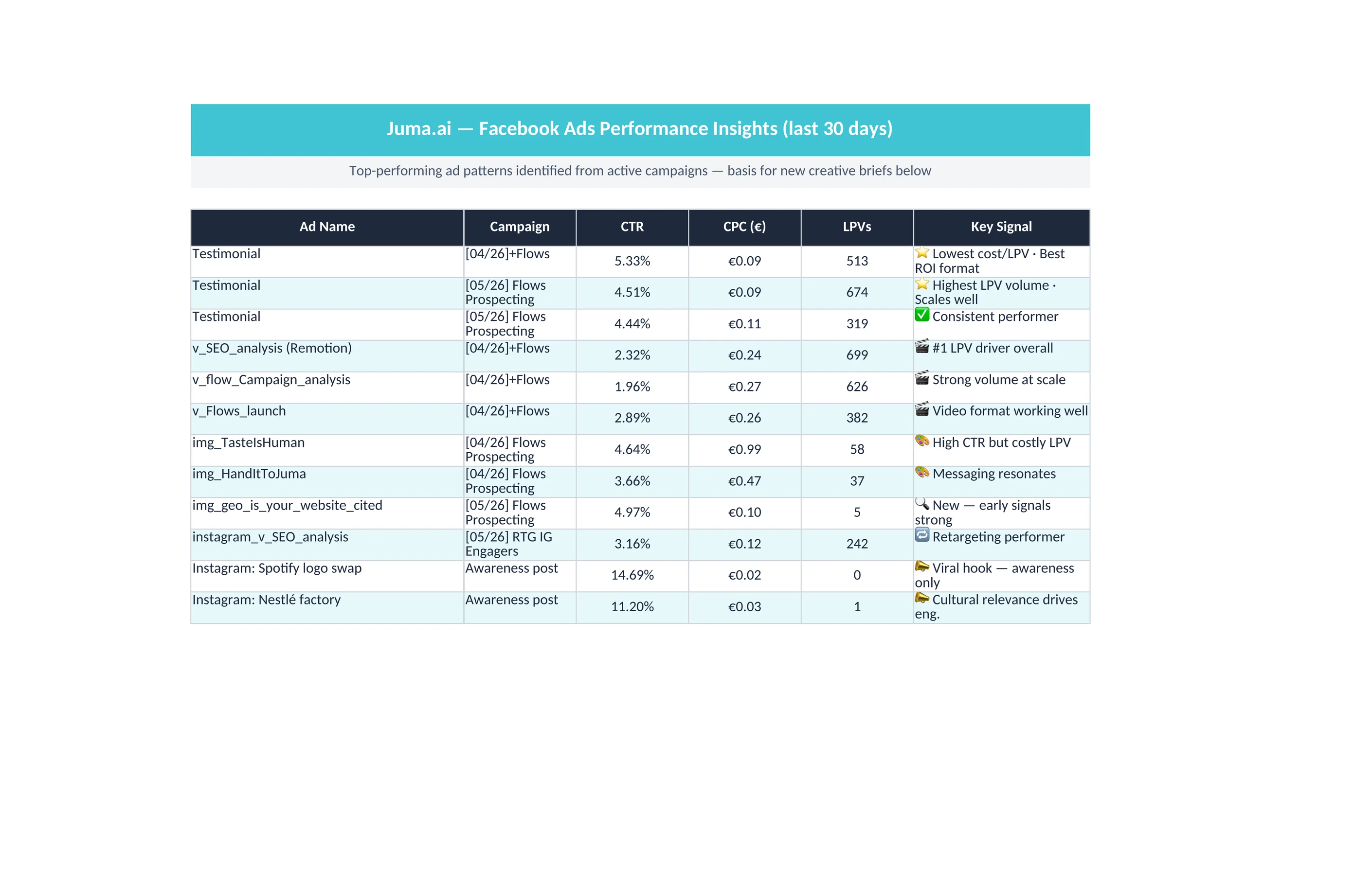
Yes, when the Meta Ads account is connected. Adding "based on what's working in our current campaigns" to the prompt triggers Juma to pull live performance from the active campaigns, identify the top performers by CTR and conversion rate, find the patterns in the winning ads, and write new variants in that pattern.
This is the strongest workflow when the account has history. New variants come out grounded in the client's real signal instead of industry assumptions or generic best practices. The first run takes a few minutes longer because of the data pull, but the variants are materially closer to ready than the cold-start version.
Can the Flow create the campaign in the ad account directly?
Yes, optionally, and in PAUSED status only. The dedicated step builds the campaign, the ad set with the proposed targeting, and one ad per approved variant in the connected Meta Ads account. Every object is created paused. Nothing goes live until the senior media buyer opens Ads Manager, reviews the setup, attaches the approved visuals, and unpauses.
This is the deepest capability the Flow offers, and it is opt-in for a reason. Direct campaign creation is fast and removes the upload-and-paste phase, but it deserves a deliberate human review step because once the campaign is live, the spend is live. The PAUSED default is the safety pattern. Strategy, taste, and the unpause decision stay human.
What about the visuals, does this Flow generate them too?
Visual generation is treated as a separate task, with its own dedicated step and its own session. Generating brand-ready Facebook ad visuals takes iteration that does not belong in the same chat as copy generation. One short prompt rarely lands a usable visual on the first try, and forcing both jobs into one execution dilutes both outputs.
The dedicated visual generation step runs from the same project so the brand voice, visual identity, and approved copy carry over. Expect to spend a session on visuals with multiple rounds of revision before the final assets are ready. The Flow is honest about this rather than pretending the visuals are a single-prompt job.






.webp)

.webp)
.webp)